-
-
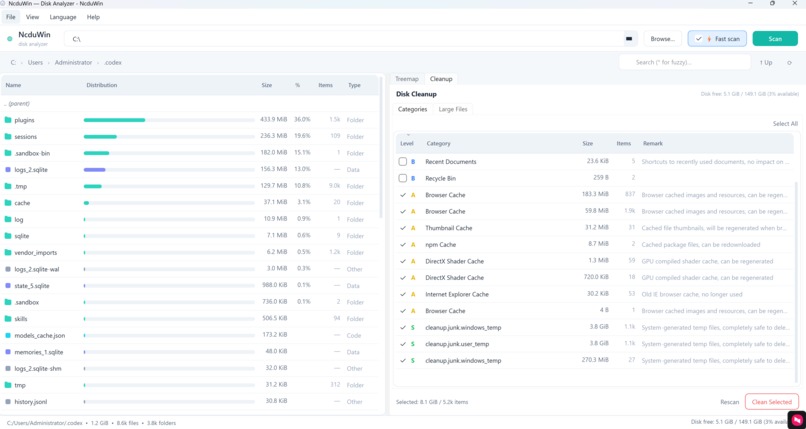
home page
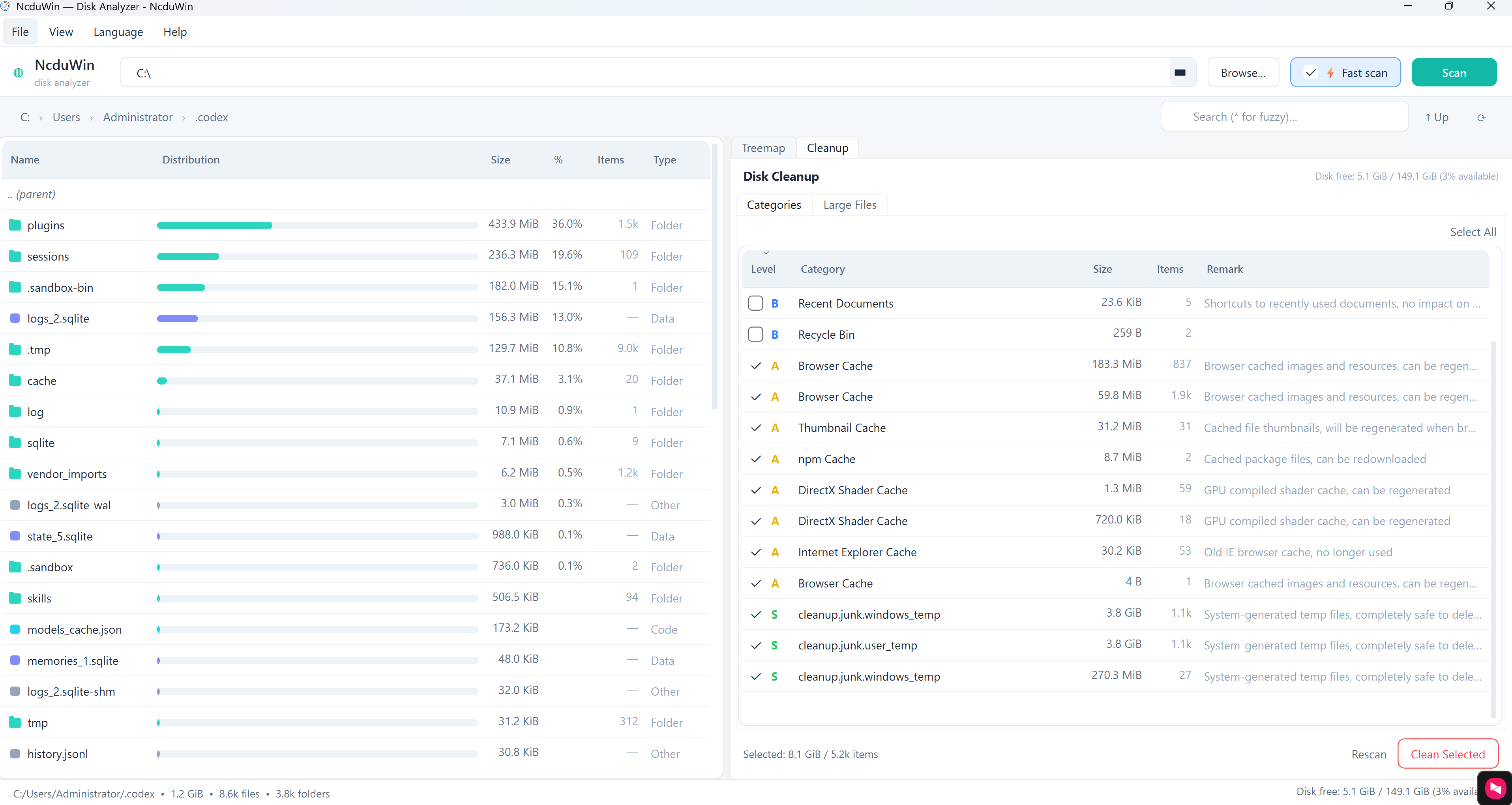
About this project — the ncdu-win-qt story
Inspiration
The project is inspired by the classic ncdu — a fast, terminal-based disk usage analyzer for Unix. I wanted the same fast, focused disk-inspection experience on Windows but with a modern GUI and visualizations. ncdu-win-qt brings ncdu-like scanning and cleanup features into a Qt-based desktop app with treemap visualizations and a light theme.
What I learned
- Windows filesystem and native API patterns
- The repo contains
src/core/WinApi.*, which wraps Windows APIs for file enumeration, attributes, and special-case handling (reparse points, etc.). Reading it improved my understanding of permission edge-cases, long path handling, and how to avoid double-counting or loops when traversing reparse points/junctions.
- The repo contains
- Background scanning and UI coordination
- The scanning logic (e.g.,
src/core/DiskScanner.*,src/cleanup/CleanupScanner.*,CleanupWorker.*) is separated from UI widgets. I learned how the project keeps the GUI responsive by running heavy I/O in background workers and emitting signals/updates safely to the main thread.
- The scanning logic (e.g.,
- Treemap and visualization design
- UI components such as
src/ui/TreemapWidget.*,SizeBarDelegate.*,LegendBar.*showed how file-size proportions map to visual primitives, how list and treemap views are synchronized, and how delegates are used to paint size bars in Qt views.
- UI components such as
- Internationalization and localization
- The repo includes
locales/en.jsonandlocales/zh.jsonplussrc/core/I18n.*. That provided a concise example of loading localized strings at runtime and structuring UI text for translation.
- The repo includes
- CMake-based cross-toolchain builds
- With
CMakeLists.txt,CMakePresets.jsonandCMakeSettings.json, I saw how a Qt + MSVC project can be driven by CMake and presets for different developer environments.
- With
How I built it (shortest path)
Prerequisites (Windows):
- Qt 6 (Widgets)
- CMake
- A C++ toolchain (Visual Studio / MSVC)
- Optionally: packaging tools if you want installers or Releases
Quick build steps:
- Clone:
bash git clone https://github.com/xiaodingfeng/ncdu-win-qt.git cd ncdu-win-qt - Configure and build with CMake:
bash mkdir build cmake -S . -B build cmake --build build --config Release- On Windows you can also use the CMake Presets or open the generated solution in Visual Studio.
- Run:
- Run the produced executable in the build output or install the provided Release package (if available).
Notes:
- Running a full-disk scan may require elevated privileges to read certain directories.
- Use Release build for best performance. The README includes instructions to download prebuilt installers/releases for quick testing.
Key source locations:
- Entry:
src/main.cpp - Scanner/core logic:
src/core/DiskScanner.*,src/core/FileNode.h - Windows API wrappers:
src/core/WinApi.* - UI:
src/ui/MainWindow.*,src/ui/TreemapWidget.*,src/ui/SizeBarDelegate.*,src/ui/BreadcrumbBar.* - Cleanup features:
src/cleanup/CleanupPanel.*,CleanupScanner.*,CleanupWorker.* - Localization:
locales/en.json,locales/zh.json,src/core/I18n.* - Build config:
CMakeLists.txt,CMakePresets.json,CMakeSettings.json
Challenges I faced and how to address them
Scanning large trees (performance and memory)
- Problem: Full-disk recursion is I/O-heavy and can create large in-memory trees.
- Mitigation: Use a worker/thread pool to parallelize scanning while limiting concurrency; stream incremental updates to the UI instead of building the whole tree before showing anything.
Reparse points / junctions / symbolic links
- Problem: Following reparse points can cause infinite loops or double-counting.
- Mitigation: Detect and handle reparse points at the WinApi layer. Skip or track already-seen target paths/IDs and avoid re-entering them.
Deletion safety (cleanup)
- Problem: Deleting files is destructive and risky (system or user critical files).
- Mitigation: Provide explicit confirmation, move to Recycle Bin when possible, show clear previews of what will be deleted and why. Implement undoable or recoverable flows where feasible.
Threading and UI updates in Qt
- Problem: Updating models/views from background threads causes race conditions.
- Mitigation: Use Qt signals/slots and post updates to the main thread; update view models only on the GUI thread.
Cross-toolchain CMake issues on Windows
- Problem: Different developers use different Visual Studio versions and different Qt install locations.
- Mitigation: Ship
CMakePresets.jsonand examples inCMakeSettings.json; document how to pass-DQt_DIR=or set the correct generator. Provide prebuilt releases to simplify testing.
How you can contribute or extend it
- New visualizations: Add a pie-chart or histogram widget under
src/ui/that consumesFileNodedata. - Performance: Improve
DiskScannerby experimenting with I/O batching, more sophisticated concurrency throttling, or caching scanned results. - Localization: Add more languages by extending
locales/*.jsonand keeping keys consistent withsrc/core/I18n.*. - Safety & testing: Add unit and integration tests under
tests/for permission-denied cases, long paths, and reparse-point loops. - Bug fixes & polish: Tackle small UI polish items in
src/ui/MainWindow.*and delegates.
Final thoughts
ncdu-win-qt is a practical example of bringing a minimal, high-value CLI UX (ncdu) into a modern Windows GUI using Qt. It covers many real-world engineering problems: native platform APIs, long-running background work, safe destructive operations, and visualization of hierarchical data. Working through this project taught me concrete techniques for safe and responsive filesystem tooling on Windows, and gave a good hands-on example of CMake-driven Qt apps.

Log in or sign up for Devpost to join the conversation.