-
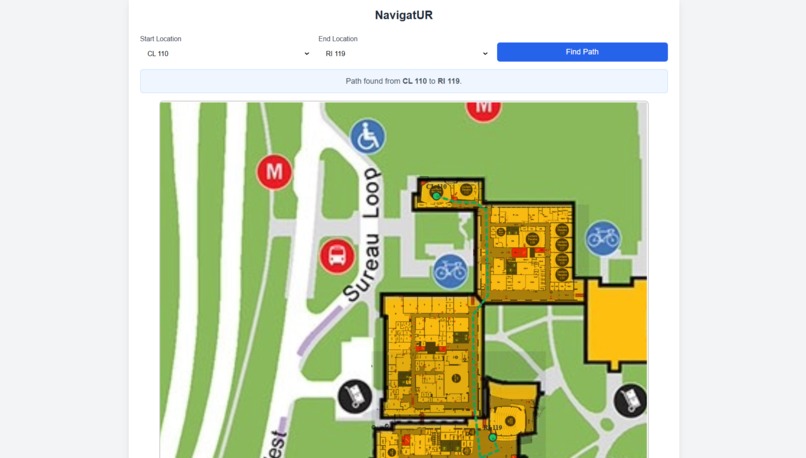
User Panel
-
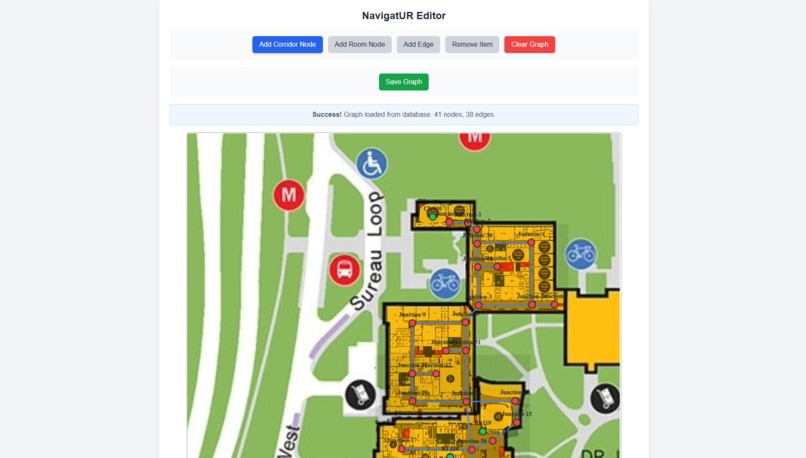
Admin Panel


Inspiration
The inspiration for NavigatUR came from a common, frustrating experience: trying to navigate a large university campus using nothing but a static, non-interactive floor plan. We saw our complex campus map not as a simple image, but as a challenge. We wanted to transform it from a "you are here" sign into a live, intelligent guide that could take anyone from any room in one building to a classroom in another, without the confusion.
What it does
NavigatUR is a cloud-native web application for indoor and campus-wide navigation.
For a User, it's simple:
- They open the web app and see a clean map of the campus.
- They select their "Start Location" and "End Location" from two simple dropdowns.
- They click "Find Path," and the app instantly draws the shortest, most efficient route on the map, guiding them from their starting room, along hallways and sidewalks, to their destination.
For an Admin, it's a powerful tool:
- They access a separate, secure admin panel.
- On this panel, they can visually add "Room" nodes (destinations) and "Corridor" nodes (junctions) directly onto the map.
- They can draw edges to connect the corridor network, creating the routes.
- When they click "Save Graph," the map is updated in real-time for all users, thanks to a live cloud database.
How we built it
We built this project in an iterative, four-stage process, evolving it from a simple prototype to a full-stack, deployed application.
Prototype (HTML/Canvas): We started with a single HTML file. We used the JavaScript Canvas API to draw our blueprint image and wrote logic to let us click on the canvas to create, drag, and connect nodes and edges.
App Separation (Frontend/Backend): We split the app into two distinct parts: a user-facing
index.htmlwith just the dropdowns, and anadmin.htmlwith all the editing tools. At this stage, it usedlocalStorageto save the graph.Cloud Integration (Firebase): To make the graph "live" and shared for all users, we replaced
localStoragewith Firebase Firestore as our backend. We used the Firestore API to save and load the graph data (nodes and edges) to a shared cloud database.Production Refactor (Vite & Deploy): We refactored the entire project from static HTML files into a modern Vite
npmproject. This allowed us to use modules, secure our API keys in.envfiles, and create an optimized production build (npm run build). Finally, we deployed the application globally using Firebase Hosting.
Challenges we ran into
Our biggest challenges were all related to deployment---the classic "it works on my machine" problem.
- Firebase Authentication: Our deployed app couldn't connect to the database. We were stuck on an
(auth/invalid-api-key)error for a long time. The fix was a three-part solution:
1.  We had to **enable "Anonymous Sign-in"** in the Firebase console.

2.  We had to find and **enable the "Identity Toolkit API"** in the Google Cloud console.

3.  We had to add our live URL (e.g., `https://navigatur.../*`) to our API key's **"Website restrictions"** to authorize the new domain.
- Production vs. Development Builds: Our deployed app would be broken, but the local
npm run devserver worked fine. We traced this to:
1.  **Stale Keys:** The build was using an old, invalid API key. We found and deleted a stale `.env.production` file that was overriding our correct `.env` file during the `npm run build` process.

2.  **Stale Assets:** We updated our campus map, but the old image was still showing on the live site. We had to manually delete the `dist` folder before rebuilding to force Vite to include the new `blueprint.png`.
Accomplishments that we're proud of
- We successfully built a full-stack, cloud-native application from a single image file.
- We solved a series of complex, real-world deployment and security issues. The feeling of finally fixing the
(auth/invalid-api-key)error was a huge accomplishment. - We implemented a clean, efficient pathfinding solution using Dijkstra's algorithm, with custom logic to handle "island" room nodes and connect them to the main "corridor" graph.
- The final product is professional and solves a real problem. The separation between the simple user interface and the powerful admin panel is something we're very proud of.
What we learned
- The Full "Dev-Ops" Lifecycle: We didn't just write code; we learned the entire process of deploying and maintaining a live web application, from build commands (
npm run build) to deployment (firebase deploy). - Cloud Security is Layered: We learned that cloud security isn't one setting. It's a chain of permissions that must all be correct: Firebase's app-level rules, Google Cloud's API-level restrictions, and the API key's domain-level restrictions.
- The Difference Between Dev and Prod: We learned (the hard way) that a development server and a production build are two different things. We now understand how build tools like Vite bundle assets, handle environment variables, and create an optimized app, and why it's so important to test the build output.
What's next for NavigatUR
- Multi-Floor Support: Adding a floor-switcher and connecting paths to elevator/stair nodes.
- Accessibility Routing: Adding an "accessible-only" toggle that finds paths using only ramps and elevators.
- Points of Interest: Adding toggleable map icons for bathrooms, vending machines, water fountains, and study areas.
- Secure Admin Login: Replacing the "secret URL" for the admin panel with a proper email/password login system using Firebase Authentication.
Built With
- css3
- firebase
- firebase-authentication-api
- firebase-firestore-api
- firebase-hosting
- firestore
- google-cloud
- html-canvas-api
- html5
- identity-toolkit-api
- javascript
- npm
- vite


