🧓 “Your Grandma’s Favorite AI Agent.”
Because accessibility doesn’t have to be boring - it can be intelligent, kind, and beautifully human.
💡Inspiration
We built Navi because not everyone grew up with technology, yet the world expects everyone to be fluent in it. For many, especially older adults, even simple online tasks can feel overwhelming.
Our goal was to create an assistant that doesn’t just talk at you, but teaches you. Navi listens to your voice, sees your screen, and patiently guides you through each click and step just like a friend or family member sitting beside you.
What started as a vision to make technology more approachable for the elderly became something bigger: a way to bring digital literacy, independence, and confidence to everyone, one screen at a time.
🧠 What it does
Navi is a voice-activated desktop assistant that provides real-time, visual guidance for any computer task.
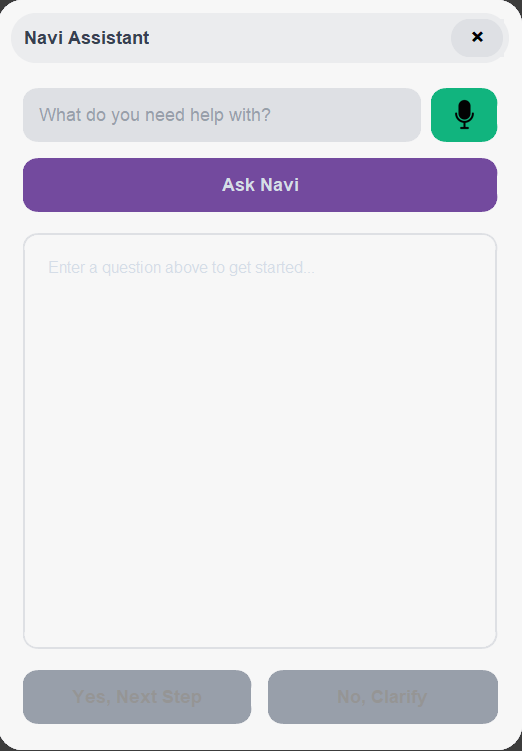
Simply say “Hey Navi” or click its interface to activate it. Once you ask a question, Navi:
🎧 Listens to your voice and transcribes it.
👁️ Sees your screen by taking a live screenshot.
🧩 Understands the context using AI.
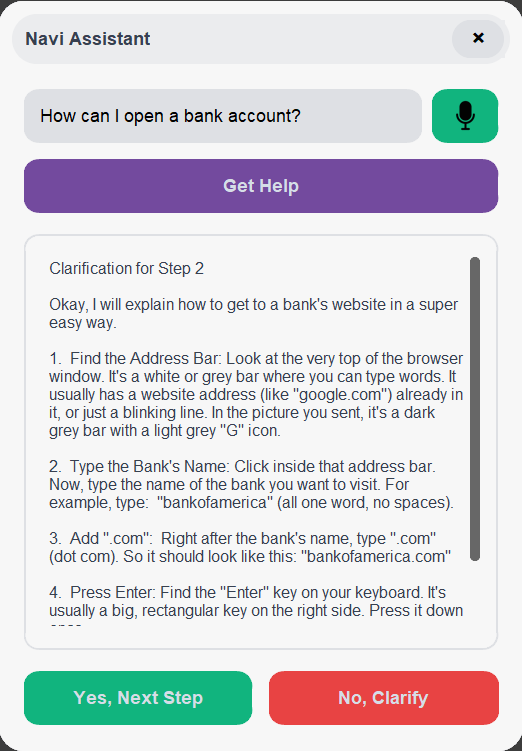
🗣️ Guides you through clear, spoken, step-by-step instructions.
If you’re stuck, just say “No” or click Clarify, and Navi instantly re-explains the step in simpler language and breaks it into smaller, easier actions.
It’s more than an assistant. It’s a teacher who lives on your screen, helping you learn technology instead of just doing it for you.
🧱How we built it
Tech Stack & Architecture:
🖥️ User Interface: Built with customtkinter for a sleek, floating desktop window.
🤖 AI Reasoning: Uses the Google Gemini model to analyze screenshots and generate structured, step-by-step instructions.
🎙️ Voice Interaction:
Wake Word Detection - “Hey Navi” via Picovoice Porcupine, running in a background thread for smooth UI performance.
Speech-to-Text & Text-to-Speech - Powered by ElevenLabs APIs for accurate transcription and natural voice output.
🧩 System Integration: pyautogui handles screenshots; pyaudio and sounddevice manage audio streams; and pygame.mixer plays synthesized speech.
⚙️ Challenges we ran into
- Cross-Platform Compatibility: Creating a transparent overlay window required platform-specific code, using different attributes for macOS (-transparent) and Windows (-transparentcolor). Wake word detection also required managing different model files for each operating system (.ppn files for Mac, Windows, and Linux).
- AI Output Reliability: The response from the Gemini API, which was expected to be in JSON format, sometimes required cleaning of extraneous text like "```json" markers. A fallback was implemented to handle cases where the AI's response was not valid JSON, preventing the application from crashing.
- Audio and Text Processing: The AI-generated text often included markdown formatting (like **) that would be read aloud awkwardly by the text-to-speech engine. A function was written specifically to clean and sanitize this text before converting it to audio.
🏆 Accomplishments that we're proud of
- Hands-Free Activation: The integration of the Porcupine wake word detector allows a user to launch and interact with the assistant just by speaking, making it highly accessible.
- Interactive Clarification Loop: The "Yes/No" feedback mechanism is a key achievement. When a user indicates they are stuck by clicking "No," the application automatically takes another screenshot and asks the AI to re-explain the step in a much simpler way, creating a patient and responsive user experience.
📚 What we learned
We learned the critical importance of writing platform-aware code when developing desktop applications, as system-level features like window transparency and audio device handling behave differently across operating systems like Windows and macOS. We also learned that integrating large language models requires robust error handling and data sanitization. The raw output from an AI is not always perfectly formatted, and it's necessary to parse, clean, and validate it before it can be used by other parts of the application, such as the JSON parser or the text-to-speech engine.
🚀 What's next for Navi
- Full Linux Support: The code includes logic to identify the Linux operating system and provides instructions on how to add a Linux-specific wake word model, indicating that achieving full cross-platform support is a clear next step.
- Enhanced Conversational Memory: The assistant currently processes one command at a time. A future version could maintain a history of the conversation and previous actions to handle more complex, multi-step tasks.
- Direct System Interaction: Beyond just showing the user where to click, Navi could be extended with capabilities to perform actions on the user's behalf, such as automatically clicking buttons or typing text into forms.


Log in or sign up for Devpost to join the conversation.