Inspiration
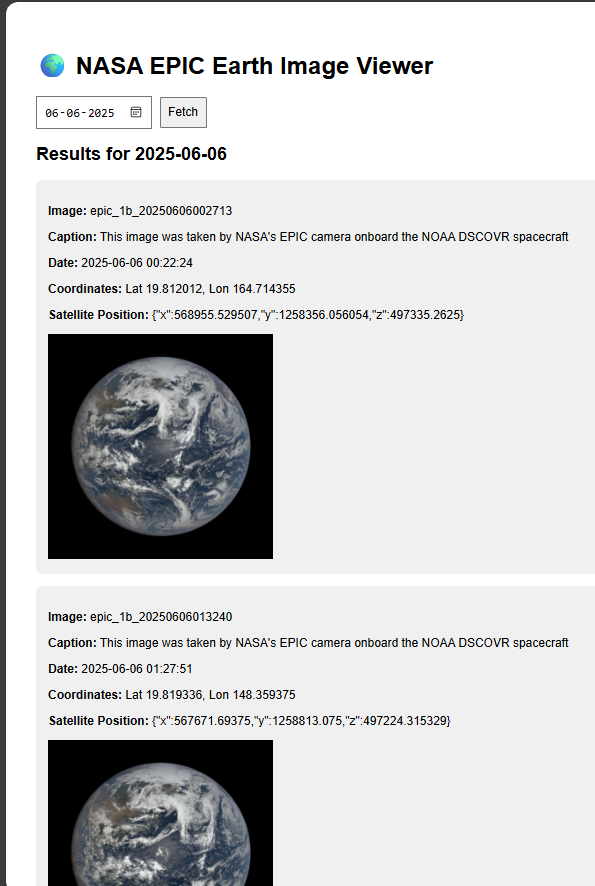
What it does
How we built it
Challenges we ran into
Accomplishments that we're proud of
What we learned
What's next for NASA EPIC viewer
My Journey to Building the NASA EPIC Earth Image Viewer
Inspiration: A Glimpse from Above
The inspiration for building the NASA EPIC Earth Image Viewer stemmed from a fascination with our planet's ever-changing beauty as seen from space. I've always been captivated by the stunning images NASA releases, particularly those from the Earth Polychromatic Imaging Camera (EPIC) on the DSCOVR satellite. The idea of being able to effortlessly browse these daily snapshots of Earth, simply by selecting a date, felt incredibly powerful and visually engaging. I wanted a personal portal to this cosmic perspective, and the thought of building it myself, from scratch, was a compelling challenge.
What I Learned: A Full-Stack Frontend Experience
This project was a fantastic learning experience, offering insights into several key areas: • React with Vite: It solidified my understanding of modern React development, particularly with Vite's blazing-fast development server and optimized build process. I gained proficiency in managing component state (useState), handling asynchronous operations, and rendering dynamic content based on API responses. • API Integration with Axios: Working with the NASA EPIC API was my first deep dive into consuming external APIs in a React application. I learned how to use Axios for making HTTP requests, handle successful responses, and gracefully manage errors. Understanding how to construct dynamic URLs based on user input was also a valuable takeaway. • Environment Variables for Security: A significant learning point was the critical importance of protecting sensitive information like API keys. Implementing environment variables (using Vite's import.meta.env) and properly configuring .gitignore to prevent their exposure on GitHub was a crucial lesson in web security best practices. • Git and GitHub Workflow: From initializing a repository, staging and committing changes, to linking a local repo with a remote GitHub repository and pushing code, this project provided hands-on experience with the fundamental Git workflow.
How I Built My Project: A Step-by-Step Approach
I approached the project systematically, following a clear set of steps:
- Project Setup: I started by setting up the React application using Vite (npm create vite@latest nasa-epic-viewer --template react), which provided a lean and efficient development environment.
- Axios Installation: Recognizing the need for simplified API calls, I installed Axios (npm install axios).
- Core Application Logic (App.jsx): This was the heart of the project. I implemented the state management for the selected date, fetched image data, and handled loading states. The fetchData asynchronous function was central to interacting with the NASA EPIC API. The UI elements, including the date input, fetch button, and the dynamic rendering of image details and the image itself, were all structured within this component.
- Styling (index.css): I applied basic global styles to ensure readability and a clean aesthetic for the viewer.
- API Key Management: Crucially, I implemented environment variables. I created a .env file for my VITE_NASA_API_KEY and updated .gitignore to exclude this file from version control. App.jsx was then modified to access the key securely.
- Git and GitHub Integration: Finally, I initialized a Git repository, staged and committed my local changes, created a new public repository on GitHub, and pushed my local code to the remote repository, making the project publicly accessible.
Challenges Faced: Overcoming Hurdles
While building, I encountered a few challenges that pushed me to learn and adapt:
• Initial API Key Exposure Concern: My primary concern was how to use my NASA API key without exposing it when pushing to GitHub. This led me to research and implement environment variables, which was a great learning experience in itself. • Understanding Vite's Environment Variables: While familiar with process.env in Node.js contexts, learning how Vite handles client-side environment variables via import.meta.env was a specific hurdle I overcame. • Troubleshooting API Responses: Initially, there were moments when the API wouldn't return data as expected. This required careful debugging of the URL construction, date formatting (.replaceAll("-", "/") for the image URL), and ensuring the API key was correctly integrated. • Git Workflow for Beginners: Remembering the exact sequence of git init, git add ., git commit, git remote add, git branch -M, and git push was a bit of a mental stack. However, practicing these commands solidified my understanding of version control. Overall, the journey from inspiration to a deployed project was incredibly rewarding, equipping me with practical skills and a deeper appreciation for secure and efficient web development practices.

Log in or sign up for Devpost to join the conversation.