-
-
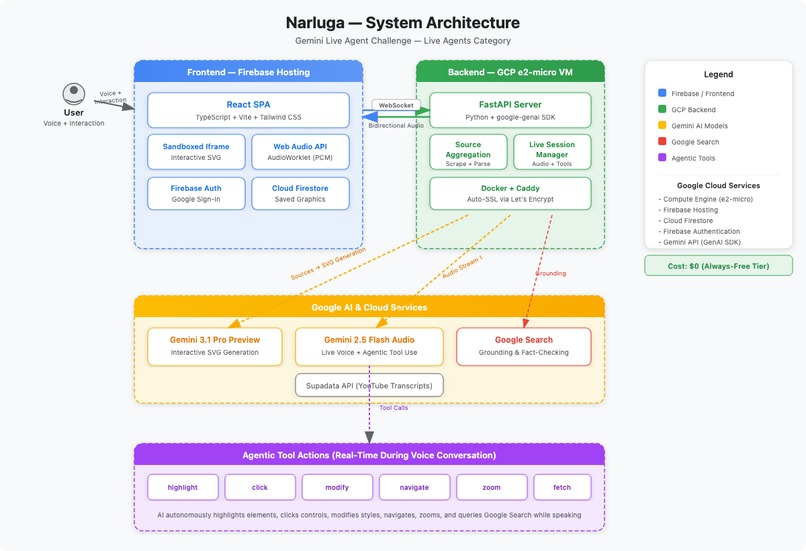
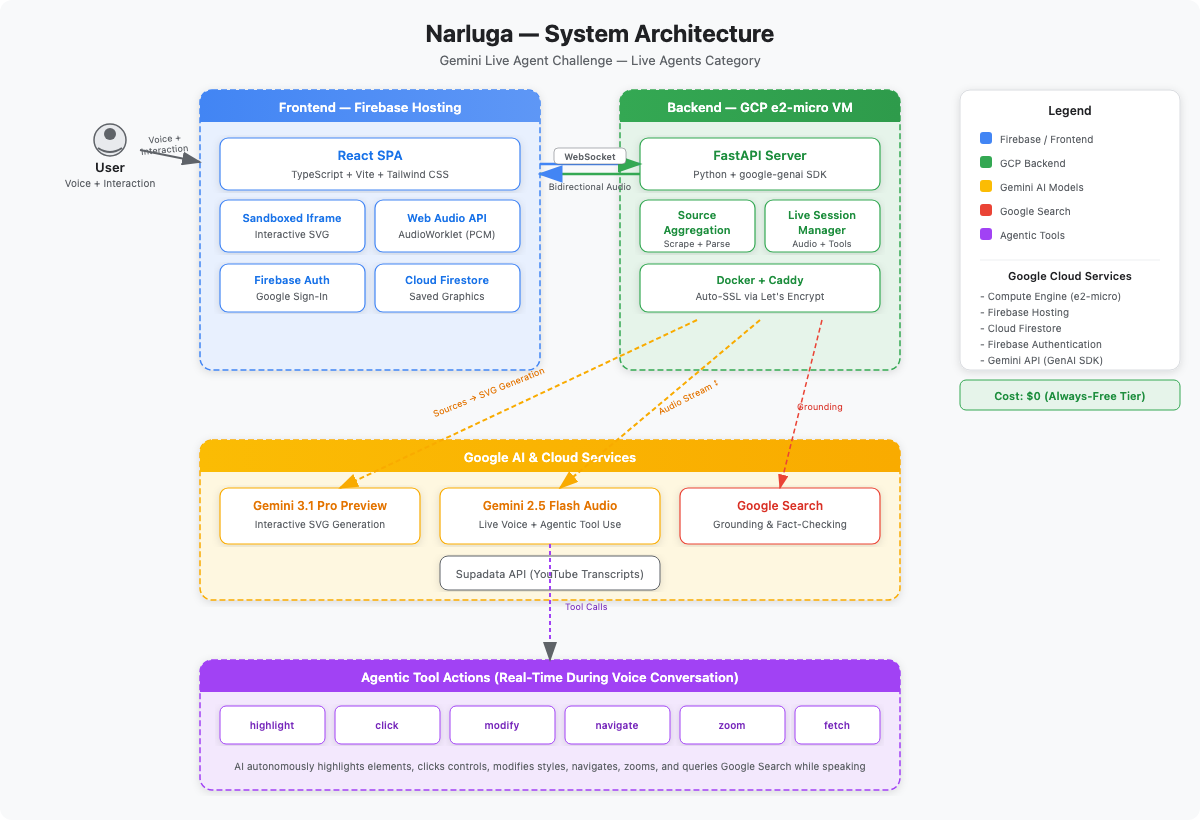
project architecture diagram
-
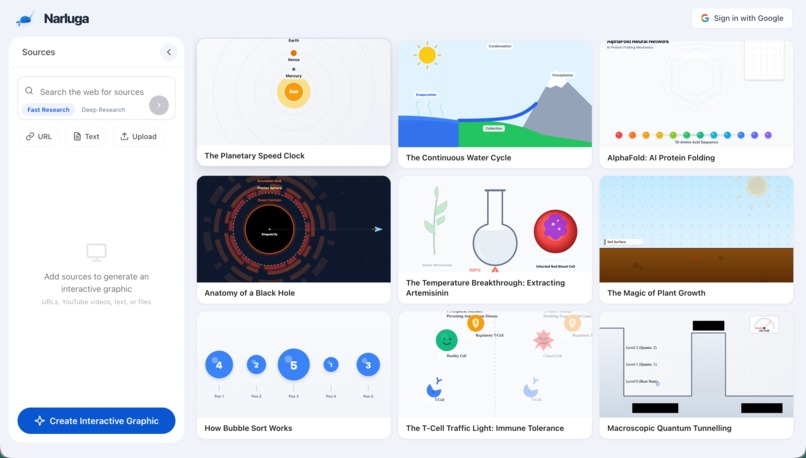
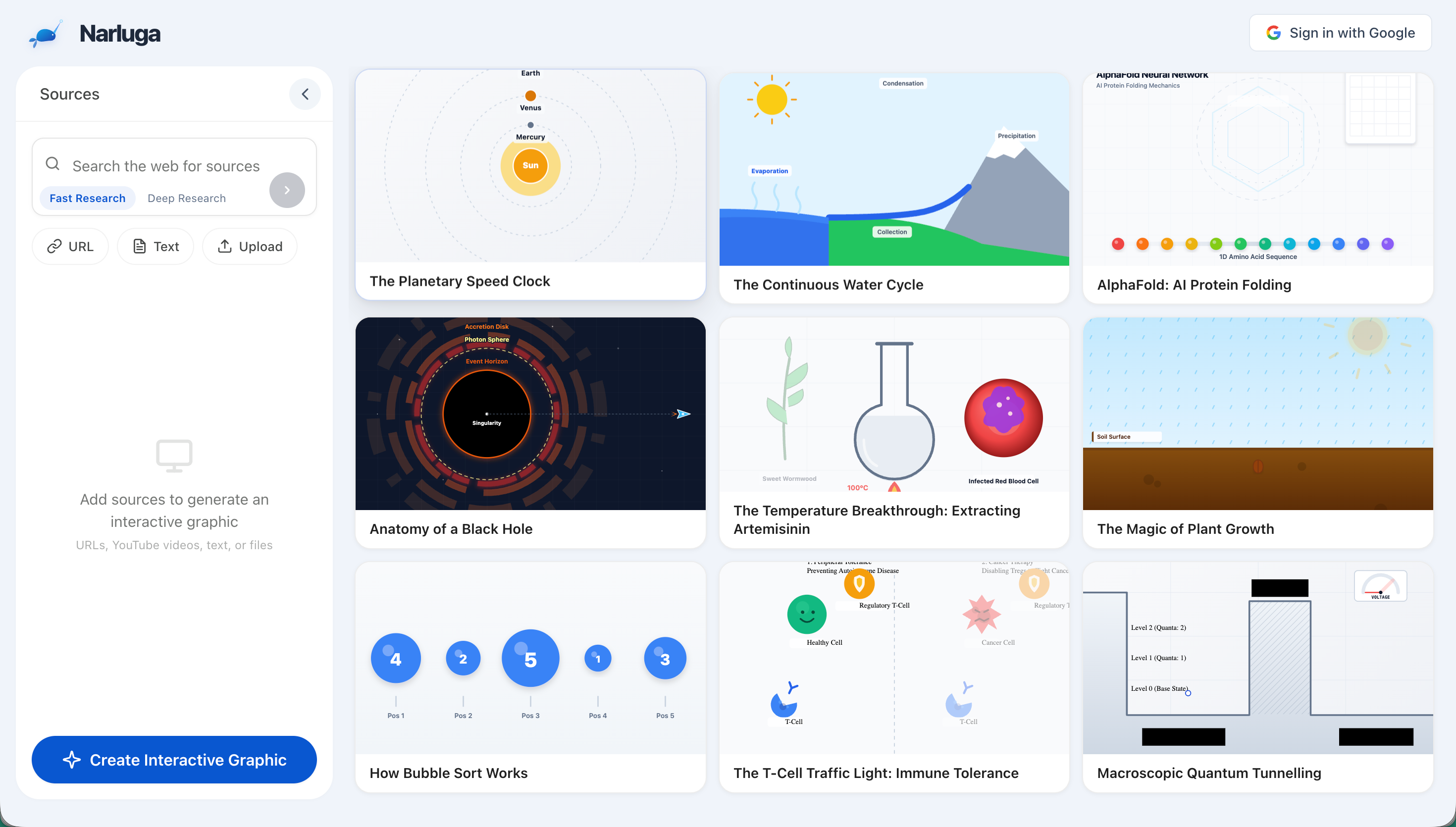
homepage with curated graphic examples
-
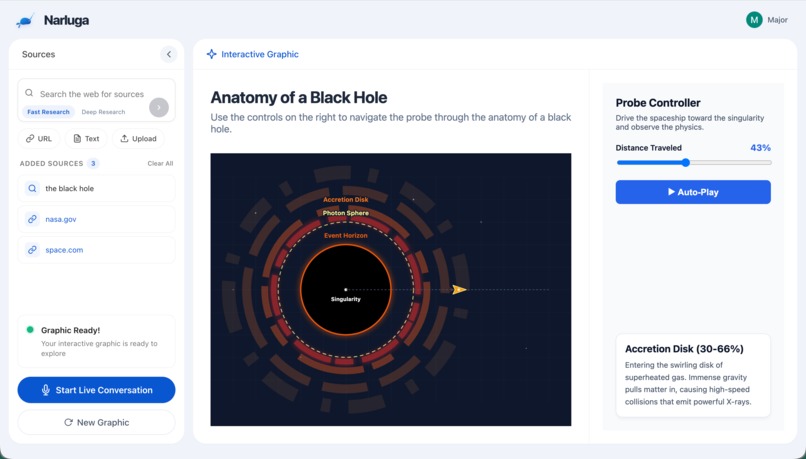
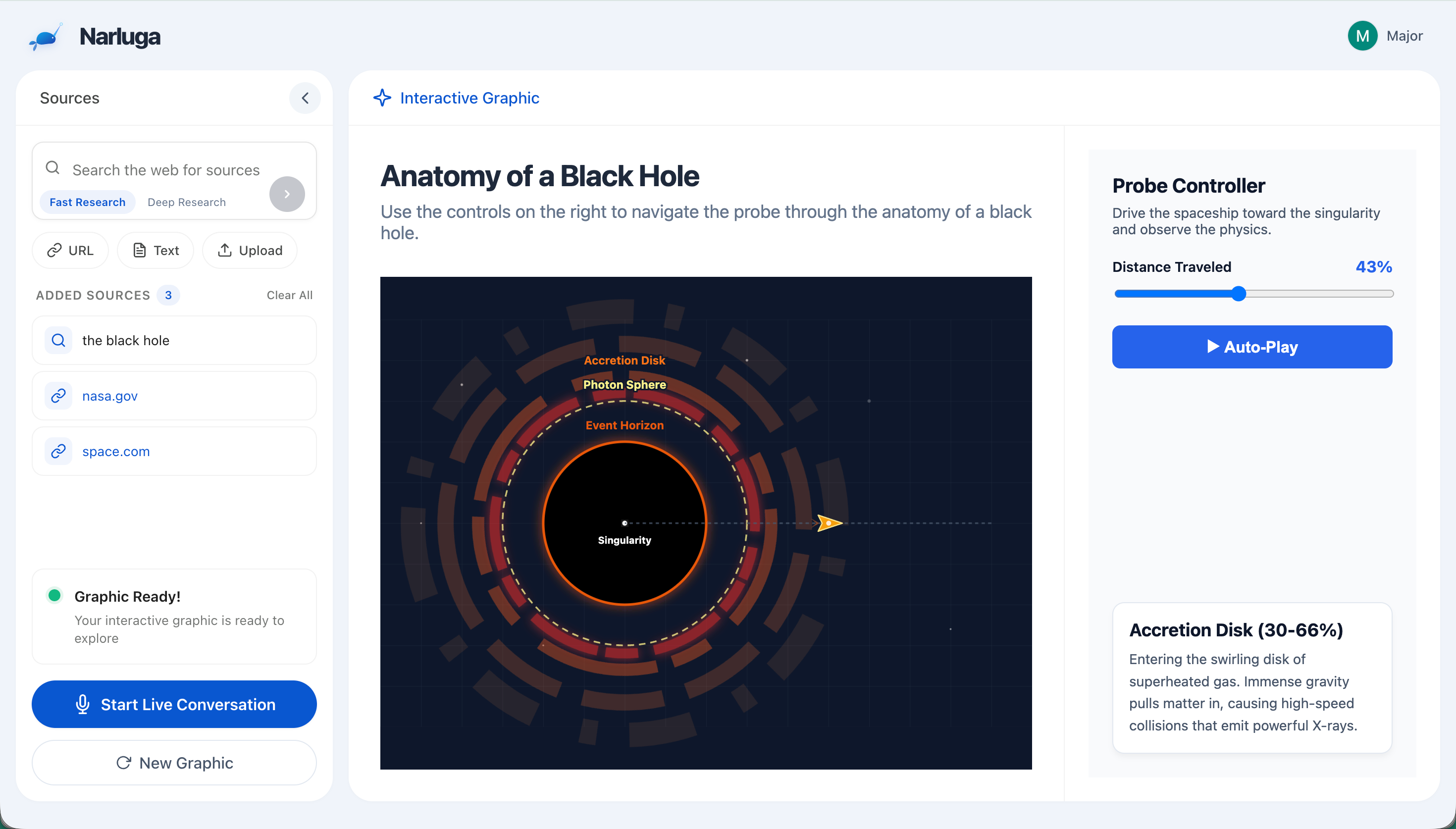
interactive graphic generated
-
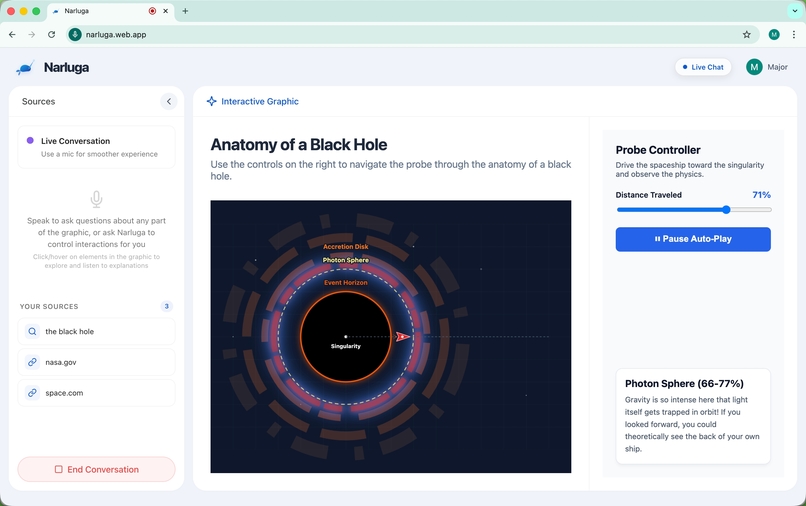
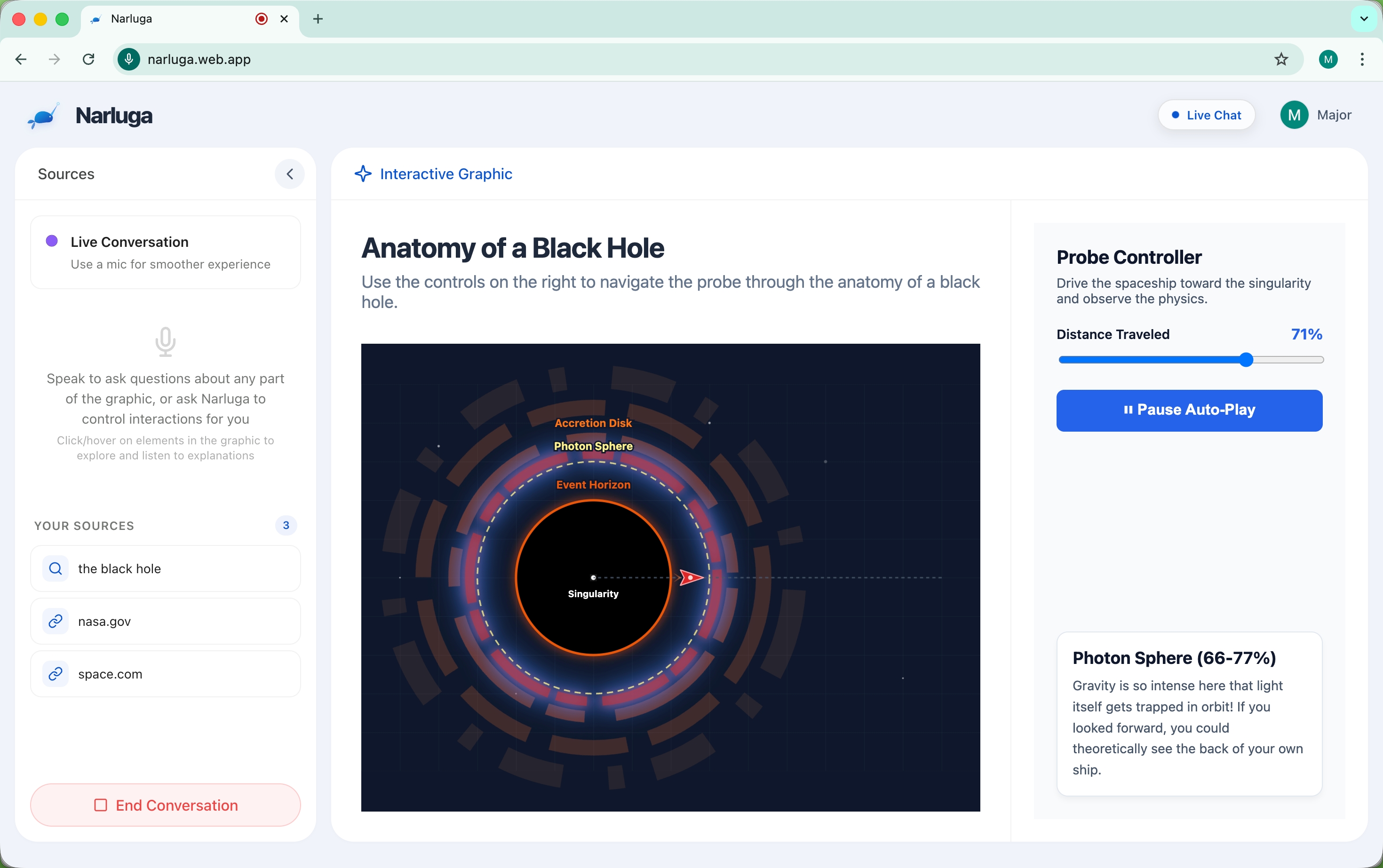
live voice conversation, ai narrating and using tools
Inspiration
Google's NotebookLM showed that AI can turn documents into engaging audio summaries. But audio alone misses a dimension — when learning about orbital mechanics or protein folding, you want to see it. I wanted to combine the best of both: rich interactive visuals with real-time voice conversation, where the AI doesn't just narrate but actively controls what you see.
What it does
Narluga takes any content source — websites, YouTube videos, text notes, or uploaded files — and transforms them into fully interactive, animated SVG diagrams. Then it lets you have a live voice conversation with an AI agent that understands and manipulates the diagram in real time.
During conversation, the AI autonomously uses six tools: highlight elements with glow effects, click buttons to toggle animations, modify visual properties (scale, color, opacity), navigate to sections, zoom in/out, and fetch supplementary information via Google Search. It decides when and how to use these tools as it speaks — no manual prompting needed.
How we built it
- Gemini 3.1 Pro generates the interactive SVG diagrams from aggregated source content
- Gemini 2.5 Flash Native Audio powers real-time bidirectional voice conversation with built-in voice activity detection and function calling
- Google Search grounding provides fact-checking and supplementary information during conversation
- FastAPI + WebSocket backend handles audio streaming, source aggregation (web scraping, YouTube transcripts via Supadata API), and tool call orchestration
- React + TypeScript frontend with Web Audio API and AudioWorklet for PCM audio capture/playback
- Generated graphics run in sandboxed iframes with strict Content Security Policy for isolation
- Deployed on GCP e2-micro VM (Docker + Caddy auto-SSL) with Firebase Hosting, Cloud Firestore, and Firebase Auth
- Fully automated deployment via four idempotent bash scripts
Challenges we ran into
- Interval stacking bug: Gemini-generated play/pause toggles sometimes created new
setIntervalcalls without clearing old ones, causing animations to speed up uncontrollably. Solved with a monkey-patchedsetInterval/clearIntervalthat tracks all intervals globally and force-clears them before each toggle. - Tool call reliability: The native audio model sometimes confused
highlight_elementwithclick_elementwhen targeting buttons, and occasionally double-toggled animations in a single response. Built three backend safeguards: auto-correction (highlight on button keywords → click), batch deduplication, and a 3-second cross-response cooldown per element. - Interruption coordination: When users interact with the diagram mid-conversation, three things must happen simultaneously — clear the frontend audio queue, signal Gemini to stop generating (
turn_complete=False), and flush in-transit audio chunks. Getting the timing right required distinguishing "actionable" tool calls (always execute) from "cosmetic" ones (skip during interruption). - Reconnection latency: Fresh WebSocket + Gemini handshake took 5-7 seconds. Solved by keeping the WebSocket alive across conversation sessions and only closing the Gemini session on "End Conversation," cutting subsequent starts to ~3 seconds.
Accomplishments that we're proud of
- The AI feels genuinely agentic — it decides on its own when to highlight, click, zoom, and fetch, creating a fluid teaching experience that adapts to each diagram
- Zero-cost deployment on Google Cloud's free tier with full automation
- Sub-3-second time to first AI audio on conversation start
- Robust tool call pipeline that handles model quirks gracefully without the user ever noticing
What we learned
- Prompt engineering for code generation (SVG + JS + CSS in one shot) requires extremely specific constraints — backtick-only strings, explicit modulo math rules, and animation state management guidelines
- Native audio models behave differently from text models with the same tools — they need backend-level guardrails for reliability
- WebSocket architecture decisions (persistent vs. per-session) have outsized impact on perceived latency
What's next for Narluga
- Support more input source types
- Diagram version history and iterative refinement ("make the orbit more elliptical")
- Export generated diagrams as standalone HTML files or embeddable widgets
Built With
- caddy
- cloud-firestore
- docker
- fastapi
- firebase-authentication
- firebase-hosting
- gemini-2.5-flash-native-audio
- gemini-3.1-pro
- google-cloud-compute-engine
- google-genai-sdk
- python
- react
- tailwind-css
- typescript
- vite
- web-audio-api

Log in or sign up for Devpost to join the conversation.