-
-
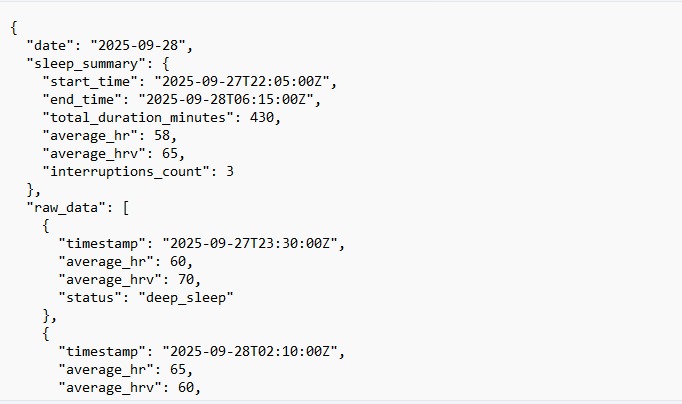
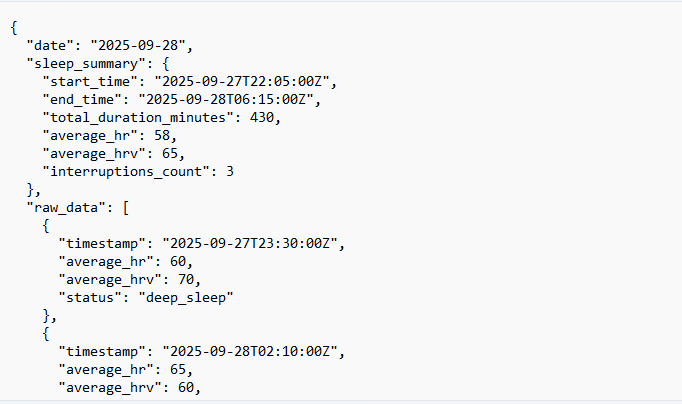
Json file with input
-
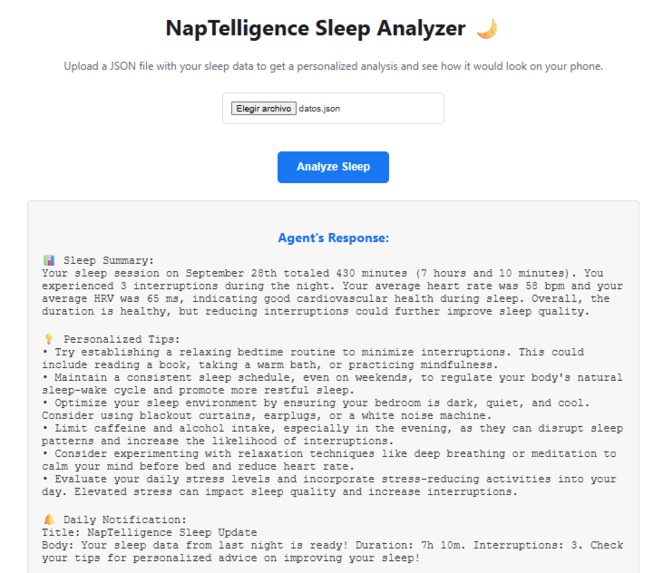
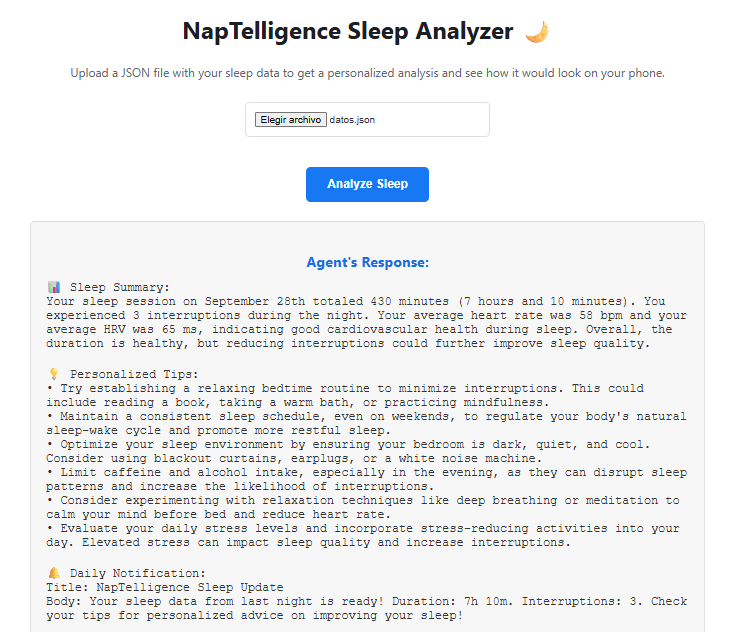
Full response of the agent
-
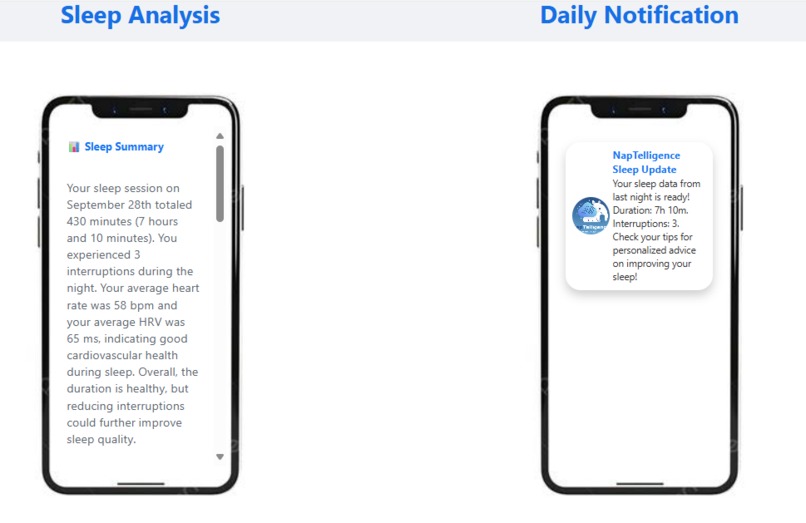
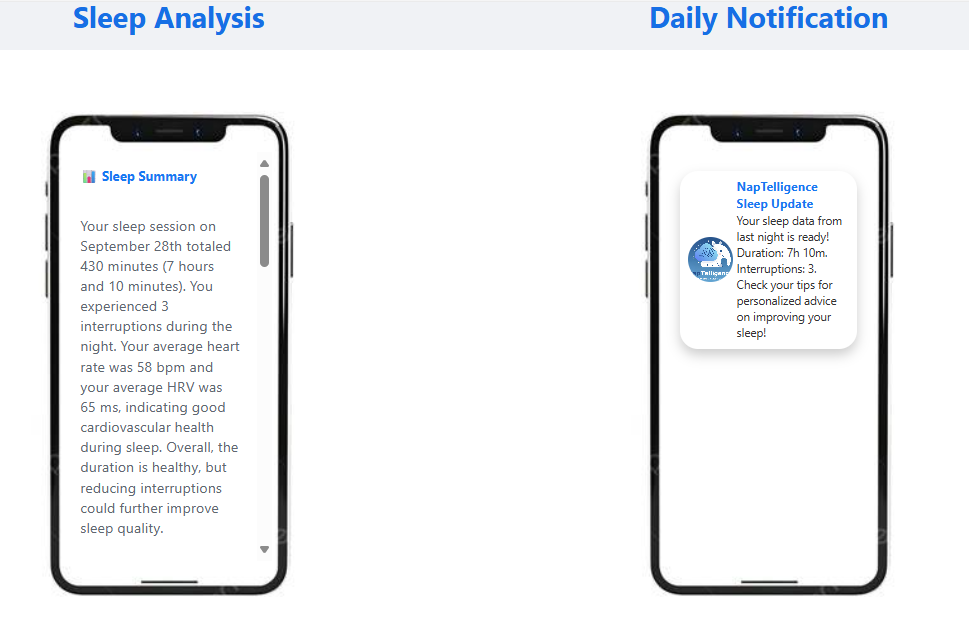
Movile simulation
-
logo
Inspiration
The idea for NapTelligence was born from a simple, universal observation, everyone around us seemed to be tired. At home, we saw family members struggling to get through the day, relying on coffee to stay productive. At university, it was the same story our friends and classmates, whether they were studying engineering, arts, or business, were all united by a common complaint of feeling constantly drained. We realized that while many people use wearable devices to track their sleep, they are often left with complex data and no clear path forward. The real challenge was turning that data into simple, actionable steps. That’s why we created NapTelligence to bridge the gap between tracking sleep and actually improving it.
What it does
NapTelligence is an AI-powered agent that acts as a personal sleep coach. Users upload their sleep data in a JSON file format, which includes metrics like total sleep duration, interruptions, average heart rate, and HRV. The agent then analyzes this data and generates three key outputs:
A concise analysis summary of the night's sleep. A list of personalized tips that are practical and actionable. A daily notification with a title and body, designed to be sent to a user's device to encourage good habits.
The project includes a web-based front-end that simulates the basic user experience on a mobile phone, allowing users to upload their data and see how the analysis and notification would appear on their device.
How we built it
NapTelligence is built on a modern tech stack designed for scalability and performance.
Backend: The core of the agent is a Python application using the FastAPI framework to create a robust API. It runs on a Uvicorn ASGI server.
AI Core: We integrated Google's Generative AI using the google-generativeai library. We use the cost-effective and powerful gemini-1.5-flash model. The magic happens through prompt engineering: we take the user's JSON input, embed it into a detailed prompt that instructs the AI to act as a sleep expert, and strictly require the output to be in a specific JSON format.
Frontend Demo: The interactive demo is built with standard HTML5, CSS3, and JavaScript. The JavaScript fetches the user's file, sends it to the FastAPI backend, and then dynamically populates the mobile phone mockups with the AI-generated response.
Deployment: The entire application is containerized using Docker for portability. The maestro.yaml file is used to configure the agent's dependencies and secret management for deployment.
Challenges we ran into
Throughout the development process, we encountered several challenges, for example:
AI Model Migration: We initially used the OpenAI API but decided to switch to Google's Gemini API for cost reasons. This required refactoring the core logic, updating dependencies, and managing new API secrets. The change was mostly generated because we don't have any money to expend.
Model Compatibility Error: We ran into a 404 Not Found error when using an incorrect model name (gemini-1.5-flash-latest). We had to debug this by researching the correct, stable model name, which turned out to be gemini-1.5-flash.
Enforcing Structured Output: Getting the LLM to consistently return a valid, parsable JSON object was critical. We overcame this by refining our prompt to be extremely specific about the required output structure, including data types and field names.
Cross-Origin Resource Sharing (CORS): When connecting our front-end demo to the backend API, we faced CORS errors that prevented the browser from fetching the data. We solved this by implementing CORS middleware in our FastAPI application.
Accomplishments that we're proud of
We are proud of several key achievements with this project:
Successful API Migration: Seamlessly transitioning the agent's core from one major AI provider to another while improving cost-efficiency.
End-to-End Functionality: Building a complete, working prototype that goes from raw data input to a clean, visualized, and user-friendly output.
Reliable Structured Data: Engineering a prompt that reliably produces valid JSON from the Gemini API, which is crucial for the stability of any application built on top of it.
Effective User Simulation: Creating a front-end demo that clearly and intuitively communicates the value of the agent by showing exactly how a user would experience it on their phone.
What we learned
This project was a significant learning experience. We learned:
The critical importance of precise prompt engineering. The quality and reliability of the AI's output are directly tied to how well you craft the instructions.
The nuances between different AI platforms and their model naming conventions.
Best practices for managing secrets and environment variables for both local development (using .env files) and cloud deployment (using secret bindings).
How to diagnose and resolve common web development issues like CORS by correctly configuring the backend server.
What's next for NapTelligence
We believe NapTelligence has a bright future and have several ideas for its evolution:
Direct Wearable Integration: Move beyond manual JSON uploads by integrating directly with APIs from popular wearable devices like Fitbit, Apple Watch, and Oura Ring.
Long-Term Trend Analysis: Allow the agent to store historical sleep data to identify long-term patterns, track progress, and offer more insightful, context-aware advice.
Proactive & Dynamic Notifications: Make the notification system smarter. For example, the agent could send a reminder to start winding down based on the user's sleep goals for that specific night.
User Feedback Loop: Implement a system where users can rate the effectiveness of the tips they receive. This feedback could be used to further personalize and improve the AI's future recommendations.


Log in or sign up for Devpost to join the conversation.