Inspiration
Live captions and meeting summaries traditionally rely on cloud APIs, creating recurring server costs, network latency, and serious privacy concerns. With Google Chrome’s on-device AI capabilities, we built NanoSub: a zero-cost, 100% private subtitle interpreter and automated note-taker running entirely inside the user's browser.
What it does
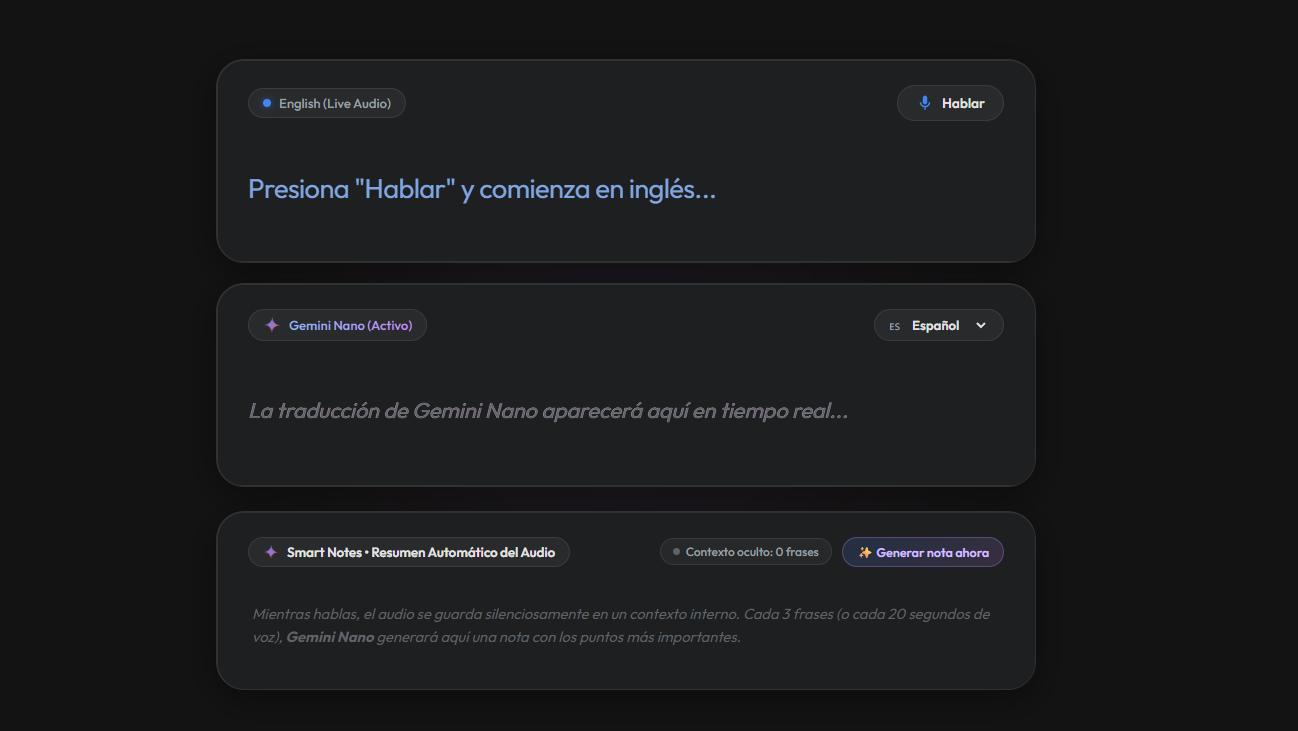
Real-Time Subtitles: Transcribes spoken English live via the Web Speech API and streams instant translations (e.g., to Spanish) using Chrome's on-device Translator API.
Hidden Context Buffer: Silently stores spoken audio in background memory without cluttering the screen with endless transcripts.
Smart Audio Notes with Gemini Nano: Periodically (every pause or a defined number of seconds), the on-device Gemini Nano LLM synthesizes the accumulated audio into concise, actionable bullet points.
100% On-Device & Private: Audio and text never leave the device, guaranteeing zero cloud cost and absolute confidentiality.
How we built it
Hybrid Built-in AI Architecture: Leveraged Chrome's
window.Translatorfor ultra-fast, stateless subtitle streaming, paired withwindow.LanguageModel(Gemini Nano Prompt API) for periodic summarization and reasoning.Web Speech API: Configured in continuous streaming mode (
interimResults = true) for sub-second speech capture.
Challenges we ran into
Suppressing LLM Meta-Chatter: Gemini Nano initially generated conversational responses (e.g., "Please provide the transcript..."). We eliminated this by combining strict, directive system prompts with a client-side sanitizer that enforces clean bullet points (
•).Context Management on Edge Hardware: To prevent on-device memory bloat during continuous speech, we implemented a sliding hidden buffer with ephemeral session cloning (
clone()/destroy()) that resets memory after each generated note.
Accomplishments that we're proud of
- Seamlessly orchestrating two distinct on-device models (specialized Translator API + generative Gemini Nano LLM) in one synchronized, real-time pipeline.
What we learned
- Best practices for on-device AI UX: handling model download states, background buffer monitoring, and prompt constraint enforcement.
What's next for NanoSub
- Floating Picture-in-Picture (PiP) Overlay: Allowing users to float NanoSub over Google Meet, Zoom, or YouTube videos.
Built With
- gemini
- gemini-nano
- translator-api
- web-speech-api


Log in or sign up for Devpost to join the conversation.