NanaGPT — AI That Actually Helps People
Built for Youth Code x AI — Track 03: AI That Actually Helps People
Inspiration
My grandparents and I message each other on WhatsApp almost every day. It's the one app they never needed help installing, never get confused navigating, and never forget how to open. But what they do forget — constantly — is whether they've taken their evening medicine, what the new tablet their doctor prescribed last month is actually for, and whether the dull ache they're feeling is something to worry about.
In India alone there are over 140 million people above the age of 60, many managing chronic conditions like diabetes and high blood pressure largely on their own, between infrequent doctor visits. They forget medications. They can't read their own prescriptions, which are often scribbled in barely legible medical shorthand. And when something feels off, their only option is often to call a family member and hope someone picks up.
This track asks for something that genuinely makes someone's life better, not just something that "works." So instead of building another app that an elderly person would have to be taught to use, I built something that lives inside the app they already know by heart.
What It Does
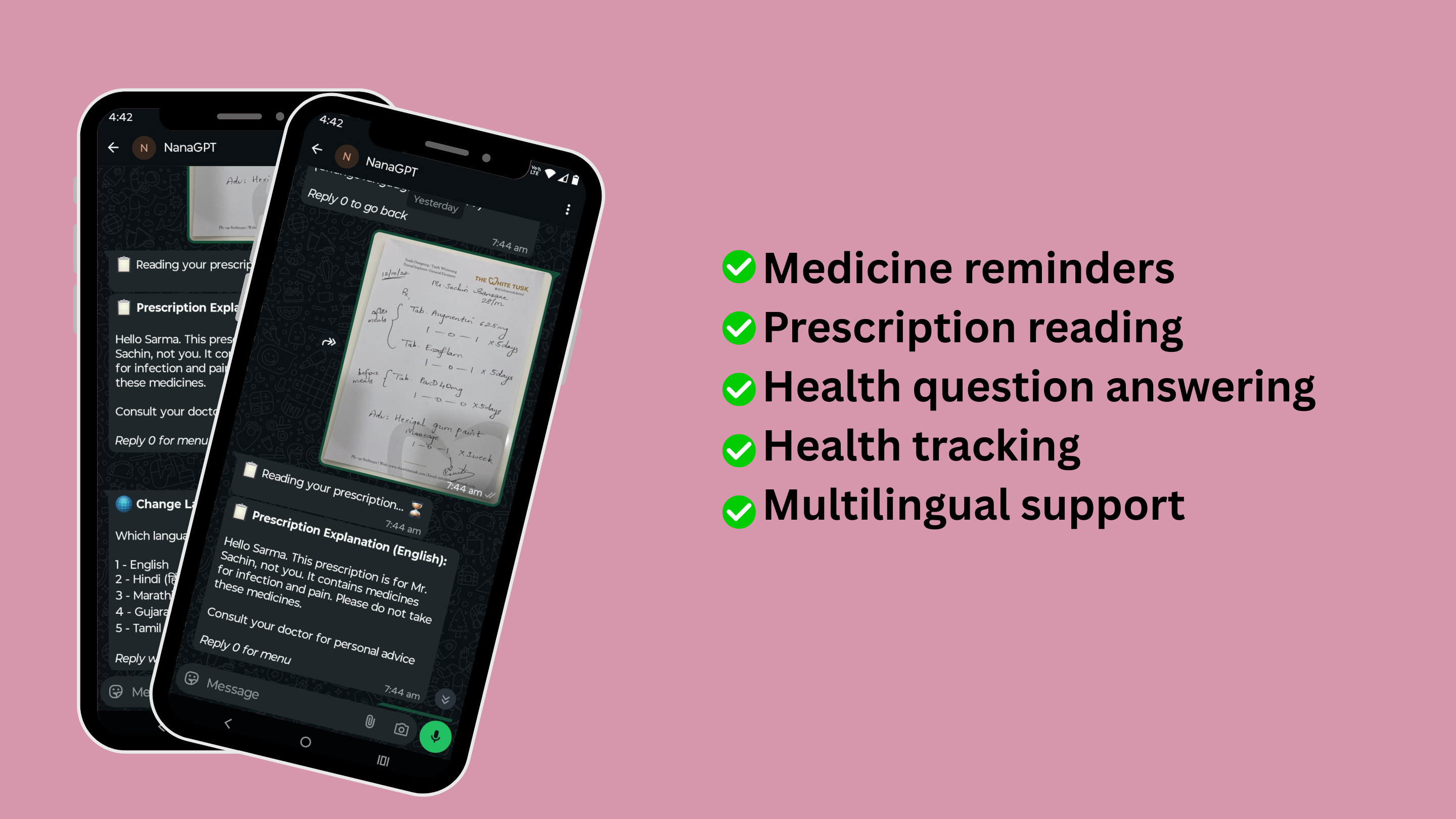
NanaGPT is a WhatsApp-based AI health companion built specifically for elderly users managing their day-to-day health independently. Everything happens through a simple numbered menu — no new interface to learn, no account to create, just replies to a chat they already know how to use.
What it actually helps with:
A Quick Health Profile, Set Up Once — On first message, NanaGPT has a short conversation to learn the user's name, age, existing conditions, and current medicines. It remembers this so the user never has to repeat their medical history again.
Medicine Reminders That Don't Give Up After One Try — A user types something like "Take my BP tablet at 9 PM daily" in their own words, and the AI understands it, schedules it, and sends it automatically. If they don't reply "done," NanaGPT follows up twice more, 10 minutes apart, getting gently more direct — because one missed notification shouldn't mean a missed dose.
Prescription Reader — A photo of a confusing, handwritten prescription becomes a plain-language explanation of what each medicine does, how to take it, and what to watch out for — in the language the user is most comfortable in.
Ask Anything, Health-Related — Users can type any health question in plain words and get a short, careful answer that already takes their known conditions and current medicines into account.
Simple Health Logging — Blood pressure, sugar, or weight readings logged with a single message, viewable later as a basic history, so trends are easy to notice.
Multilingual by Default — English, Hindi, Marathi, Gujarati, and Tamil, switchable any time — because understanding your own health shouldn't depend on understanding English.
How I Built It
Tech Stack
| Layer | Technology |
|---|---|
| Conversational AI | ASI:ONE API (asi1-mini model) |
| Backend | Python, Flask |
| Database | PostgreSQL (hosted on Supabase) |
| Scheduler | APScheduler (reminders and follow-ups) |
| Messaging Channel | Meta WhatsApp Business API |
| Hosting | Render |
| Uptime Monitoring | UptimeRobot |
Why WhatsApp, Specifically
The biggest reason assistive tools don't get used by elderly people isn't that the tools are bad — it's that a new app is itself a barrier. A new icon to find, a new login to remember, a new layout to figure out. Every one of those is a place where someone can get stuck and give up.
By building entirely inside WhatsApp, none of that exists. The user opens the same app they use to talk to their grandchildren, and a numbered menu takes it from there. The goal wasn't to build the most advanced interface — it was to remove every possible reason someone might not use it.
Architecture
WhatsApp User
     |
     v
Meta WABA Webhook  (POST /webhook)
     |
     v
Flask App  (Render)
     |
     ├── State Machine   (onboarding / menu / reminder / prescription / ...)
     |
     ├── ASI:ONE API     ←── understands free-text input, replies in the right
     |                        language, reads prescription photos, parses reminders
     |
     ├── PostgreSQL (Supabase) ←── profiles, reminders, health logs, chat history
     |
     └── APScheduler     ←── checks reminders every minute, sends WhatsApp
                              alerts and follow-up nudges if unconfirmed
How ASI:ONE Makes This Work
Understanding plain language, not forms. A user shouldn't have to fill out a structured form to set a reminder. They type "Take my sugar tablet after breakfast daily," and ASI:ONE extracts the medicine name, time, and frequency from that sentence, returning it as structured data the app can save — all without the user knowing any of that is happening.
Personalized answers. Every question sent to ASI:ONE includes the user's stored conditions and medicines, so the same question gets a more relevant answer based on who's actually asking.
Replies in the right language and script. For a grandmother more comfortable in Marathi than English, ASI:ONE is instructed — explicitly, and more than once in the prompt — to reply only in her selected language, in the correct script, so she's never the one doing the translating.
Reading prescriptions a person can't read themselves. The photo is converted to base64 and sent to ASI:ONE as a vision input. It reads the doctor's handwriting and explains it back in plain words.
Remembering the conversation. The last few exchanges are passed back into every ASI:ONE call so the bot stays contextually aware without the user having to manage or even notice that it's happening.
Challenges I Ran Into
Resisting the urge to over-build the interface. My first instinct as a developer was to make the bot fully free-text and "smart" about understanding anything typed at it. But that's intimidating, not helpful, for someone unsure what to type. I kept pulling the design back to a simple numbered menu, even when it felt less impressive from a coding standpoint, because it's what actually works for the people this is for.
Reminders silently not arriving. Partway through building, reminders stopped showing up at all. It turned out the background scheduler wasn't starting correctly under the production server, and my free hosting tier was putting the app to sleep when idle, killing the scheduler entirely. For a tool whose entire purpose is reliable reminders, a silent failure like this is the worst possible outcome — it looks like it's working until the moment someone actually needs it. I fixed the scheduler's startup and added an uptime monitor to keep the app continuously alive.
Losing user data between sessions. Early on, the database reset every time the server restarted, meaning a returning user would be asked to set up their whole profile again, and any reminders they'd set would just vanish. For someone already a little unsure about trusting technology with their health information, that's a fast way to lose their confidence in the tool. I moved to a properly hosted database so nothing gets lost.
Getting the AI to actually stick to one language. Simply asking the model to "reply in Hindi" wasn't reliable — it kept drifting back to English. Since language really is the whole point of that feature, I had to be much more explicit and repetitive in the instructions, and added a quick check right after a language change to confirm it actually worked.
Accomplishments I'm Proud Of
- Built something that works on a platform elderly users already trust, with zero new app to install.
- A reminder system that follows up instead of giving up after one notification — closer to how an actual family member would nag you about your medicine.
- Prescription explanations in regional Indian languages, solving a problem that affects not just elderly patients but the family members trying to help them long-distance.
- Chose simplicity over cleverness throughout — fewer choices, done reliably, beats a flashier interface that's harder to trust.
- A fully working, deployed system that runs on a real WhatsApp number today, not just a demo video.
What I Learned
- Good accessibility design often means doing less, not more. Every extra step or unfamiliar choice is a place where the exact person you're trying to help might just give up.
- Boring infrastructure decisions — like where data is stored or whether a background process survives a restart — aren't boring at all when the product is something people are depending on for their health.
- Trust is fragile and expensive to rebuild. A reminder that doesn't show up once is enough to make someone stop believing the tool works.
- The best way to make a piece of technology accessible to someone isn't to add accessibility features on top — it's to meet them on the platform they already trust.
What's Next for NanaGPT
- Family Visibility, With Consent — A simple, opt-in way for family members to check in on reminder adherence and health trends, without taking control away from the user themselves.
- Drug Interaction Warnings — Using ASI:ONE to flag risky combinations between a user's existing medicines and anything new they ask about.
- Voice Note Support — Many elderly users would rather speak than type. Full voice transcription would remove the last real barrier to using this comfortably.
- Reliable, Always-On Hosting — Moving off free-tier infrastructure so the core feature — reminders that actually arrive — never depends on a workaround.
- Gentle Health Trend Nudges — Periodic, plain-language summaries of logged readings that encourage a conversation with a doctor, without ever trying to diagnose anything itself.


Log in or sign up for Devpost to join the conversation.