NanaGPT — A WhatsApp Companion for Independent Healthcare Management in Old Age
Built for the Assistive Innovation Challenge
Inspiration
Aging is, in many ways, a disability that the world rarely talks about that way. As people grow older, ordinary tasks that once required no thought — remembering when to take a tablet, understanding what a doctor's handwriting actually says, knowing whether a symptom is serious — become genuine daily obstacles. Declining memory, failing eyesight, and reduced literacy with technology don't take away a person's desire to live independently, but they do take away their ability to do it without support.
The Assistive Innovation Challenge asks a direct question: how can technology help someone navigate the world with more confidence and independence? For elderly individuals, especially in India where over 140 million people are above the age of 60, independence in healthcare is one of the most fragile freedoms. Many manage chronic conditions like diabetes and hypertension alone, between infrequent doctor visits, with no one reliably available to remind them, explain things to them, or notice when something is wrong.
We did not want to build something that asked an elderly person to adapt to new technology. We wanted technology to adapt to them. Nearly every elderly person we know already uses WhatsApp to talk to their children and grandchildren. It is already familiar, already trusted, and already open on their phone. So instead of asking them to download a new "accessibility app," we built NanaGPT to live inside the one app they never had to be taught.
What It Does
NanaGPT is a WhatsApp-based AI health companion designed specifically to support elderly users' independence in managing their own healthcare — without requiring a caregiver to be present for every step.
It communicates entirely through a simple numbered menu, removing the cognitive load of free-form typing or navigating a complex app interface. A user can reply with a single digit to access any feature.
Core accessibility-focused features:
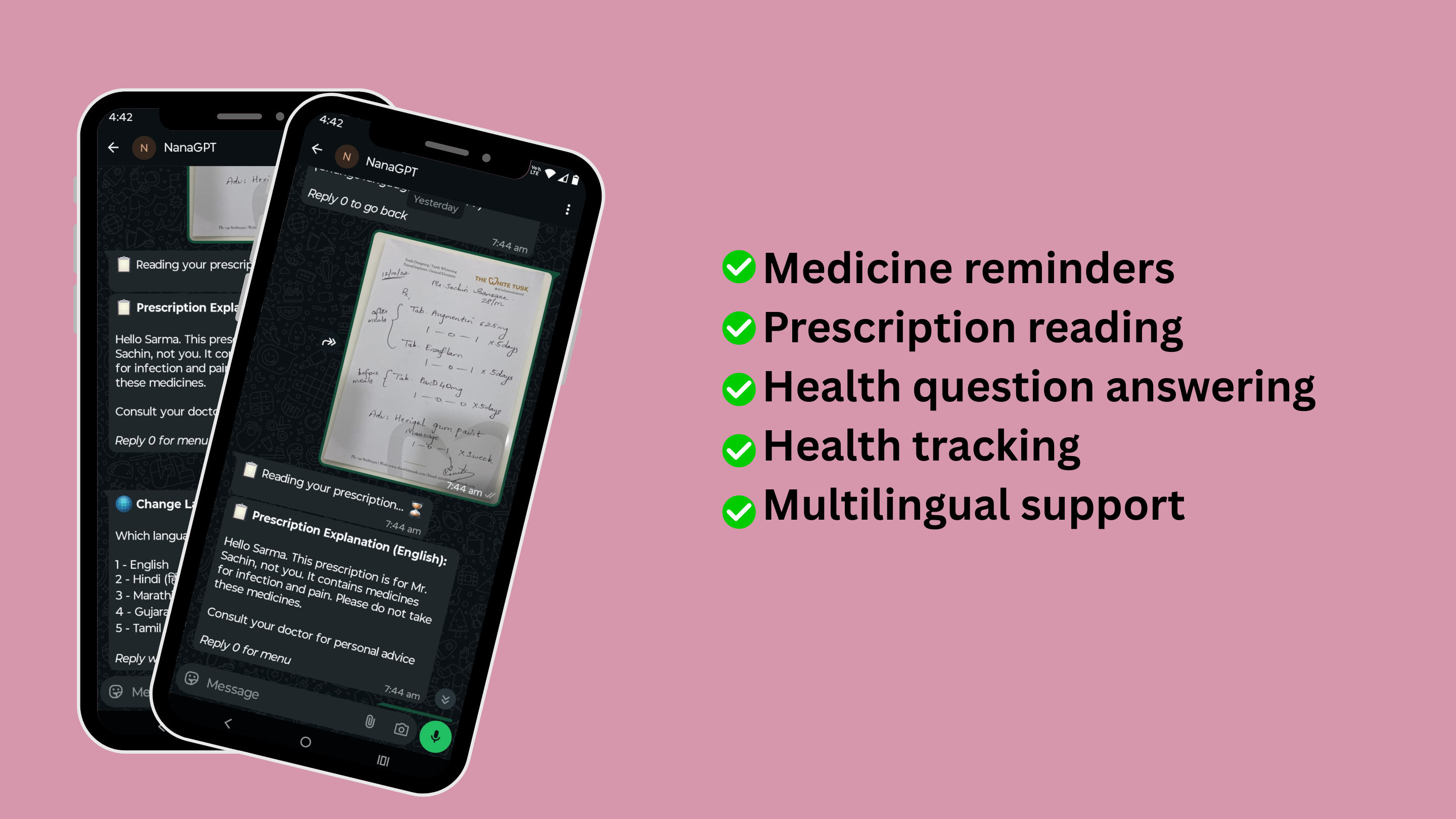
Guided Onboarding Profile — On first use, the bot has a short conversation to learn the user's name, age, known health conditions, and current medicines. This profile quietly powers every future interaction, so the user never has to repeat their medical history.
Medicine Reminders, Spoken in Plain Language — A user simply types something like "Take my BP tablet at 9 PM daily" and the bot understands it, schedules it, and delivers it automatically — no forms, no app calendar, no manual setup.
Persistent Follow-Up Reminders — Memory lapses are exactly the problem this tool exists to solve, so a single reminder isn't enough. If the user doesn't confirm with "done," NanaGPT follows up twice more at 10-minute intervals with increasingly direct, supportive language — functioning like a patient, repeating nudge a caregiver would give in person.
Prescription Reader for Independent Understanding — A photo of a handwritten or printed prescription is often unreadable to both the patient and their family. The user photographs it and sends it; NanaGPT identifies each medicine, explains its purpose, dosage, and precautions, in plain language — restoring a piece of independence that illegible handwriting otherwise takes away.
Health Question Answering — Users can ask anything about their health in their own words and receive a short, contextual, non-alarming answer that takes their existing conditions and medicines into account.
Health Log Tracking — Blood pressure, blood sugar, or weight readings can be logged with a single message and reviewed later as a simple history — giving users and their families a way to notice trends without a clinical dashboard.
Multilingual Support — The bot communicates in English, Hindi, Marathi, Gujarati, and Tamil, switchable at any time. Language should never be the barrier between a person and their own health information.
How We Built It
Technology Stack
| Layer | Technology |
|---|---|
| Conversational AI | ASI:ONE API (asi1-mini model) |
| Backend | Python, Flask |
| Database | PostgreSQL (hosted on Supabase) |
| Scheduler | APScheduler (reminders and follow-up nudges) |
| Messaging Channel | Meta WhatsApp Business API (WABA) |
| Hosting | Render |
| Uptime Monitoring | UptimeRobot |
Why WhatsApp as the Accessibility Layer
The single biggest barrier to assistive technology adoption among the elderly is not the technology itself — it is the unfamiliarity of a new interface. A new app means a new icon to find, a new login to remember, a new layout to learn. Every one of those steps is a point of failure for someone with reduced tech fluency, low vision, or memory difficulty.
By building entirely inside WhatsApp, NanaGPT removes every one of those failure points. There is no install, no account creation, no new UI. The user opens the same green icon they already use to talk to their grandchildren, and a structured, numbered menu guides them from there. This is accessibility by subtraction — removing friction rather than adding features.
Architecture
WhatsApp User
     |
     v
Meta WABA Webhook  (POST /webhook)
     |
     v
Flask App  (Render)
     |
     ├── State Machine   (onboarding / menu / reminder / prescription / ...)
     |
     ├── ASI:ONE API     ←── language understanding, multilingual replies,
     |                        prescription image analysis, reminder parsing
     |
     ├── PostgreSQL (Supabase) ←── user profiles, reminders, health logs,
     |                              conversation history (persistent)
     |
     └── APScheduler     ←── checks active reminders every minute,
                              sends WhatsApp alerts and follow-up nudges
How ASI:ONE Powers Independence
ASI:ONE is what allows NanaGPT to feel less like a form and more like a conversation — which matters enormously for an elderly user who may not type precisely or phrase things the way an app expects.
1. Personalized, Condition-Aware Responses — Every request to ASI:ONE includes the user's stored conditions and medicines in the system prompt. A question like "Can I take Crocin?" is answered differently for someone with kidney issues than for someone without, without the user needing to repeat their medical history each time.
2. Natural Language Understanding for Reminders — Elderly users should not need to fill out a structured form to set a reminder. They type "Take my sugar tablet after breakfast daily" in their own words, and ASI:ONE extracts the medicine name, time, and frequency, returning it as structured data inside a custom tag that the application parses and saves.
3. Multilingual, Script-Correct Replies — For a user more comfortable in Hindi, Marathi, Gujarati, or Tamil than English, ASI:ONE is instructed — explicitly and repeatedly — to reply only in the selected language and the correct native script, removing the burden of translation entirely from the user.
4. Vision-Based Prescription Reading — Prescription photos are converted to base64 and sent to ASI:ONE as a vision input. The model reads handwritten or printed text that the user themselves often cannot decipher, and explains it back to them simply.
5. Conversational Memory Without Complexity — The last few exchanges are passed back to ASI:ONE on every call, so the bot remains contextually aware within a session, without the user ever needing to understand or manage that context themselves.
Challenges We Ran Into
Designing for low digital literacy, not for ourselves — The hardest part of this project was not the code; it was resisting the urge to build something we, as developers, would find intuitive. A free-text chatbot is impressive but unforgiving for someone unsure what to type. We repeatedly simplified the interface back down to numbered choices, even when a more "flexible" design felt technically nicer.
Reminders not arriving — root cause was accessibility-critical — Mid-build, reminders stopped firing reliably. The cause turned out to be twofold: the scheduler was not starting correctly under our production server, and our free hosting tier was putting the app to sleep after inactivity, silently killing the background scheduler. For a tool whose entire purpose is dependable reminders, this was the most serious bug we faced — an assistive feature that fails silently is worse than one that was never built, because it creates false trust. We resolved it by fixing the scheduler's startup behavior and adding an uptime monitor to keep the service continuously alive.
Data persistence for a tool meant to be trusted long-term — Our initial lightweight database was wiped every time the server restarted, meaning a returning user would be asked to re-onboard and would lose their reminders without warning. For an elderly user, repeated unexplained "Let's set up your profile again" prompts erode trust quickly. We migrated to a properly hosted database to guarantee continuity.
Getting language compliance right — Simply telling the AI model to "reply in Hindi" was not reliable enough; it would drift back into English. Because language is itself an accessibility feature here, we could not treat this as a minor detail — we rewrote the instructions to be explicit about script and repeated the constraint, then added a verification step on every language change.
Prescription images failing silently — WhatsApp's media links expire within minutes, so by the time the AI tried to read the image, it was often already gone. We fixed this by downloading and embedding the image directly, but the deeper lesson was that any failure in this feature directly blocks a user from understanding their own medication — so it needed to be made resilient, not just functional.
Accomplishments That We Are Proud Of
- Built a complete assistive tool that requires zero new app installation, meeting elderly users exactly where their digital comfort already is.
- A reminder system that does not just fire once and disappear, but actively follows up — mirroring the persistence of a real caregiver rather than the indifference of a typical notification.
- Prescription literacy support in regional Indian languages, directly addressing a barrier that affects both elderly patients and the family members trying to help them from a distance.
- A conversational design that prioritizes simplicity and forgiveness over flexibility, recognizing that for this user group, fewer choices done reliably matter more than many choices done imperfectly.
- A fully working, deployed, end-to-end system — not a mockup — that can be tested on a real WhatsApp number today.
What We Learned
- Accessibility often means designing less, not more. Every additional choice, every extra step, every unfamiliar icon is a potential point of exclusion for the exact users we are trying to help.
- The most "invisible" infrastructure decisions — where data is stored, whether a background process survives a server restart — are not backend details when the product is assistive technology. They are the difference between a tool an elderly person can depend on and one that quietly fails them.
- Trust, once broken (a forgotten profile, a reminder that doesn't arrive), is disproportionately costly for users who are already wary of technology. Reliability is not a feature for assistive tools — it is the core requirement.
- Meeting people where they already are, technologically and linguistically, removes more barriers than adding new features ever could.
What's Next for NanaGPT
- Caregiver Visibility Without Surveillance — A lightweight, opt-in way for family members to see reminder adherence and health log trends, supporting independence rather than undermining it — the user stays in control of their own data.
- Drug Interaction Checking — Using ASI:ONE to flag risky combinations between a user's existing medicines and any new one they ask about, adding a safety layer appropriate for users who may not always have a pharmacist nearby.
- Voice Message Support — Many elderly users are more comfortable speaking than typing, particularly those with limited literacy or vision difficulties. Full voice-note transcription would remove the last remaining barrier to entry.
- Always-On, Production-Grade Hosting — Moving off free-tier infrastructure to guarantee that reminders, the feature this entire project exists to deliver, never depend on a workaround to stay alive.
- Proactive, Gentle Health Nudges — Periodic, plain-language summaries of health trends (e.g., consistently elevated readings) that encourage a conversation with a doctor, without ever diagnosing or alarming the user.


Log in or sign up for Devpost to join the conversation.