-
-
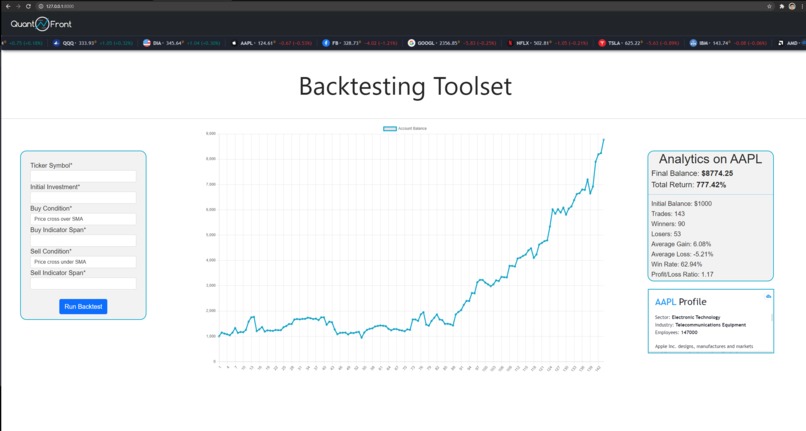
Website (go to www.quantfront.net to try it out)

Inspiration
Creating backtesting software is time-consuming and requires comprehensive data science knowledge. A free, easy-to-use platform would make it much easier for beginners to get involved in quantitative analysis.
What it does
It performs backtesting on all the securities in the various world stock exchanges. The user can chose their buy and sell indicator settings and run a backtest that will give detailed information about the trading strategy they chose.
How I built it
- Python for the backtesting algorithm
- Django for the website back end
- HTML/CSS/JS for the website front end.
- Tradingview for the banner and company information widgets
- Bootstrap for the CSS framework
- Server hosting with Linode
Challenges I ran into
Working alone on such an ambitious project was the most challenging part. I pretty much coded the entire 20-hour span straight and still didn't have time to add the options chain analysis toolset or the asset allocation toolset. Also, I am not too familiar with JavaScript so passing context between python and js files took me quite a bit of time to learn.
Accomplishments that I'm proud of
Creating a functional website in 20 hours that can perform backtesting for free is something I am very proud of. Working alone and being able to see my project come to fruition was very satisfying and I am still surprised at how well it works.
What I learned
Going into this hackathon, I had only ever used Django for a very simple static webpage so going through the process of creating an interactive website taught me a lot about the structure of websites. I also learned how to use chart.js which is something I plan to heavily use in the future.
What's next for quantfront.net
I plan to leave the website up so others can learn more about quantitative analyses. I will add more toolsets such as the options analyses and asset allocation toolset I was not able to add today. I am also going to add informative pages to the website so inexperienced individuals can understand how backtesting works.


Log in or sign up for Devpost to join the conversation.