-
-

top
-
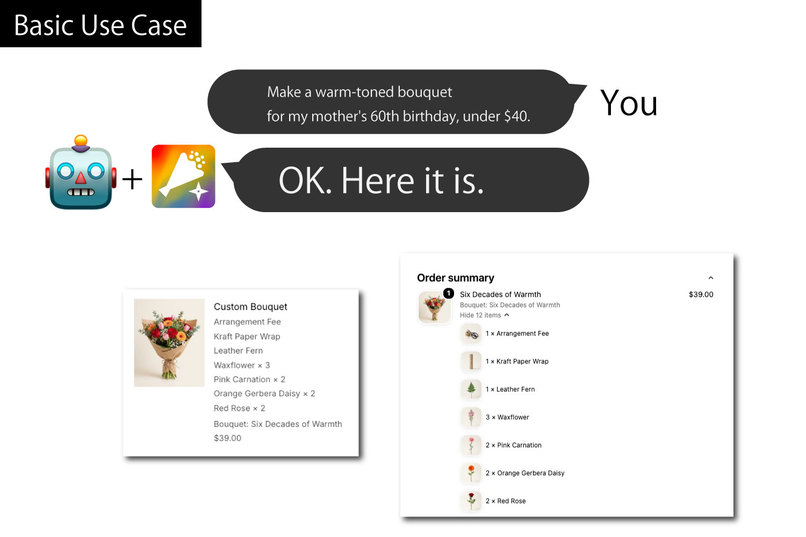
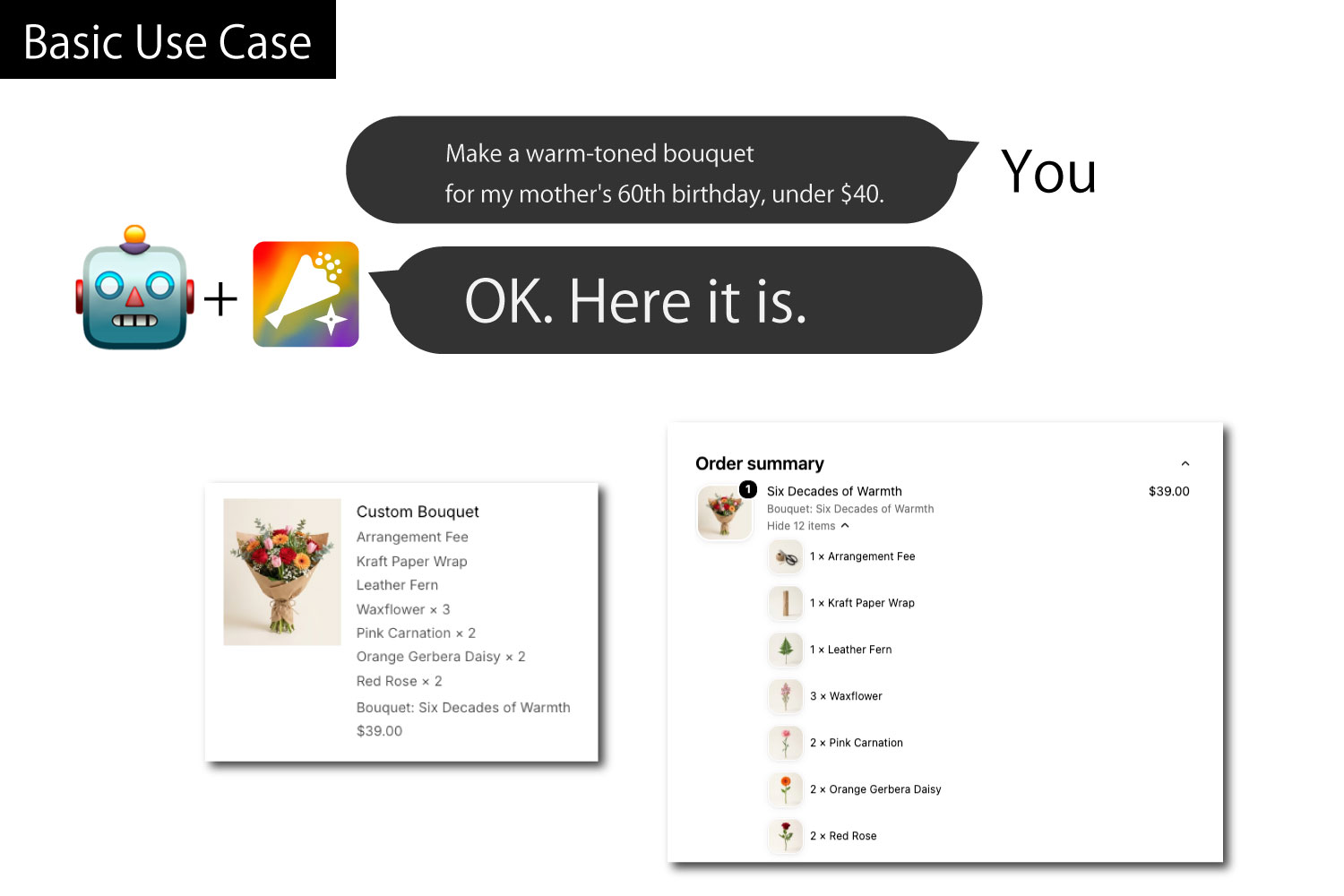
Basic Use Case
-
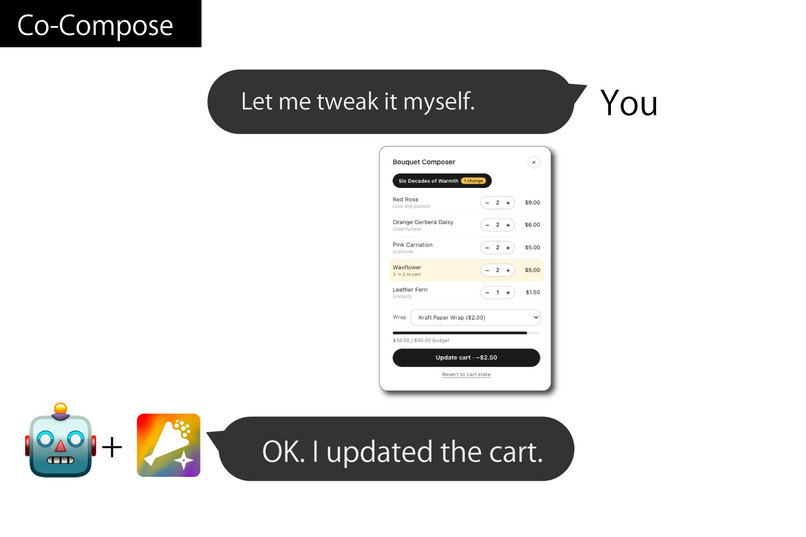
Co-Compose
-
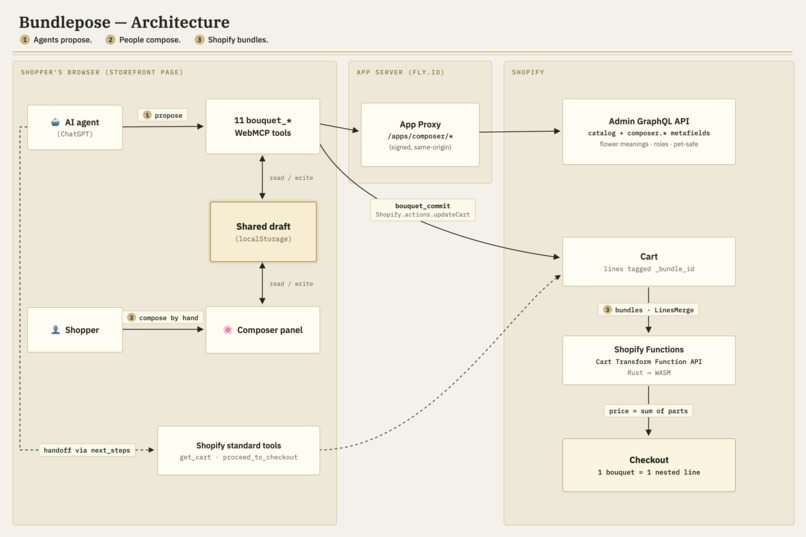
System

Inspiration
E-commerce lets anyone sell 24 hours a day — but an online store is really an unmanned roadside stand. Nobody greets you, nobody asks who the flowers are for.
We build Shopify apps for a living (Theme App Extensions, Shopify Functions), and florists are a vertical where this gap hurts most. Custom bouquets ARE sold on Shopify today — but the "custom" part still happens over phone calls, LINE messages, and free-text note fields. The composition, the price, the stock — none of it is structured.
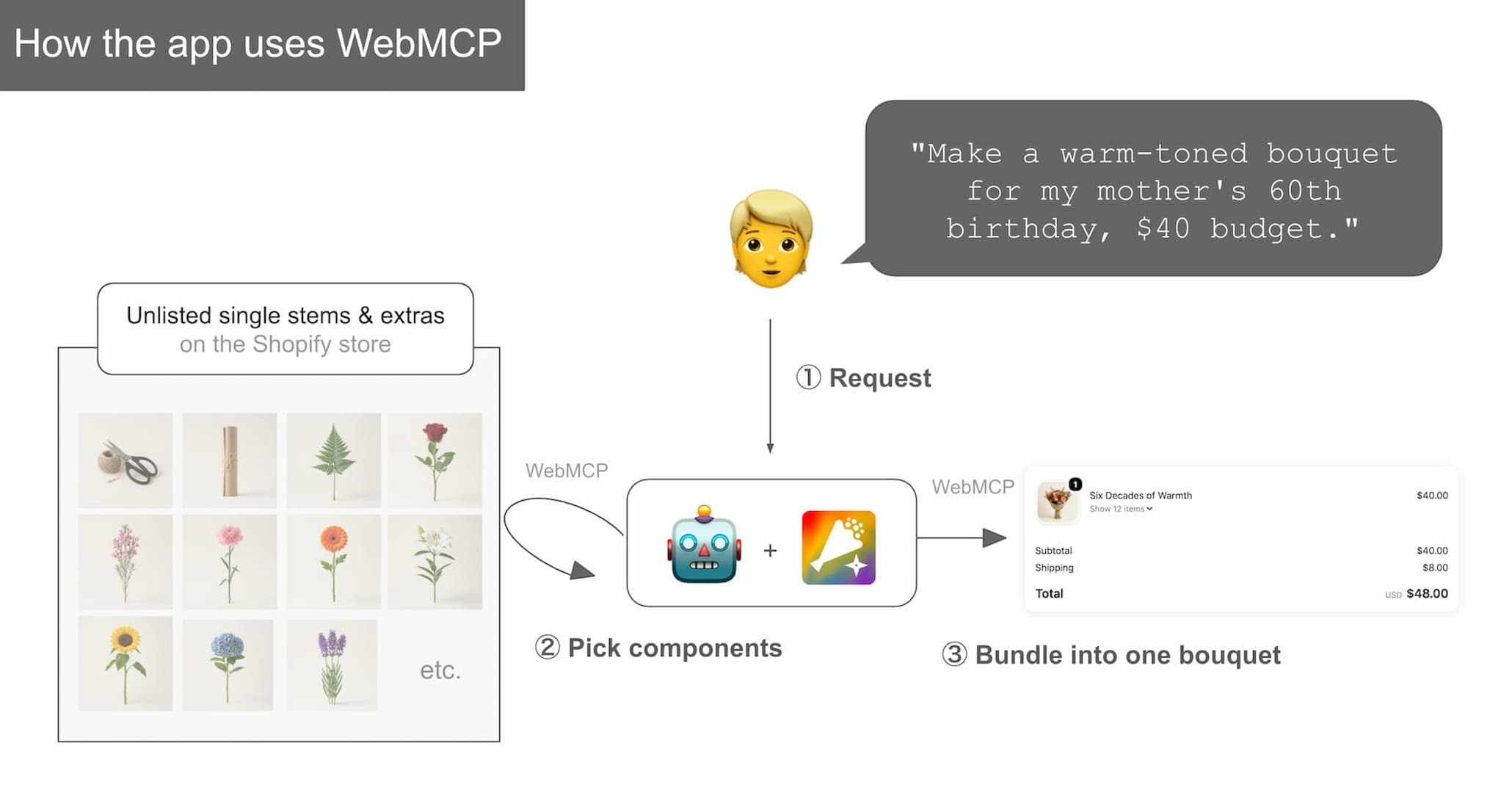
When WebMCP arrived, we saw a chance to put a clerk back in the store: an agent that listens to "something warm for my mother's 60th birthday, under $40," knows the flowers (meanings, occasions, pet safety), and builds the bouquet with you. Shopping agents are good at finding products that already exist. We wanted the harder thing: turning agentic commerce from product discovery into product creation.
What it does
Bundlepose is a Shopify app where a shopper and an AI agent compose a product that doesn't exist yet — and turn it into a real order.
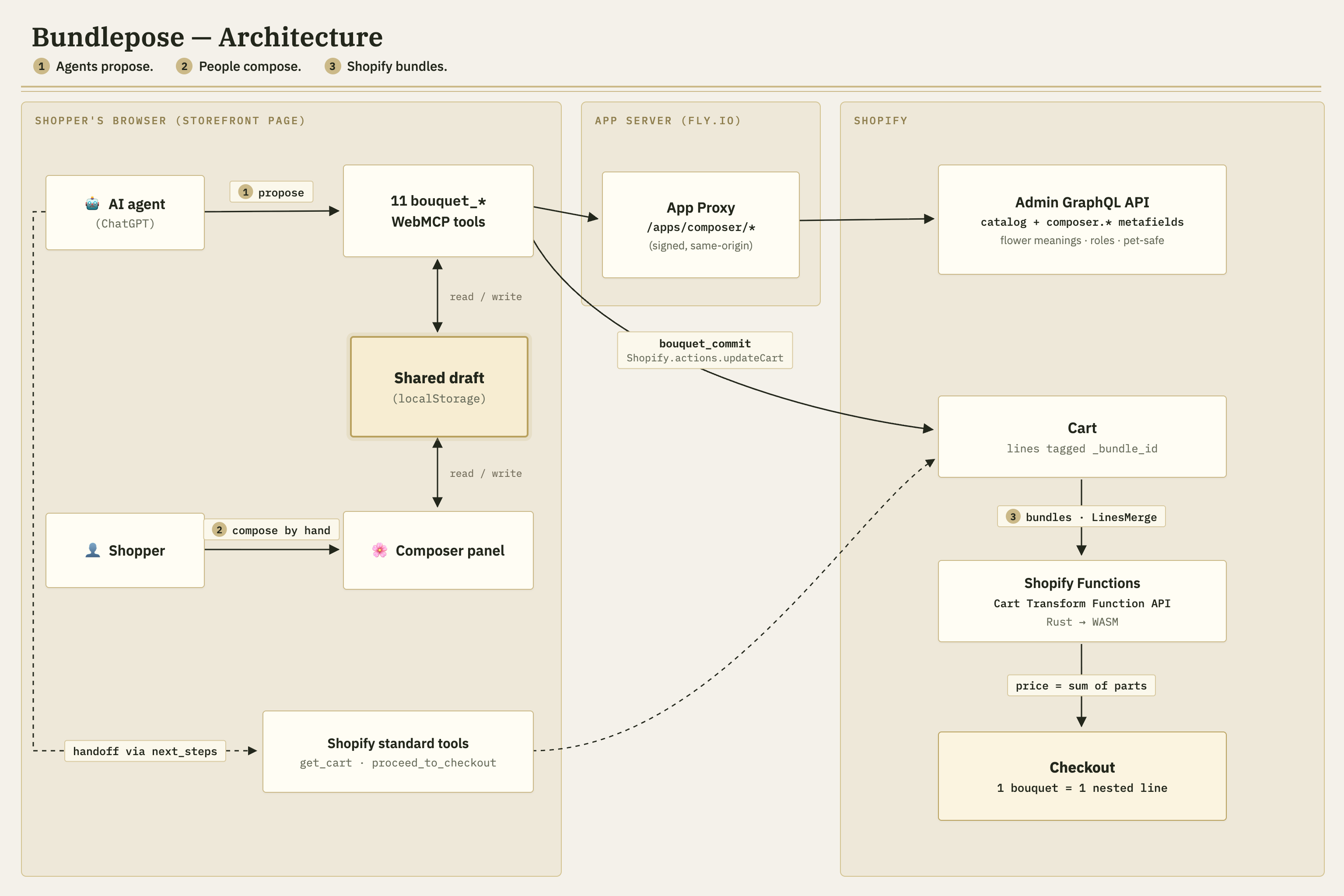
- The agent proposes. Through 11
bouquet_*WebMCP tools registered on every storefront page, the agent reads the florist's rules (slots, stem limits, budget) and today's flowers — real Shopify variants with metafields for role, color, flower meaning, occasions, and pet safety — then drafts a bouquet within the budget. - The person composes. The draft appears in a composer panel on the same page. The shopper
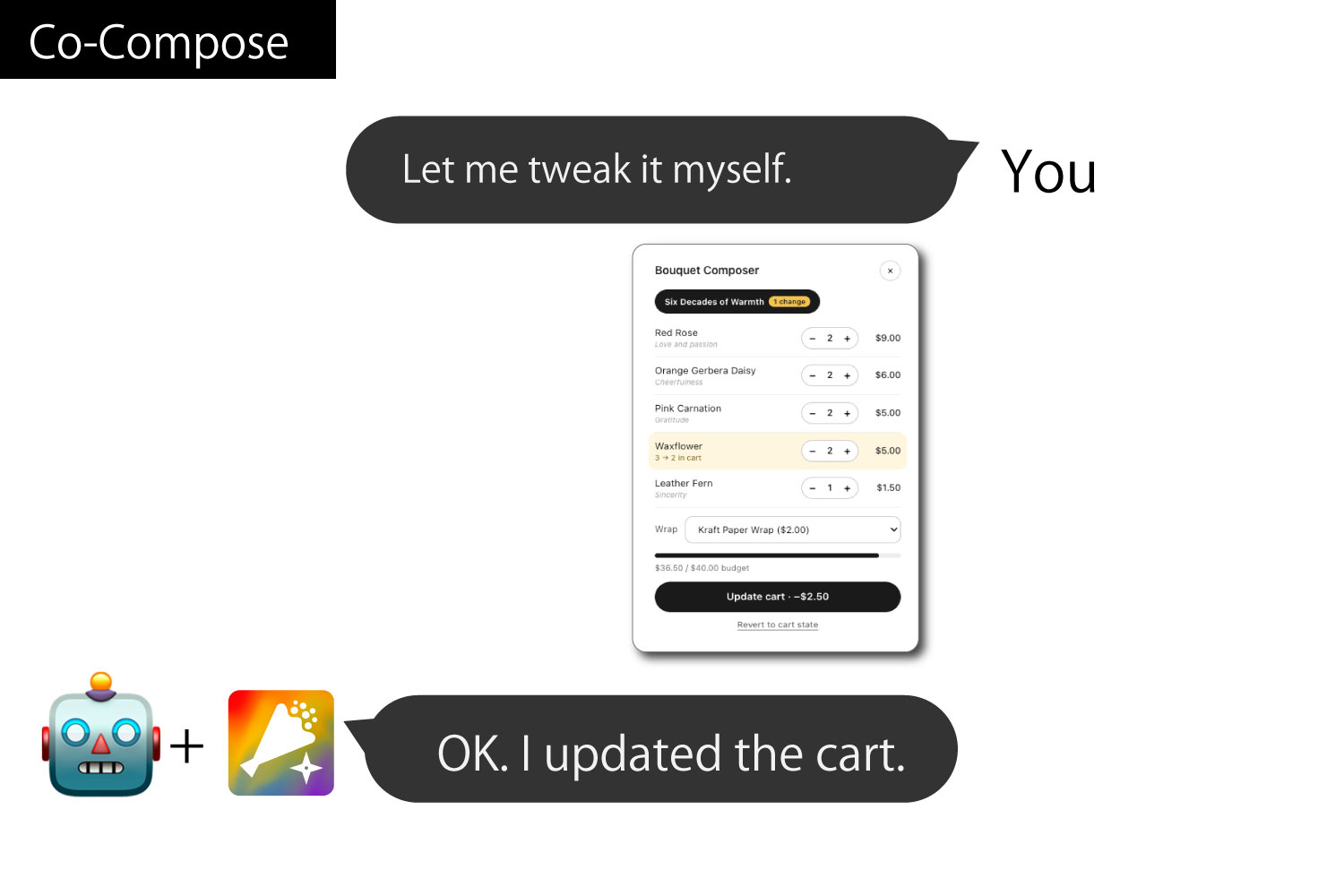
adjusts quantities, removes a stem, picks the wrap, restores something — by hand. The agent
sees those hand edits on its next
bouquet_get_statecall and rebalances. One shared workbench, edited from both sides. - Shopify bundles.
bouquet_commit— the only tool allowed to touch the cart — validates the draft and adds it. A Cart Transform Function (Rust) merges stems, wrap, and arrangement fee into one cart line, priced as the exact sum of its parts, carrying its recipe through checkout. Three bouquets? Three clean lines, not thirty loose stems.
Why this needs WebMCP: Shopify's built-in storefront tools already let agents search products and fill carts — but they can only sell what exists. A bouquet that was just invented in conversation isn't a product; twelve loose stem lines don't tell the merchant "this is one bouquet," and two bouquets in one cart are indistinguishable mush. Page-level WebMCP tools + a Cart Transform close exactly that gap: the agent works inside the store's own rules and inventory, hands off to Shopify's standard tools for checkout, and the human approves on the same page they're browsing. The UX win is concrete: what used to be a phone call, a LINE thread, and a free-text note field becomes a structured, priced, stock-checked bouquet built right on the product page — and one clean line in the cart instead of a dozen loose stems.
The tools: bouquet_get_rules, bouquet_list_components, bouquet_create,
bouquet_get_state, bouquet_add_items, bouquet_remove_items, bouquet_set_wrap,
bouquet_set_note, bouquet_validate, bouquet_commit, bouquet_discard.
How we built it
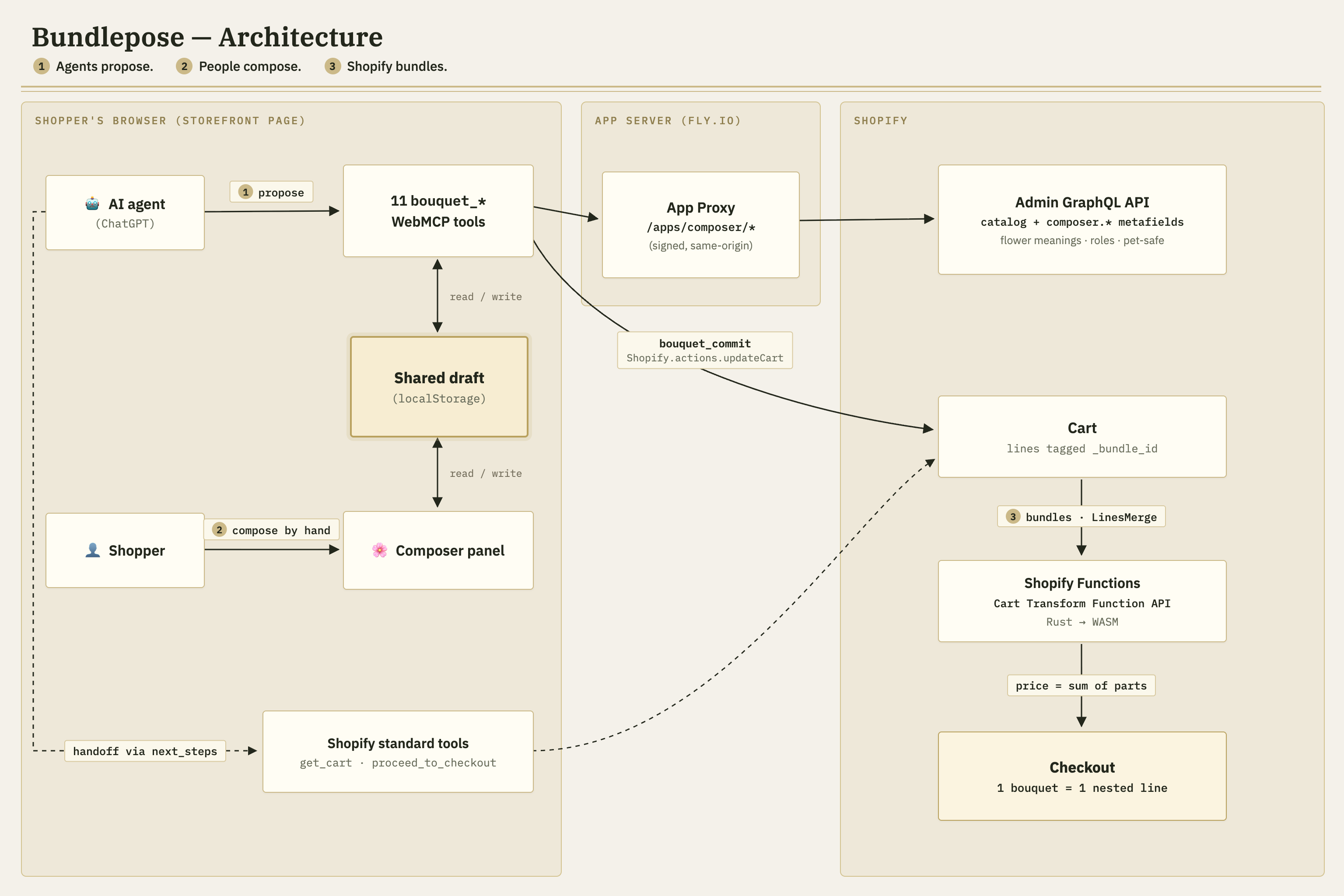
- Storefront (Theme App Extension, app embed): registers the 11 tools via
document.modelContext.registerTool()— imperative API, top-level document (ChatGPT does not detect tools inside iframes). Tools and the composer panel mutate one shared draft store (persisted to localStorage), so agent calls re-render the panel instantly and human edits are readable back throughbouquet_get_state, including a per-stem diff against what's already in the cart. - Backend (React Router 7 + TypeScript on Fly.io, SQLite/Prisma): tools call the store's
own domain via Shopify App Proxy (
/apps/composer/*) — signed, same-origin, zero CORS. We verified WebMCPexecuteruns in the normal page context (not a sandbox), which makes this possible. The catalog endpoint reads the Admin GraphQL API, exposingcomposer.*metafields (role, color, meaning, occasions, pet-safe) as the agent-facing florist knowledge. - Cart write:
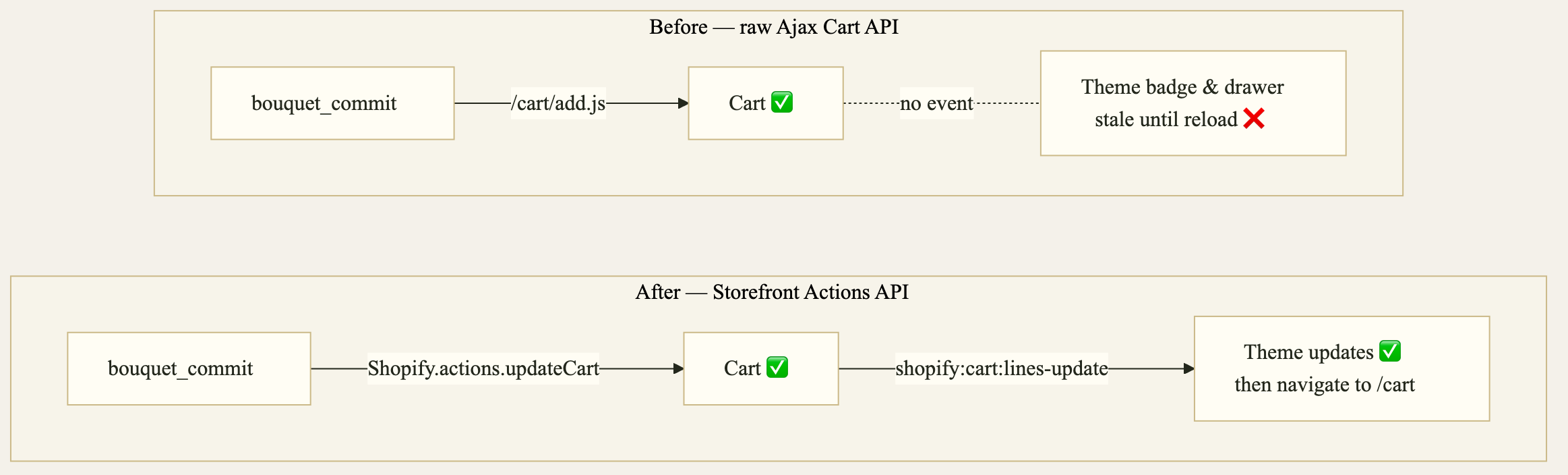
Shopify.actions.updateCart(Storefront Actions API) with hidden_bundle_id/_bundle_nameline attributes, Ajax Cart API fallback — then navigate to/cart, which is always correct regardless of theme. - Bundling (Shopify Function, Rust → WASM): groups cart lines by
_bundle_idand emits aLinesMergeoperation under a "Custom Bouquet" parent variant (requiresComponents: true, price $0 — the merged line's price is the components' sum). Config lives in a metafield on the Cart Transform; missing config = no-op, so checkout never breaks. Fixture-tested with@shopify/shopify-function-test-helpers. - Merchant setup: an idempotent admin setup page — one click seeds the demo florist
(14 stems with metafields, 2 wraps, an arrangement fee, the merge parent kept UNLISTED:
purchasable by direct variant reference for the merge, hidden from search), another
activates the transform after
shopify app deploy.
Challenges we ran into
- Exposing WebMCP tools on a Shopify store. A Theme App Extension turned out to be the
right surface: its app embed runs in the storefront's top-level document, which is where
agents such as ChatGPT discover tools. We then named and scoped the
bouquet_*tools so they complement — rather than overlap with — Shopify's standard storefront tools, which already handle search, cart and checkout. - Staying in sync with the store's theme. Writing to the cart from a tool succeeded on the server, but the theme's cart icon and drawer did not reflect the change. The theme owns that state and only reacts to its own events, so we moved the commit path to Shopify's Storefront Actions API, which fires those events, and navigate to the cart page after a commit so the result is always visible.
- Co-composing with the agent, not through it. Our first approach drove every cart change through WebMCP alone, and the shopper ended up doing more work — each small tweak became another round of conversation. So we built the embedded composer: the agent's proposal lands in an on-page panel that the shopper can edit by hand, and the agent reads those edits back. Splitting the work this way is what finally made the experience feel good.
Accomplishments that we're proud of
- The full loop works end-to-end from ChatGPT: conversation → draft → hand-edit → agent rebalance → commit → one merged bouquet line → checkout.
- The math is exact. Five lines (3 roses, 4 tulips, 2 eucalyptus, wrap, fee) merge into "Warm Birthday Bouquet — $39.50", precisely the sum of its parts; a second bouquet stays its own line, and checkout expands each into its recipe.
- A real shared workbench. Remove a stem by hand and the panel shows "Removed / Restore",
the agent sees
changes_since_cart, and "Update cart · +$3.00" shows the delta before you approve. - It's a product, not a rig: idempotent one-page seed of the demo florist, graceful fallback in browsers without WebMCP, and a Rust Function with fixture tests.
What we learned
- Chat is not always the best interface. When you build with WebMCP, it's tempting to think of every interaction as a conversation. But some things — like removing one stem or trying a different wrap — are faster to do by hand than to describe in words. To give customers a good experience, we learned to combine chat with other kinds of UI, rather than force everything through the agent.
- WebMCP tools have to coexist with other apps' tools. Publishing tools with WebMCP turned out to be easy. That is exactly why it needs care: on a platform like Shopify, our tools run on the same page as Shopify's own tools and, in the future, tools from other developers' apps. Tool names, descriptions and responsibilities need to be designed so that agents can tell them apart and use them together.
- Explaining this to customers is hard. Our demo store shows a banner inviting shoppers to try the new experience with their AI agent. In practice, it is still difficult for a non-engineer to understand what that means or how to start. Until WebMCP-capable browsers are common, even a careful explanation will only go so far — as app developers, we need to keep working on how this is introduced to real shoppers.
What's next for Bundlepose
- Let the agent sell, not just build: add
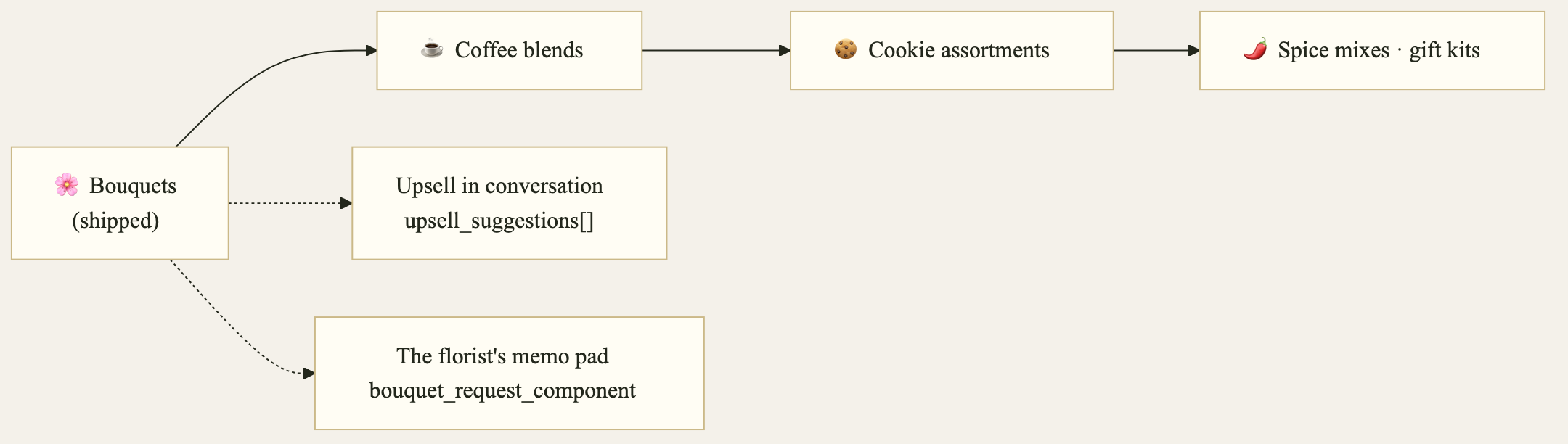
upsell_suggestions[]tobouquet_validate/bouquet_get_statereturns — "for $3 more, satin wrap," "your budget fits one more focal stem" — so upselling happens in conversation, the way a real clerk does it. - More templates for the same engine. The Cart Transform's grouping logic is product-agnostic and the shop rules already ship as a profile object (noun, unit, slots) — generalizing the tool names and copy is the next step: coffee blends, cookie assortments, spice mixes, gift kits. Same mechanics, different nouns.
- A safety net Function (checkout validation blocking loose component lines) and usage-based billing counted on paid bouquets, not tool calls.
Built With
- docker
- fly.io
- graphql
- javascript
- liquid
- node.js
- prisma
- react
- react-router
- rust
- shopify
- sqlite
- typescript
- webmcp
Log in or sign up for Devpost to join the conversation.