-
-
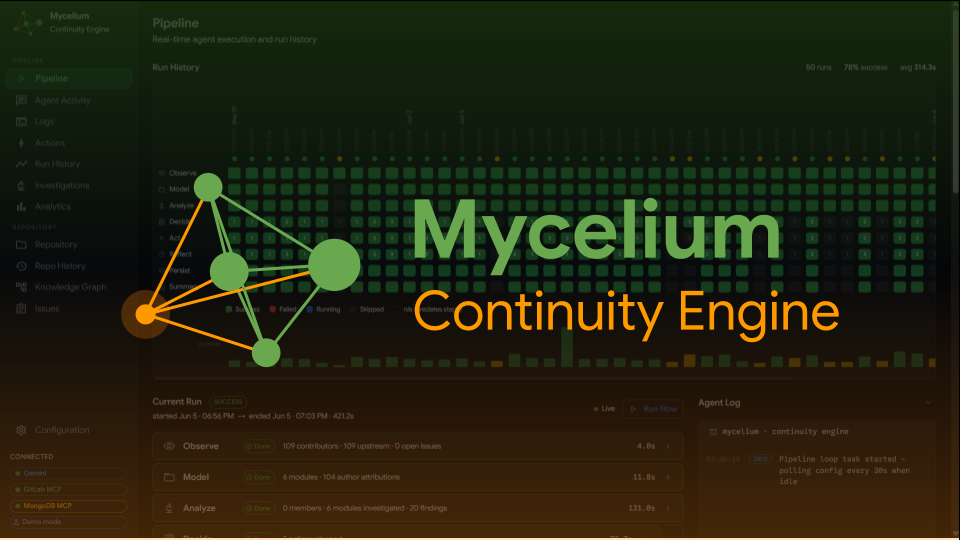
Mycelium Logo and Banner
-
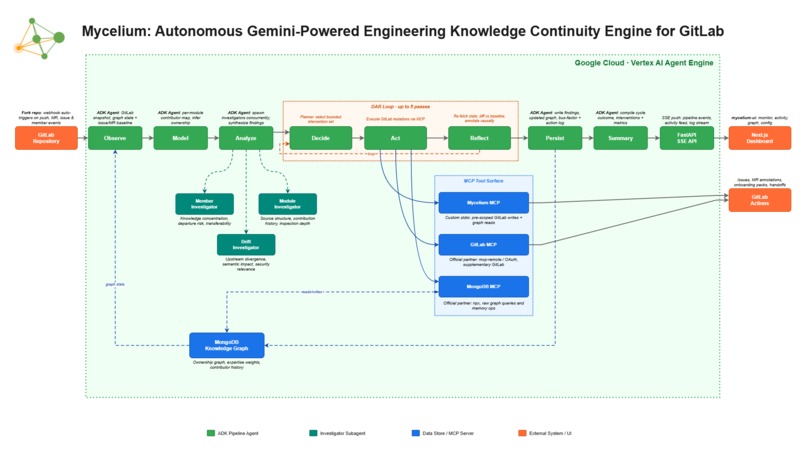
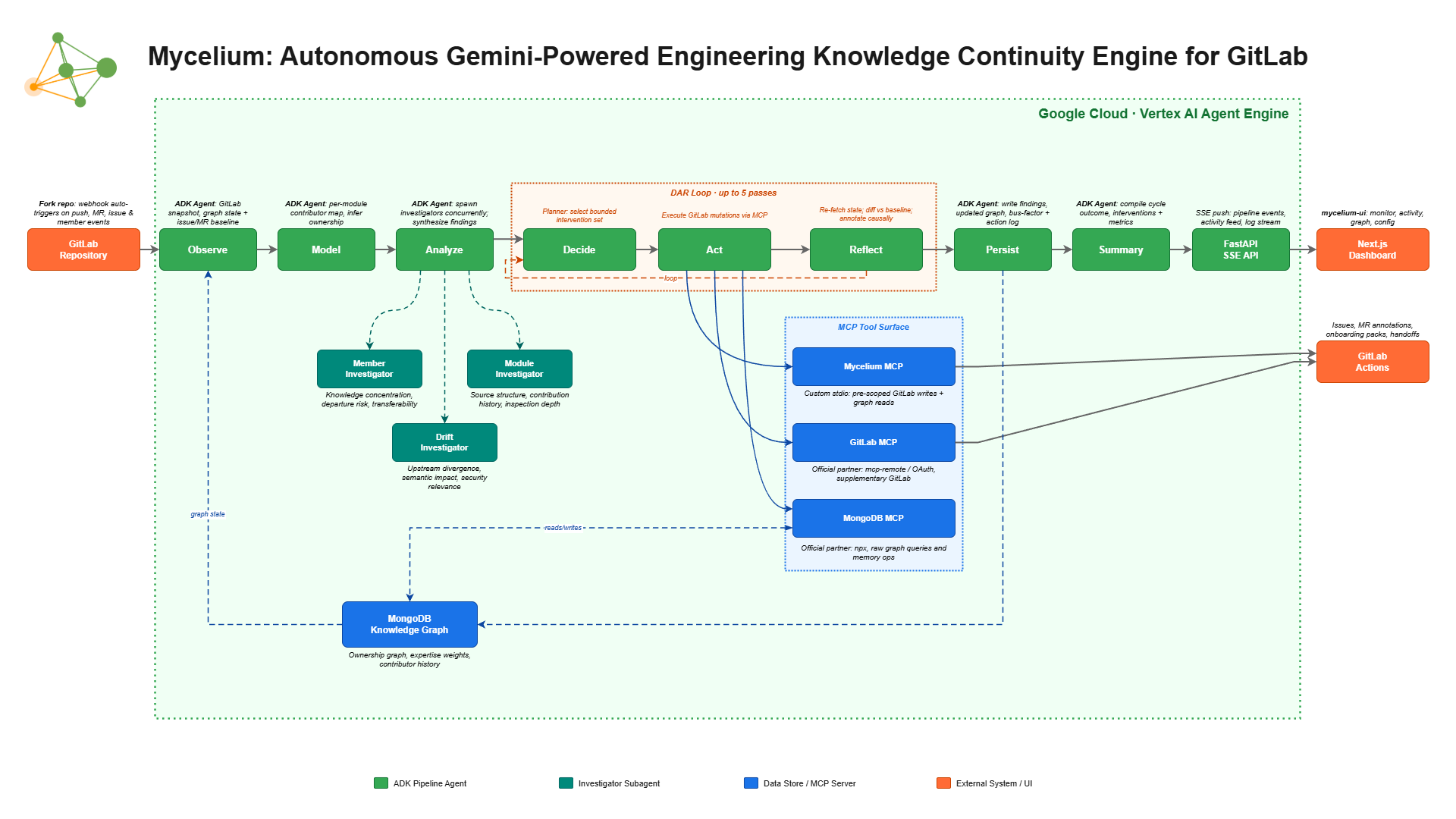
Mycelium Architecture Diagram
-
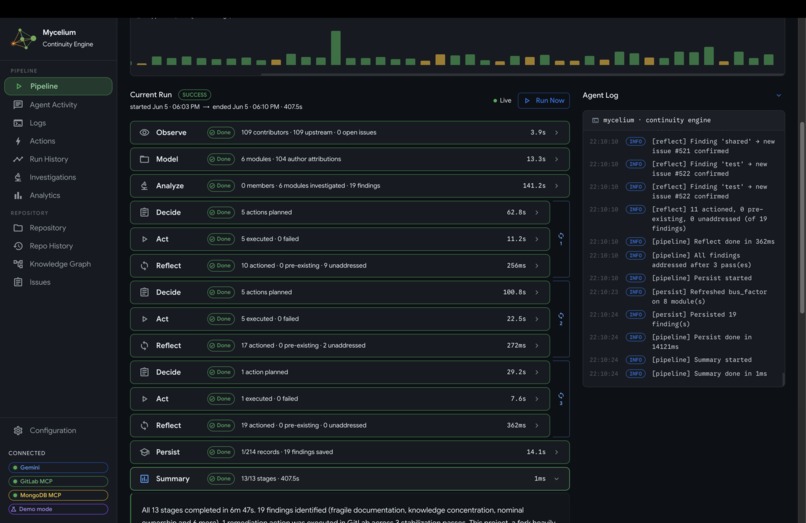
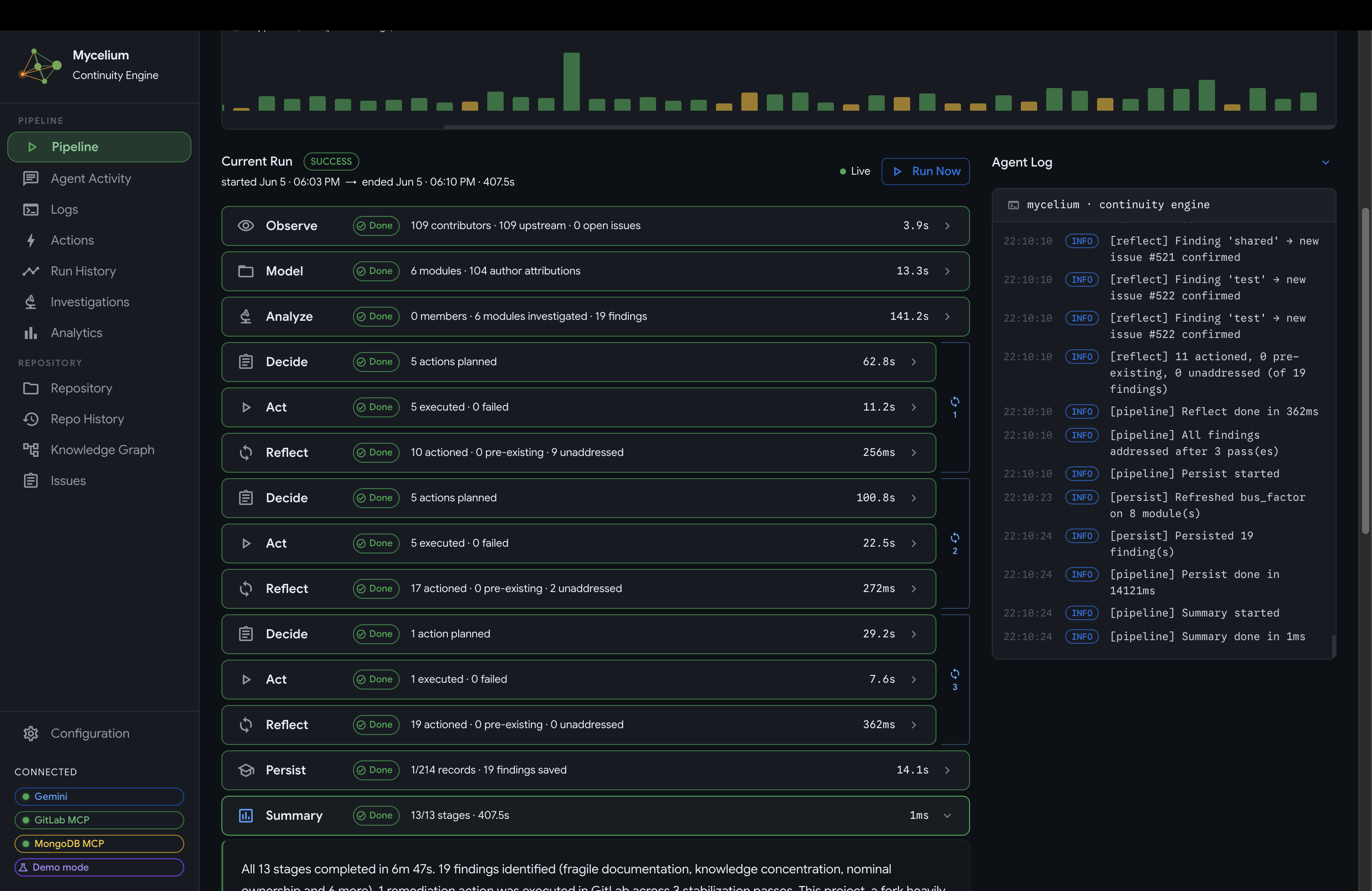
Completed Mycelium Pipeline Run
-
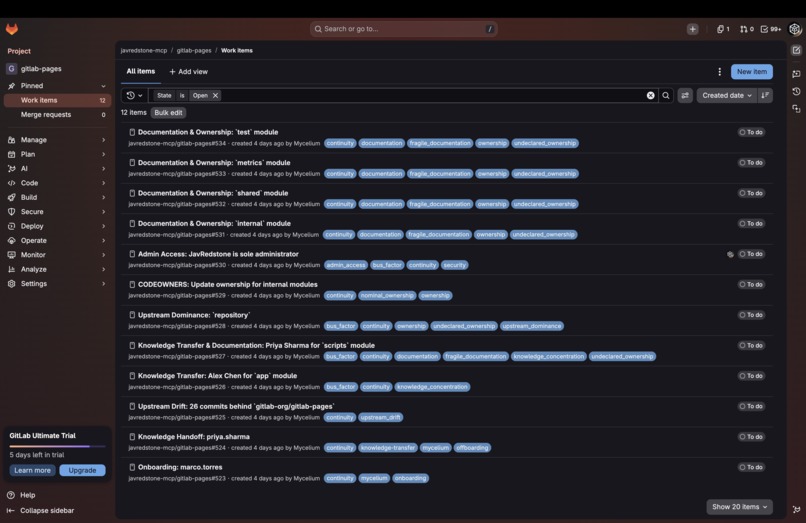
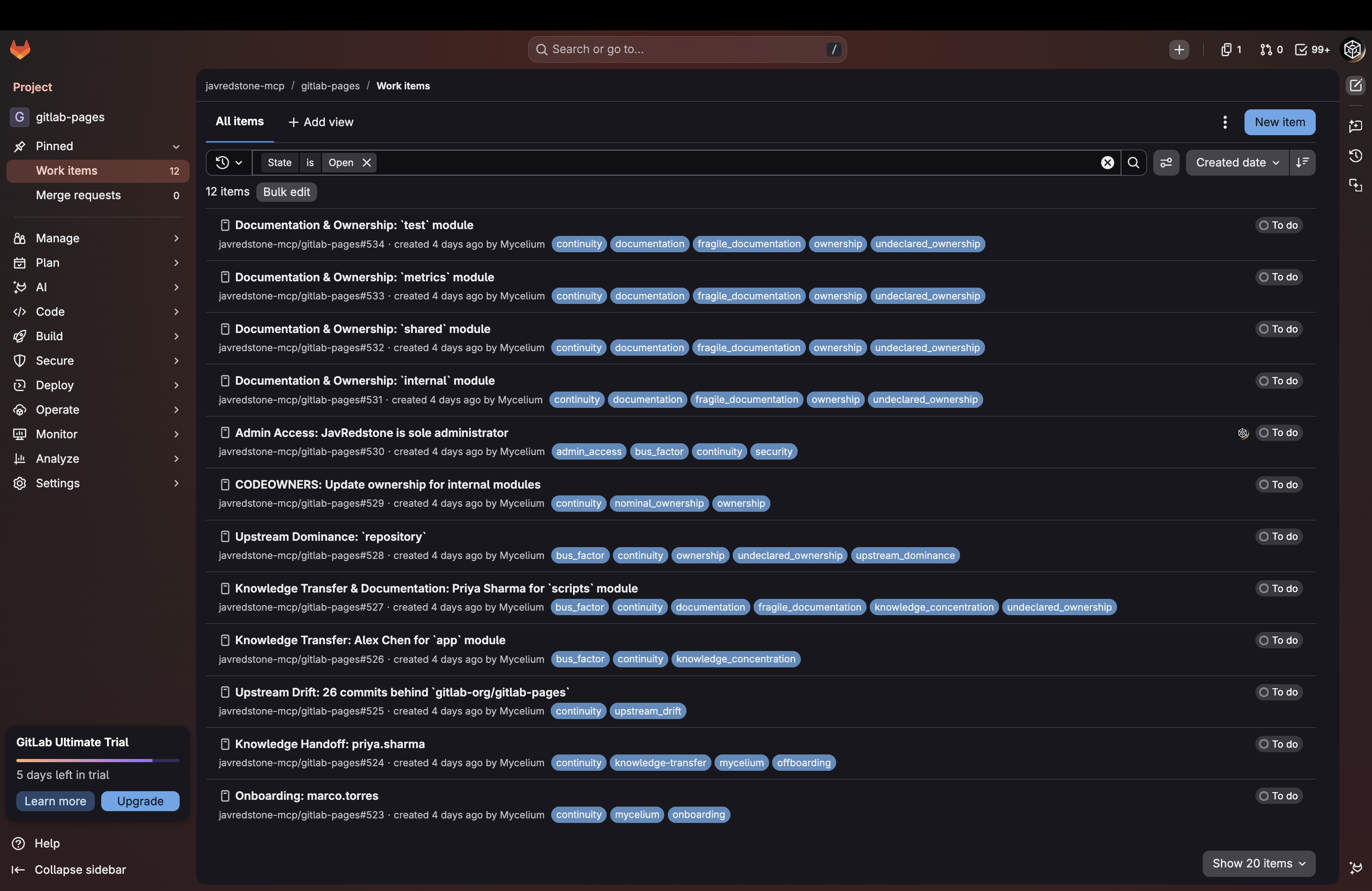
All GitLab Issues Created
-
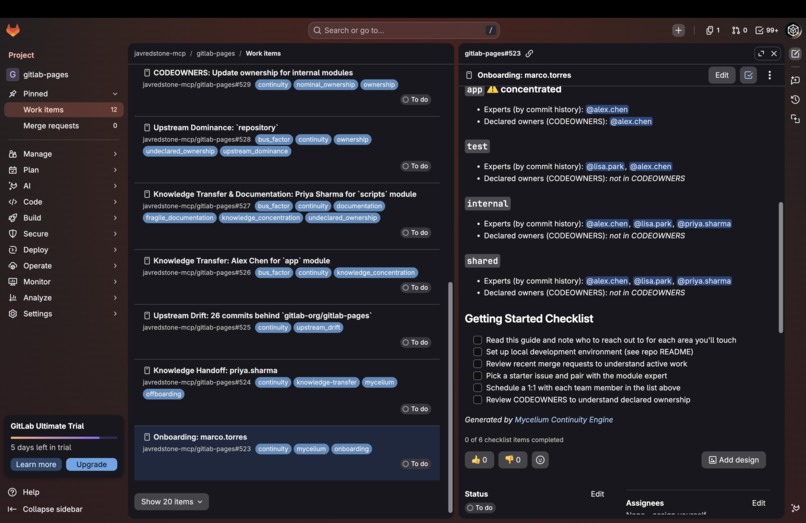
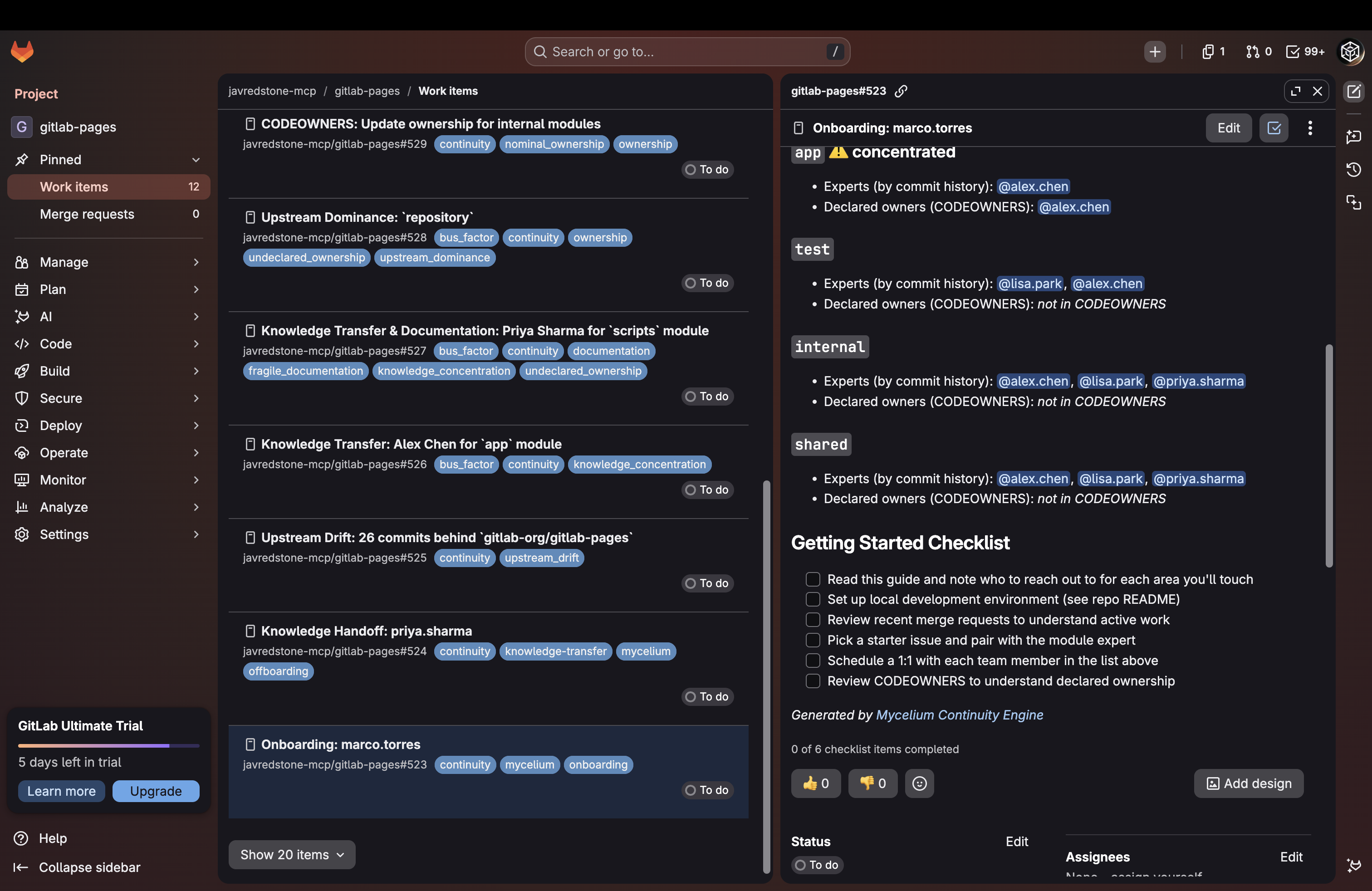
GitLab Issue for Onboarding
-
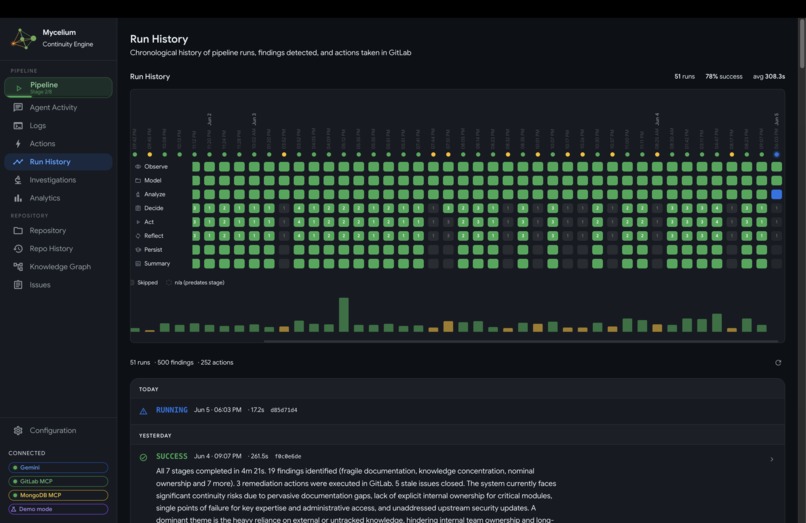
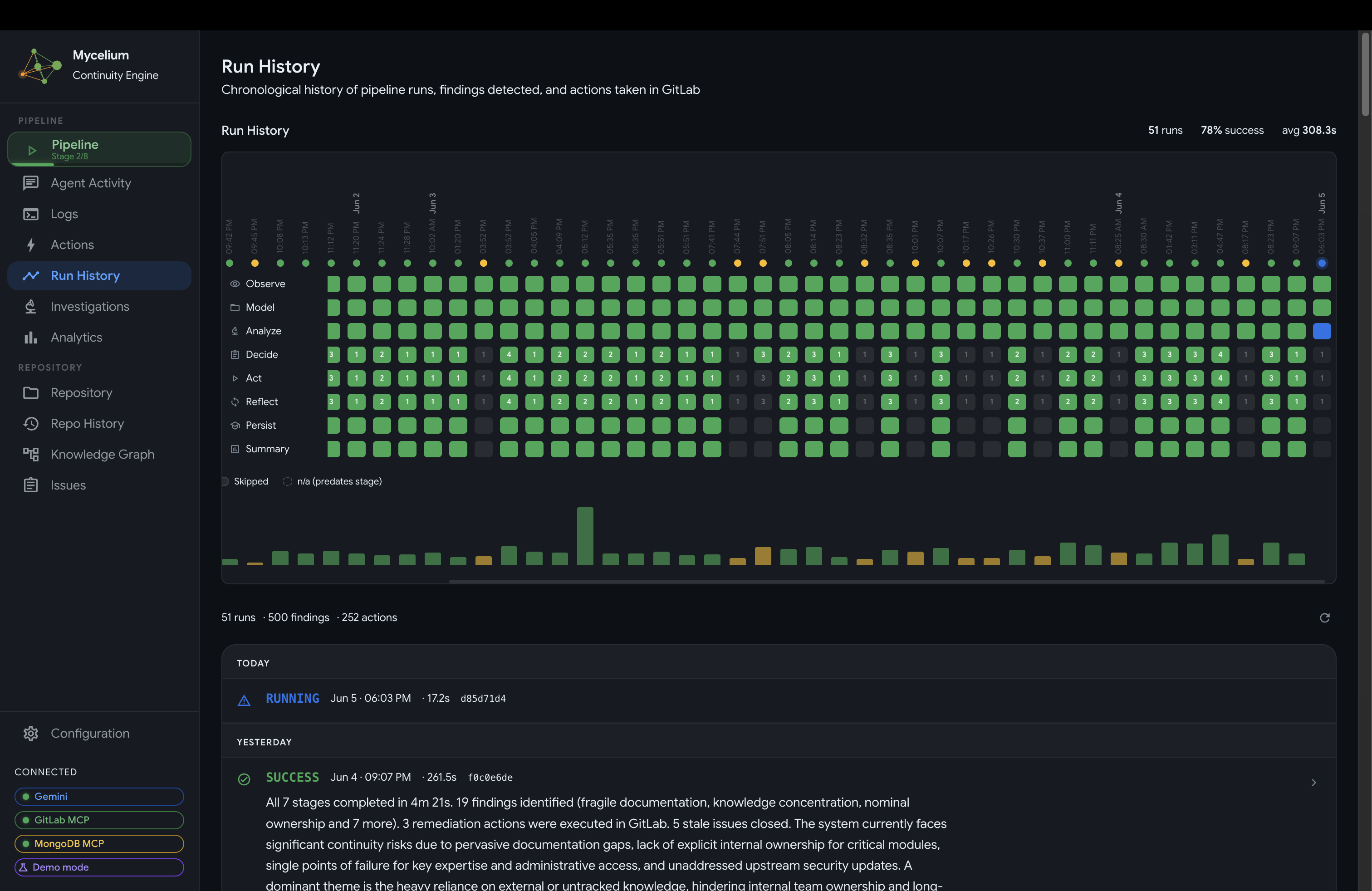
Mycelium Run History
-
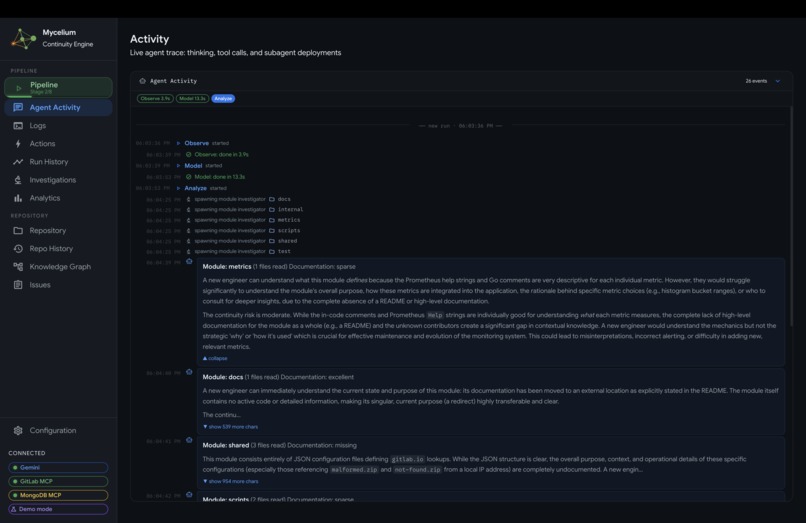
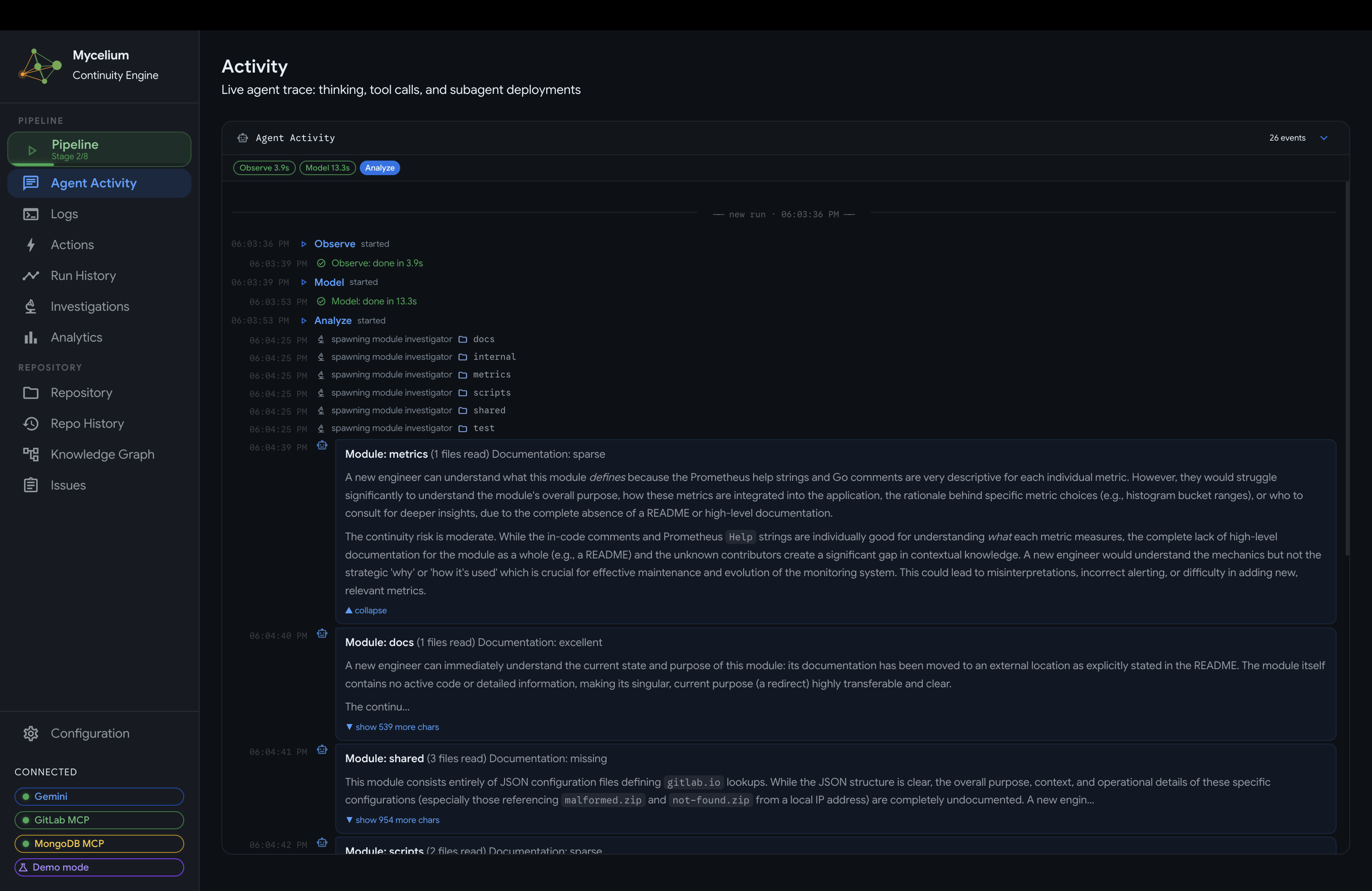
Mycelium Agent Activity
-
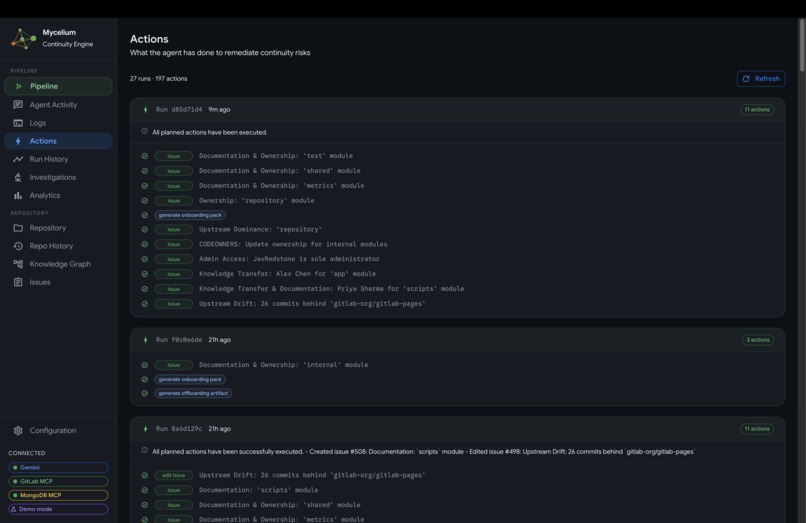
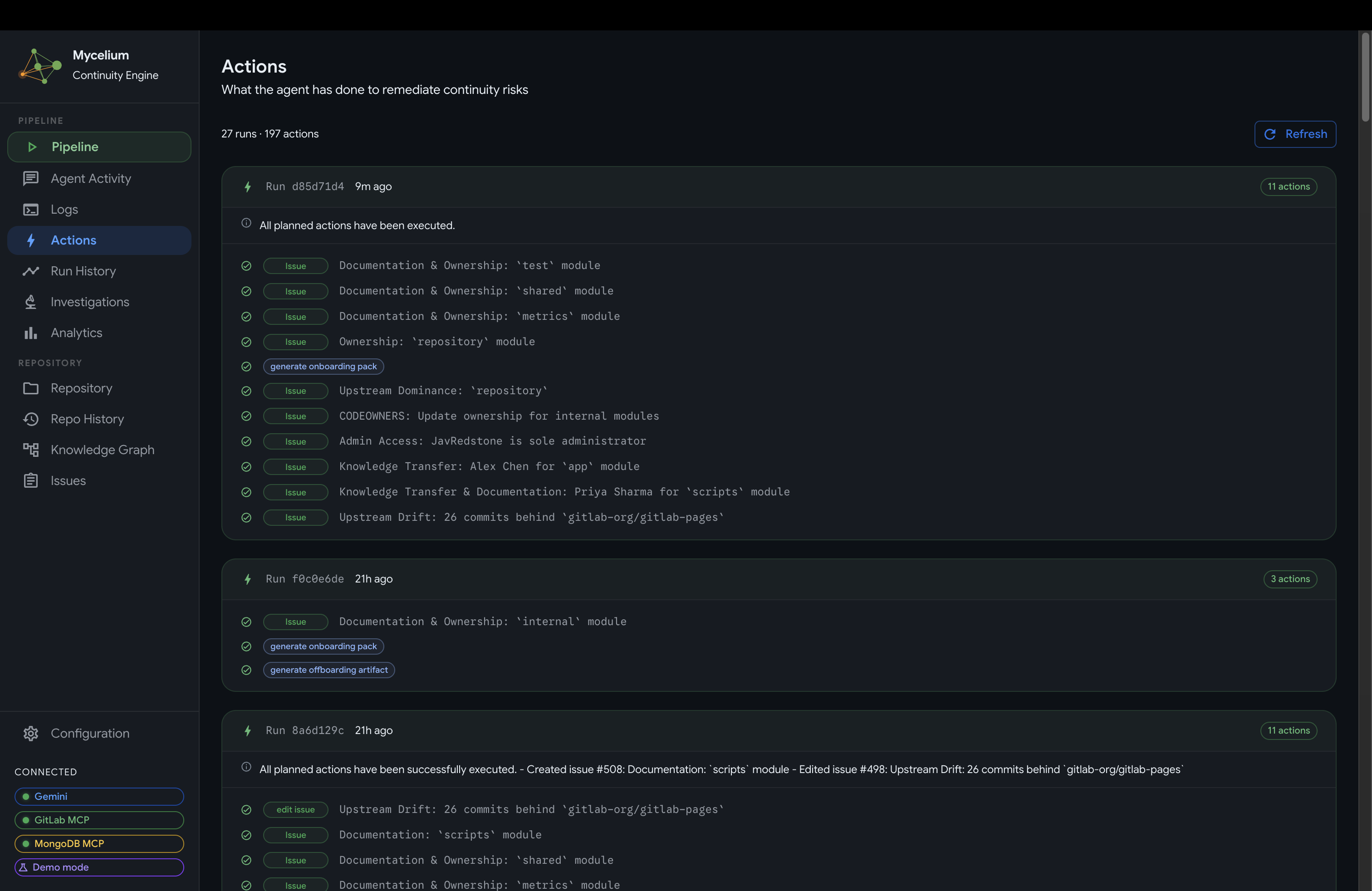
Mycelium Agent Actions
-
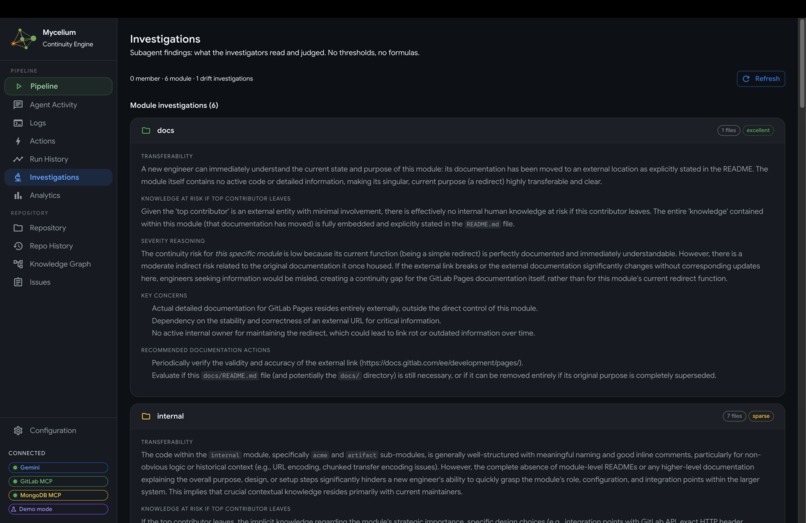
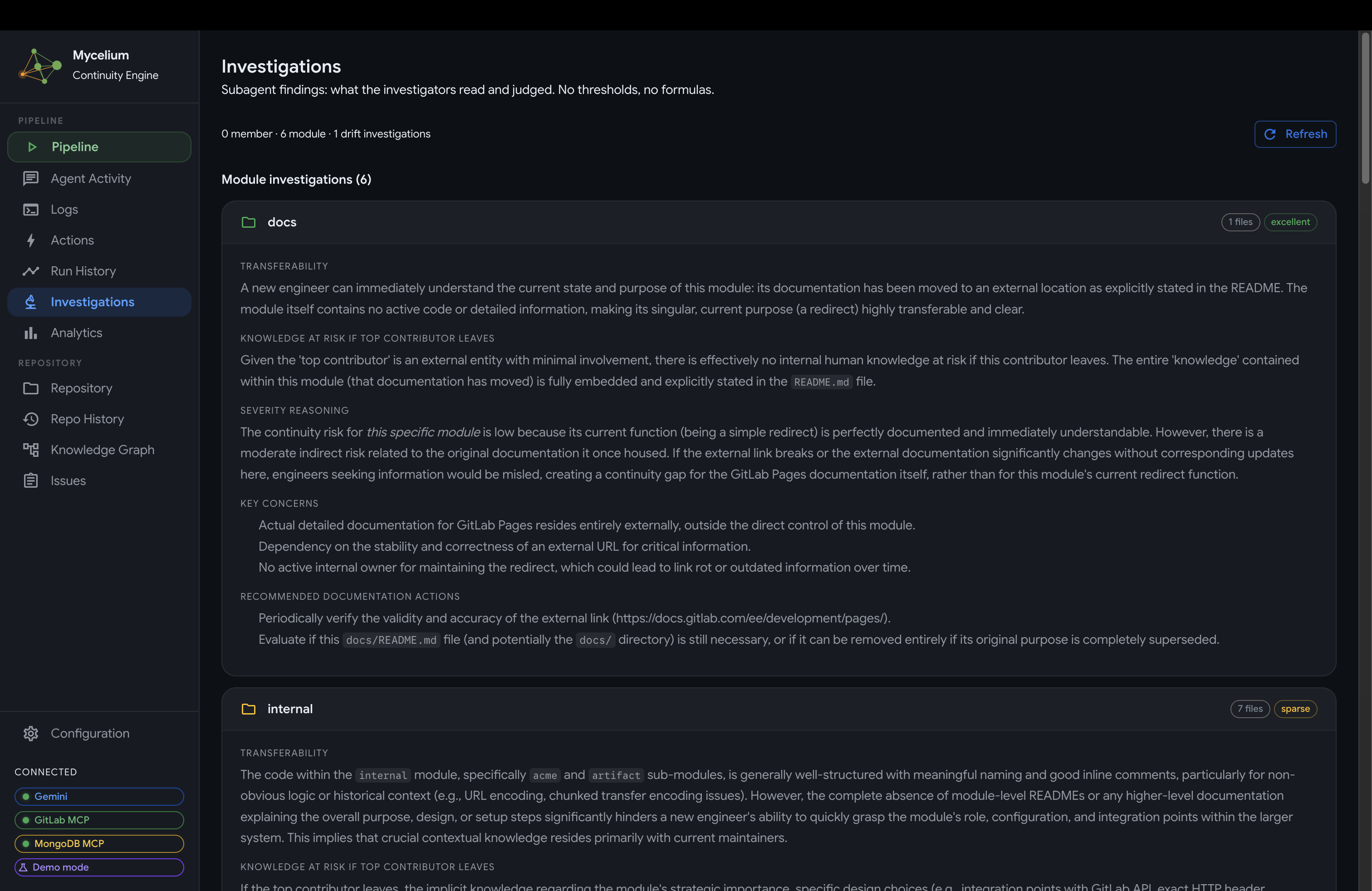
Mycelium Subagent Investigations
-
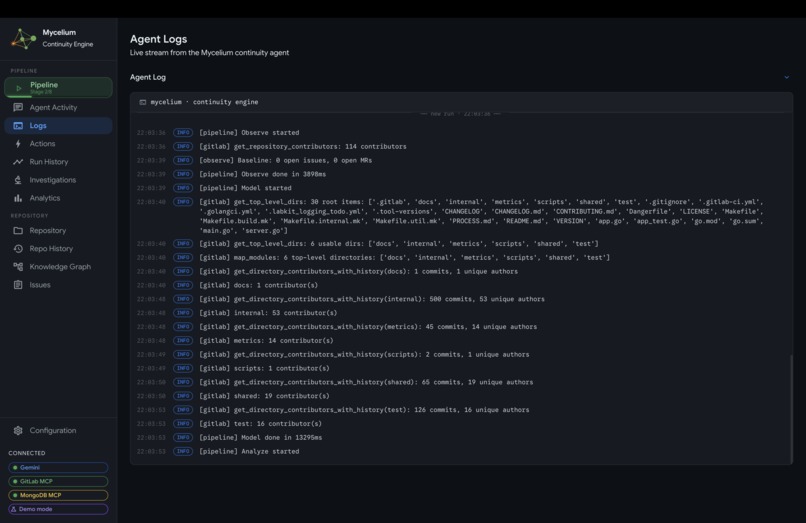
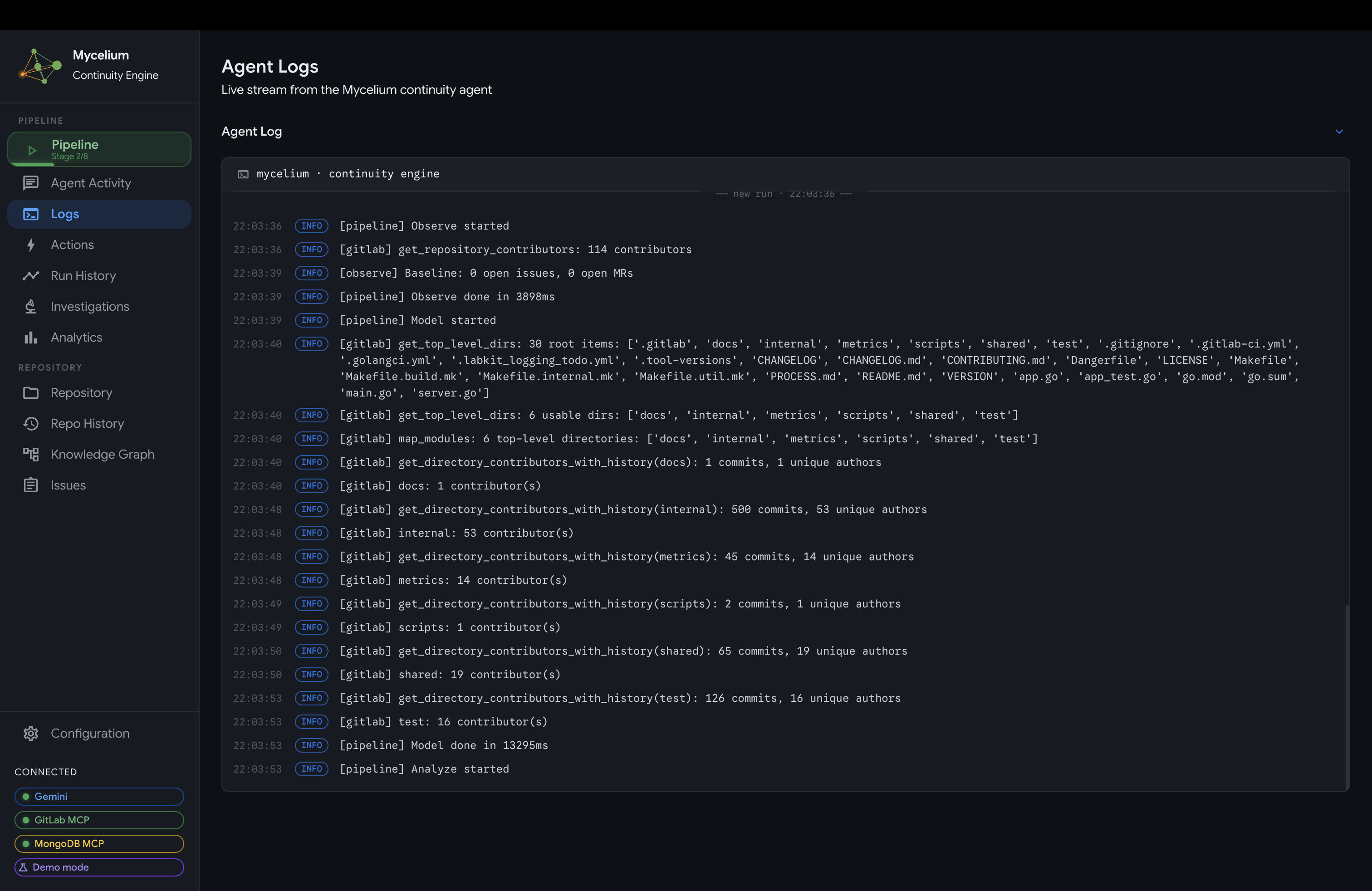
Mycelium Agent Log
-
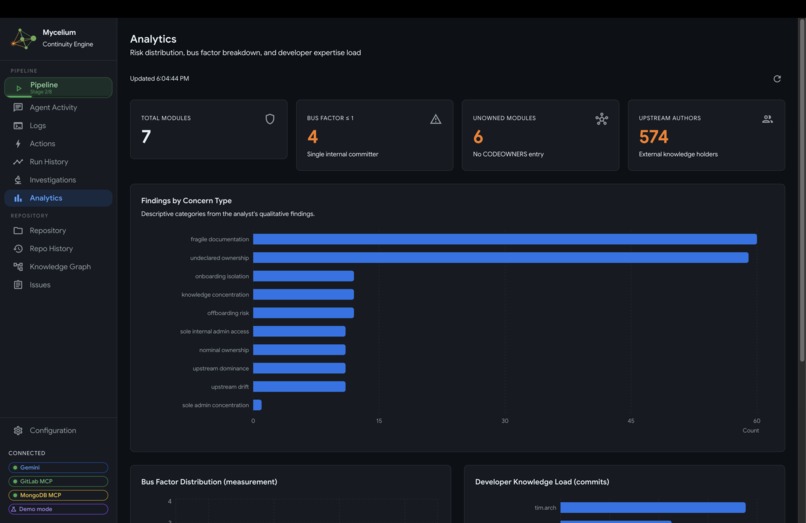
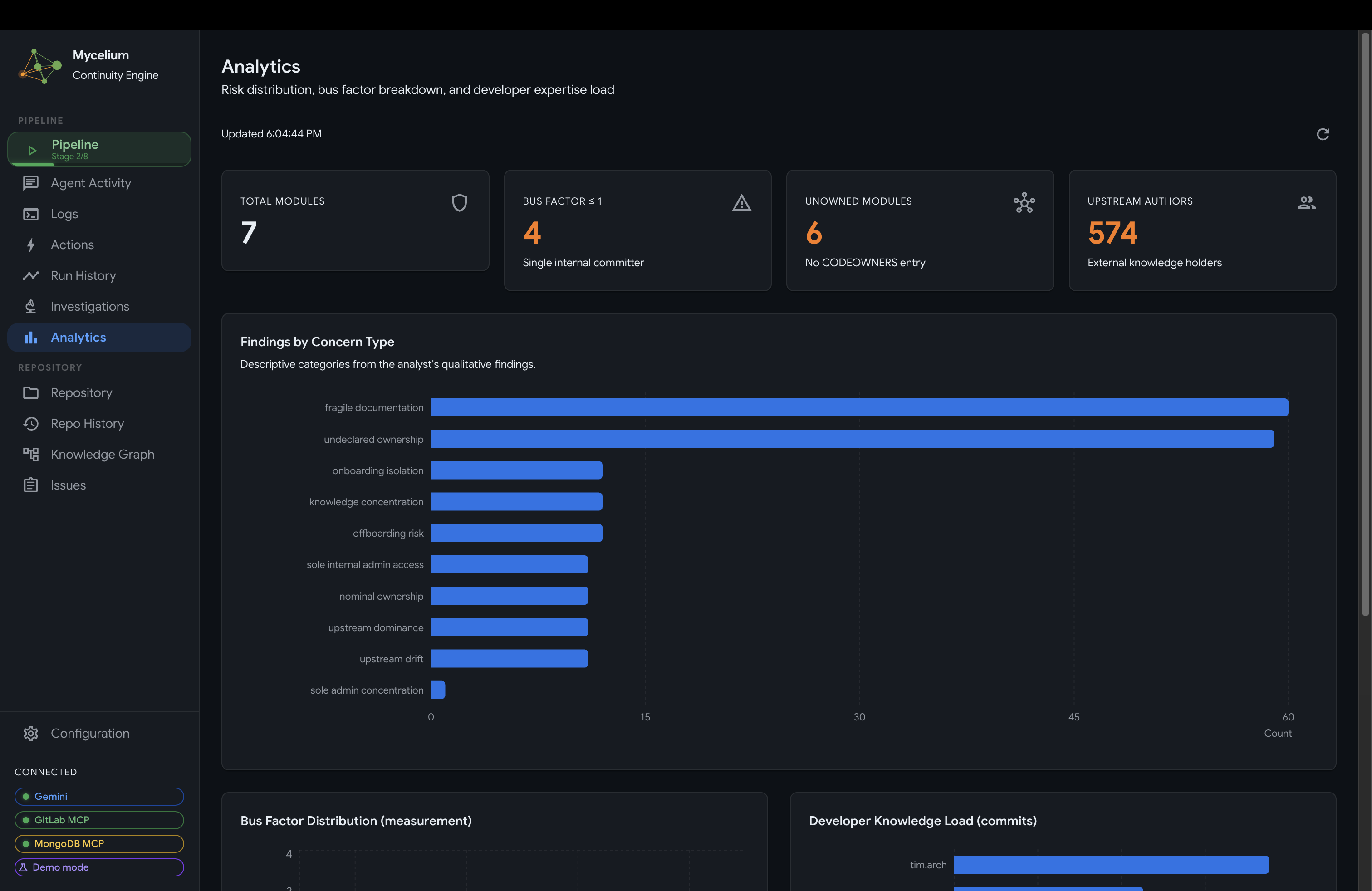
Mycelium Analytics Panel (Findings by Concern Type)
-
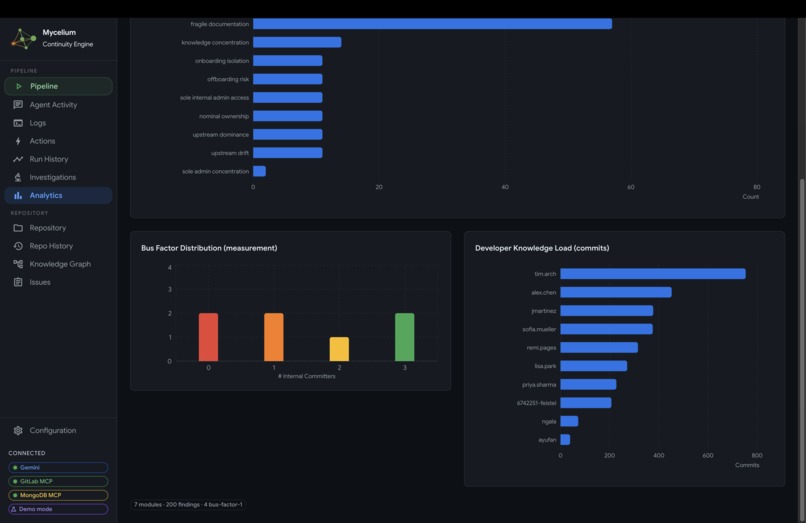
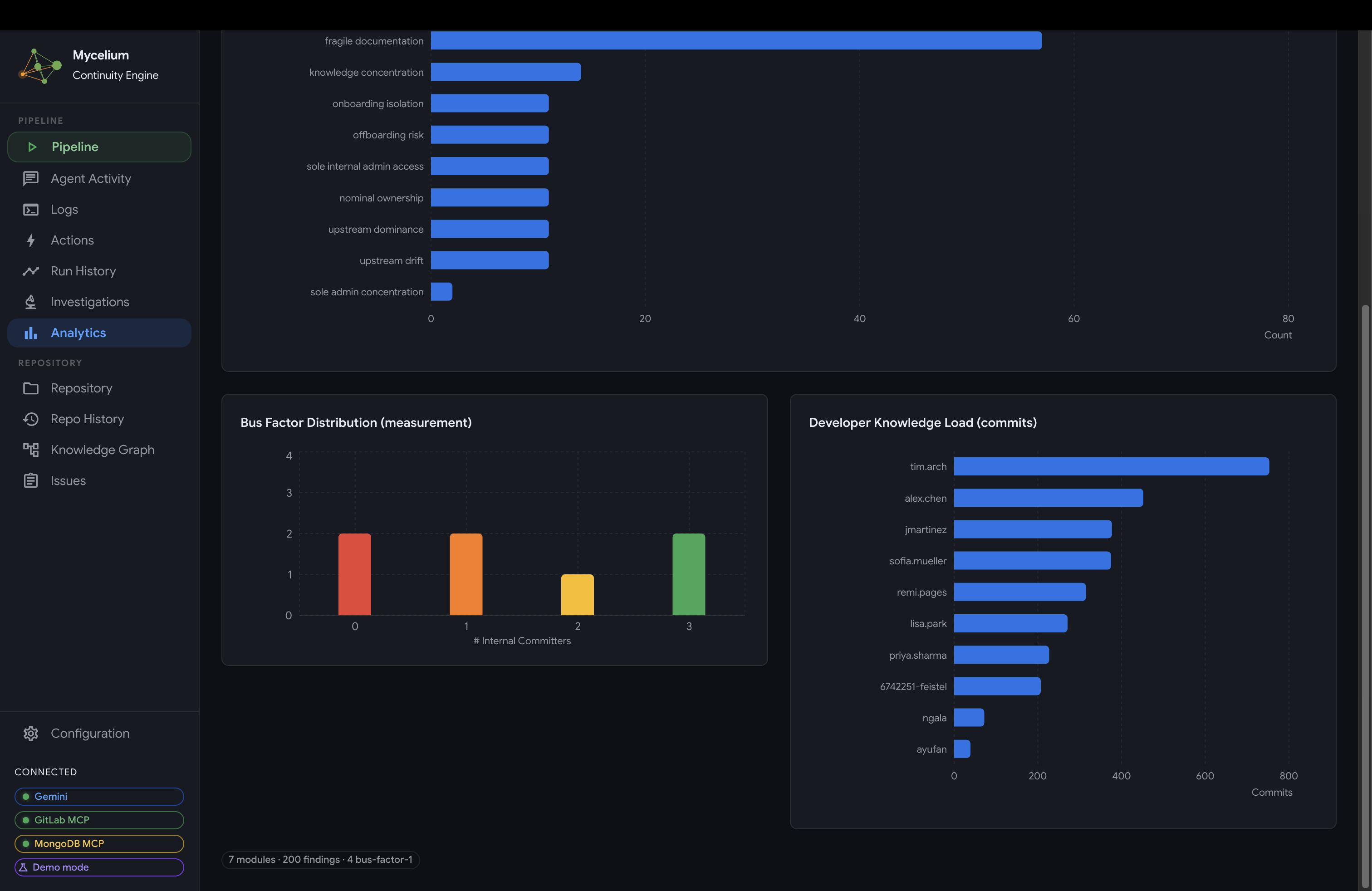
Mycelium Analytics Panel (Bus Factor Distribution)
-
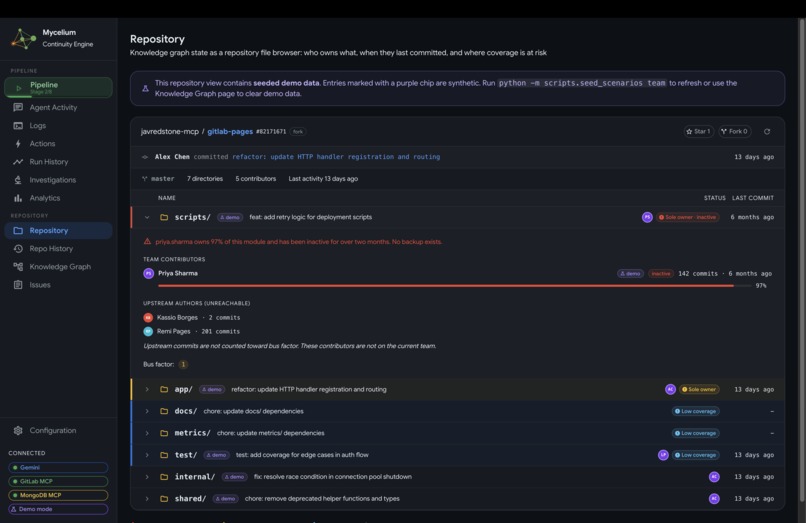
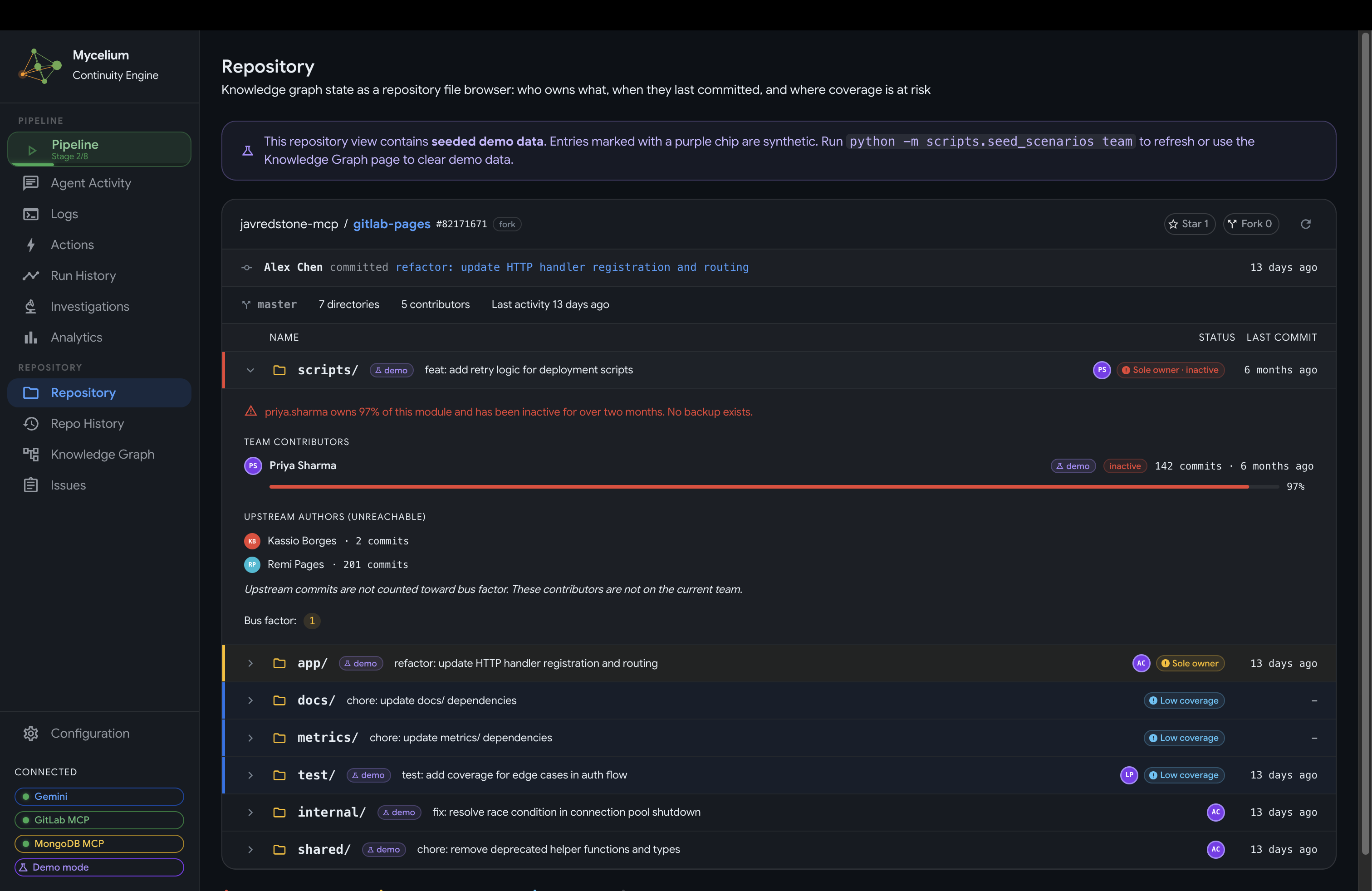
Mycelium GitLab Repository View
-
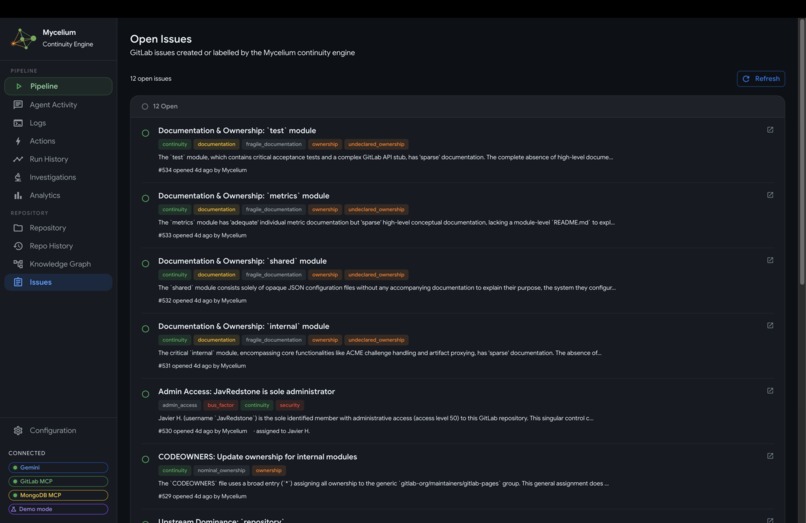
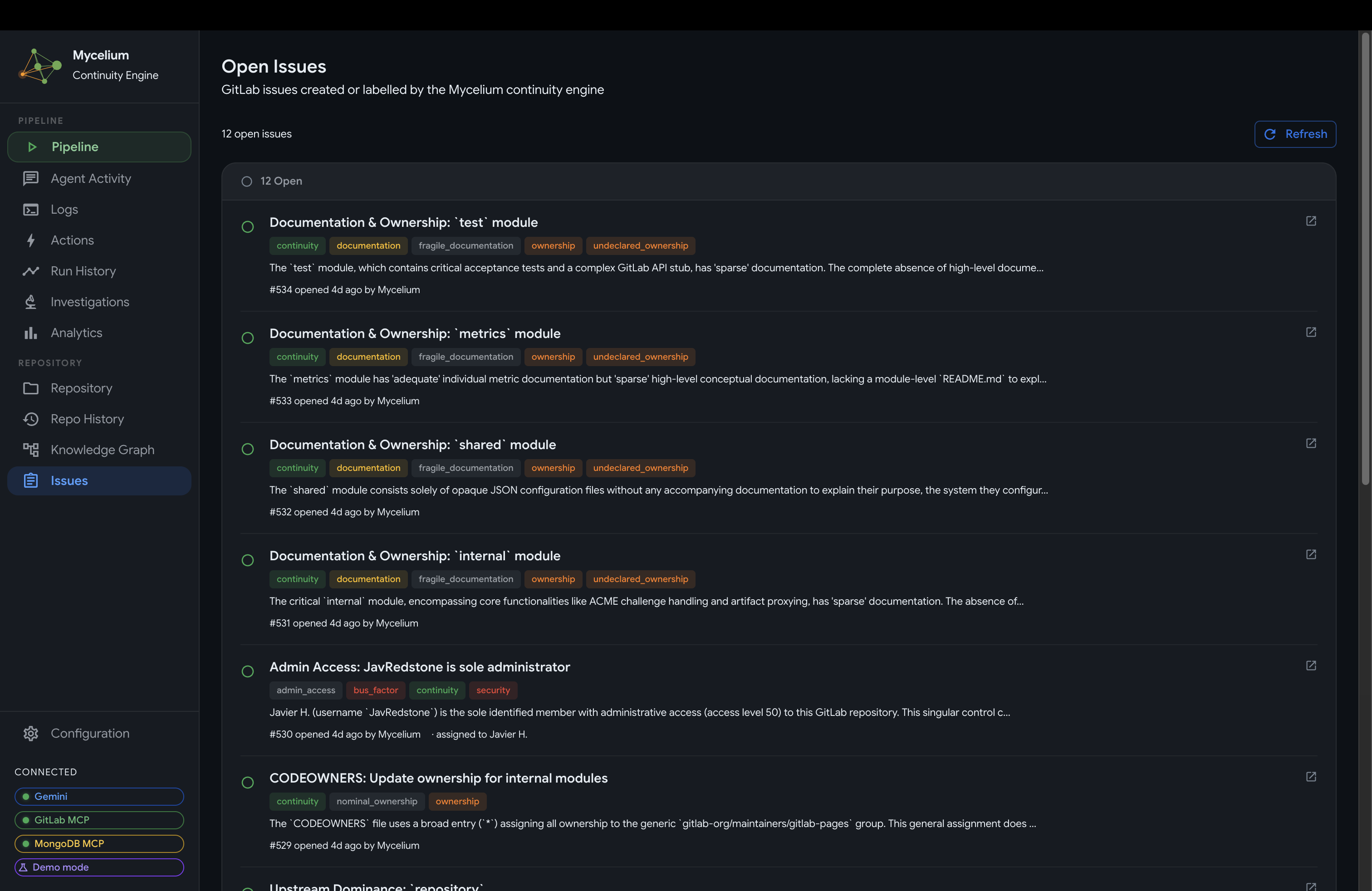
Mycelium GitLab Issues View
-
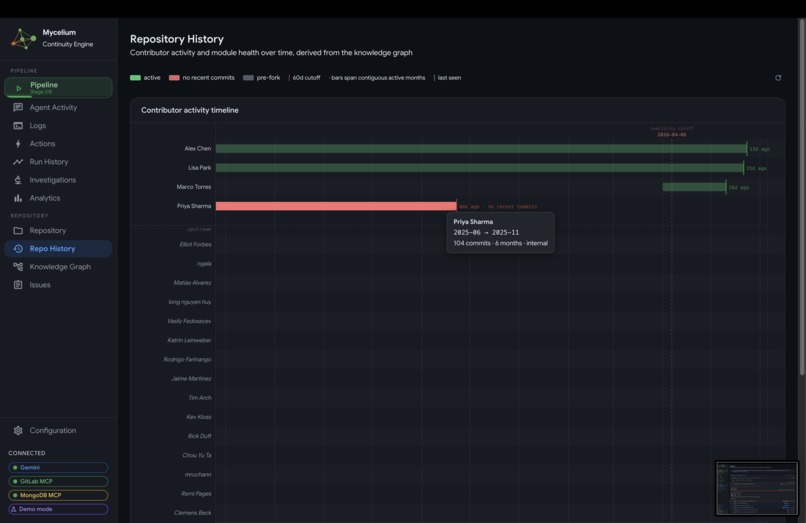
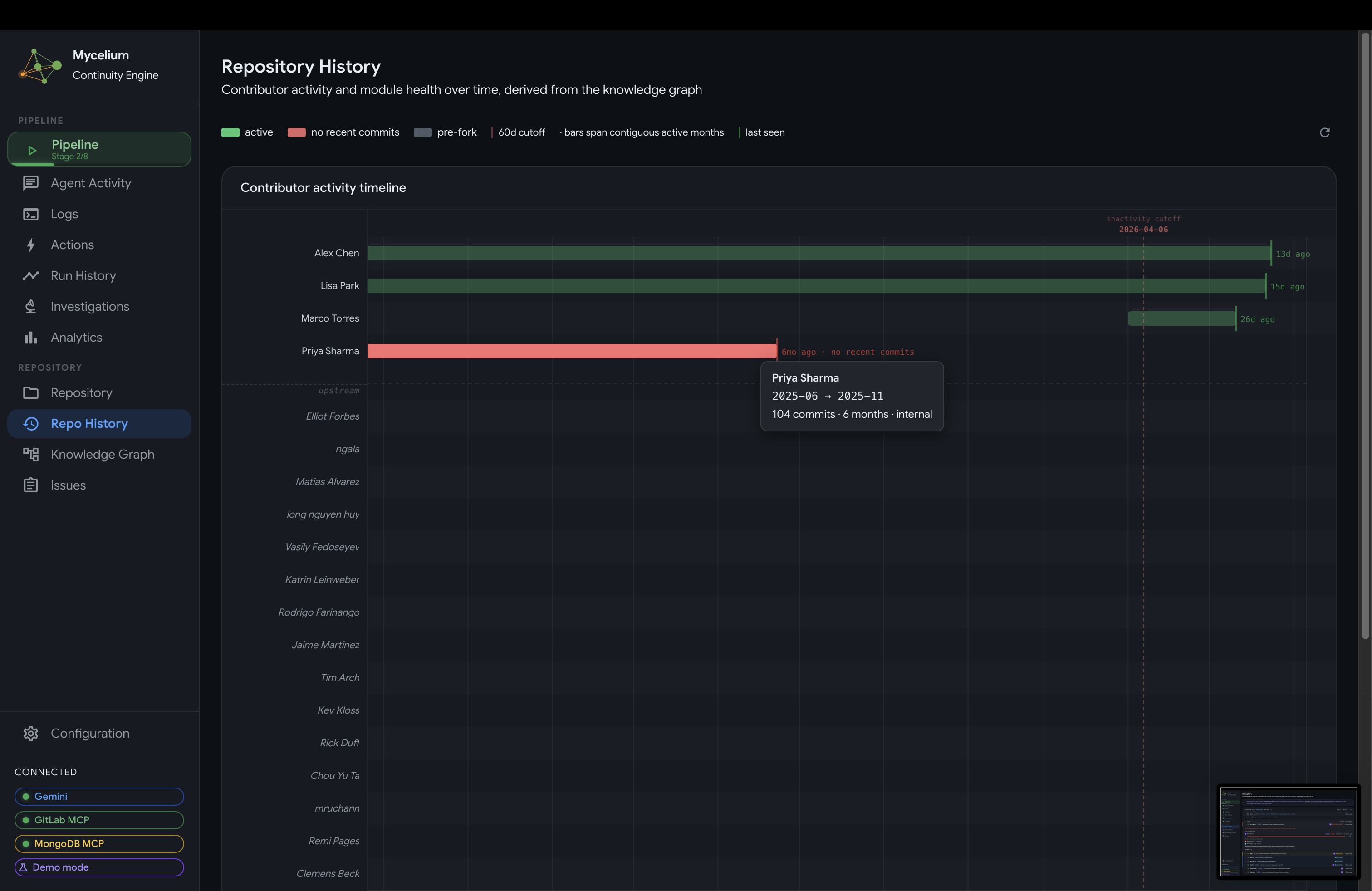
Mycelium GitLab Repository Contribution Timeline
-
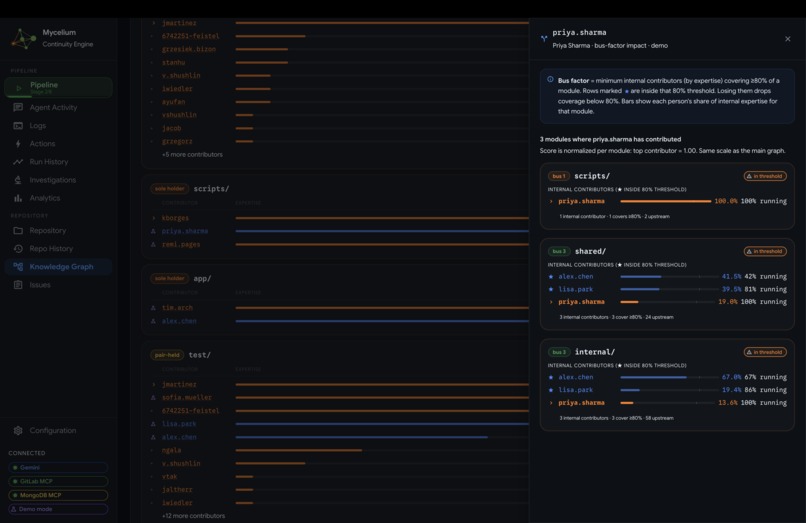
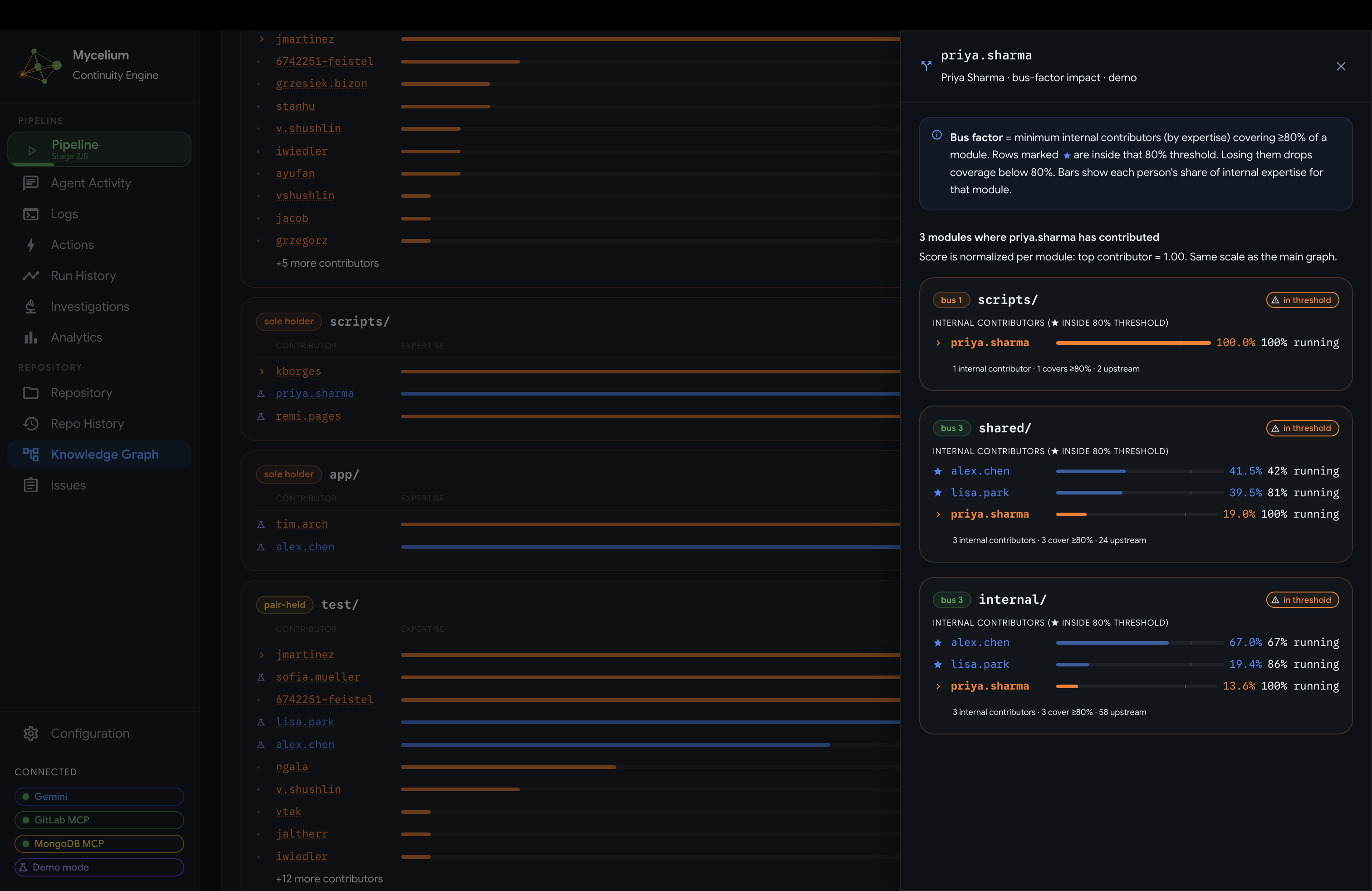
Mycelium Knowledge Graph and Bus Factor
-
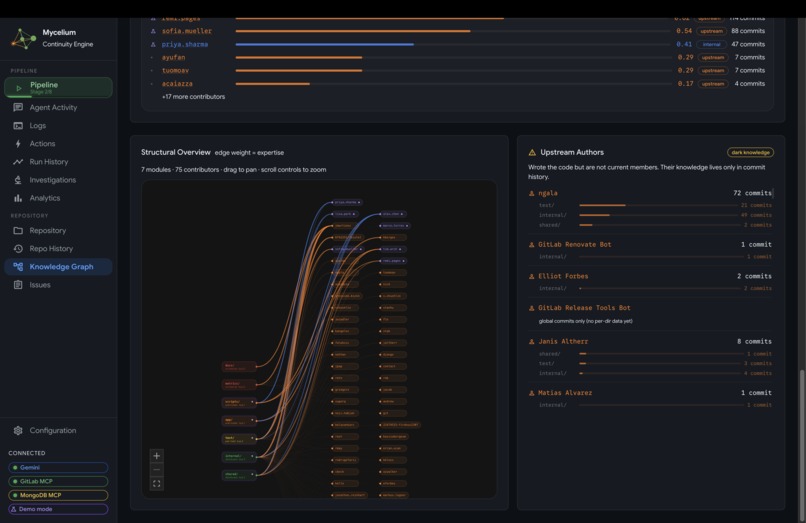
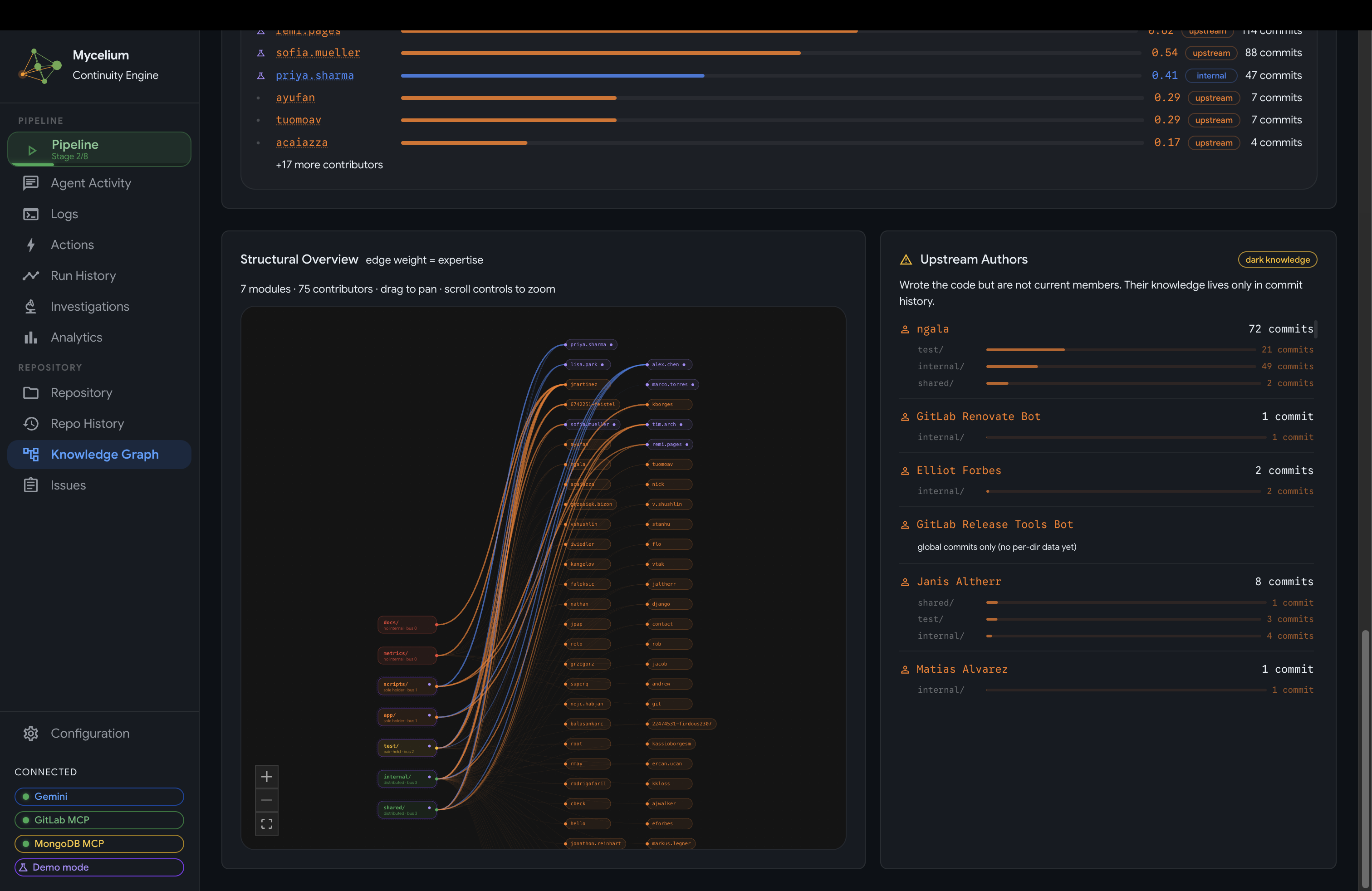
Mycelium Knowledge Graph Visualization
-
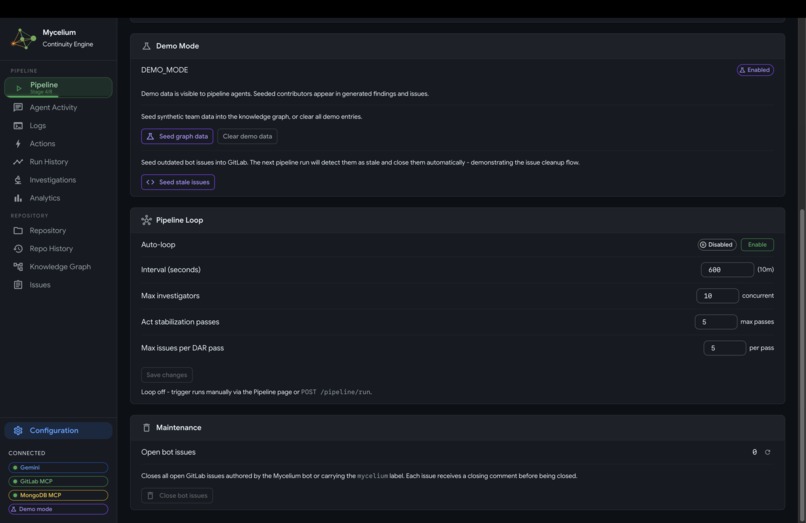
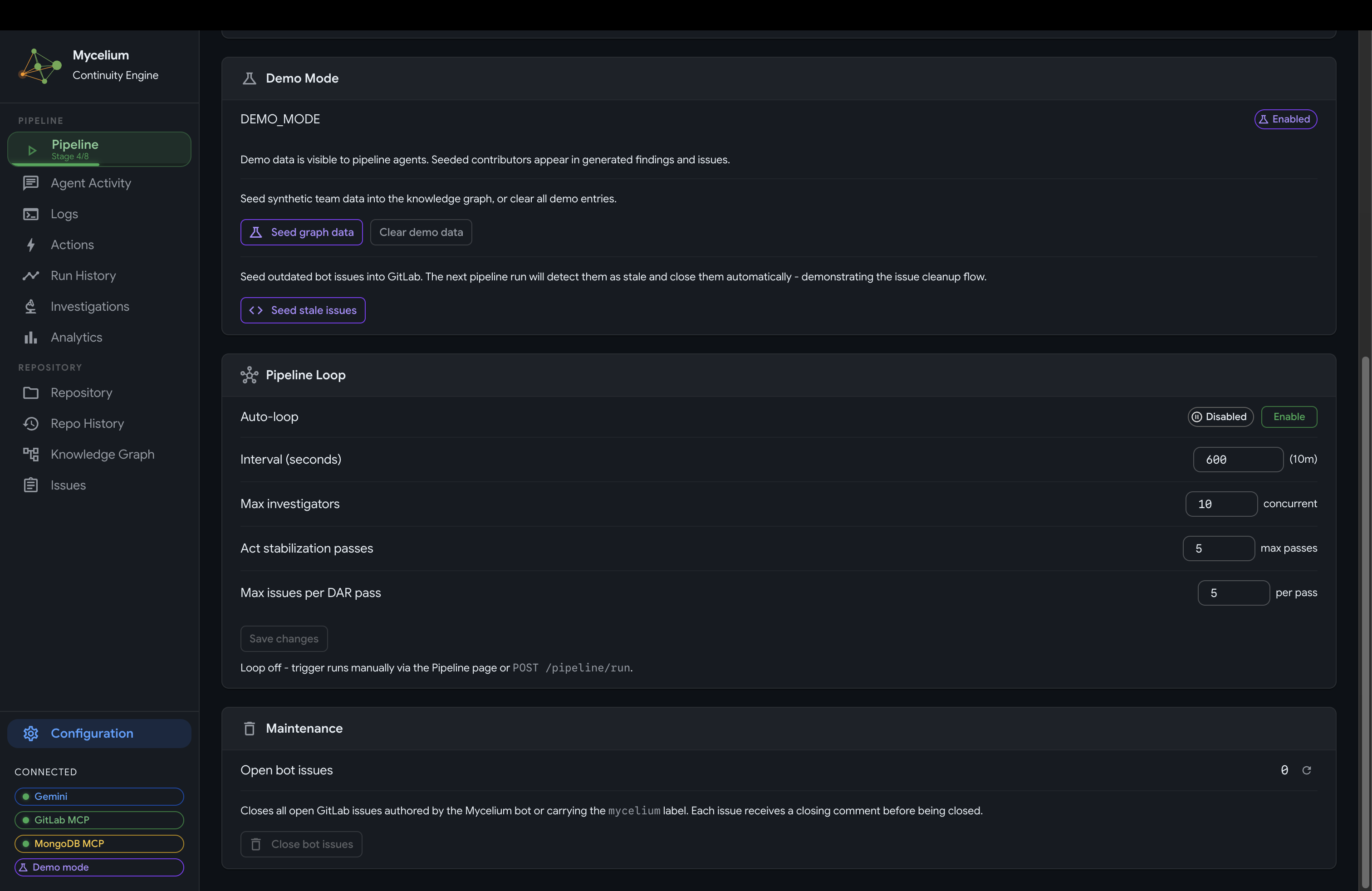
Mycelium Configuration
-
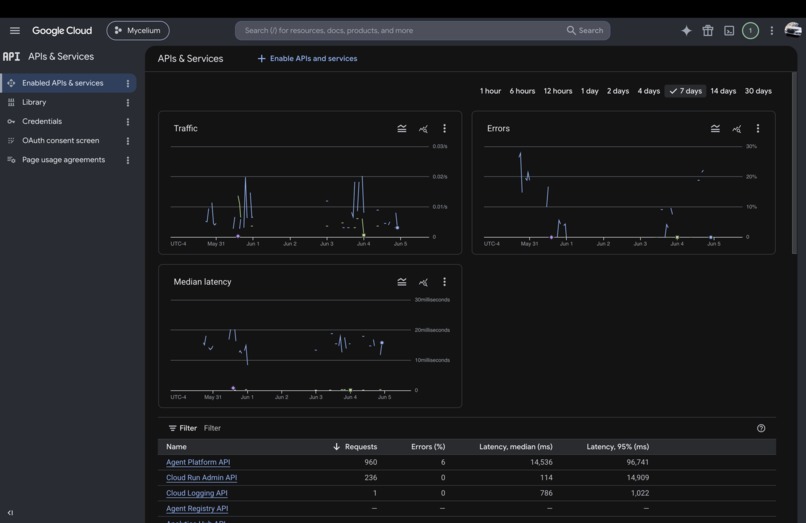
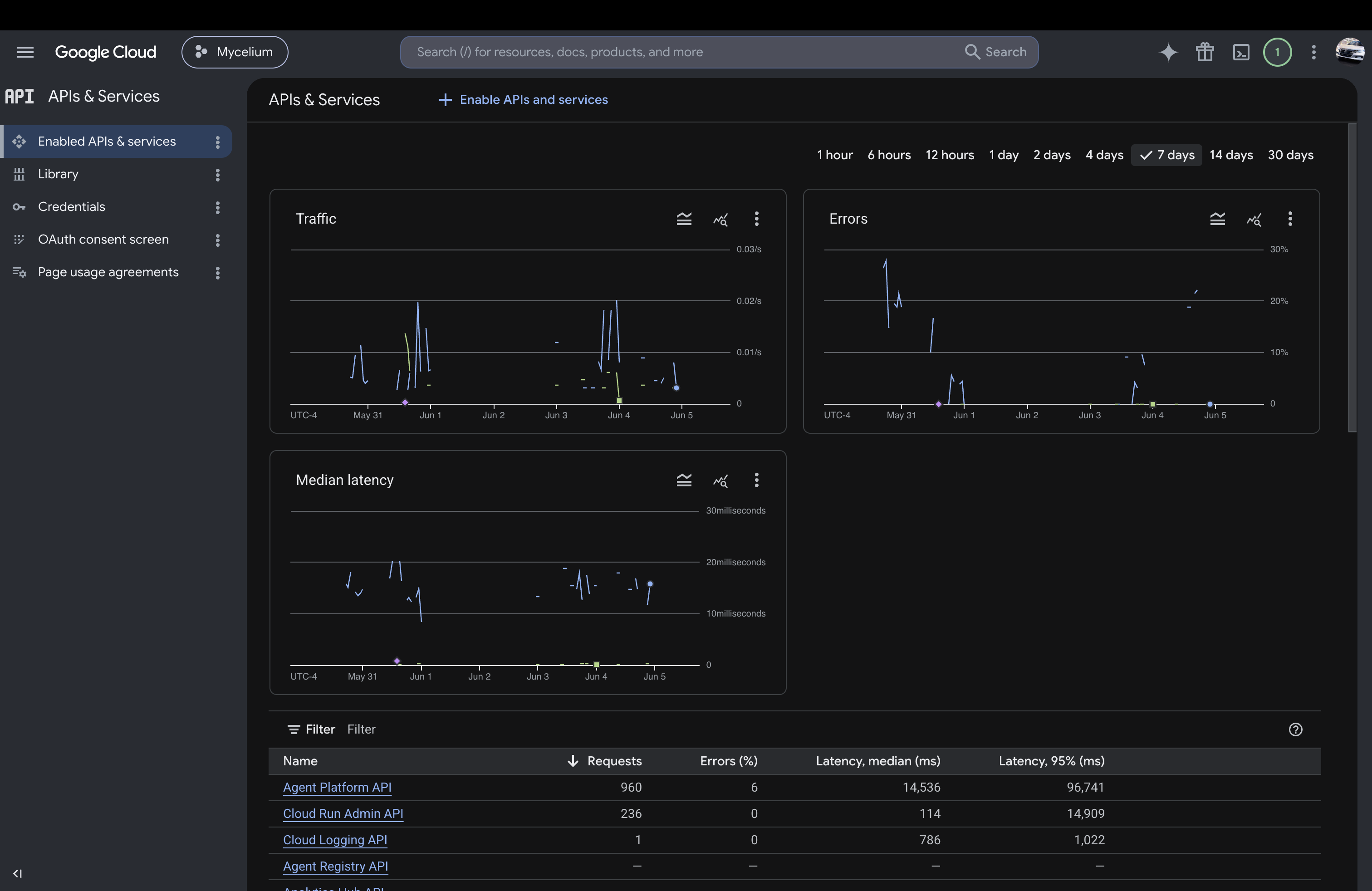
Google Cloud APIs and Services (Agent Plaform API, Cloud Run API, Cloud Logging API)
-
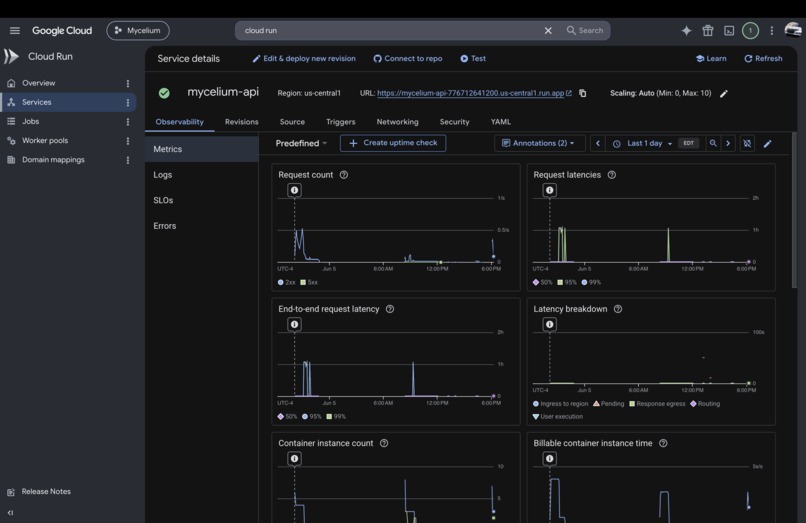
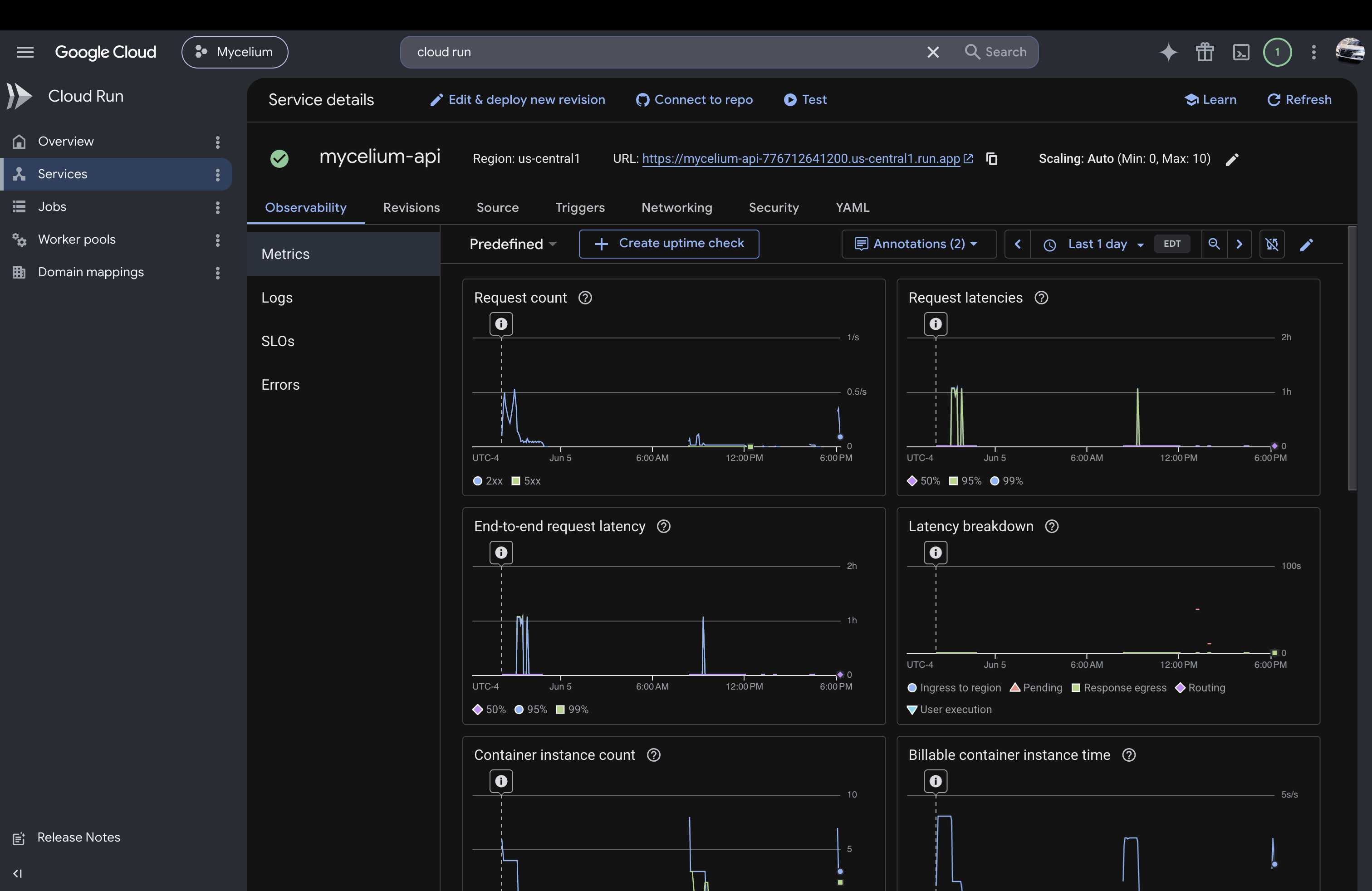
Google Cloud Run Metrics
About Mycelium
GitHub · Demo · Try it out

System architecture
Inspiration
Every engineer who joins a large codebase runs into the same gap: the code exists, but the context does not. Documentation is incomplete, CODEOWNERS is outdated, and critical knowledge often lives only in the heads of a few people who may no longer be active in the repository. What is missing is not more documentation, but a way to continuously reconstruct real understanding from how the system is actually used and modified.
Mycelium was built to treat that gap as a live systems problem inside GitLab rather than a static documentation problem.
What it does
Mycelium is an autonomous GitLab agent that prevents engineering knowledge loss by continuously modeling ownership, expertise, and structural fragility across a codebase and acting directly inside GitLab to stabilize it.
It infers real ownership from repository activity such as commits, reviews, module interaction, and temporal patterns. It identifies concentrated expertise risk, orphaned subsystems, and hidden fragility created by evolving codebases and forks.

Monitored GitLab repository
When it detects issues, it acts inside GitLab:
- creates targeted issues describing continuity risks
- generates onboarding context packs for new contributors
- produces handoff artifacts from historical activity when engineers go inactive
- closes stale issues when risks are resolved

Agent-created issues in GitLab

Issue targeting onboarding a new contributor
Core loop: Observe → Model → Analyze → Decide → Act → Reflect → Persist → Summary
The system is fully autonomous once configured. It does not require the UI to operate. The UI is a monitoring surface; the agent runs independently of it. At the same time, the system is designed so that you remain in control at every level: the autonomous loop can be switched on or off at any time, every run can be triggered manually or stopped mid-execution, all configuration is adjustable live, and the full action history is always visible so you can see exactly what the agent did and why.
Autonomous loop: The server runs a background task that continuously checks whether the autonomous loop is enabled. When switched on, the system runs the full pipeline, waits a configurable interval (default 10 minutes), then repeats indefinitely without any user action. The loop interval, investigator concurrency, and maximum stabilization passes can all be adjusted at runtime through the configuration API without restarting the server. When the loop is off, the system waits for an explicit trigger.
Webhook-driven triggers: GitLab webhooks (push, merge request, issue, and member events) automatically trigger a pipeline run when relevant repository activity is detected, so the system responds to real repository changes in real time.
CLI: The system ships with a terminal interface for operating the agent directly without a browser. Key commands include:
- run with live streaming: trigger a pipeline run and stream all activity events to the terminal in real time
- status: display the current knowledge graph state, concentrated modules, and recent run history
- onboard / offboard: generate an onboarding pack or handoff artifact for a specific team member on demand, creating a GitLab issue immediately
- inspect: query the knowledge graph for per-module ownership breakdowns or per-developer expertise profiles
- replay: replay stored activity events from any past pipeline run at adjustable speed
- demo seed: seed controlled scenarios for demonstration purposes
The CLI connects to the running backend and can be pointed at any deployment, local or on Cloud Run.
Monitoring UI: Although the agent runs without it, a Next.js dashboard provides full visibility into every layer of the system. Each page is a live view into a different part of the pipeline:
- Pipeline: the current run in progress, with each of the 8 stages shown as it executes. Expandable agent traces show every tool call, reasoning step, and subagent spawn in real time.

Live agent trace

Agent run logs
It reveals the full reasoning trace for each stage: which tools were called, what the model concluded, and which subagents were spawned for deeper investigation. This makes every decision fully auditable, with no black-box behavior. When a run finishes, the dashboard transitions to a completion summary showing total findings produced, actions taken, and the net change in knowledge graph state relative to the previous cycle.

Completed pipeline run and run history

Completed pipeline stages
- Analytics: observational measurements across the knowledge graph. The central chart is the bus factor distribution, which counts how many internal contributors have meaningful ownership of each module. A bus factor of 1 means one person holds all recoverable knowledge for that area and a single departure would leave it unmaintained. The chart is color-coded from red (single-owner concentration) through to green (well-distributed knowledge). Alongside it: findings grouped by concern type, and a developer knowledge load chart showing relative commit concentration across contributors.

Findings by concern type

Bus factor distribution
- Knowledge Graph: an interactive node-link diagram of the full developer-module ownership topology, with inferred expertise weights and fork-aware separation of internal contributors from upstream authors.

Bus factor breakdown

Ownership topology
- Investigations: the full written output of the investigator subagents, including which files were read, what knowledge is at risk if a contributor becomes unavailable, transferability assessments, and recommended documentation actions for each flagged module or member.

Investigator output
- Issues: a live view of every GitLab issue the agent has created, linked to the findings that generated them.

Issues dashboard
- Actions: a log of every GitLab operation the agent executed, grouped by pipeline run, with tool-level detail and success or failure status.

Actions log
- History / Timeline: a chronological record of all pipeline runs with per-stage timing and outcomes. Any run can be expanded to see its full activity trace. A separate repository history view shows how activity in the codebase has evolved over time, including commit patterns, contributor involvement, and module churn that feeds into the ownership inference model.

Run history

Repository activity history
- Config: runtime controls for the autonomous loop, run interval, investigator concurrency, and stabilization pass limits, all applied live without restarting the server.

Runtime configuration
How we built it
Mycelium is built on the Google Cloud Agent Builder ecosystem for the GitLab track, using Gemini via Vertex AI as the reasoning model and ADK (Agent Development Kit) as the agent runtime deployed on Vertex AI Agent Engine.
The system is structured across three layers:
Reasoning layer (Vertex AI and Gemini): The act agent runs continuous multi-step reasoning over repository state. It uses investigator subagents that read actual file content from GitLab before producing qualitative assessments of ownership and structural risk. There are no fixed thresholds. Judgments come from interpreting code and context directly.
Three types of investigator subagent are spawned concurrently during the Investigate stage:
Module investigator: recursively walks a module's directory tree, reading READMEs, key configuration files, and source code samples (up to 30 files with adaptive depth). It then asks Gemini to assess transferability: whether a new engineer could pick up the module from what is actually written down, not from file counts. It produces a documentation state ranging from excellent to missing, a transferability assessment, what knowledge would be lost if the top contributor left, and specific documentation actions to close identified gaps. Placeholder docs score worse than no docs; abandoned placeholder comments are themselves a signal.
Member investigator: focuses on a single high-attention team member and the modules they uniquely contribute to. It reads sample file content from those modules and asks Gemini to assess what walks out the door if that person goes inactive. The attention reason shapes interpretation: a sole contributor means no internal backup exists; recently inactive prompts an assessment of what is at risk if they do not return; a recent joiner surfaces the risk of assigning critical work too early; multi-module concentration highlights single-point-of-failure spread across multiple areas. Output includes knowledge at risk, transferability today, urgency reasoning, and recommended actions.
Drift investigator: targets forked repositories. It reads the upstream commits the fork has not yet merged and judges sync urgency from commit content, not commit count. Three Common Vulnerabilities and Exposures (CVE) patches outweigh thirty README typo fixes. It identifies high-priority commits (security signals, breaking changes, critical-path edits) versus low-impact noise (formatting, changelogs, version bumps) and produces a content-driven urgency assessment and a recommended action.
All three subagents are lightweight direct Gemini calls rather than full ADK agent runtimes, so many can be spawned concurrently per pipeline run, controlled by the configurable investigator concurrency setting.
Execution layer (GitLab MCP and MongoDB MCP): Two official MCP servers are used:
- GitLab MCP executes real repository actions such as issues, merge requests, and annotations
- MongoDB MCP provides persistent graph queries over system memory
To maximize GitLab integration, the system pairs the official GitLab MCP with a custom MCP server that wraps the GitLab API directly. The two work together as a unified tool surface: the official GitLab MCP brings its full breadth of repository operations, while the custom server extends it with tools tailored specifically to Mycelium's continuity workflows. Together they give the agent the widest possible reach into GitLab without sacrificing safety boundaries.
Memory layer (MongoDB): A persistent knowledge graph stores inferred ownership per module, contributor history over time, bus factor signals, qualitative findings, and full action logs. Each pipeline run updates and reuses this evolving state.
Infrastructure layer (Cloud Run and FastAPI): A FastAPI backend runs on Cloud Run via Docker and handles webhook ingestion, pipeline orchestration, REST APIs, and SSE streams. GitLab webhooks trigger autonomous runs, and the UI streams live agent execution in real time. Runtime configuration (loop enable/disable, interval, investigator concurrency, and stabilization pass limits) is stored in MongoDB and applied without restarting the server, so the agent's behavior can be tuned live against a deployed instance.

Cloud Run metrics
Challenges we ran into
The hardest part of the system was designing the Decide → Act → Reflect loop so it reliably converges. The agent generates findings from evolving repository state, but GitLab issues are also free-form text, so ensuring consistent matching between new findings and existing issues is non-trivial. The loop must avoid creating duplicates while still capturing genuinely new risks, and it must converge toward resolution instead of repeatedly resurfacing the same issues.
This required careful coordination between detection, action, and feedback phases so that each cycle improves state rather than reintroducing noise.
Accomplishments that we're proud of
Mycelium does not stop at analysis. It performs real actions inside GitLab and verifies their impact by re-fetching repository state and comparing it against prior cycles in the Reflect stage. This closes the loop between reasoning and execution.
The investigator architecture is also a key result. Member, module, and drift subagents analyze real file contents before producing assessments, allowing the system to distinguish meaningful structural signals from purely statistical patterns.
The fork-aware design correctly separates internal and upstream contributors, preventing false ownership assumptions in forked repositories and surfacing upstream-dominant modules as a distinct continuity risk.
What we learned
Engineering knowledge behaves like a dynamic system rather than static documentation. The only reliable signal is continuous interpretation of repository activity over time through a live graph.
In agent systems like this, correctness depends less on model quality and more on system design. The hardest problems are state consistency, deduplication, and convergence across repeated autonomous cycles.
We also learned that avoiding scalar risk scores fundamentally changes system design. Every decision must be made from structured context rather than thresholds, which increases flexibility but requires more careful reasoning and validation.
What's next for Mycelium
The next step is organization-level expansion. Today Mycelium operates at a single repository level, prioritizing depth and correctness.
The next evolution is cross-repository intelligence, where developers are modeled as organization-level entities whose expertise spans multiple repositories. This enables detection of organization-wide continuity risks where a single engineer becomes a critical dependency across multiple codebases.
The implementation path is to extend the knowledge graph with project-scoped keys and fan the pipeline across repositories through orchestration changes. The longer-term shift is restructuring the graph so developers are top-level entities and repositories are scoped beneath them.
The long-term vision is Mycelium as a persistent organizational memory layer inside GitLab, continuously tracking how knowledge moves across people, repositories, and time, and intervening before continuity failures become incidents.
Technologies Used
Google Cloud: Gemini, Vertex AI, Vertex AI Agent Engine, Google ADK, Cloud Run, Google Cloud Storage
Other: GitLab MCP, MongoDB MCP, MongoDB Atlas, GitLab API, GitLab Webhooks, FastAPI, Next.js, Docker
AI / Reasoning
| Technology | Role |
|---|---|
| Gemini (via Vertex AI) | Primary reasoning model for all agent stages and investigator subagents |
| Google AI SDK | Gemini API client; used for direct subagent calls and streaming |
| Google ADK (Agent Development Kit) | Agent runtime for the main pipeline agent; manages tool dispatch and multi-step reasoning |
| Vertex AI Agent Engine | Managed runtime that hosts the ADK agent in production on Google Cloud |
| Vertex AI | Platform layer for ADK and Gemini access |
Google Cloud Infrastructure
| Technology | Role |
|---|---|
| Cloud Run | Hosts the FastAPI backend; auto-scales to handle webhook bursts and concurrent pipeline runs |
| Google Cloud Storage | Staging bucket for ADK Agent Engine deployment artifacts |
| Google Cloud Secret Manager | Stores API keys and credentials securely; retrieved at startup |
| Google Cloud Logging | Structured log ingestion from the backend |
| Docker | Container image build and deployment to Cloud Run |
Agent Tools / MCP
| Technology | Role |
|---|---|
| GitLab MCP (official) | Executes repository operations: creating issues, posting comments, updating merge requests |
| Custom GitLab MCP server | Wraps the GitLab REST API directly; extends the official MCP with continuity-specific tools (onboarding packs, handoff artifacts, stale-issue resolution) |
| MongoDB MCP (official) | Gives the ADK agent direct read/write access to the knowledge graph during pipeline execution |
| MCP protocol | Client library used by ADK MCPToolset to connect the agent to both MCP servers |
Data / Persistence
| Technology | Role |
|---|---|
| MongoDB Atlas | Persistent knowledge graph: ownership weights, contributor history, bus factor signals, findings, action logs, runtime config |
| Motor | Async MongoDB driver for Python; used throughout the FastAPI backend |
| PyMongo | Synchronous MongoDB access for CLI and background tasks |
Backend
| Technology | Role |
|---|---|
| FastAPI | REST API server; handles webhook ingestion, pipeline orchestration, and all UI data endpoints |
| GitLab API | REST API used by the observation and action layers to read repository state and write back to GitLab |
| GitLab Webhooks | Push, merge request, issue, and member events that trigger autonomous pipeline runs in real time |
| Uvicorn | ASGI server running FastAPI on Cloud Run |
| SSE (Server-Sent Events) | Pushes live agent activity to the UI and CLI in real time |
| Pydantic | Request/response validation and settings management |
| httpx | Async HTTP client for outbound calls |
CLI
| Technology | Role |
|---|---|
| Click | CLI framework for the terminal interface |
| Rich | Terminal rendering: tables, progress, live streaming output |
Frontend (Monitoring UI)
| Technology | Role |
|---|---|
| Next.js | React framework; App Router with SSE-based real-time streaming |
| React | UI component library |
| TypeScript | Type safety across all frontend code |
| MUI (Material UI) | Component library: layout, data tables, chips, drawers |
| React Flow | Interactive node-link diagram for the Knowledge Graph page |
| Recharts | Charts for the Analytics page (bus factor distribution, findings by type, knowledge load) |
| Tailwind CSS | Utility-first styling |
Built With
- cloud-run
- docker
- fastapi
- gemini
- gitlab-api
- gitlab-mcp
- gitlab-webhooks
- google-adk
- google-cloud
- mongodb-atlas
- mongodb-mcp
- next-js
- vertex-ai
- vertex-ai-agent-engine


Log in or sign up for Devpost to join the conversation.