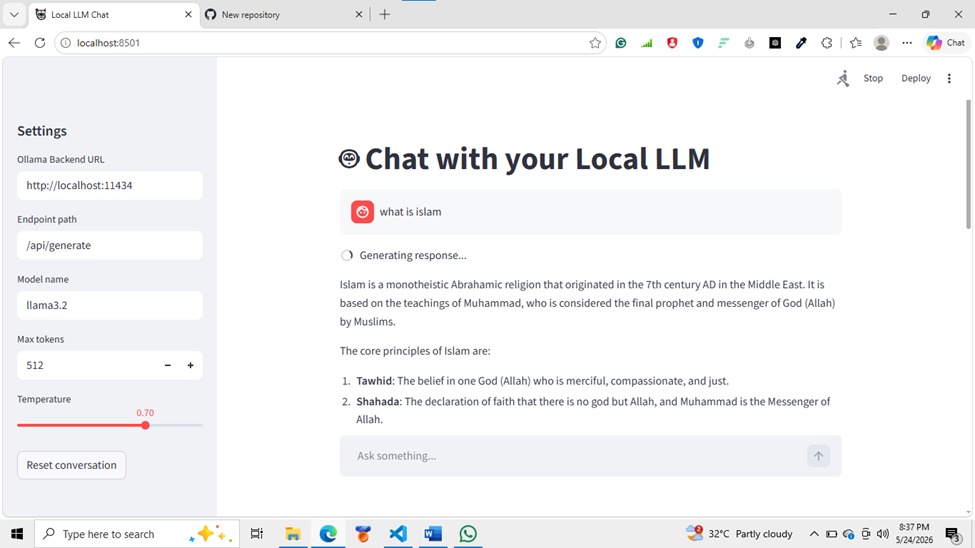
Project Title: Local LLM Inference Web Interface Overview: This project is a simple Streamlit-based web application that connects to a locally hosted LLM using Ollama. The interface enables a user to enter questions, configure the local backend settings, and receive model-generated responses in a conversational format. Features:
- Clean Streamlit frontend with a chat-style interface
- Configurable Ollama backend URL, endpoint path, and model name
- Adjustable
max_tokensandtemperaturesettings - Conversation history display
- Reset conversation button
- Support for streaming Ollama JSON response chunks Implementation Details:
- Written in Python using
streamlitandrequests - Backend communication is performed via HTTP POST requests to the local Ollama endpoint
- The app parses streaming JSON lines returned by Ollama and aggregates them into a complete assistant response
- Chat history is stored in
st.session_stateto preserve messages during page interaction Setup and Usage Instructions: - Open your project directory: ‘’’powershell cd C:\Users\Admin\my_llm_app
- Create a Python virtual environment:
powershell
py -3.14 -m venv .venv
3. Activate the environment:
powershell Set-ExecutionPolicy -Scope Process -ExecutionPolicy Bypass ..venv\Scripts\Activate.ps1 4. Install dependencies:powershell python -m pip install --upgrade pip python -m pip install -r requirements.txt - Run the application:
powershell python -m streamlit run app.py - Open the browser at the URL provided by Streamlit, usually:
http://localhost:8501 - In the app sidebar, verify the settings:
Ollama Backend URL:http://localhost:11434Endpoint path:/api/generateModel name:llama3.2(or your installed model name) Notes: a. The app assumes Ollama is running locally and accessible on port11434b. If the app does not respond, ensure Ollama is active and the endpoint is correct c. This project is designed for local inference, not cloud deployment
Built With
- ollama
- python
- request
- streamlit

Log in or sign up for Devpost to join the conversation.