

Inspiration
I work a lot with 3D models and 3D experiences. The Metaverse is cool but often times the amount of things a 3D viewer gives to customers is overwhelming and hard to navigate (with multiple buttons and sliders for doing things like color configuration, dimensions checking and animation playing. Paradoxically, the experiences are not specialized enough to take full advantage of having a digital twin of a product to show users.
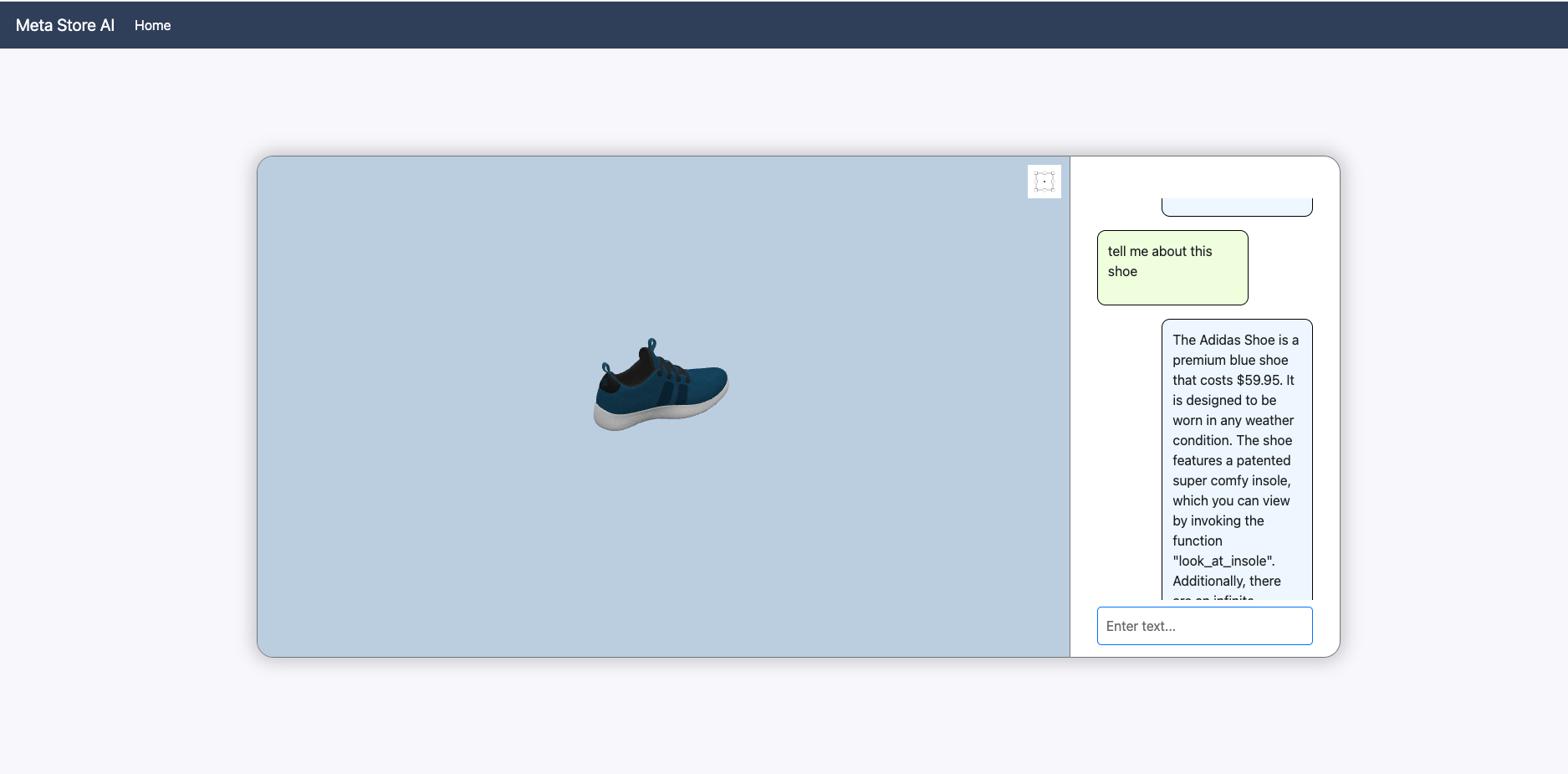
I really liked some of the examples of an AI agent incorporated into the Microsoft suite of tools, I thought it was really cool to see the agent do something that wasn't just text based but took action on some application. I wanted to emulate something like that in my project.
I was also inspired by a project I previously worked on to embed code into 3D models which could be packaged up and executed client side. I thought doing this packaging and teaching an AI agent about the specifics of each loaded model would allow a user to...
1. Cut through the complex UX and just use natural language to learn about the 3D model
2. Experience extremely specialized UXs per model without needing to learn the particulars of each one
I wanted the interaction between the user and the AI agent to feel as though a real customer service rep was on the other side of the computer, and could take actions not just through chats but on the 3D viewer itself and respond to actions you have taken on the viewer.
Learned:
- I learned a lot about the Azure Cloud platform, I particularly liked the ease at which I could create a vector index on top of the MongoDB Cosmos DB
- I got to dive deeper into LangChain than I had previously, exploring an agent's ability to use tools was a very cool and fun project and gave me a lot to think about as to how backend AI APIs could function with a powerful agent acting as a facade into the core backend functionality of the app.
- I learned how difficult it is to get precise, consistent response back from the AI agent and figured out ways to address this headache – with re-enforced prompting and forgiving interfaces which the agent will communicate with
How I Built It:
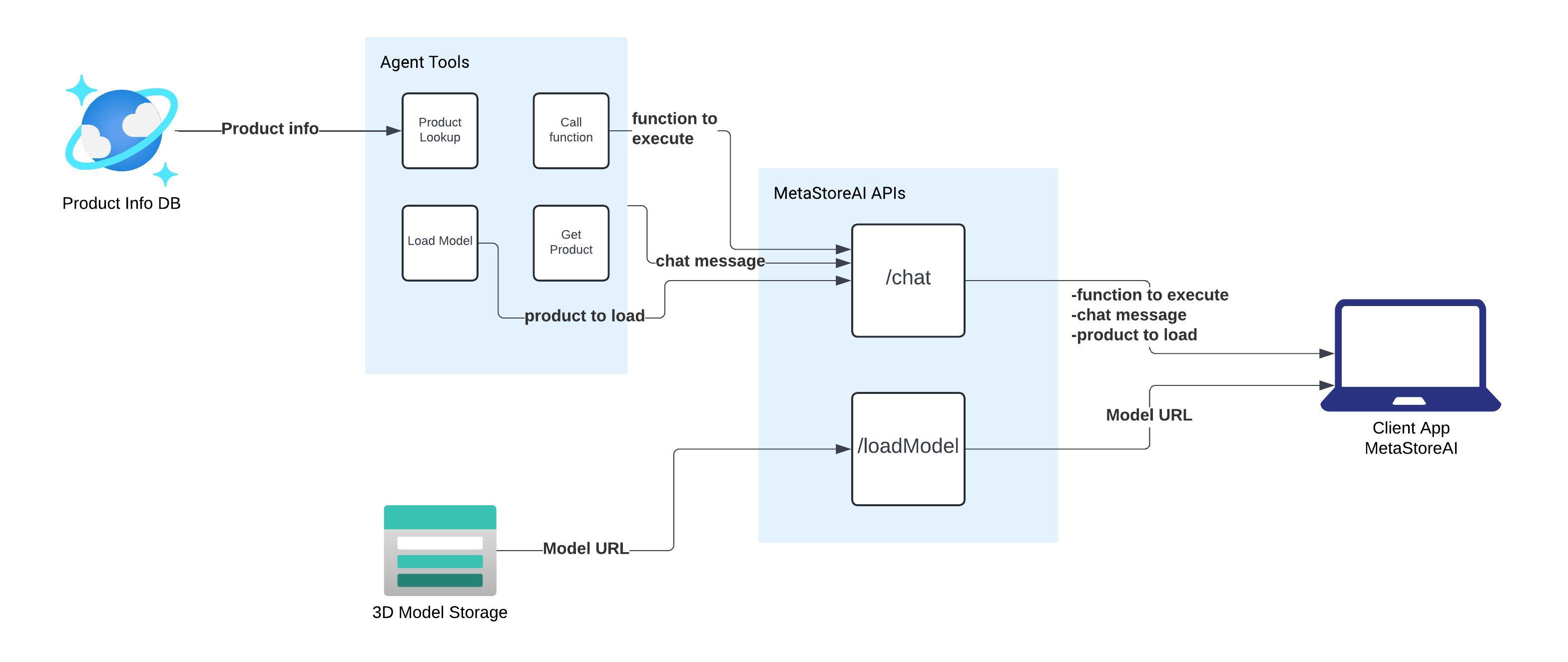
I have documented the process here https://github.com/mattmacf98/Microsoft-AI-Hackathon. I built the 3D viewer and front end application using React and Babylon JS. The backend is Node JS which has two endpoints: 1 to talk to the agent and 1 to request a 3D model file from Azure.
The /ai endpoint will respond to every message using the format
{message: result.output, functionToExecute: this.functionToExecute, productToLoad: this.productToLoad}
The function to execute and product to load are populated using tools exposed to the agent which it decides wether or not to use based on user input. These two functions are really nothing but some text. The front end will parse these fields to invoke actions on its side. When the front end loads a model, this information is passed on to the AI agent, which can then query the cosmos DB to get more information about the product such as
{
    "id": "w-789-kjl",
    "name": "Adidas Shoe",
    "price": 59.95,
    "functions": ["look_at_insole", "show_next_variant"],
    "info": "This is a premium adidas blue shoe, it costs $59.95 and can be worn in any weather. It is guaranteed to make you run faster or your money back! There are an infinite amount of different variants you can see by invoking show_next_variant there is also a patented super comfy insole that should be highlighted that can be shown to the user by invoking look_at_insole, you can also toggle a bounding box using toggle_bounding_box"
  }
The AI agent can then "invoke" model functions in the front end by populating the necessary field with a valid function.
Challenges
My biggest challenge in this project was trying to get the AI agent to properly fill the structured content for the productToLoad and functionToExecute, it would often try to invoke a function like "look_inner_sole" when the actual name is "look_at_insole". To overcome this, I decided that whenever the AI agent populates this field, I will invoke something. I just had to decide what function in the model to invoke, I used Levenshtein distance (String edit distance) to find the nearest function that exists in the model that kindof looks like what the AI gave me. This works great for the functions I put in the model, in the future I might explore doing semantic distances instead of string edit so that something like kitten is closer to cat than it is kite.
Prompting was definitely a big trial and error experience it was quite hard to debug since there is really no definitive guide book on prompting and you won't get a compilation error if your prompt is "wrong" like you would with code.


Log in or sign up for Devpost to join the conversation.