-
My First Novice Quest
Inspiration
As this was my very first venture into the Atlassian Forge platform, my primary inspiration was to successfully complete the Novice Quest and gain hands on experience. I wanted to build something that, while simple, demonstrated a core capability of Forge: interacting with user context. The idea of a "hello world" that genuinely felt personalized by greeting the actual user Browse a Confluence page immediately resonated. It felt like a small, friendly touch that could make a user's experience slightly more engaging than a generic message.
What it does
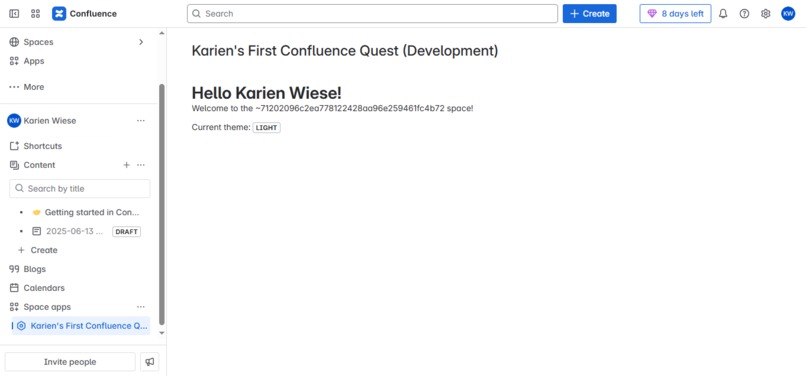
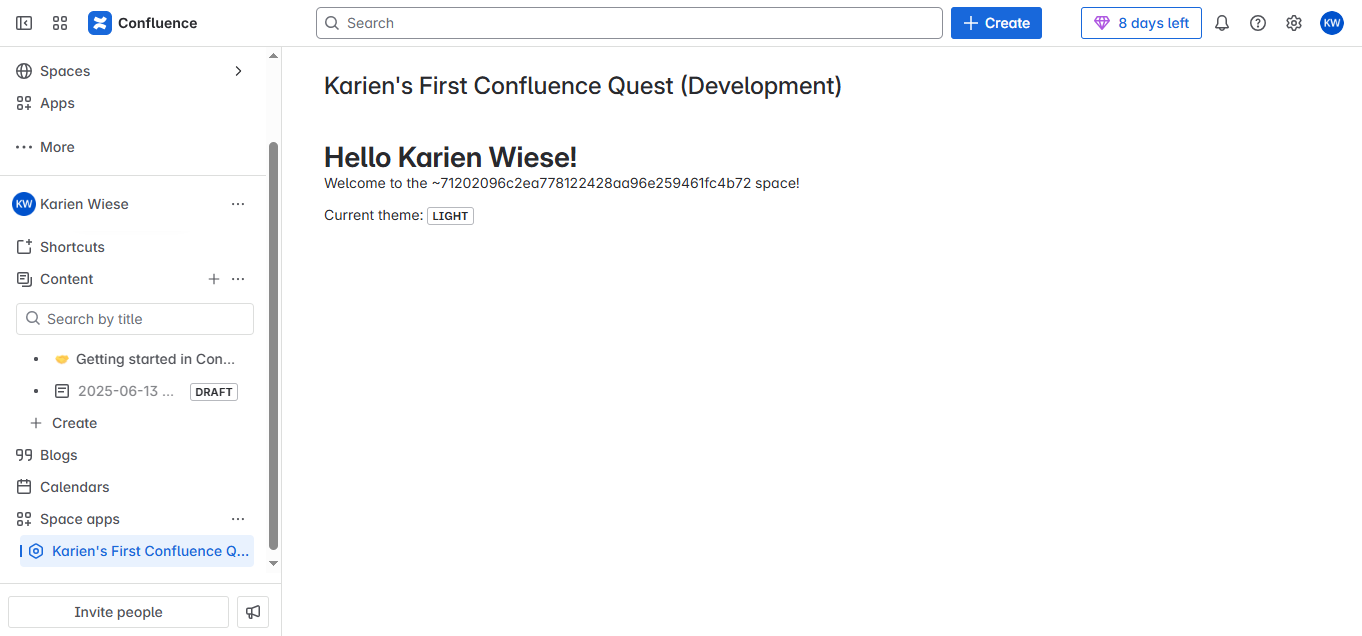
My project is a foundational "hello world" application built on Atlassian Forge. Its core functionality is straightforward: when inserted onto any Confluence page, it displays a personalized greeting message. Specifically, the macro intelligently fetches the currently logged-in user's display name and presents a welcoming message, for example, "Hello, [User's Display Name]! Welcome to the [space.key] space." This simple yet effective interaction clearly showcases Forge's ability to access user context and seamlessly integrate within the Confluence user interface.
How we built it
Building this application involved a clear, guided process, primarily following the Forge Quest Novice tutorial: *Project Initialization: * I began by using the Forge CLI's forge create command to set up a new Confluence macro template, which provided the foundational structure. *Frontend Development with UI Kit: * For the user interface, I leveraged Atlassian's UI Kit, specifically using components like Text and Macro. This allowed me to quickly design a UI that inherently looked and felt native to Confluence, ensuring a consistent user experience. *Backend Logic (Resolver Function): * The core intelligence of the app resides in its backend resolver function. Here, I utilized the @forge/api package to make a secure call to the Confluence API, specifically to retrieve the displayName of the user who is currently viewing the macro. *Data Flow: * The retrieved displayName was then efficiently passed from this serverless backend function to the frontend UI component, enabling the dynamic rendering of the personalized greeting on the Confluence page. *Deployment and Testing: * Throughout the development process, I frequently used forge deploy and forge install commands to push my changes and test the app directly within my Confluence Cloud instance. This iterative deployment was crucial for verifying functionality and catching any issues early.
Challenges we ran into
As a first-time Forge user, the primary "challenge" was more of a learning curve to grasp the unique architecture. The main point of focus was, Understanding Context Passing. Initially, I took some time to fully grasp how data and context (like user information) are securely passed from the serverless backend function (the resolver) to the frontend UI component. A bit of focused debugging and reviewing the documentation helped clarify this data flow, which is a fundamental aspect of Forge app development. This wasn't a blocker but a valuable learning moment that solidified my understanding of how Forge connects its different parts.
Accomplishments that we're proud of
I'm particularly proud of, Successfully deploying my first-ever Forge app, Getting an application from concept to a live, working state in Confluence, entirely on my own, was a significant personal accomplishment. Creating a truly personalized "hello world". Moving beyond a static message to dynamically fetch and display the user's name felt like a meaningful step, demonstrating a practical use of Forge's capabilities right from the start. Gaining a foundational understanding of Forge, This project demystified the Forge platform for me, from its command-line interface to its serverless functions and UI Kit, giving me confidence for future builds.
What we learned
This project provided an invaluable hands-on education in the Forge ecosystem. I gained a solid understanding of The rapid development workflow Forge offers, The speed at which an app can be scaffolded, developed, and deployed is truly impressive. The power of the Function-as-a-Service (FaaS) model, Understanding how backend logic operates without infrastructure management is a game-changer for app development. How the Atlassian UI Kit streamlines frontend development, It simplifies creating native-looking experiences within Atlassian products. The secure and efficient way to interact with Atlassian APIs, I learned how to securely fetch essential user and product data.
What's next for My First Forge Confluence App
This "hello world" is just the beginning! Moving forward, I'm genuinely excited to leverage my new Forge skills to build more sophisticated and impactful applications for Confluence. My next steps will involve, Finishing the Apprentice Level, My next step is Enhancing Information Display, I'm keen to explore creating Confluence macros that can pull and present dynamic data from external sources, making pages more informative and interactive. Improving Collaboration, I see potential in developing apps that add custom collaborative features directly within Confluence pages, perhaps facilitating simpler polls, feedback mechanisms, or content contributions. Automating Repetitive Tasks, I'm interested in how Forge could be used to automate aspects of Confluence content management or integrate with other tools to streamline workflows for teams.

Log in or sign up for Devpost to join the conversation.