-
-

logo
-
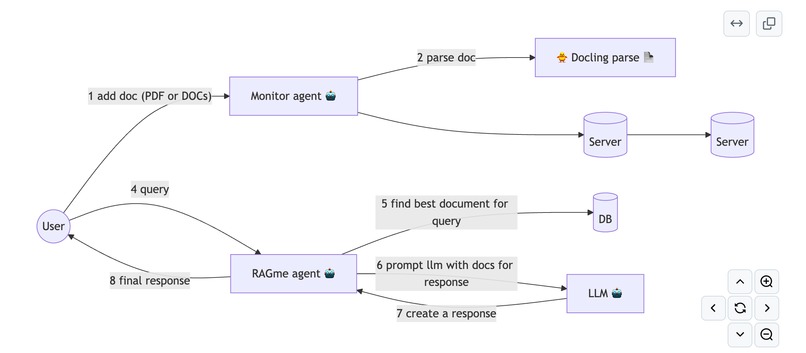
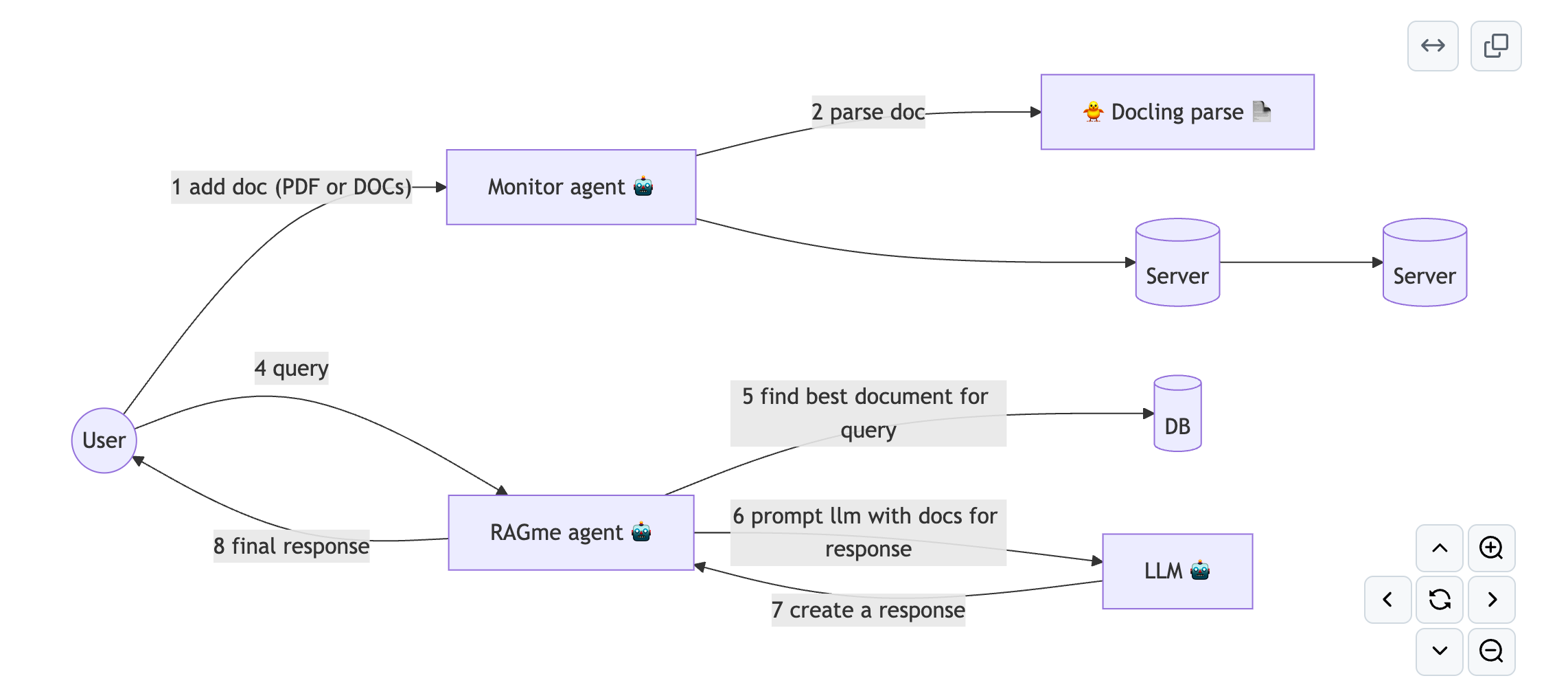
architecture

Video
Inspiration
Need to recall web sites and documents I visit and read on a daily basis.
What it does
Easily capture the web sites I visit and documents I read. RAG them and expose a set of agents that can infer idiosyncratic insights on them.
How we built it
Built on top of existing RAGme-ai
- MCP server to load and RAG files: PDFs and docs
- agent to load pass these to RAGme
- agent to find web sites using browserbase and add to the RAG
- agent to create insights from today's documents
flowchart LR
    user((User)) -- "1 add doc (PDF or DOCs)" --> monitor-agent["Monitor agent 🤖"]

    monitor-agent -- "2 parse doc" --> docling["🐥 Docling parse 📄"]
    monitor-agent --> mcp-server[(Server)]

    mcp-server--> ragme-api[(Server)]

    user((User)) -- "4 query" --> ragme-agent["RAGme agent 🤖"]
    ragme-agent -- "5 find best document for query" --> vector-db[(DB)]

    ragme-agent -- "6 prompt llm with docs for response" --> llm["LLM 🤖"]
    llm -- "7 create a response" --> ragme-agent

    ragme-agent -- "8 final response" --> user((User))
Challenges we ran into
Auto upload docs (PDF and DOCX) such that they can be added side by side to URLs
Accomplishments that we're proud of
Streamlined interface including Google Chrome extension to add URLs as well as a simple drop file into a directory to add to document collection.
What we learned
Three things:
- Cursor is amazing at assisting
- Using code assistance can lead to much more difficult problems to debug (since so much code is done so fast)
- RAG can be great for generating insights.
What's next for My Daily Insights
- Add security
- Add images and videos
- Allow multiple users (SaaS)

Log in or sign up for Devpost to join the conversation.