-
-
My Assistant
My Assistant - AI-Powered Presentation Creator
Transform your ideas into AI-powered presentations with voice and video using cutting-edge AI technology.
Features
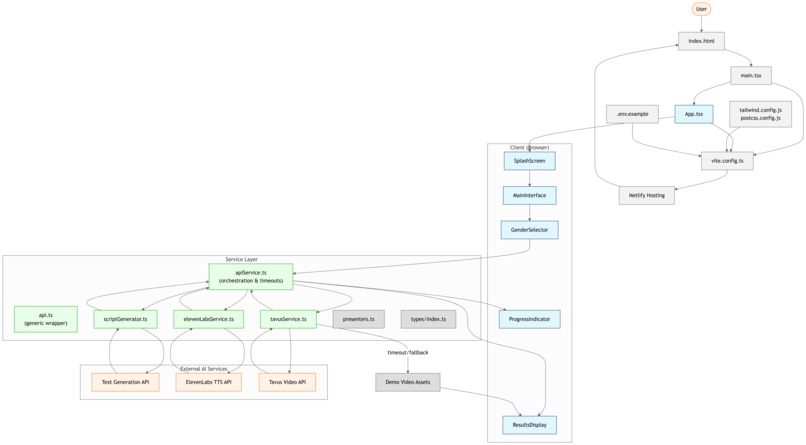
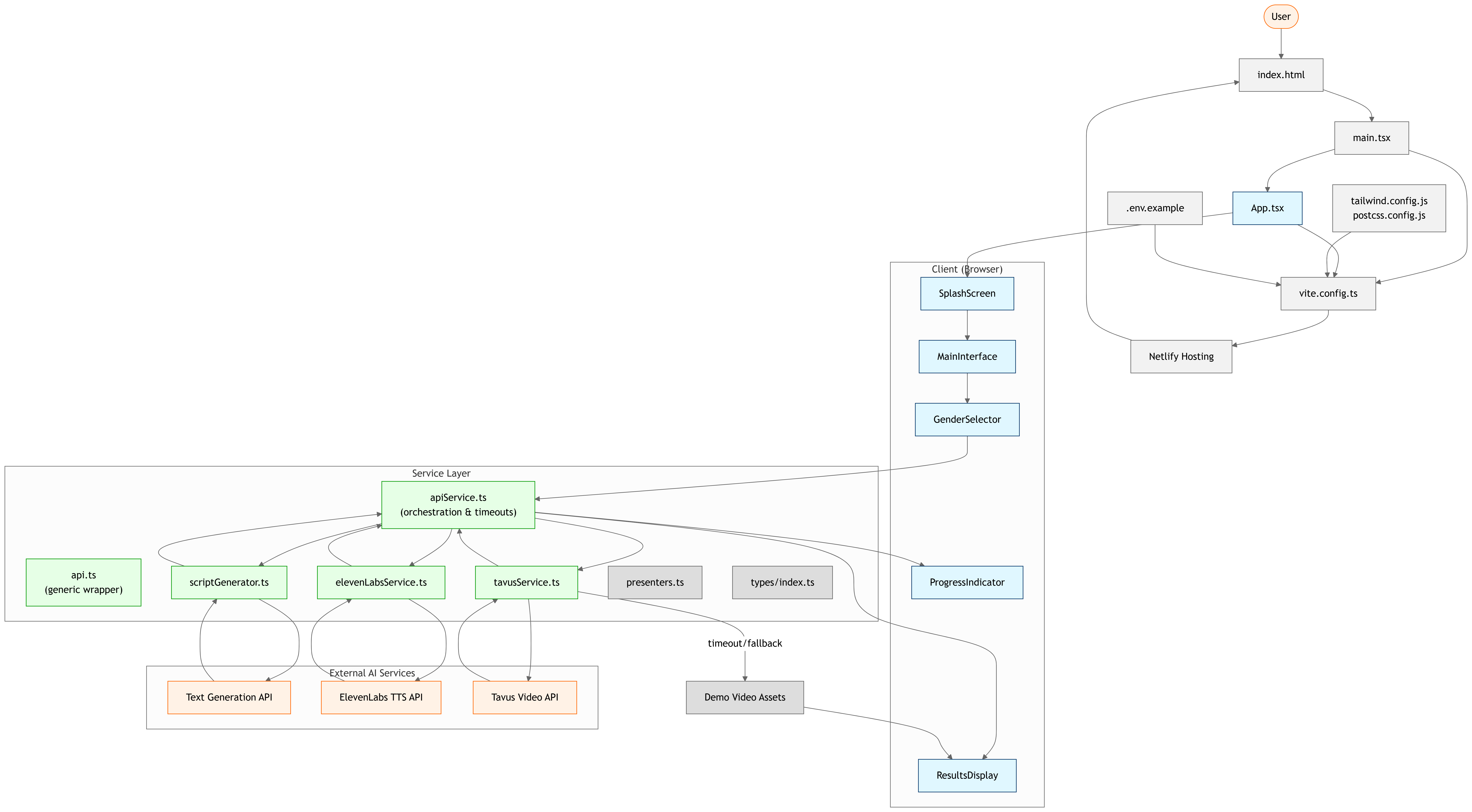
🎯 Topic Input - Enter any topic you want to present about 👥 AI Presenter Selection - Choose between male (Nathan) or female (Anna) AI presenters 📝 Script Generation - Automatically generates engaging 4-5 sentence scripts 🎙️ Voice Synthesis - Real-time voice generation using ElevenLabs 🎥 Video Creation - AI-powered talking head videos using Tavus 📊 Real-time Progress - Detailed progress tracking with time estimates ⏱️ Smart Timeouts - Intelligent fallback handling for long generation times 📱 Responsive Design - Works perfectly on mobile and desktop ⬇️ Download & Share - Download videos and share via link
Video Generation Process
What to Expect
- Script Generation: ~5 seconds
- Voice Synthesis: ~10 seconds
- Video Generation: 1-3 minutes (this is normal!)
During Video Generation
The app provides real-time updates showing:
- Current processing status (queued → generating → processing → ready)
- Time elapsed and estimated time remaining
- Detailed explanations of what the AI is doing
- Progress bars with realistic completion percentages
Why Video Takes Time
AI video generation is a complex process involving:
- Script Analysis - Understanding content and timing
- Facial Expression Generation - Creating realistic expressions
- Lip Sync Processing - Synchronizing mouth movements with audio
- High-Quality Rendering - Producing professional video output
Fallback System
If video generation takes longer than expected (>3 minutes), the app automatically:
- Provides clear explanations of delays
- Uses high-quality demo videos as fallbacks
- Maintains full functionality for audio and script features
Setup Instructions
1. Environment Variables
Create a .env file in the root directory with your API keys:
VITE_ELEVENLABS_API_KEY=your_elevenlabs_api_key_here
VITE_TAVUS_API_KEY=your_tavus_api_key_here
2. API Keys Required
- ElevenLabs API Key: Get from ElevenLabs Dashboard
- Tavus API Key: Get from Tavus Dashboard
3. Installation
npm install
npm run dev
4. Build for Production
npm run build
AI Presenters
Male Presenter - Nathan
- Voice: Brian (ElevenLabs Voice ID: 21m00Tcm4TlvDq8ikWAM)
- Replica ID: r1fbfc941b (Tavus)
- Characteristics: Professional, clear, engaging tone
Female Presenter - Anna
- Voice: Alice (ElevenLabs Voice ID: EXAVITQu4vr4xnSDxMaL)
- Replica ID: r4c41453d2 (Tavus)
- Characteristics: Warm, articulate, friendly tone
Technology Stack
- Frontend: React 18 + TypeScript
- Styling: Tailwind CSS
- Icons: Lucide React
- Voice AI: ElevenLabs API
- Video AI: Tavus API
- Build Tool: Vite
- Deployment: Netlify Ready
Usage
- Enter a Topic (e.g., "How to stay focused", "Benefits of meditation")
- Select Your AI Presenter (Male/Female)
- Click "Generate AI Presentation"
- Watch the Progress - Real-time updates show:
- Script generation (5s)
- Voice synthesis (10s)
- Video generation (1-3 minutes)
- Enjoy Your Presentation - Play, download, or share
Performance & Optimization
Enhanced User Experience
- Progress Tracking: Real-time status updates with time estimates
- Smart Polling: Efficient API polling with exponential backoff
- Timeout Handling: Graceful fallbacks when generation takes too long
- Error Recovery: Automatic retry mechanisms for network issues
Production Optimizations
- Code Splitting: Vendor and library chunks for faster loading
- Asset Optimization: Optimized builds with source maps disabled
- Proxy Configuration: CORS handling for API requests
- Responsive Design: Mobile-first approach with breakpoints
Troubleshooting
Video Generation Issues
- Long Wait Times: Video generation typically takes 1-3 minutes - this is normal
- Timeout Fallbacks: If generation exceeds 3 minutes, demo videos are used
- API Limits: Check your Tavus API quota and rate limits
- Network Issues: App automatically retries failed requests
Common Solutions
- Check API Keys: Ensure both ElevenLabs and Tavus keys are valid
- Network Connection: Stable internet required for video generation
- Browser Compatibility: Use modern browsers (Chrome, Firefox, Safari, Edge)
- Clear Cache: Refresh browser cache if experiencing issues
Deployment
This app is ready for deployment on Netlify:
- Build the project:
npm run build - Deploy the
distfolder to Netlify - Add environment variables in Netlify dashboard:
VITE_ELEVENLABS_API_KEYVITE_TAVUS_API_KEY
Environment Variables for Production
# Netlify Environment Variables
VITE_ELEVENLABS_API_KEY=your_production_elevenlabs_key
VITE_TAVUS_API_KEY=your_production_tavus_key
API Documentation
ElevenLabs Integration
- Endpoint: Text-to-Speech API
- Models: eleven_multilingual_v2
- Output: MP3 44.1kHz 128kbps
- Features: Natural voice synthesis with emotion
Tavus Integration
- Endpoint: Video Generation API v2
- Features: AI talking head videos
- Processing: 1-3 minute generation time
- Output: High-quality MP4 videos
Built with Bolt.new
This application was created using Bolt.new - the AI-powered web development platform that enables rapid prototyping and deployment of full-stack applications.
License
MIT License - feel free to use this project as a starting point for your own AI-powered applications.
Support
For issues or questions:
- Check the troubleshooting section above
- Verify your API keys are correctly configured
- Ensure stable internet connection for video generation
- Review browser console for detailed error messages
Made with ❤️ by Abd ul Hannan
Built With
- bolt.ai
- typescript


Log in or sign up for Devpost to join the conversation.