-
-
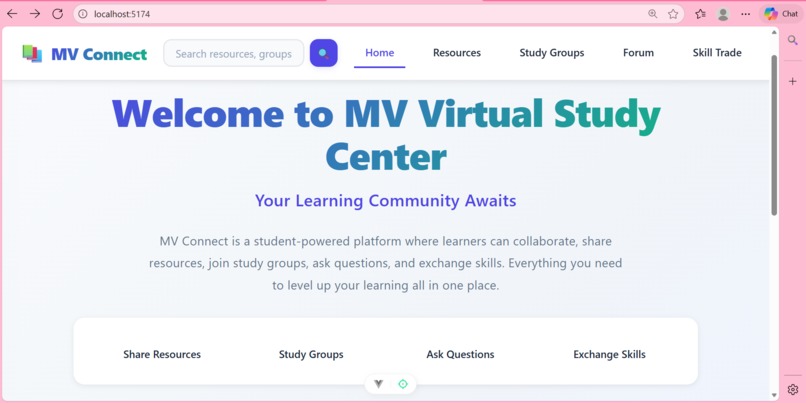
the home page of my web app
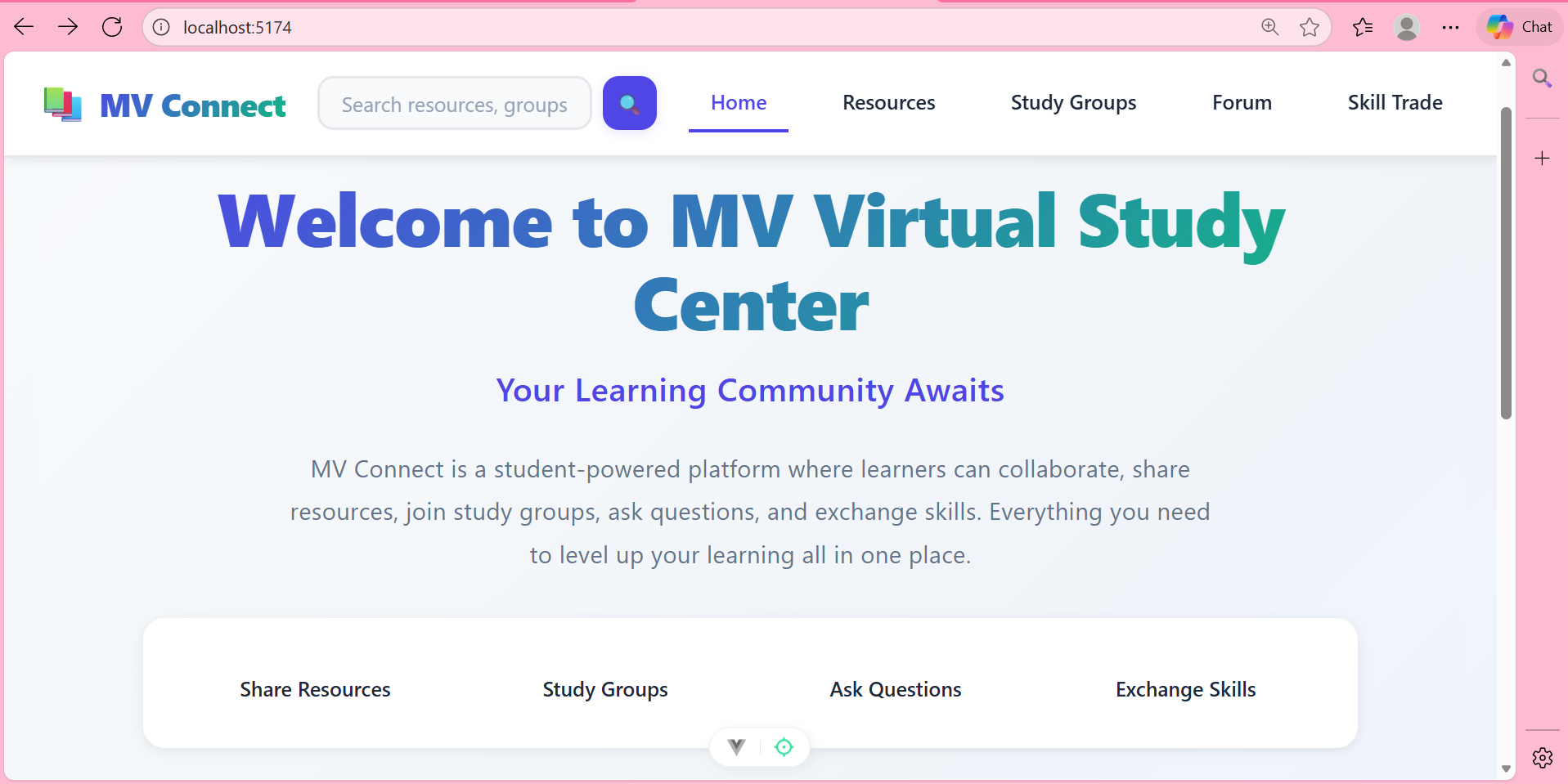
MV Connect: Building a Digital Campus Community
🎓 What Inspired Me
The inspiration for MV Connect came from observing the fragmented nature of student life at Monta Vista High School. I noticed that despite our school's excellent resources, students often struggled to connect with each other academically. Study groups formed haphazardly, valuable notes got lost in digital clutter, and students with complementary skills rarely found each other.
I remembered my own experience trying to find a physics study group last semester—scrolling through multiple Discord servers, checking Google Classroom announcements, and asking around in different classes. The process was inefficient and frustrating. I realized that what we needed wasn't another social media platform, but a purpose-built tool designed specifically for academic collaboration.
The hackathon's challenge to "improve our school in any way" gave me the perfect opportunity to address this problem systematically. I wanted to create something that felt like a digital extension of our campus—a place where the collaborative spirit of MVHS could thrive online.
🛠️ How I Built MV Connect
Phase 1: Planning & Architecture
I started by mapping out the four core problems I wanted to solve:
- Study group discovery - Making it easy to find academic partners
- Resource sharing - Centralizing quality learning materials
- Academic Q&A - Creating a focused space for course questions
- Skill exchange - Facilitating peer-to-peer tutoring
The architecture followed a component-based approach with Vue.js, which allowed me to build each feature as an independent module that could be tested and refined separately.
Phase 2: Development Journey
The build process flowed naturally from the foundation outward:
Core Framework Setup
- Configured Vue 3 with Vite for fast development
- Implemented Vue Router for seamless navigation
- Created the initial component structure
Building the Components Each major feature became its own ecosystem:
- Study Groups: Cards with filtering and search
- Resources: Upload/download system with categorization
- Forum: Question/answer interface with voting
- Skill Trade: Matching system for skill exchange
Styling & UX Polish
- Developed a "Modern Academic Hub" design system
- Implemented responsive design for all screen sizes
- Added micro-interactions and animations
- Created a consistent visual language across all pages
Backend Simulation
- Set up JSON Server to simulate API endpoints
- Created realistic mock data for testing
- Implemented basic CRUD operations for all features
📚 What I Learned
Technical Growth
Vue.js Deep Dive: This project pushed me beyond basic Vue concepts into advanced features like computed properties, watchers, and reactive patterns that made the filtering systems work smoothly.
Component Architecture: I learned to design reusable, maintainable components that could scale. The
ResourceCardandStudyGroupCardcomponents taught me the value of props-based design.State Management Patterns: Without Vuex/Pinia initially, I mastered using reactive refs and computed properties to manage complex state relationships—like connecting search filters to displayed data.
CSS Mastery: Creating a cohesive design system taught me about CSS custom properties, responsive design patterns, and animation timing functions that feel "just right."
Product Development Insights
User-Centric Design: Every feature decision started with "What would an MVHS student actually use?" This mindset kept the project focused and practical.
Progressive Enhancement: I learned to build the core functionality first, then layer on enhancements—starting with basic card displays, then adding filtering, then animations, and finally polish.
Problem-Solving Methodology: Breaking down a broad goal ("improve collaboration") into specific, implementable features was a valuable skill to develop.
🧗 Challenges Faced
Challenge 1: Data Architecture
Problem: How to structure data so that study groups, resources, and forum posts could be efficiently filtered and searched.
Solution: I created a normalized data structure with clear relationships between entities. Each resource type got its own API endpoint with consistent fields, making filtering logic reusable across components.
Challenge 2: Responsive Design Complexities
Problem: The feature-rich interface had to work perfectly on everything from iPhone screens to desktop monitors.
Solution: I adopted a mobile-first approach, building each component to work on small screens first, then using CSS Grid and Flexbox to adapt layouts for larger screens. The floating cards on the homepage were particularly tricky—I had to create different layouts for mobile versus desktop.
Challenge 3: Balancing Features vs. Polish
Problem: With limited time, I had to decide between adding more features or polishing existing ones.
Solution: I focused on making the four core features work exceptionally well rather than adding marginal features. Each main section got dedicated attention to ensure it felt complete and intuitive.
Challenge 4: Simulating Real Backend Behavior
Problem: Without a real backend, I needed to make the app feel "alive" with data persistence and realistic responses.
Solution: JSON Server with carefully crafted mock data and relationships. I created sample data that reflected real MVHS courses and scenarios, making the demo feel authentic.
💡 Key Insights & Breakthroughs
The Power of Constraints: Working within the hackathon timeframe forced creative solutions. The JSON Server approach, while simple, ended up being perfect for demonstrating the concept.
Design Systems Pay Off: Spending time upfront on a consistent color palette, typography scale, and spacing system saved hours later and gave the app a professional feel.
Student Perspective Matters: As a current student, I had insider knowledge of what features would actually get used versus what sounded good theoretically.
Iteration is Key: The home page went through three complete redesigns before landing on the current version. Each iteration taught me something about user expectations and visual hierarchy.
🌟 The Most Rewarding Part
Seeing the pieces come together in the final home page was incredibly satisfying. Watching the floating cards animate, the responsive grids adapt, and the feature cards light up on hover—it transformed from a collection of components into a cohesive product.
The moment I could click from the home page to each feature, filter content, add new items, and see everything update in real-time—that's when MV Connect stopped being a project and started feeling like a real tool that could help my classmates.
🚀 Looking Ahead
MV Connect isn't just a hackathon project to me—it's a prototype for how digital tools can enhance our school community. I envision this growing into a platform where:
- Teachers can share official resources
- Clubs can find new members
- Students can build academic reputations
- The entire MVHS community becomes more connected
This project taught me that technology isn't just about fancy features—it's about solving real problems for real people. And sometimes, the most impactful solutions are the ones that help us connect with each other.
Built during the Monta Vista Web Dev Hackathon by a student who believes that when we learn together, we all succeed.
Built With
- css3
- html5
- javascript
- json
- vite
- vue

Log in or sign up for Devpost to join the conversation.