About the Project
Inspiration
I visit museums and exhibitions almost every week. During each visit, I often find myself having small but meaningful reactions to artworks: a question about a material or technique, a memory triggered by a color, or a feeling that is difficult to explain in the moment.
For example, when I saw cloisonné objects in a museum, I wanted to understand how the technique was different from ordinary coloring or surface decoration. In other exhibitions, I found myself wondering about the historical background of the artist, the social context of the work, or why I felt emotionally connected to one piece but not another.
The problem is that these thoughts are very easy to lose.
I usually take photos, save exhibition posters, write short notes, or search for information online. But after the visit, everything becomes scattered across my photo album, notes app, browser history, and social media drafts. A few weeks later, I may remember that I visited an exhibition, but I no longer remember what I loved, what I questioned, or how the experience changed the way I look at art.
MuseLog was inspired by this gap.
Most museum apps focus on the artwork, the institution, or the exhibition guide. MuseLog focuses on the viewer. It is an AI-powered museum reflection companion that helps users turn exhibition visits into personal memories, structured reflections, and eventually a long-term aesthetic profile.
The core idea is simple:
A museum visit should not disappear after the user leaves the gallery. It should become part of the user’s personal aesthetic journey.
What It Does
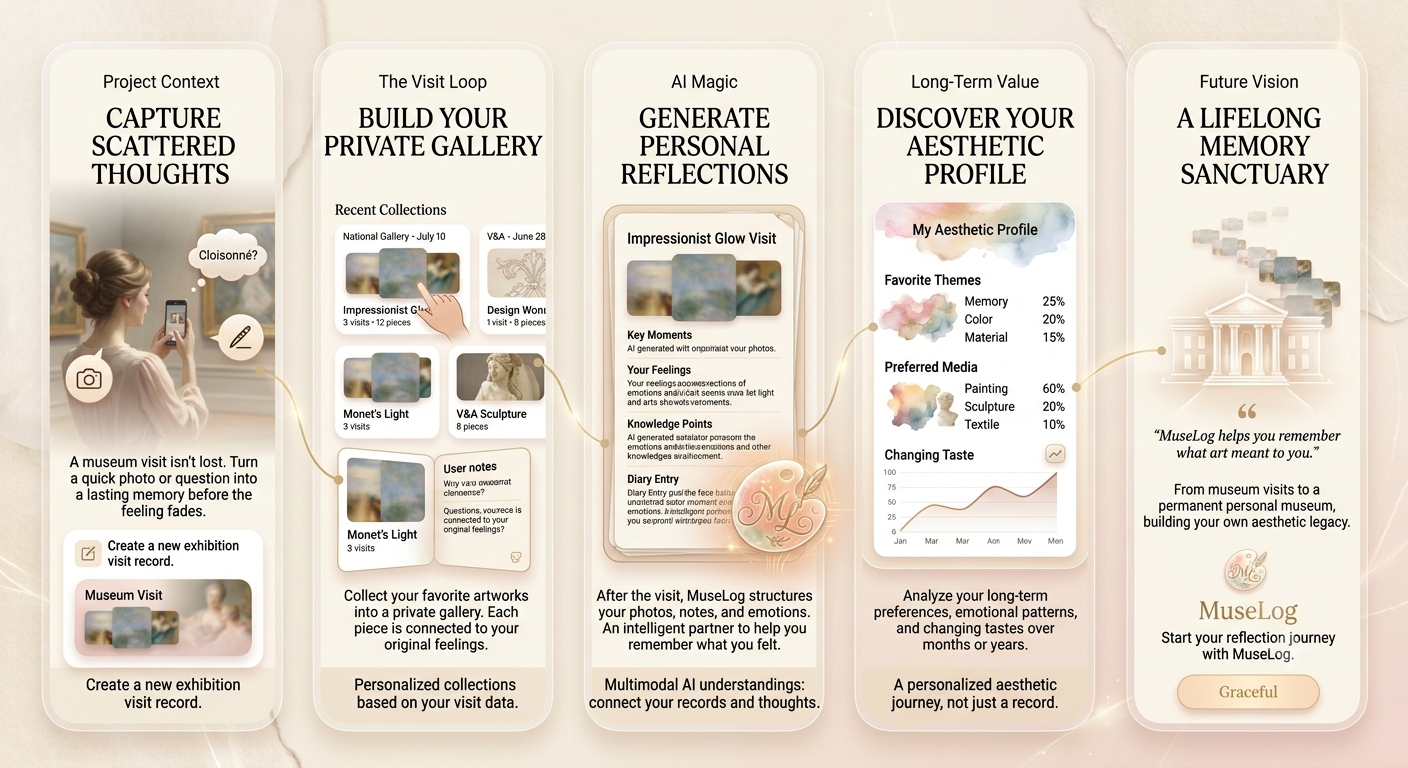
MuseLog helps users capture, organize, and revisit their exhibition experiences.
The prototype focuses on one complete user flow:
- Create an exhibition visit Users can create a record for a museum or exhibition they are visiting, including the title, date, location, and optional poster or ticket image.
- Capture moments during the visit While viewing artworks, users can quickly upload a photo, write a short reflection, save a question, or mark a piece as a favorite. The goal is to make recording lightweight enough that it does not interrupt the viewing experience.
- Generate an AI reflection after the visit
After the exhibition, MuseLog uses the user’s photos, notes, questions, and favorites to generate a structured reflection. This may include:
- key artworks or moments;
- the user’s original feelings;
- questions worth exploring further;
- knowledge points related to the artworks;
- a short personal exhibition diary;
- a social media caption based on the user’s actual notes.
- Build a private gallery Favorite artworks are collected into a personal gallery. When users open an artwork card, they can flip it to see what they felt or wrote at the time. This turns the collection into something more personal than a simple image archive.
- Lay the foundation for long-term aesthetic insights Over time, MuseLog can analyze repeated patterns in a user’s exhibition history: preferred themes, materials, art styles, emotional keywords, and changing taste across months or years.
The long-term vision is to help users answer questions like:
- What kinds of artworks do I consistently return to?
- What themes appear most often in my favorite exhibitions?
- Am I drawn more to color, material, history, identity, memory, or atmosphere?
- How has my aesthetic preference changed over time?
- How has my way of seeing changed?
How We Built It
For the Build Week prototype, I focused on building a minimal but meaningful end-to-end experience rather than trying to complete every future feature.
The product was designed around a simple loop:
Capture → Reflect → Collect → Revisit
The prototype uses AI in three main ways:
1. Multimodal Understanding
MuseLog can process exhibition-related inputs such as artwork photos, exhibition labels, and user-written reflections. The AI helps connect visual records with text-based thoughts so that the user does not need to manually organize everything after the visit.
2. Reflection Generation
Instead of producing a generic museum review, the AI is prompted to stay close to the user’s actual input. It separates factual information, user observations, emotional reactions, questions, and possible follow-up knowledge. This is important because the product should not overwrite the user’s voice. The AI should help structure the memory, not replace it.
3. Personal Gallery and Memory Retrieval
Favorite artworks are displayed as a private digital exhibition. The key interaction is that each artwork is not only shown as an image, but also connected to the user’s original feeling or question. This makes the gallery feel like a memory archive rather than a static collection.
Codex was used as a development partner to help translate the product flow into a working prototype, structure the frontend experience, and iterate on implementation details more quickly.
What I Learned
The biggest thing I learned is that AI products become much more interesting when they are designed around long-term user memory rather than one-time generation.
At first, this project looked like a simple exhibition note-taking app. But as I thought more deeply about the user journey, I realized the real value is not just recording what the user saw. The real value is helping the user understand what they repeatedly notice, love, question, and remember.
I also learned that AI should not always be placed as a chatbot. In MuseLog, AI works better as an invisible organizer and reflection partner. It appears at the moment when the user needs help making sense of scattered inputs.
Another learning was the importance of preserving the user’s original voice. A polished AI-generated paragraph is not always better. Sometimes the most valuable line is the messy note the user wrote in front of an artwork, because that note carries the authenticity of the moment.
Challenges
- Deciding the right scope for the prototype: MuseLog has many possible directions: museum guide, artwork recognition, knowledge graph, social sharing, aesthetic personality test, annual report, and more. For the Build Week version, I had to focus on the smallest product loop that still communicates the core idea.
- Balancing knowledge and emotion: A museum app can easily become too informational, while a journaling app can become too vague. MuseLog needs to do both: help users learn about artworks while also protecting their subjective experience.
- Designing AI outputs that are grounded in user input: If the AI invents emotions or produces generic artistic language, the product loses trust. The reflection needs to feel personal, specific, and evidence-based.
- Designing for future value: The most powerful version of MuseLog depends on long-term data. But a hackathon prototype needs to show value immediately. The solution was to make the first-use experience useful on its own while clearly pointing toward the larger vision of an evolving aesthetic profile.
What’s Next
The next version of MuseLog will focus on three areas.
- First, I want to improve the capture experience by adding voice notes, faster artwork tagging, and smoother gallery creation during an actual museum visit.
- Second, I want to build better review and memory features, such as weekly artwork revisits and follow-up questions that encourage users to reflect on how their interpretation changes over time.
- Third, I want to develop the long-term aesthetic profile. After enough exhibition visits, MuseLog should be able to summarize a user’s recurring themes, preferred media, emotional patterns, and aesthetic changes by quarter or year.
Eventually, MuseLog could generate a personal annual art report — not just showing how many exhibitions the user visited, but revealing what kind of art they were drawn to and how their way of seeing changed.
MuseLog is not meant to tell users what art means.
It is meant to help users remember what art meant to them.
Built With
- claude
- codex
- cursor
- gemini

Log in or sign up for Devpost to join the conversation.