Muse: AI Design Partner for Non-Technical Builders
Point at anything in your running app, say what you want in plain English, and Muse rewrites the real source code. A design tool for people who can't read code.
React 18 · Vite · Tailwind · Anthropic Claude
Inspiration
A founder or PM has a live web app that a contractor or a former dev built. They want one visual change: the button color, a card's spacing, the headline font. They open the repo and find 40 files of JSX and Tailwind. They don't know which file holds the thing they're looking at, so they don't touch it. They close the laptop and wait days for an engineer.
Every AI coding tool we tried assumes the opposite of this person. v0, Lovable, and Claude Artifacts generate a new app from a blank prompt. Cursor and Copilot live inside the editor and expect you to already know which file to open. None of them help someone change an app that already exists without reading code.
That is the gap. Muse starts where the user actually is: looking at the running product. You point at the thing, describe the change in plain English, and it happens in the real code.
What it does
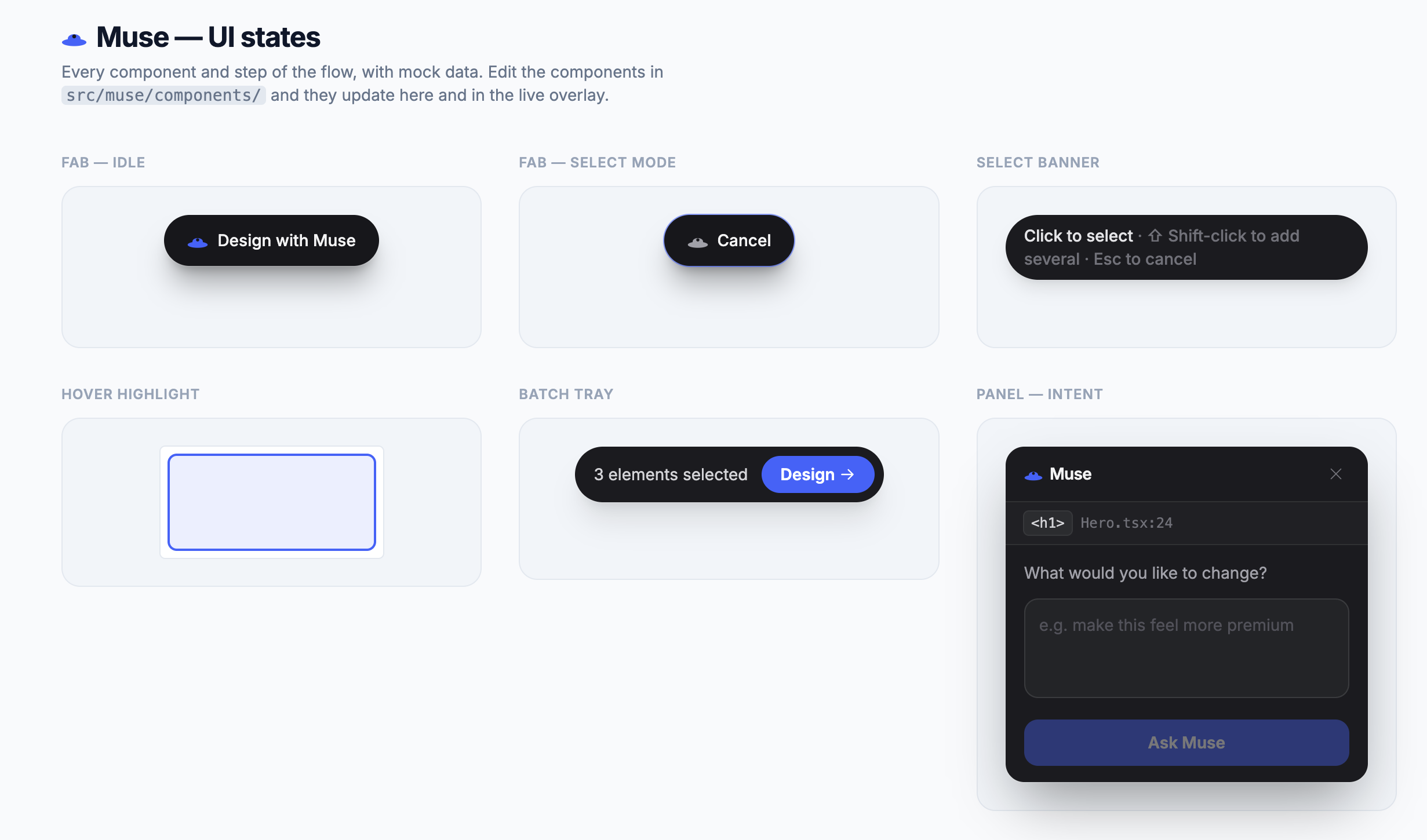
Muse is a floating overlay that loads alongside any React + Vite app in development. The user:
- Clicks the Muse button (bottom-right) to enter select mode. Hovering highlights elements with a component breadcrumb.
- Clicks any element on screen to select it (shift-click to batch-select several at once).
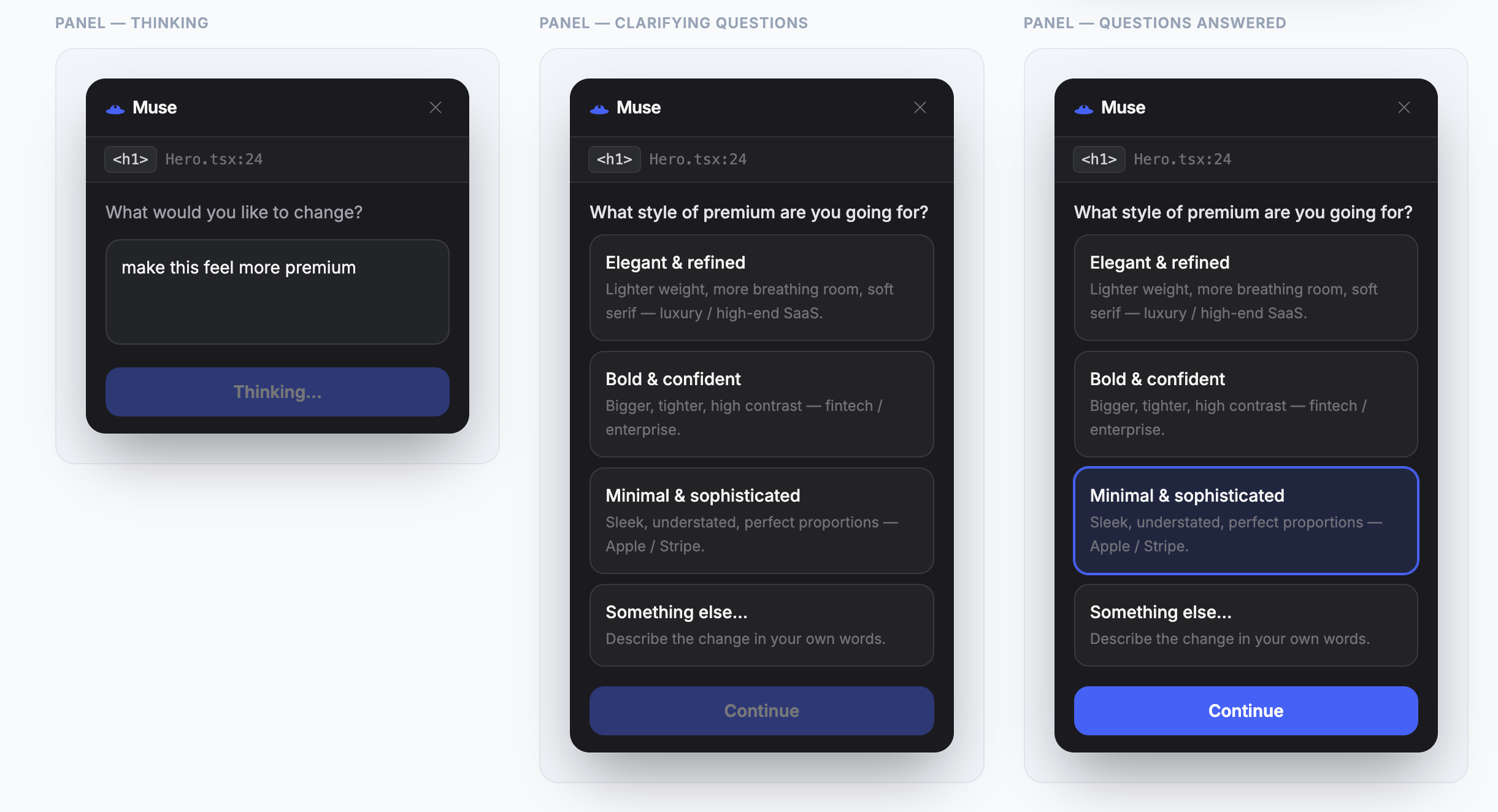
- Describes the change in plain English, e.g. "make this card feel warmer and less boxy."
- Muse asks one or two clarifying questions with pre-set visual options (no code, no jargon).
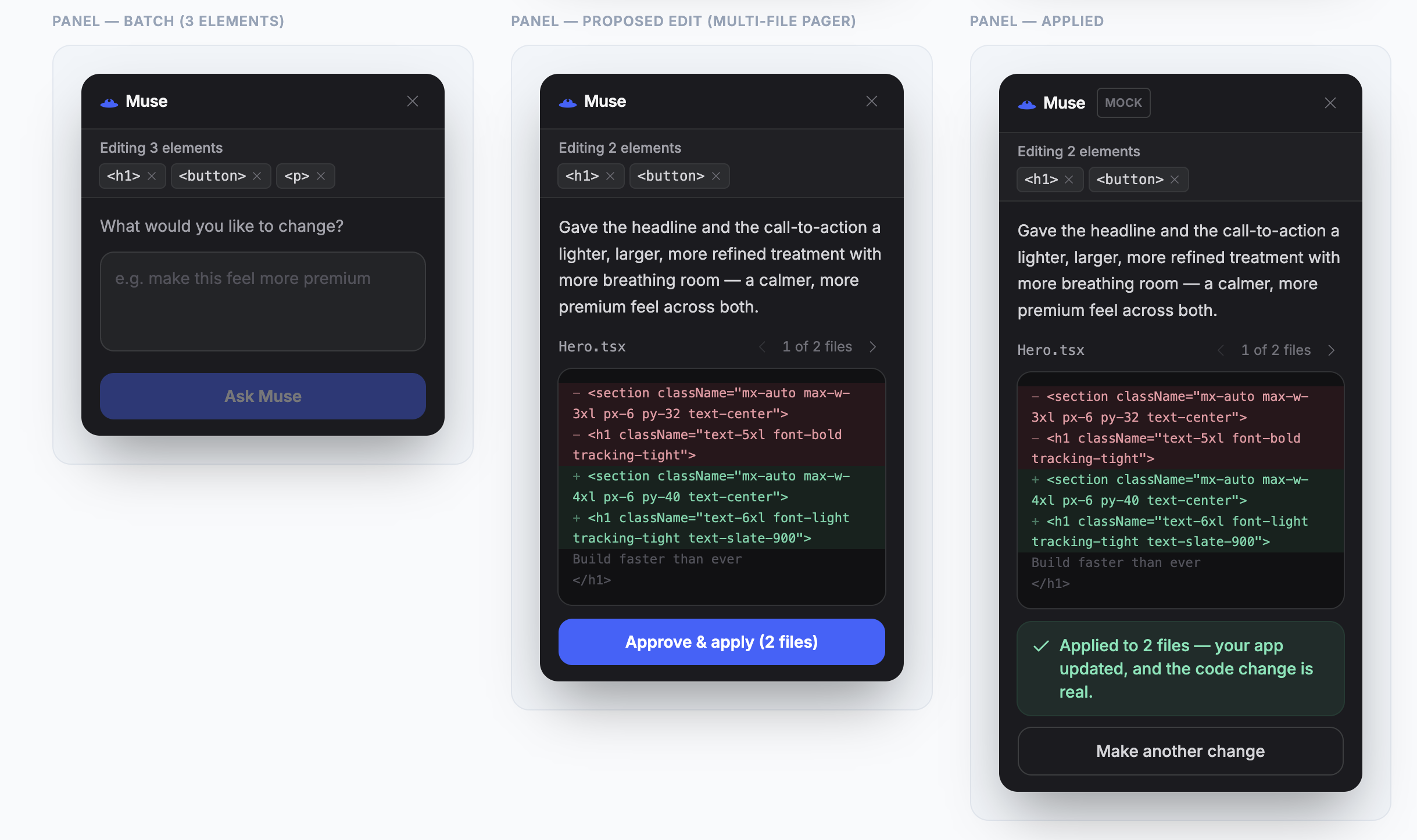
- The AI proposes the edit. The user sees the diff and approves.
- The file is written to disk and Vite HMR reloads the app instantly.
- Full undo / redo / revert history is kept for the whole session.
A real run from our demo: we clicked a headline on a running app, typed "make this feel more premium," Muse asked "What kind of premium?" with three visual options, we picked "Minimal & sophisticated," it proposed changes to two files, we approved, and the app hot-reloaded. The diff it produced is real, mergeable code, not a throwaway DOM hack.
The partner feeling (design and interaction)
The hardest design problem was not visual. It was making the AI feel like a collaborator instead of a prompt box. Two decisions drove that:
- It asks before it acts. On an open-ended request like "make it pop," Muse responds the way a good designer would: one or two short questions with concrete visual options, written in plain language. A specific request ("make this button blue") skips straight to the edit. This clarifying-question loop is the soul of the product, inspired by how Claude's own design surfaces guide you with questions rather than a blank box.
- It lives in the environment. A near-black floating panel sits over your real app (a Linear and Mercury influence: one accent color, hairline borders, no gradients, Inter throughout). In select mode the cursor shows a devtools-style label of the element you are about to pick, anchored to the pointer so it never covers the target.
The whole surface is built so a non-technical person understands it in seconds and never sees a config file or a line of code unless they ask to see the diff.
The hard part: mapping DOM elements to source files
The first technical question was: how do you go from a clicked DOM element to the source file it came from? We considered three approaches.
Option 1: Build-time data attributes (Babel plugin). Inject data-source="HomePage.tsx:42" onto every JSX element at compile time, the way React DevTools used to work. We ruled it out: the attributes bloat the DOM, they go stale when HMR hot-patches a component without a full recompile, and it means maintaining a Babel transform on top of the existing Vite/React setup.
Option 2: React DevTools protocol. The DevTools extension exposes a protocol for inspecting the fiber tree. It requires the extension to be installed, couples us to browser-specific internals, can't run in an embedded context, and adds a cross-context messaging layer with extra latency and failure modes.
Option 3: Direct React fiber introspection (what we built). In development, @vitejs/plugin-react already injects JSX source info (file, line, column) onto every React element. It lands on the fiber as _debugSource, and every DOM node React renders has a __reactFiber$ property at runtime. We walk the fiber's _debugSource and _debugOwner chain until we find a source location.
function getSourceLocation(el: Element): SourceLocation | null {
  let fiber = getFiber(el)
  while (fiber) {
    if (fiber._debugSource) return fiber._debugSource
    fiber = fiber._debugOwner ?? fiber.return
  }
  return null
}
The tradeoff: this is a semi-private React API, and React 19 removes _debugSource (which is why we pin React 18). For a dev-mode tool this is the right call. No build tooling changes, no DOM bloat, it resolves dynamically from the live fiber tree, and it works the moment npm run dev starts.
Editing across multiple files
Selecting several elements at once raised a harder problem: the elements often live in different files, so one request becomes a multi-file edit. We made propose_edit return an array of file edits, read every selected file into a single context, and render the result as a per-file diff pager (one file at a time, with prev/next). Approve writes all files in one atomic operation. Undo treats each apply as one multi-file batch, so reverting a three-file change restores all three together rather than one at a time.
Backend architecture: where to run the AI
The AI needs to receive the selected element's metadata, read the source file from disk, call Claude, and write the edited file back. Three options.
Option 1: Separate Express server. A standalone Node process on a different port. The obvious problem is CORS on every request from the overlay, plus two processes to manage, environment variables to coordinate, and a second command to explain. For a tool aimed at non-technical users, that is a dealbreaker.
Option 2: Serverless / cloud function. This solves CORS via a same-origin proxy but the function can't read the user's local source files, so you'd send full file contents over the wire on every request (slow and expensive), plus auth and key management on a hosted service, plus an internet dependency.
Option 3: Vite plugin middleware (what we built). Vite's configureServer hook lets you attach Express-style middleware to the dev server itself. We implemented musePlugin() as a Vite plugin that adds /api/muse/chat and /api/muse/write on the same origin and port as the app. Same process, no CORS, direct filesystem access, one command to start.
export function musePlugin(): Plugin {
  return {
    name: 'muse-backend',
    apply: 'serve', // dev server only, never ships to production
    configureServer(server) {
      server.middlewares.use('/api/muse/chat', ...)
      server.middlewares.use('/api/muse/write', ...)
    },
  }
}
The tradeoff is that this only runs during development (the apply: 'serve' flag guarantees it never enters a production build). That is actually what we want. It is a dev tool, and there is no production attack surface.
AI interaction: two tools, not free chat
We did not want free-form streaming chat. The AI needs to produce one of two structured outputs: ask a clarifying question, or propose a file edit. We modeled this as Claude tool use with exactly two tools:
ask_clarifying_questionsreturns one or two questions, each with two or three plain-English options (no jargon, no code). Used when the request is open-ended.propose_editreturns an array of{ fileName, newContent }objects (complete updated files) plus a rationale.
We set tool_choice: { type: 'any' } to force Claude to always call one of the two. A simpler single-tool schema (always propose) would make the model guess on ambiguous requests like "make it feel more premium," producing edits the user did not want. The two-tool design lets the model decide when to clarify versus act.
For file editing we chose full file replacement over AST patching or line-range diffs. AST patching needs a parser that understands every JSX/TypeScript pattern and is fragile with unusual code style. Line-range replacement breaks on any structural change. Full replacement is simple, always correct, and gives Claude full context of the file it is modifying. The cost is higher token usage, which we offset with prompt caching on the system prompt.
Security
The /write endpoint touches disk, so we were careful:
- File paths are resolved with
fs.realpathSyncand validated withpath.relative, not a stringstartsWithcheck (which is defeated by../traversal, symlinks, or asrc-evil/prefix collision). - Only files inside
src/can be written. - The model can only write files it actually read in the same request (bound to
resp.originals), not arbitrary output. - All files are validated before any are written (all-or-nothing), so a partial batch can't leave the codebase broken.
- A 200KB per-file cap stops runaway model output.
Tech stack
| Layer | Choice | Why |
|---|---|---|
| Framework | React 18 + Vite | _debugSource on fibers; Vite plugin API for the backend |
| Styling | Tailwind CSS | Claude edits classes inline, no runtime style injection |
| AI | Claude (Sonnet) via Anthropic SDK | Tool use, prompt caching, long context for full-file reads |
| Backend | Vite plugin middleware | Same origin, no CORS, direct disk access, single process |
| Language | TypeScript throughout | Type safety on fiber internals and API contracts |
Honest limitations
We would rather be straight about the edges:
- Dev-mode only. Muse runs against
npm run dev, not a deployed site. That is deliberate: it edits source, not the live DOM, so you get real code instead of throwaway hacks. The hosted mode below is how we'd reach stakeholders without a dev environment. - React 18. The fiber
_debugSourcetrick uses a semi-private API that React 19 removes, so we pin React 18 on purpose. - Best with inline utility classes. Muse edits Tailwind classes in the markup. Apps that route everything through CSS variables or styled-components give it less to act on.
Challenges
- Fiber introspection is undocumented. The
__reactFiber$key has a runtime-generated suffix that differs across React versions, so we scan keys by prefix instead of hardcoding one. - Two features collided. Multi-select (multi-file) and undo/redo were built in parallel, and undo/redo assumed a single file per edit. Merging them meant redesigning history so each entry is a multi-file batch, then rewiring undo/redo/revert to write across every file at once.
- The model could write files you never selected. A review pass caught that
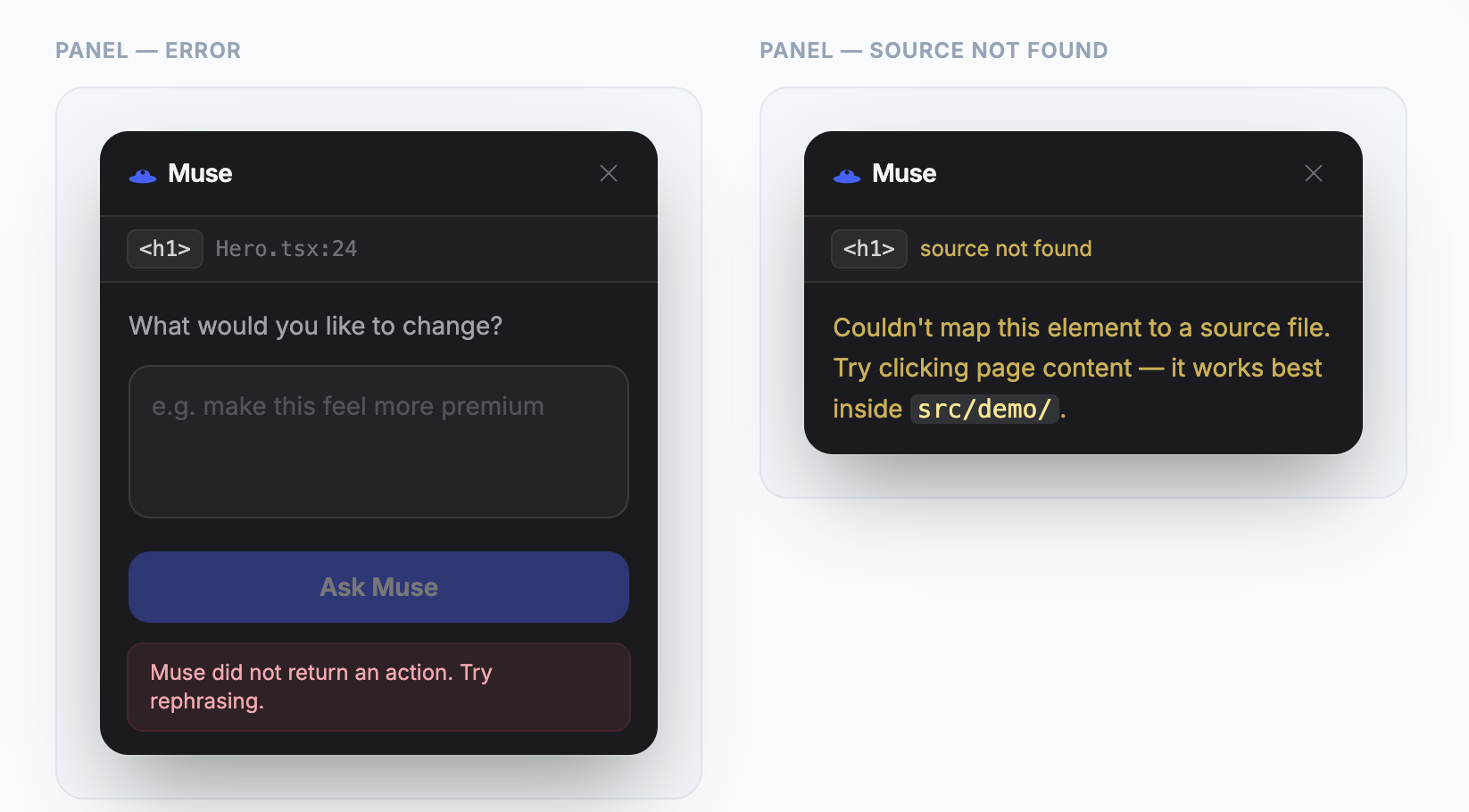
propose_editcould return any file undersrc/. We now bound writes to the exact files read that turn. - HMR timing. Vite reloads asynchronously after a write, so we show an "applied" state and let the live reload speak for itself rather than polling for completion.
What's next
- One-line install: a published Vite plugin you add to
vite.config.ts. - Vue and Svelte support (both compilers expose similar debug-source info).
- Hosted mode that outputs a patch or PR instead of writing to local disk, so a non-developer can propose design changes without running anything locally.

Log in or sign up for Devpost to join the conversation.