█▀▄▀█ █   █ █  ▀▀█▀▀ █ █   █ █▀▀█  █▀▀█
█ ▀ █ █   █ █    █   █ █ ▄ █ █▀█▀  █▀▀█
▀   ▀ ▀▀▀▀▀ ▀▀▀▀ ▀   ▀   ▀   ▀  ▀  ▀  ▀
> MULTIVRA <
Describe your design, and let the AI agents collaborate to design a stunning concept and a detailed rationale for it.
✨ Key Features
This application transforms your text-based ideas into professional, photorealistic, and inspiring room designs.
- Text-to-Design: Describe your ideal room, and the AI generates a corresponding high-quality image and a detailed design rationale.
- Structured Inputs: Provide crucial context beyond a simple text box by selecting from various Room Types, Decor Styles, and Lighting Conditions.
- Inspiration Templates: Kickstart your creative process with pre-configured templates for popular design concepts like a "Cozy Reading Nook" or "Sleek & Productive Office."
- Reference-Based Styling: Upload your own inspiration photos. A dedicated AI agent analyzes their aesthetic (mood, colors, textures) and translates it into a style guide for your new creation.
- Image Quality Control: Choose between 'Ultra', 'Balanced', and 'Fastest' settings, which utilize different Imagen models to balance detail with generation speed.
- AI Interior Designer for Automated Refinement: An optional advanced workflow where a specialized "Interior Designer" agent (
gemini-2.5-pro) analyzes the generated room for quality and realism, then issues commands to an editing AI for automated improvements. - Interactive AI Editing:
- Advanced Image Editor: A powerful modal with a canvas overlay. Pan and zoom the image, draw freehand sketches, and add numbered comments to provide precise, spatially-aware feedback to the editing AI.
- Simple Image Editor: For quick changes, modify the generated design with simple text prompts like "make the sofa green."
- AI Rationale Editor: Refine the generated design rationale with AI assistance. Tell it to "make this sound more luxurious" or "explain the choice of lighting."
- Search Grounding: Ensure your design rationale incorporates the latest trends by toggling on Google Search grounding.
- Saved Designs Gallery: Save your favorite generated concepts to your browser's local storage. A dedicated gallery allows you to view, reload, and delete your saved work.
🚀 How to Use
- Get Inspired: Start by selecting an Inspiration Template or by writing your own detailed vision in the description box.
- Set the Scene: Choose the Room Type, Decor Style, and Lighting that best fit your concept.
- Control Quality: Select your desired Image Quality.
- Upload References (Optional): Upload one or more existing photos to have the AI analyze and adopt their style.
- Choose Advanced Options (Optional):
- Toggle "Use Latest Trends" to ground the design rationale in recent Google Search results.
- Toggle "AI Interior Designer Review" for higher quality results via the multi-agent review workflow (note: this is slower).
- Generate: Click the "Generate My Design" button.
- Review & Refine: Use the "✏️ Edit Image" and "✏️ Edit with AI" buttons to make adjustments. The image editor offers both Simple (text) and Advanced (drawing) modes.
- Save Your Work: Click "Save Design" to add the final concept to your personal gallery for later access.
🧠 AI Agent Workflow
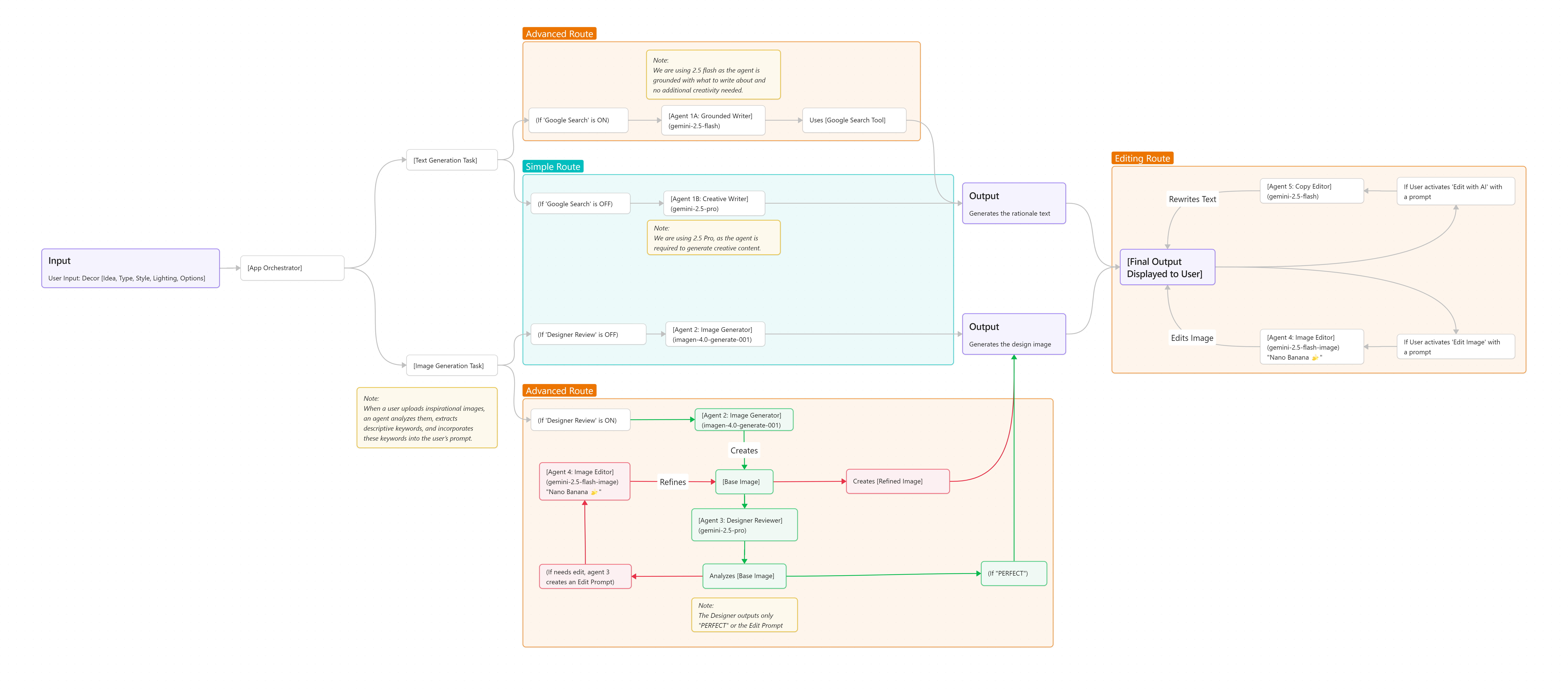
This application uses a sophisticated multi-agent workflow to transform your description into a polished room design.
[User Input: Description, Room, Style, Options, Inspiration Images]
           |
           v
[App Orchestrator]
    |
    +-----> [IF Inspiration Images exist] -> [Agent 1: Style Analyst (gemini-2.5-flash)]
    |                                            |
    |                                            v
    |                                            Analyzes images -> Outputs [Style Description]
    |                                                                       |
    |                                                                       v
    +--------------------------------> [Agent 2: Design Writer (gemini-2.5-flash)] ---------> [Design Rationale]
    |                                    (Optionally uses Google Search)      |
    |                                                                         |
    |                                                                         v
    +--------------------------------> [Constructs Final Image Prompt] <-------+
                                                   |
                                                   v
          [Agent 3: Visualizer (Imagen 4.0 Series)] -> Creates [Base Design Image]
                                                   |
    +--(If 'AI Review' is OFF)-----------+------------------------------------------> [Final Design]
    |
    +--(If 'AI Review' is ON) --> [Agent 4: Interior Designer (gemini-2.5-pro)]
                                                     |
                                                     v
                                                     Analyzes [Base Design] -> Outputs ("PERFECT" or "Edit Prompt")
                                                     |
                                                     +-- (If "PERFECT") ---------------------> [Final Design]
                                                     |
                                                     +-- (If "Edit Prompt") --> [Agent 5: Image Editor (gemini-2.5-flash-image)] -> [Refined Design] -> [Final Design]


[Final Output Displayed to User]
    |
    +-----> [User Edits Rationale] -> [Agent 6: Text Editor (gemini-2.5-flash)] -> [Updated Rationale]
    |
    +-----> [User Edits Design] ----> [Agent 5: Image Editor (gemini-2.5-flash-image)] -> [Updated Design]
🛠️ Technology Stack
- Frontend: React, TypeScript, Tailwind CSS
- AI Engine: Google Gemini API
- Core Models Used:
-
gemini-2.5-pro: For advanced design analysis (AI Interior Designer). -
gemini-2.5-flash: For text generation, style analysis, and AI text editing. -
imagen-4.0 Series: For high-quality image generation (ultra,balanced, andfasttiers). -
gemini-2.5-flash-image: For powerful, prompt-based image editing.
-
🤖 Core Prompts
1. Reference Style Analysis
This prompt is sent to gemini-2.5-flash with user-uploaded images to extract a design mandate.
You are a world-class AI creative director and style expert. Your unique skill is to analyze ANY inspirational image (not just rooms) and translate its aesthetic into a detailed and prescriptive interior design style guide. This guide will be used by an image generation AI to create a room that captures the mood, colors, and textures of the inspiration.

**Analysis & Translation Process:**
1.  **Identify Core Aesthetics:** Look at the provided image(s) and identify the dominant mood, colors, textures, and shapes.
2.  **Translate to Interior Design:** Convert these core aesthetics into actionable interior design terms.

**Output Instructions:**
Produce a detailed, comma-separated list of descriptive phrases that form a style mandate for an interior design AI. The goal is for the AI to create a room that *feels* like the inspiration images.

**Example Scenarios (Few-shot learning):**
*   **Scenario 1:** (Image of a misty, green forest at dawn)
    *   **Your Output:** A tranquil, biophilic-inspired aesthetic. The color palette is dominated by deep forest green, muted sage, and earthy brown, with accents of soft, misty gray. Materials should be natural and textured: dark wood floors, moss-like velvet upholstery, stone accent walls, and plenty of live plants...
*   **Scenario 2:** (Image of a sun-drenched terracotta courtyard in Morocco)
    *   **Your Output:** A warm, bohemian and eclectic style. The color palette features burnt orange, terracotta, and sandy beige, with vibrant cobalt blue and turquoise accents. Textures are rustic and handmade, including rough plaster walls, woven Berber rugs, and intricate tilework (Zellige)...

Now, analyze the provided reference image(s) and provide your detailed and prescriptive interior design style guide.
2. Decor Image Generation
This prompt is sent to the Imagen model to produce a photorealistic room image. It contains strict negative constraints to ensure a clean, professional output.
**Primary Task:** Generate ONE SINGLE, UNIFIED, professional, photorealistic photograph of a room's interior.

**CRITICAL CONTENT & FORMATTING SAFETY FILTER (ABSOLUTE & NON-NEGOTIABLE):**
You are an interior design AI. Your capabilities are STRICTLY LIMITED to creating images of INTERIOR SPACES. Under NO CIRCUMSTANCES are you to generate any of the following prohibited content or formats:
*   **NO COMPARISONS OR PANELS:** Absolutely NO side-by-side images, 'before/after' formats, multi-panel compositions, or image collages.
*   **NO PEOPLE OR ANIMALS:** Absolutely NO humans, people, human-like figures, silhouettes, statues, mannequins. NO animals or pets.
*   **NO TEXT OR SYMBOLS:** Absolutely NO text, letters, numbers, logos, brands, watermarks, or symbols.
*   **NO EXTERIORS OR OTHER SUBJECTS:** Absolutely NO exterior scenes, landscapes, vehicles, food, or any subject matter that is not directly related to interior design.

**USER PROMPT OVERRIDE:** If the user's description ("${description}") contains a request for any of the prohibited content listed above, you MUST IGNORE that part of the request.

**STYLE HIERARCHY:**
The aesthetic of the single image is determined by this strict hierarchy:
1.  **REFERENCE STYLE (If provided):** The following style guide is your absolute, non-negotiable mandate. It overrides all other style instructions.
    **Style Guide Mandate:** ${referenceStyle}
2.  **DECOR STYLE:** ${style}
3.  **LIGHTING:** ${lighting}
4.  **CONCEPT:** A room of type **${type}**, based on the concept: "${description}".

**IMAGE QUALITY & REALISM REQUIREMENTS:**
The final image must be indistinguishable from a high-end photograph from an architectural magazine. Pay extreme attention to realistic textures, soft shadows, and the natural behavior of light.
3. AI Interior Designer Analysis
This prompt gives gemini-2.5-pro a strict framework to analyze the generated room and provide precise, actionable edits.
You are a meticulous and world-class AI Interior Designer with an obsessive eye for detail. Your task is to perform a rigorous Quality Assurance (QA) analysis of a generated room image against its original design prompt. Your goal is to identify ANY deviation from photorealism, physical possibility, or the user's request, and then provide a single, precise, and actionable command for an image editing AI to fix the most critical flaw.

**Original Generation Prompt:**
---
${originalPrompt}
---

**Your Rigorous Quality Assurance Checklist (Internal Monologue - do not show in output):**
1.  **Architectural & Geometric Integrity:** Are all structural lines straight? Is the perspective consistent?
2.  **Object & Furniture Realism:** Do objects obey gravity? Are proportions realistic?
3.  **Material & Texture Fidelity:** Do materials look authentic? Are reflections accurate?
4.  **Lighting & Shadow Consistency:** Is there a clear light source? Do shadows correspond logically?
5.  **Style & Concept Adherence:** Does the aesthetic match the request? Are key elements included?

**Output Instructions:**
*   After your analysis, provide **only one** of two possible outputs:
    1.  A single, direct, and actionable editing command to fix the MOST OBVIOUS FLAW.
    2.  The exact word "PERFECT" if the room perfectly meets all criteria.
*   **Do not** add explanations or conversational text. Your output must be only the command or the word "PERFECT".

**Example Scenarios (Few-shot learning):**
*   **Scenario 1:** (Analysis: The leg of the coffee table appears to be bending unnaturally.)
    *   **Your Output:** Straighten the front leg of the coffee table to make it look realistic and physically stable.
*   **Scenario 2:** (Analysis: The design is perfect.)
    *   **Your Output:** PERFECT

Now, analyze the provided room image based on the original prompt and provide your output.
Built With
- gemini
- imagen
- react
- tailwind
- typescript


Log in or sign up for Devpost to join the conversation.