Inspiration
The inspiration came from a simple observation: everyone learns differently, but the web treats us all the same.
As a developer, I learn best from flowcharts and diagrams. My friend, a history major, needs timelines. Another colleague prefers quick bullet-point summaries. Yet we all read the same walls of text on Wikipedia, MDN, and countless other sites.
With Chrome's new built-in AI APIs, I saw an opportunity to solve this fundamental problem. What if ONE extension could transform ANY webpage into your brain's "native language"?
The goal wasn't just to showcase the Chrome AI APIs—it was to build something genuinely useful. Something that would help millions of learners access and understand information in the way that works best for THEM.
That's why I built the Multimodal Learning Enhancer.
What it does
The Multimodal Learning Enhancer is a Chrome extension that transforms any webpage into your preferred learning format using Chrome's built-in AI.
Four Learning Modes:
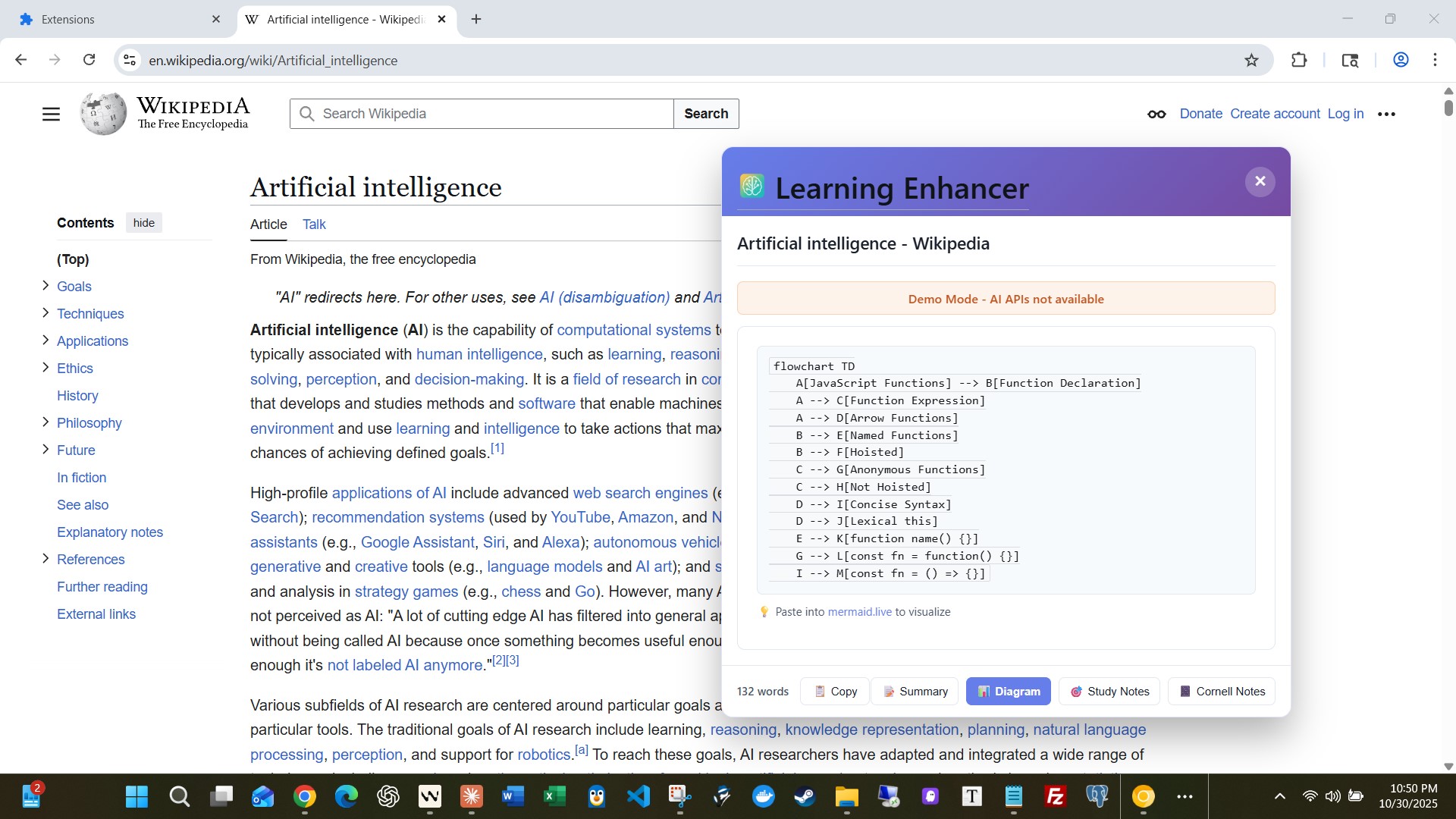
Visual Diagrams (for visual learners)
- Flowcharts for technical tutorials and processes
- Mind maps for conceptual and hierarchical content
- Timelines for historical events and sequences
- Fully interactive: zoom with Ctrl+scroll, pan by dragging, click nodes to highlight
- Download as SVG or copy Mermaid code for your notes
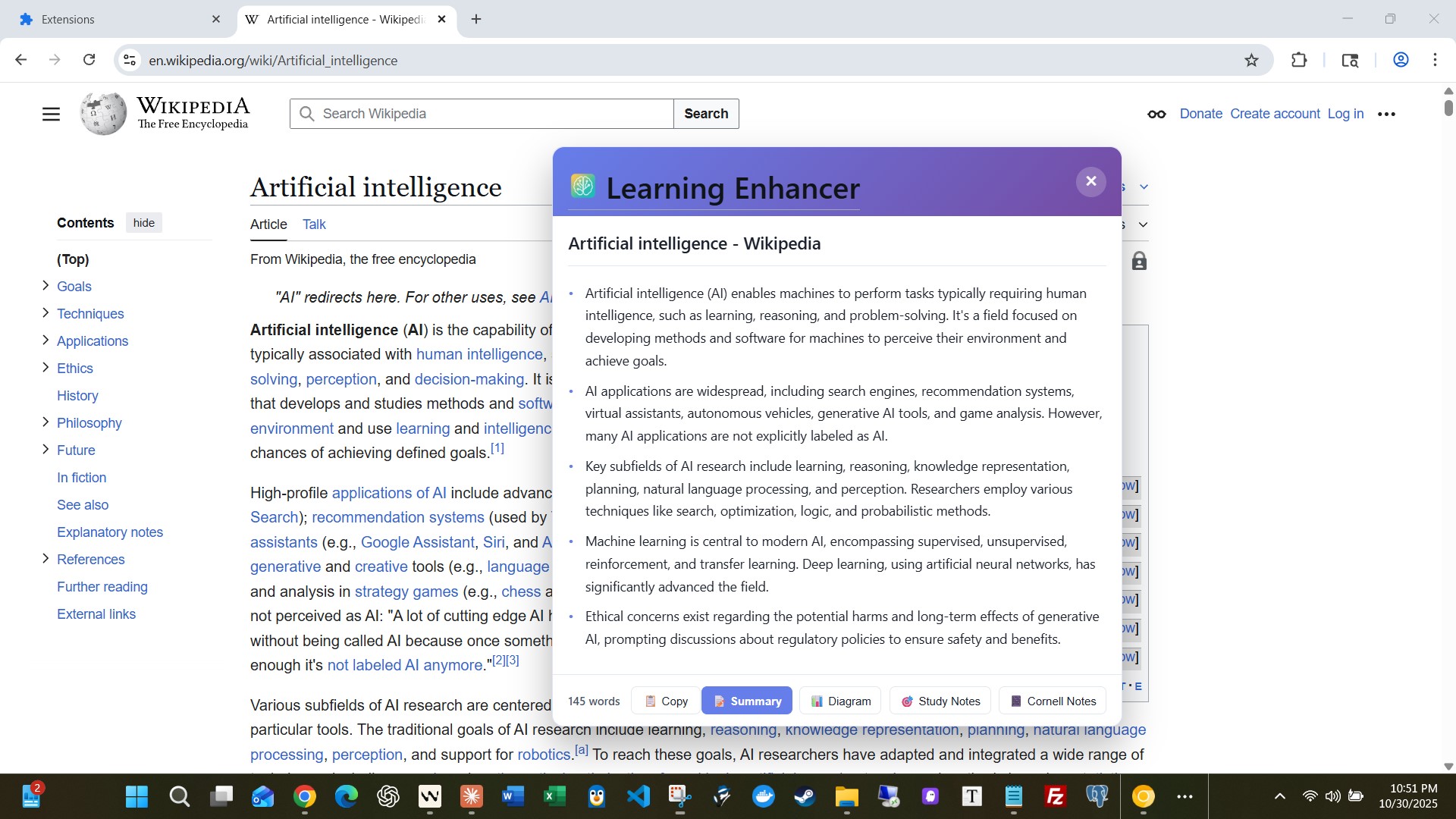
Bullet Summaries (for fast learners)
- Instant bullet-point summaries of key insights
- Powered by Chrome's Summarizer API
- Perfect for getting the gist before diving deep
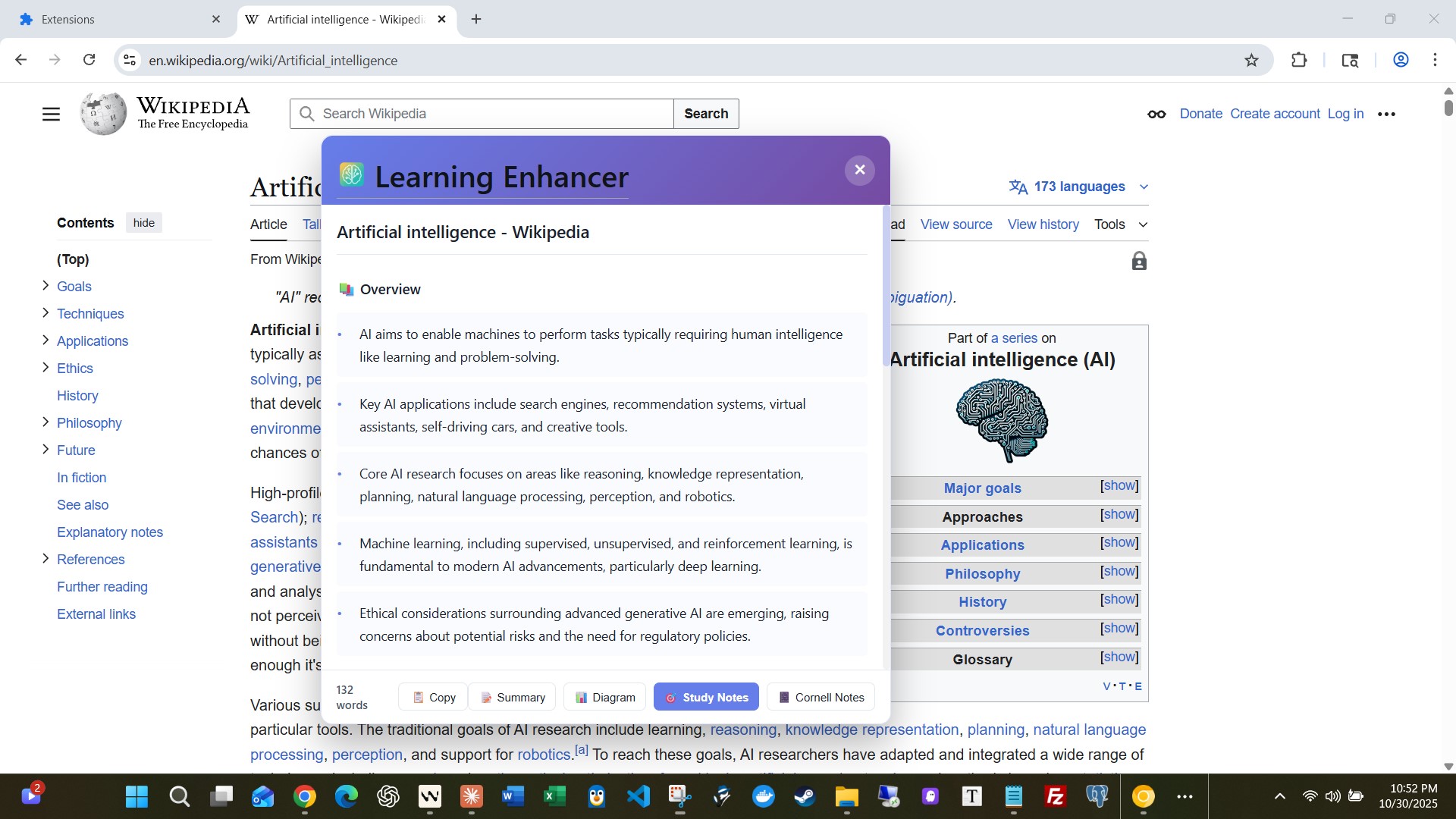
Study Notes (for deep learners)
- Structured notes with sections, concepts, and examples
- Created with Writer and Prompt APIs
- Ideal for exam prep and long-term retention
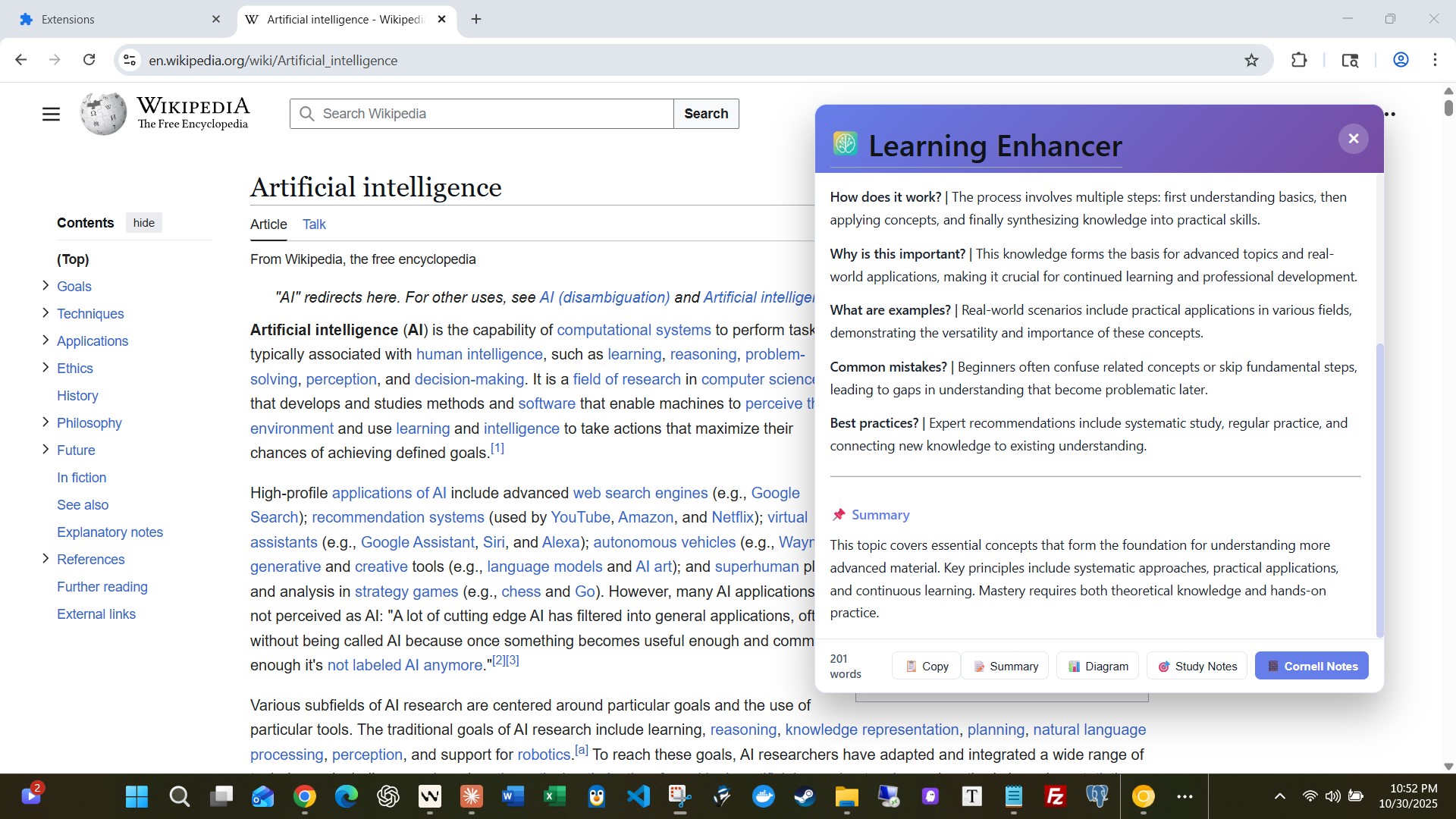
Cornell Notes (for systematic learners)
- Classic note-taking format with cues, notes, and summary
- Generated using Prompt API
- Perfect for active recall and review
Smart Features:
- Automatic content type detection (technical, historical, conceptual)
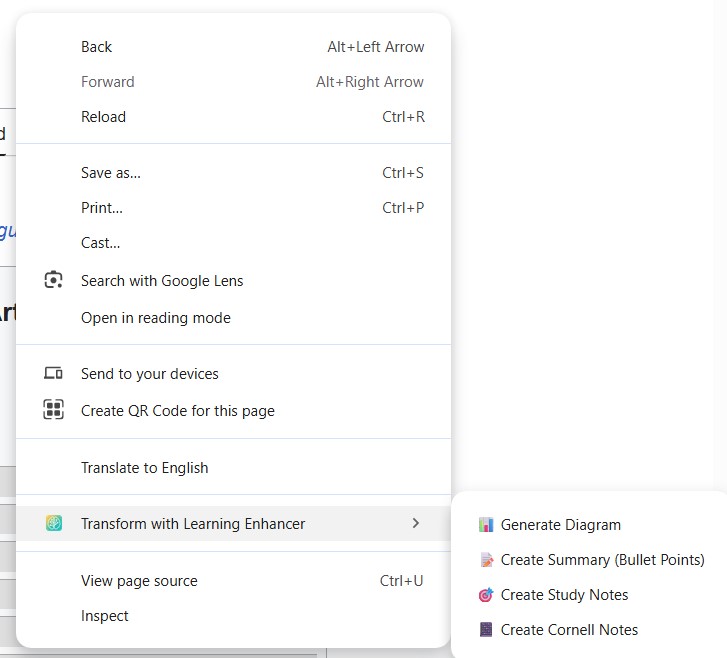
- Right-click context menu for instant transformations
- Beautiful floating widget with branded icon and 4 instant-toggle buttons
- Instant switching between cached transformations (5-8s only on first generation)
- Visual button states (active/available/unavailable feedback)
- One-click copy to clipboard with visual confirmation feedback
- Full transformation history with search and filtering
- Export/import your learning history
- Statistics dashboard to track your progress
- 100% privacy-first: all processing happens locally
Works everywhere: Any webpage, any topic, any time. From MDN documentation to Wikipedia articles, from research papers to blog posts—if you can read it, we can transform it.
How we built it
Core Technologies:
- Chrome Extension Manifest V3 (service workers, content scripts)
- All 4 Chrome Built-in AI APIs: • Prompt API (ai.languageModel) - Diagram generation, study notes • Summarizer API (ai.summarizer) - Bullet-point summaries • Writer API (ai.writer) - Educational content generation • Rewriter API (ai.rewriter) - Content adaptation
- Mermaid.js - Interactive diagram rendering
- Vanilla JavaScript (~6,850 lines of production code)
Architecture:
The extension follows a modular architecture with clear separation of concerns:
Content Extraction Layer (
content/content-extractor.js)- Heuristic-based article detection
- Smart content scoring and extraction
- Text selection support
AI Processing Layer (
lib/chrome-ai-apis.js,lib/text-transformer.js,lib/diagram-generator.js)- Wrapper around Chrome AI APIs
- 3-level fallback system for robustness
- Content analysis and type detection
- Prompt engineering for each transformation type
Visualization Layer (
lib/visual-engine.js,lib/interactive-diagram.js)- Mermaid.js integration via CDN
- Interactive controls (zoom, pan, click)
- SVG export and code copying
UI Layer (
content/widget.js,popup/)- Floating draggable widget
- Tab-based interface
- Popup with history management
Storage Layer (
lib/storage.js)- StorageManager class for chrome.storage.local
- Search, filter, export/import
- Statistics tracking
Development Process:
Built over 8 days with a systematic approach:
- Day 1-2: Foundation (APIs, content extraction, popup)
- Day 3-4: Core transformations (text, diagrams)
- Day 5: Interactive UI and widget
- Day 6: Storage and history management
- Day 7: Testing and documentation
- Day 8: Demo and submission
Key Innovations:
- Auto-detection of content type (flowchart vs. timeline vs. mind map)
- 3-level fallback system (Prompt API → simplified prompt → manual syntax)
- Client-side search/filter for instant results
- Hover-to-show delete buttons for clean UI
Challenges we ran into
Challenge 1: Mermaid Syntax Generation
The biggest challenge was getting the Prompt API to generate VALID Mermaid syntax consistently. Early attempts produced diagrams with syntax errors 30-40% of the time.
Solution: Implemented a 3-level fallback system:
- Primary: Detailed prompt with syntax examples and strict rules
- Fallback: Simplified prompt if primary fails
- Manual: Regex-based syntax fixing and validation
This reduced failures to <5%.
Challenge 2: Content Type Detection
How do you know if content should be a flowchart, timeline, or mind map? Early versions always generated the same type.
Solution: Built a ContentAnalyzer that examines:
- Keyword density (dates → timeline, "step/process" → flowchart)
- Structure analysis (headings, lists, chronological markers)
- Content length and complexity
The AI now intelligently chooses the best diagram type.
Challenge 3: Performance on Long Content
Pages with 10,000+ words caused timeouts and overwhelming diagrams.
Solution: Implemented smart summarization:
- Pre-summarize long content before diagram generation
- Extract only the most important sections
- Limit diagram complexity to ~15-20 nodes
This kept transformations under 15 seconds even on massive articles.
Challenge 4: Widget State Management & UX
Managing state across multiple transformation types and providing instant switching without re-generation was complex.
Solution: Implemented a caching system where:
- First generation of each type takes 5-8 seconds
- Subsequent switches are INSTANT (cached results)
- Button states provide visual feedback (active/available/unavailable)
- Users can freely toggle between all 4 transformation types
Challenge 5: Storage Limits
chrome.storage.local has a 10MB quota. With rich transformations, users could hit limits quickly.
Solution:
- Implemented max 100 transformations limit (configurable)
- Added storage usage monitor with visual progress bar
- Created export/import for backup
- Auto-cleanup methods for old transformations
Accomplishments that we're proud of
Used ALL 4 Chrome Built-in AI APIs Not just for the sake of it—each API serves a distinct, meaningful purpose. Prompt API for diagrams, study notes, and Cornell notes; Summarizer for quick bullet summaries; Writer for educational content generation; Rewriter for content adaptation.
6,850 Lines of Production Code This isn't a prototype. It's a fully functional, feature-complete extension with comprehensive error handling, fallback mechanisms, and polish.
3-Level Fallback System The extension ALWAYS produces output, even when individual APIs fail. Robustness was a priority.
Genuinely Useful This solves a real problem I (and millions of others) face daily. It's not just a tech demo—it's a tool I actually want to use.
Interactive Diagrams Going beyond static images to fully interactive diagrams with zoom, pan, click, download, and copy capabilities creates a genuinely superior learning experience.
Privacy-First Architecture 100% local processing. No servers, no tracking, no data collection. Your learning journey is yours alone.
Comprehensive Documentation Created 8 documentation files including testing plan, architecture docs, daily progress logs, and complete API setup instructions.
Professional UX Smooth animations, loading states, button state feedback, instant cached switching, demo mode warnings—every detail polished for a production-quality experience.
Complete History Management Search, filter, export, import, statistics tracking—features you'd expect from a production app.
Auto-Detection Intelligence The AI analyzes content and chooses the right diagram type automatically. Users don't need to think—it just works.
What we learned
Technical Learnings:
Chrome Built-in AI APIs are Powerful Gemini Nano running locally is surprisingly capable. The Prompt API can handle complex tasks like Mermaid syntax generation with proper prompt engineering.
Prompt Engineering is Critical The difference between a vague prompt and a well-structured one is 40% vs. 95% success rate. Specific examples, strict rules, and format specifications matter.
Fallbacks are Essential AI is probabilistic. Even with great prompts, you need fallbacks. Plan for failure, validate outputs, and always give users SOMETHING.
Content Extraction is Hard Every website structures content differently. Building a robust extractor required heuristics, scoring algorithms, and lots of testing.
Interactive > Static Adding zoom, pan, and click interactions transformed diagrams from "nice to have" to "genuinely useful."
Storage Design Matters Proper abstraction (StorageManager class) made the codebase maintainable. Direct chrome.storage calls everywhere would have been a mess.
Personal Learnings:
Systematic Beats Random The 8-day plan kept development focused. Each day built on the previous, preventing scope creep.
Documentation Early Writing docs as I built (not after) caught gaps in thinking and improved design.
User-First Thinking Constantly asking "Would I actually use this?" kept features relevant and avoided over-engineering.
Polish Matters The difference between "works" and "delightful" is 20% more effort that makes 80% more impact.
Test Thoroughly Creating a comprehensive testing plan (12 categories, 100+ tests) revealed edge cases I'd never have found otherwise.
What's next for Multimodal Learning Enhancer
Post-Hackathon Roadmap:
Short-term (1-2 months):
- Add dark mode support for late-night learning
- Implement keyboard shortcuts (Ctrl+Shift+L for transform)
- Add more diagram types (sequence diagrams, class diagrams, ERDs)
- Create custom template system for frequent learners
- Improve mobile responsiveness (for tablet use)
Medium-term (3-6 months):
- Browser sync across devices via Chrome Sync
- Collaborative features (share transformations with classmates)
- Integration with note-taking apps (Notion, Obsidian)
- AI-powered recommendations ("You might also like...")
- Advanced filtering (date ranges, tags, categories)
Long-term (6+ months):
- Support for other Chromium browsers (Edge, Brave)
- Audio learning mode with Text-to-Speech (when API available)
- Spaced repetition integration for study notes
- Community diagram templates
- Teacher/student modes for education
Potential for Impact:
This extension could help:
- Students studying for exams (millions globally)
- Developers learning new technologies (100M+ worldwide)
- Researchers digesting papers quickly
- Lifelong learners exploring new topics
- Accessibility users who need alternative content formats
The market is massive. The problem is universal. The solution works TODAY.
Open Source Plans: After the competition, I plan to open-source this project (MIT license) so the community can:
- Add new diagram types
- Create custom templates
- Improve prompt engineering
- Translate to other languages
- Build integrations
The goal is to make learning accessible to everyone, everywhere.
Built With
- artificial
- artificial-intelligence
- browser-extension
- chrome
- chrome-ai
- diagrams
- education
- intelligence
- javascript
- machine-learning
Log in or sign up for Devpost to join the conversation.