-
-
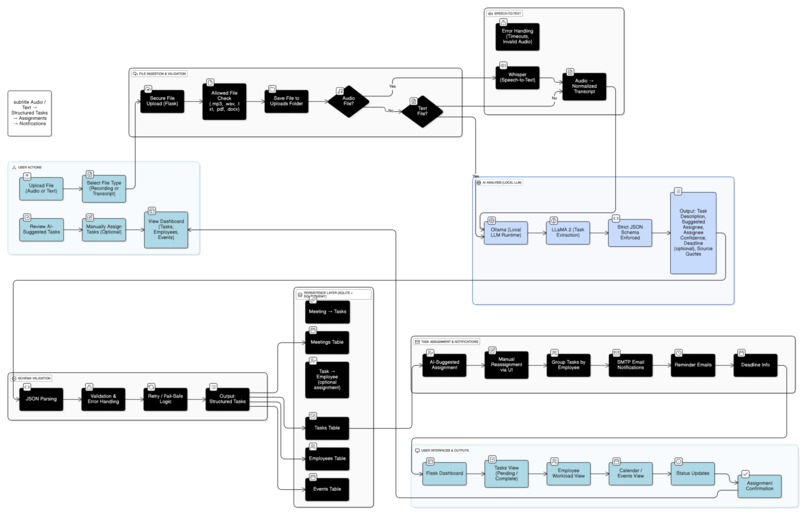
Flow Diagram
-
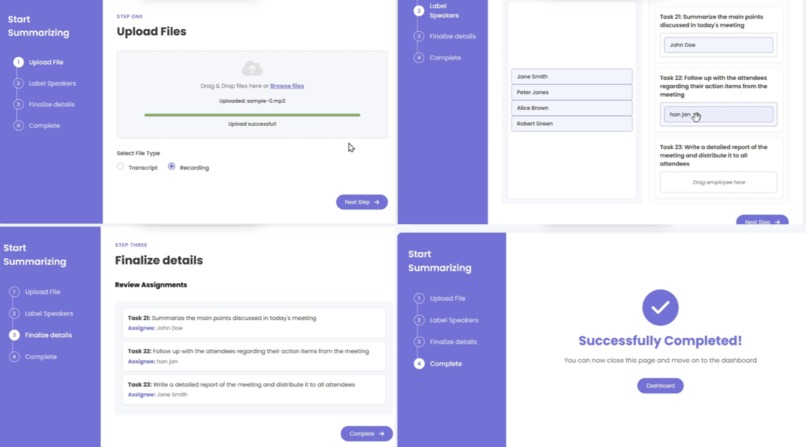
AI powered task assign
-
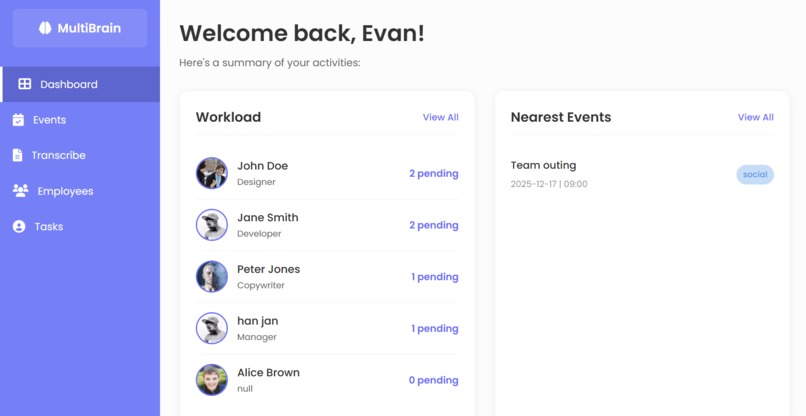
Dashboard
-
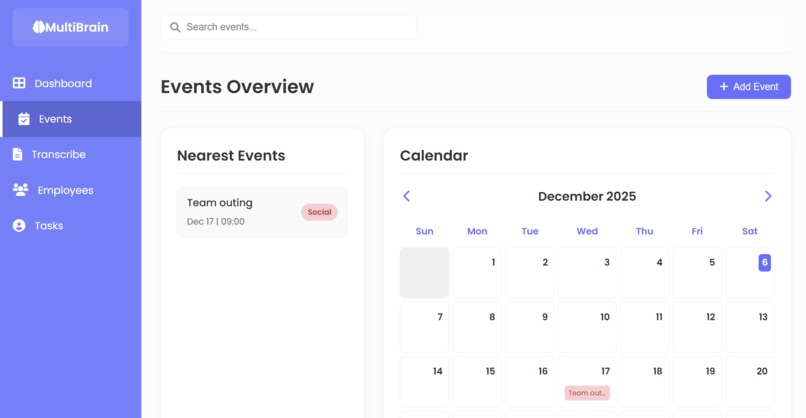
Event page
-
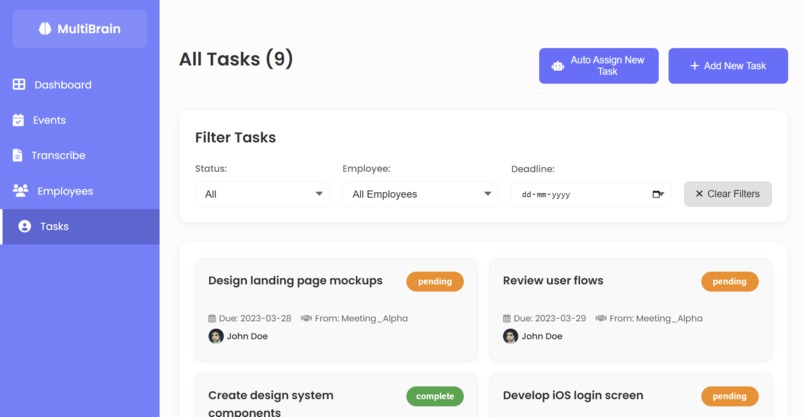
Task page
-
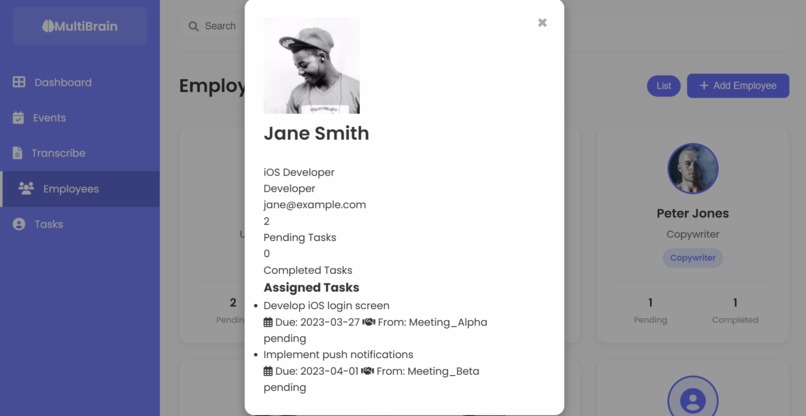
Employee page


Inspiration
Teams sit through meeting after meeting and still walk out asking, “Okay, so what am I supposed to do now?”
Most tools stop at transcripts or generic summaries, which still force each person to dig through text, guess ownership, and send manual follow-ups. MultiBrain AI was inspired by the idea of treating meetings as an input stream for an AI “ops layer” that automates the boring part: extracting tasks, assigning owners, and nudging people at the right time.
From one messy conversation, it automatically produces owned tasks, deadlines, and reminders — so work actually moves forward.
What it does
MultiBrain AI is an AI-powered meeting ops assistant that turns recordings or transcripts into structured work:
- Ingests meeting audio (.mp3/.wav) or text transcripts
- Uses Whisper to transcribe audio into clean, normalized text
- Sends the transcript to a local LLaMA 2 model (via Ollama) with a strict JSON schema to extract:
- Task description
- Suggested assignee + confidence
- Deadline (if mentioned)
- Source quote for context
- Task description
- Stores employees, tasks, meetings, and events in SQLite through SQLAlchemy models
- Lets you review and assign tasks from a Flask dashboard
- Shows per-employee workload (pending vs completed tasks)
- Sends grouped reminder emails to each assignee with their tasks and deadlines
- Sends optional team-wide emails when new events are added to the calendar-style view
From one messy meeting, MultiBrain AI produces owned tasks, a schedule, and notifications.
How it's built
MultiBrain AI is a three-layer system:
Ingestion & ASR
- Flask backend exposes an upload endpoint for audio or text.
- Audio files are transcribed with Whisper into normalized text, with basic format checks and error handling.
- Flask backend exposes an upload endpoint for audio or text.
Task extraction (local LLM)
- Transcripts are sent to a local LLaMA 2 model via Ollama over HTTP.
- A strict JSON schema in the prompt forces the model to return structured tasks (description, suggested assignee, deadline, confidence, source quote).
- The backend validates and parses this JSON into
MeetingandTaskrecords.
- Transcripts are sent to a local LLaMA 2 model via Ollama over HTTP.
Ops & delivery layer
- Data is stored in SQLite using SQLAlchemy models for
Employee,Task,Meeting, andEvent. - Flask templates render four main views: upload/auto-assign, events (calendar-style), tasks (with status filters), and employees (per-person workload).
- A small SMTP module groups tasks by assignee and sends reminder emails, and optionally broadcasts new events to the whole team.
- Data is stored in SQLite using SQLAlchemy models for
Challenges faced
Strict JSON from LLaMA 2
Getting a local LLaMA 2 model to reliably emit strict JSON (instead of chatty prose) was harder than expected. It took multiple prompt iterations and defensive parsing logic to keep the pipeline robust when the model drifted from the schema.Audio & transcription pipeline
Handling different audio formats and Whisper’s dependencies (ffmpeg, CPU vs GPU performance) required extra work to keep the upload route responsive and avoid timeouts or crashes.Schema design for real workflows
Modeling relationships between meetings, tasks, employees, and events in a way that supports both calendar views and workload dashboards involved a few rounds of schema refactoring.Email configuration & deliverability
Setting up secure SMTP with app passwords, avoiding credentials in code, and formatting grouped emails so they’re readable (and not flagged as spam) took more iteration than simply “send email”.
Proud Accomplishments
- In internal tests, MultiBrain AI converted a 30–45 minute meeting into structured, assigned tasks in under 2 minutes of post-processing, eliminating manual follow-ups.
- Built a fully local-first AI workflow that combines Whisper, LLaMA 2 via Ollama, Flask, and SQLite into one cohesive meeting ops assistant.
- Went beyond “AI meeting summaries” to generate structured tasks, link them to employees, and close the loop with dashboards and notifications.
- Designed a clean, multi-page dashboard (events, tasks, employees) that makes the underlying data model visible and useful.
- Implemented grouped reminder emails per assignee, which makes the AI output actionable in real inboxes, not just in a UI.
Lessons learnt
- How to design AI systems that don’t stop at summarization but actually drive work: from unstructured audio → structured entities → assignments → notifications.
- How to work with local models (Ollama + LLaMA 2) in a production-style HTTP pipeline, including strict schema prompting and error handling.
- How much small UX decisions matter: grouping tasks by assignee, showing pending vs completed counts, and treating email as a first-class output channel.
- The importance of clear separation of concerns between ingestion, AI reasoning, and ops/notification layers.
What's next for MultiBrain AI
- Add speaker diarization so tasks and quotes can be tied to who actually said what, not just suggested assignees.
- Integrate with Google Calendar / Outlook so events sync directly instead of living only in the internal calendar view.
- Add Jira / Asana / Notion export so tasks can flow into existing team task systems.
- Introduce role-specific views (manager vs individual contributor dashboards) and basic analytics on meeting-generated workload.
Built end-to-end as a solo project, handling backend architecture, AI integration, data modeling, and UX decisions.
BY: HANNAH JANAWA ([email protected])
Built With
- css
- ffmpeg
- flask
- html
- javascript
- ollama
- python
- sqlalchemy
- sqlite
- whisper

Log in or sign up for Devpost to join the conversation.