-
-
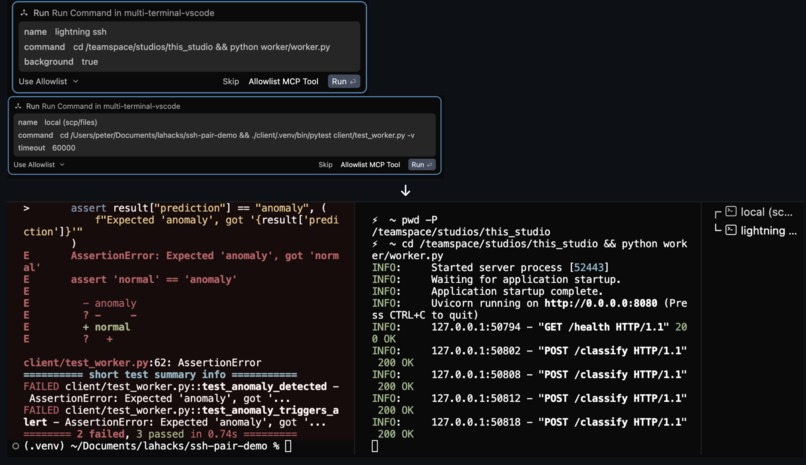
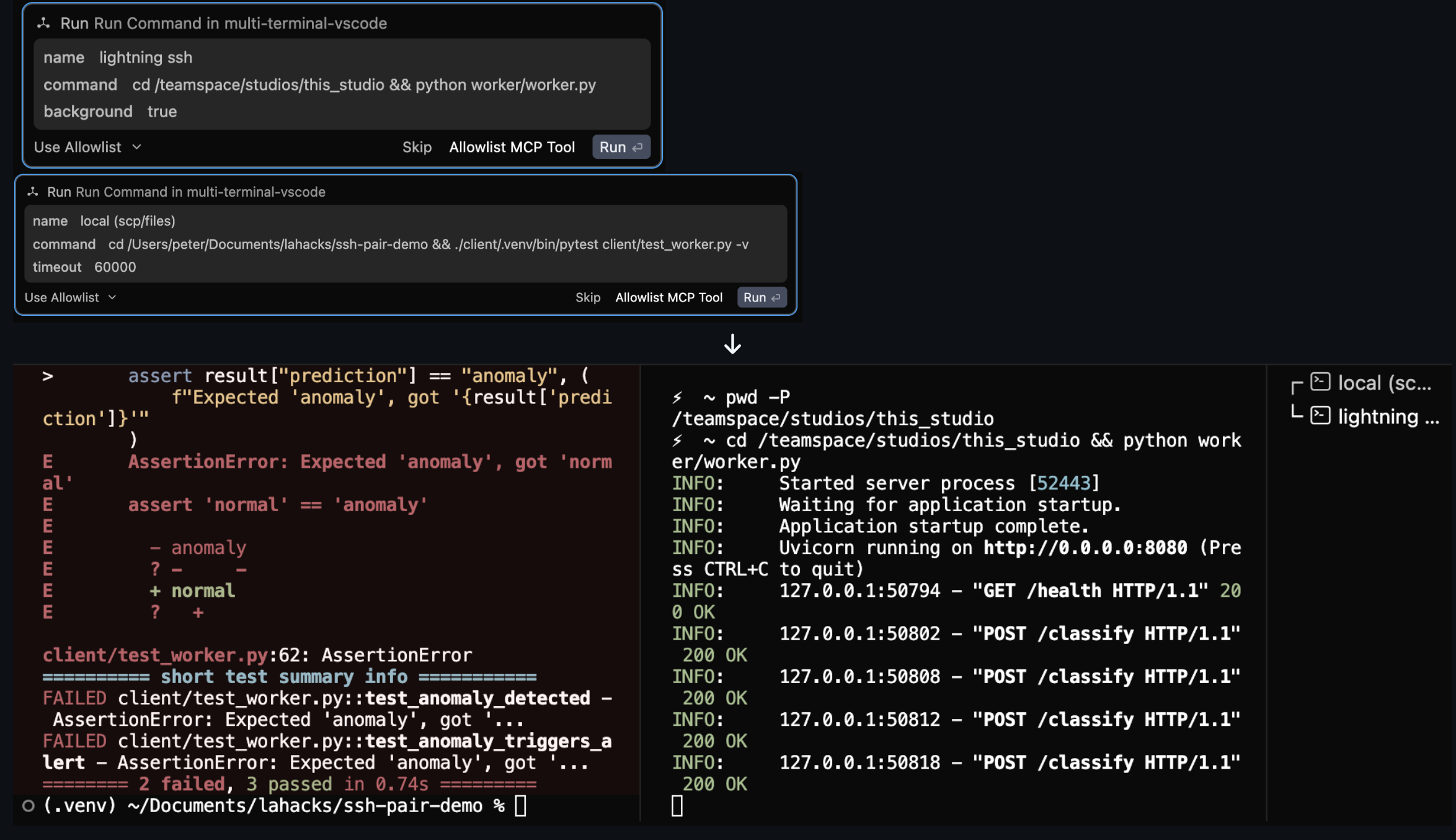
(VSCode Extension) Client Server MTA before implementing fix
-
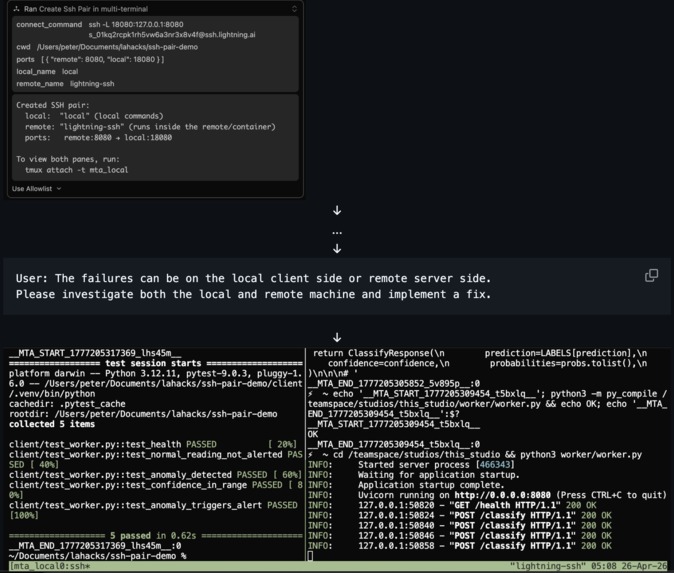
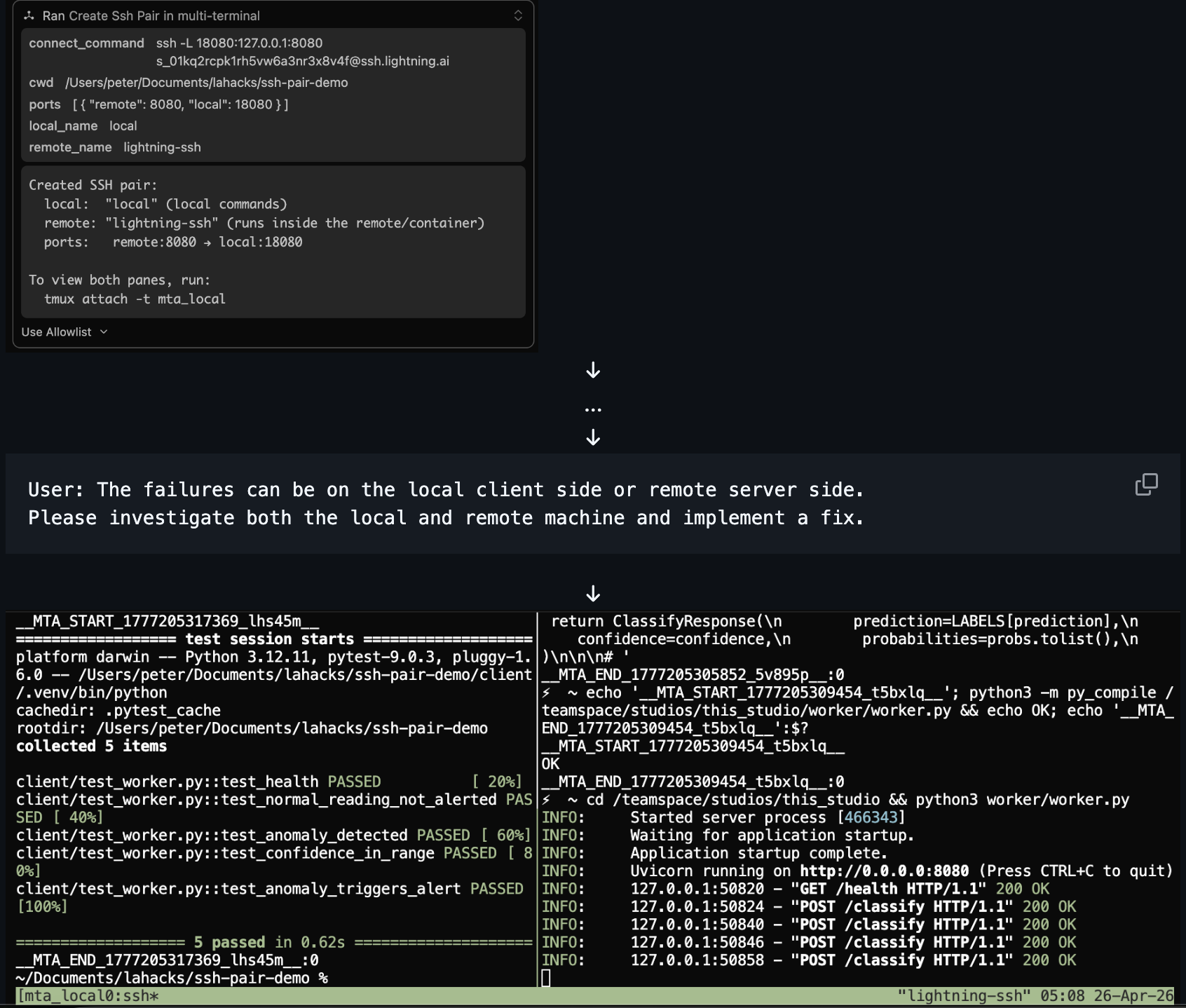
(tmux) Client Server MTA after implementing fix
-
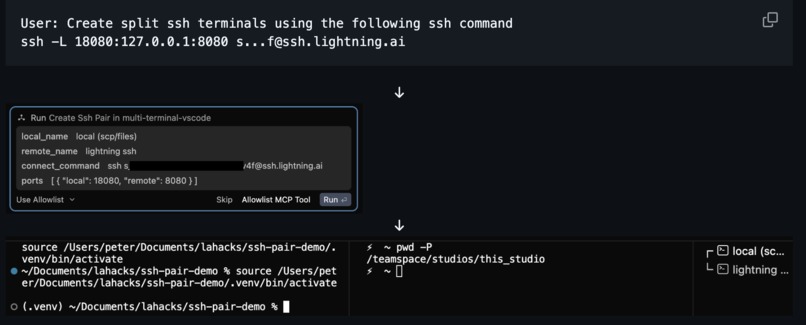
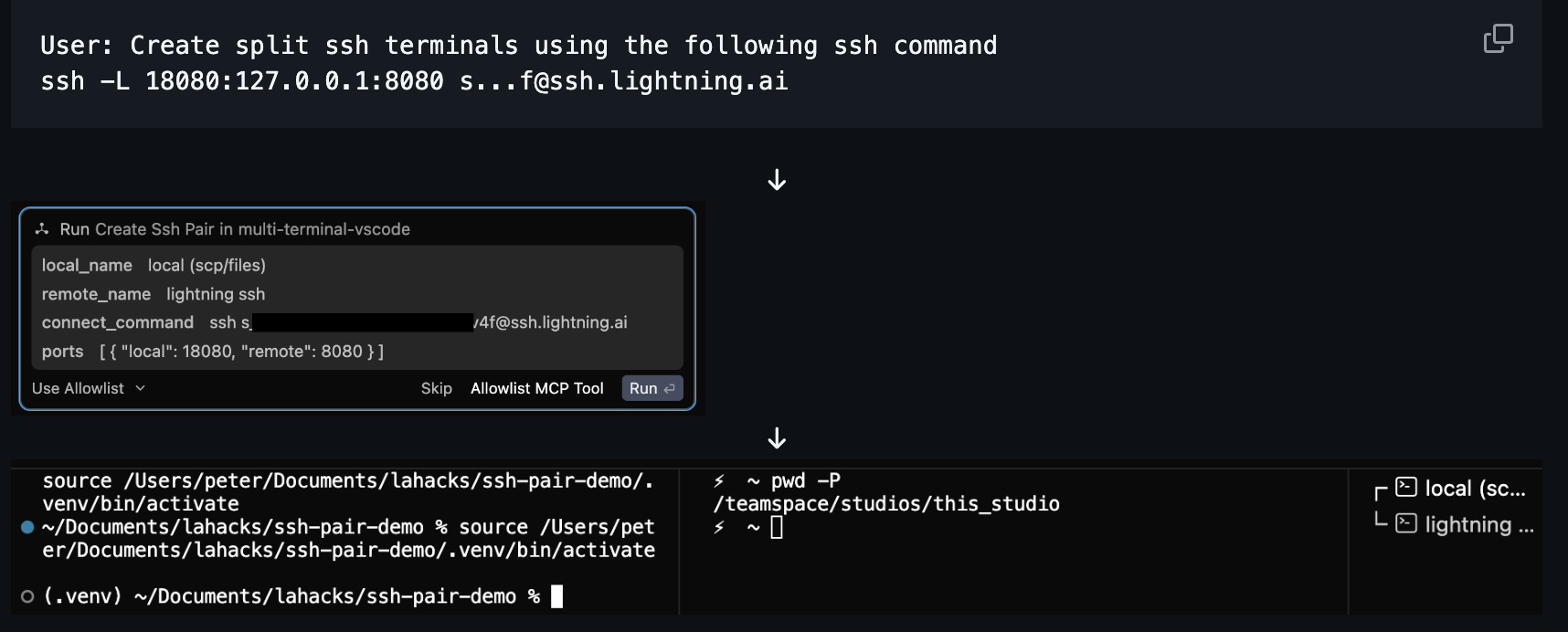
Initial creation of side-by-side Cursor terminals from create_ssh_pair MCP call
Inspiration
Use Case 1: During some of my previous internships, the most challenging debugging sessions were when I was working across multiple systems (e.g., local + inside a Docker container, head node + remote VM). An AI Agent running on one machine typically does a poor job of understanding context from the other machine. Typically, I would run one agent on one machine and another agent on another machine, but they do a poor job solving problems that require knowledge of both systems because they don't communicate with each other directly.
Use Case 2: While contributing to a large open source data warehouse project called ClickHouse, I usually have to run a server in one terminal and then run a test command in a second terminal (as the client). When I ask a coding agent to investigate a bug, it makes code changes but fails to iterate by running the tests with the updates (and hence can't debug as effectively). Essentially, it fails miserably because it needs to perform operations in two terminals: 1) recompile and restart the server, and 2) run the tests as a client process. Running it on the client terminal, it tries to find the server process, kill it, and start a new one. However, it fails because it also needs to run the client as a separate process. Eventually, I end up having to manually kill the server and restart it for the agent, which significantly slows the iteration process and brings a human-in-the-loop.
If only a single agent could smoothly leverage multiple terminals...
What it does
Multi-Terminal Agent integrates with an existing coding agent, enabling it to effectively control two terminals through an MCP Server. The MCP Server exposes tool calls and instructions that enable the coding agent to create multiple processes, execute commands on them, and read the outputs. Effectively, this serves as a context bridge between multiple machines for a single brain (the agent).
How I built it
After coming up with the problem I wanted to solve, I leveraged multiple AI coding agents such as Windsurf, Cursor, and Claude Code to propose ideas and approaches to solve the problem. I tried two approaches: a VS Code extension and a CLI implementation that uses the tmux command.
The tmux implementation works with any kind of coding agent because it lives entirely in the CLI. It creates a split pane of terminals, and the agent can send commands to the terminal.
The VS Code Extension implementation leverages the VS Code SDK to enable the agent to create VS Code terminals and use triggers available through the SDK, which provides a better UX.
I also developed a few specific MCP tool calls to standardize common processes that were difficult for the agent to do on its own, such as update_remote_file. This made the quality of these operations consistent and reduced agents' confusion about how to do things.
In addition to supporting multiple terminals, I added support for the agent to work across an SSH connection. create_ssh_pair is a tool that creates two side-by-side terminals, one for the local machine and one that's already SSH'd into a remote machine. The agent can then send commands to whichever terminal it needs to. This is supported by both implementations
Challenges I ran into
Originally, I wanted to develop the VS Code version of the project to use for Windsurf. Unfortunately, I found that the Windsurf IDE doesn't expose the terminals I create through the VS Code Extension API to the user. Technically, they are created and are operated on, but they weren't visible to the user, which was important to me because I wanted the user to be able to scroll, view, and interact with the terminals themselves. Eventually, I switched to using Cursor to test my project on because it successfully exposed the terminals my agent creates. In theory, Windsurf should be able to support this project with a small fix to their internal codebase.
Working with forever-running commands (e.g., running a server) was quite hard because I needed to teach the agent to return after launching it in the terminal, come back later and remember it's blocked, know to kill it (Ctrl+C) before running another command in the terminal, and restart the server when it wants to run the tests again.
Leveraging the remote terminal was especially challenging compared to a regular local terminal. I wanted to avoid downloading an agent in the remote session because there are situations where it's inconvenient, disallowed, or even not possible. This means all interactions with the remote machine are done through commands that the agent submits (e.g., ls, cat). The agent would stumble a lot trying to update remote files. I found that agents struggled when generating diff patches and applying them to files, but they excelled when they instead just overwrote the entire file.
Another challenge was that starting a server occasionally failed (e.g., port already in use). It's very natural to have the agent immediately move on after launching the run server command because it doesn't make sense to have it constantly poll the server command forever. After the command failed, the agent would move on and attempt to run commands as if the server were running. I solved this by having the MCP server wait a second after launching the server and return a snapshot of the existing output to the agent. This passed the failure output from the MCP server to the agent, so the agent knew to investigate the proper problem at the server.
I ran into many issues, given that the public API surface of existing coding products is limited to integrations such as MCP servers. I needed to implement workarounds to implement some features, and some features were just not possible without access to the core IDE codebase. The UX, for example, could definitely be improved with access to modifying the core IDE.
I built the tmux implementation of the project to serve as a more general approach that would work for CLIs. I found the user experience was much rougher, making it difficult to navigate each pane of the terminal window because tmux has special keybindings for navigating terminals.
Accomplishments that I'm proud of
I'm happy that I built a working project that successfully addressed the two use cases I had in mind. Enabling an agent to debug across a local and remote codebase that aren't all stored on one machine (Use Case 1) and to independently develop a project using a client-server workflow (Use Case 2).
I'm proud of the MCP's management of blocking terminal commands. Originally, the agent would stumble a lot trying to run commands in the server terminal when the server process was still running. After my changes to the MCP server, the agent smoothly tracks and knows when it needs to kill the server based on the response from the MCP server.
I'm proud of its relative simplicity. While there was a lot of iteration for development, it's not too large in codebase size.
What I learned
Building integrations is hard because a large part of what I'm capable of implementing is dependent on the public interface exposed by the proprietary product. Many features and areas of work were either made harder or just impossible because I couldn't modify the internal codebase. Simultaneously, it's interesting to find workarounds to arrive at a working solution, even if it's less pretty than it could be otherwise.
I've learned that it can be hard to get agents to follow rules given to them through AGENTS.md or instructions. It's important to refine these in order for the agent to obey.
This was the first time I developed a VS Code Extension and an MCP Server. They're both more powerful than I initially realized. I originally thought MCP servers were primarily for data source integrations, but I'm impressed by their ability to extend the capabilities of the agent.
I learned about the differences between various AI coding tools that I used for development. While they have similar interfaces, they have different properties that are only obvious after working with them deeply. Some may be higher quality and slower, while others might be faster and lower quality for some tasks.
What's next for Multi-Terminal Agent
While this MVP successfully debugs across SSH sessions, more work needs to be done to make this effective on larger codebases on the other side of an SSH session. I think it would struggle with much larger codebases on the remote side, since it's not as powerful for investigation and searching through remote connections.
While there is a tmux implementation that solely uses the command line, it's not as fleshed out and is not a great user experience. In the future, I would like to have a more fleshed-out implementation of a CLI version of the Multi-Terminal Agent.
While the current implementation works, it's more of a Proof of Concept than a production-ready tool. I think a tool like this would be best built natively within the IDE, as it would have access to more powerful APIs and a better user experience.
Built With
- cursor
- mcp
- typescript
- vscodesdk
- windsurf

Log in or sign up for Devpost to join the conversation.