-
-
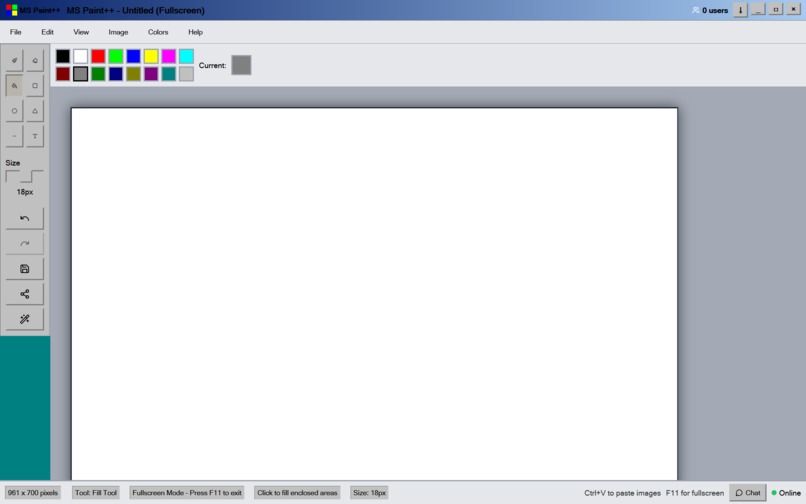
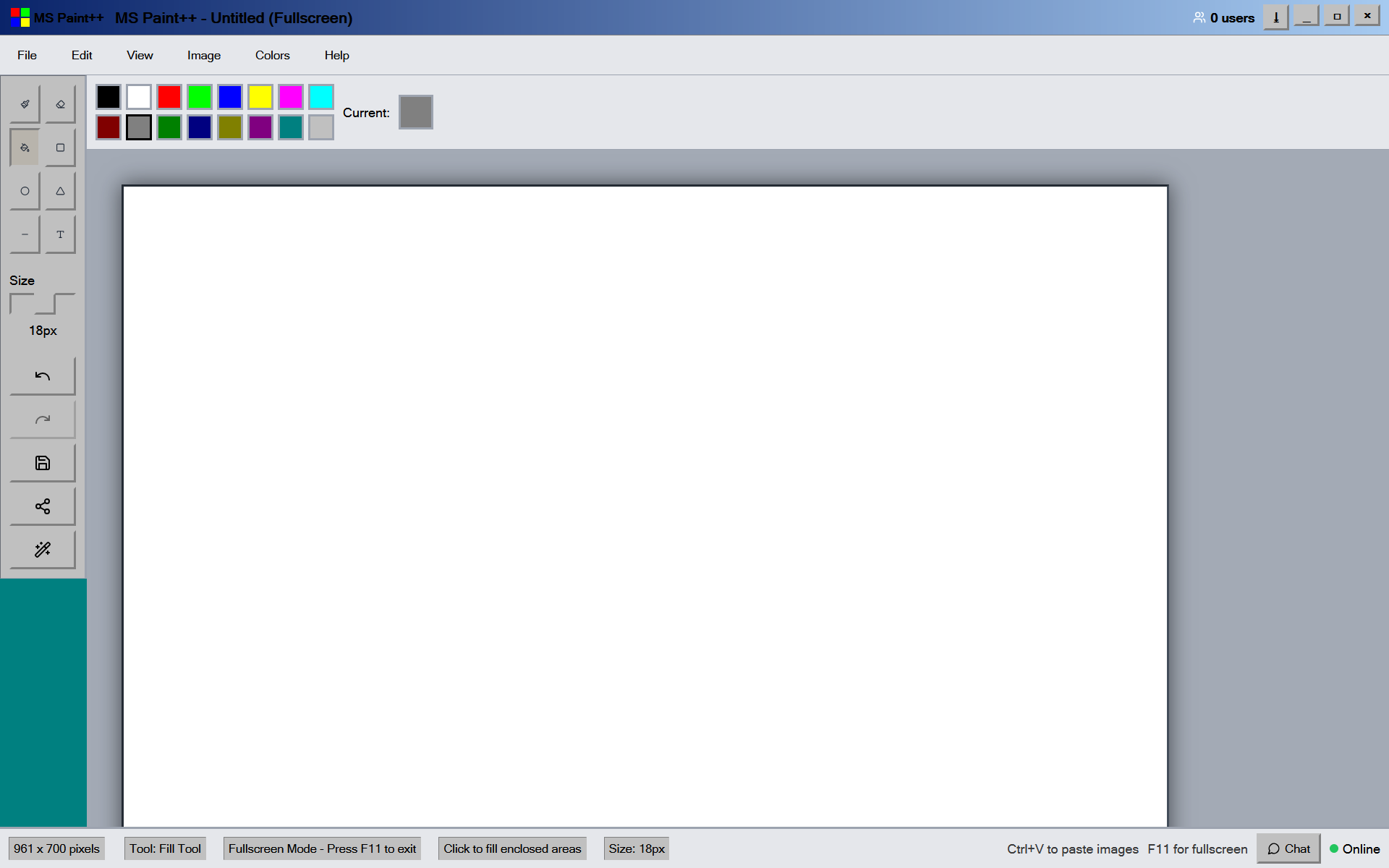
retro windows 98 interface
-
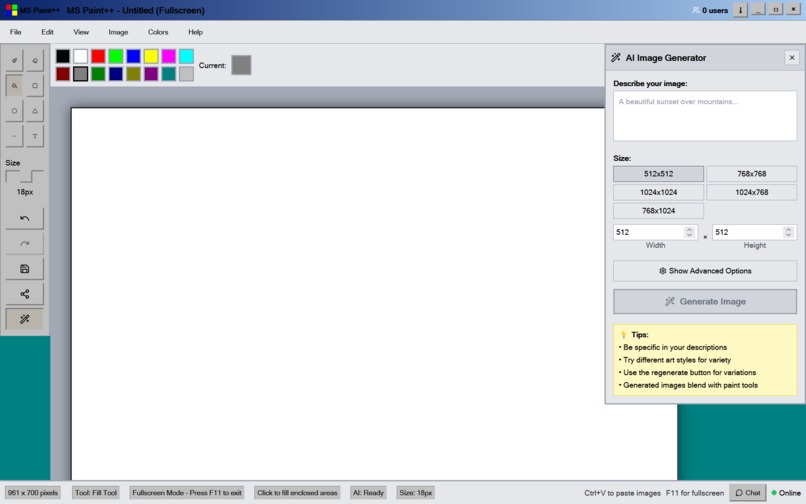
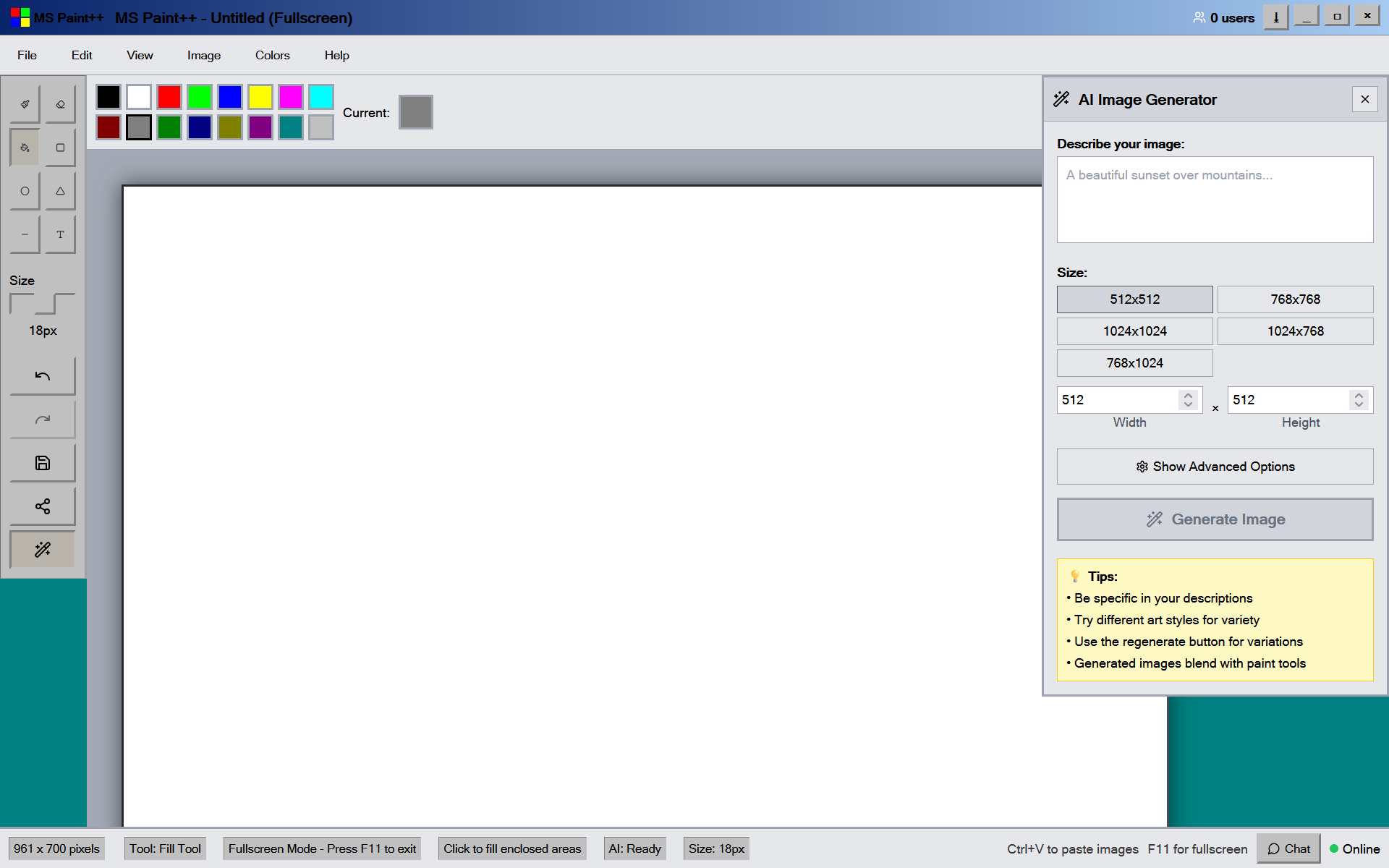
ai generator pallet
-
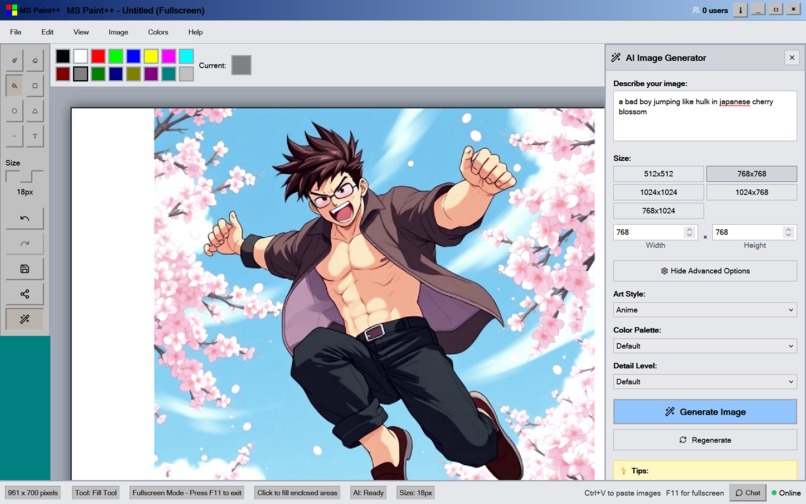
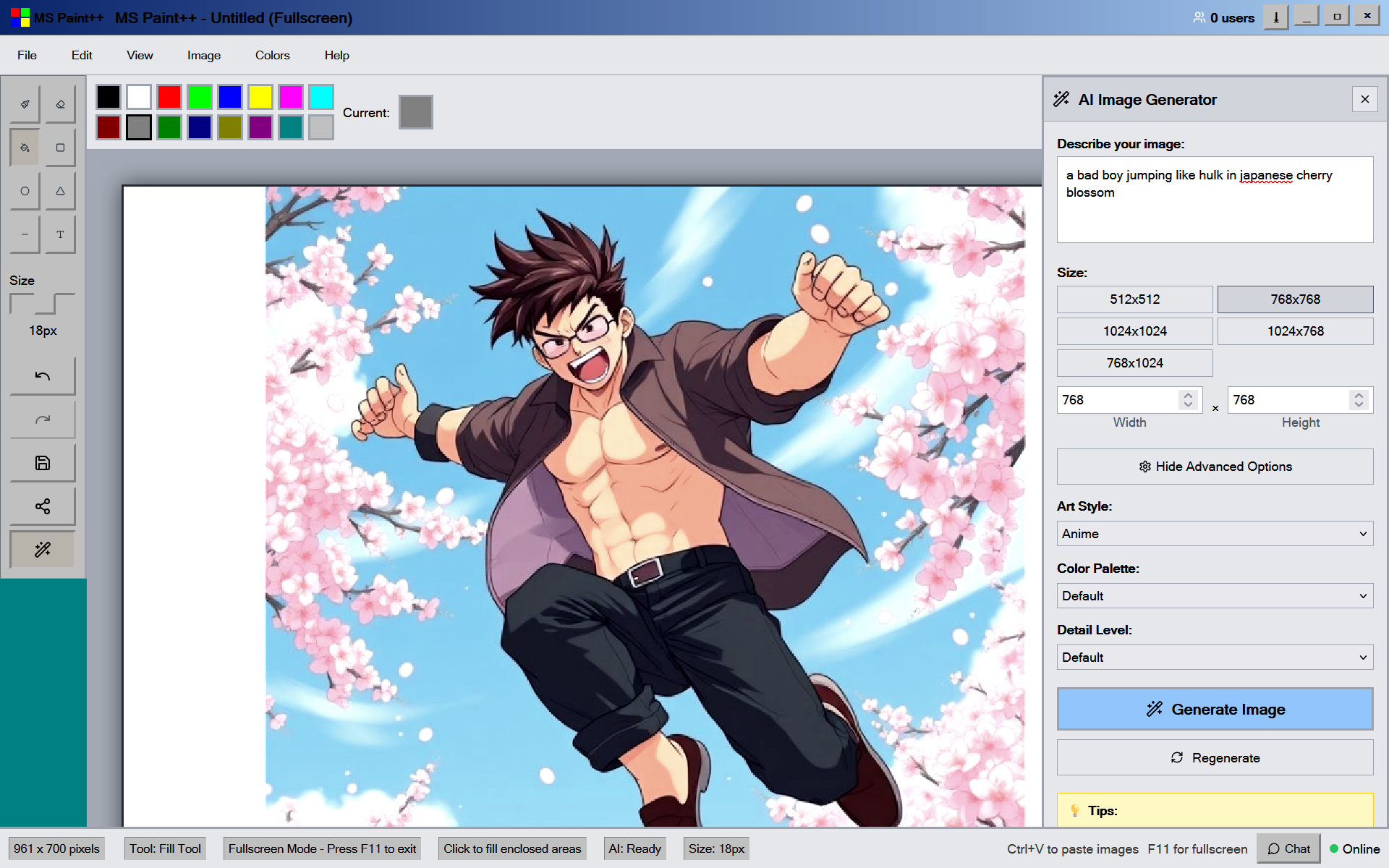
generated thorough pollination ai
-
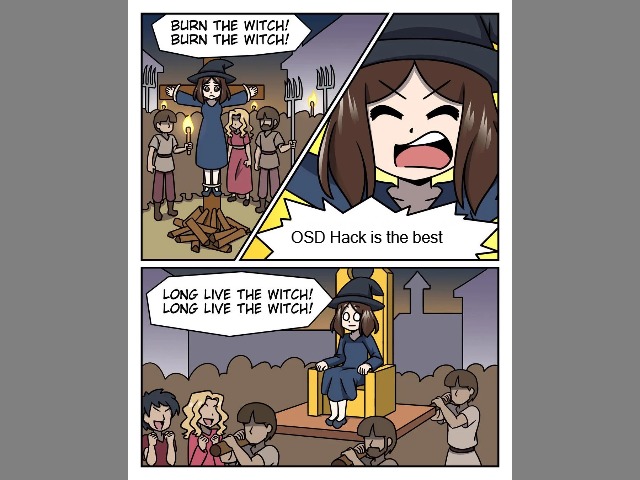
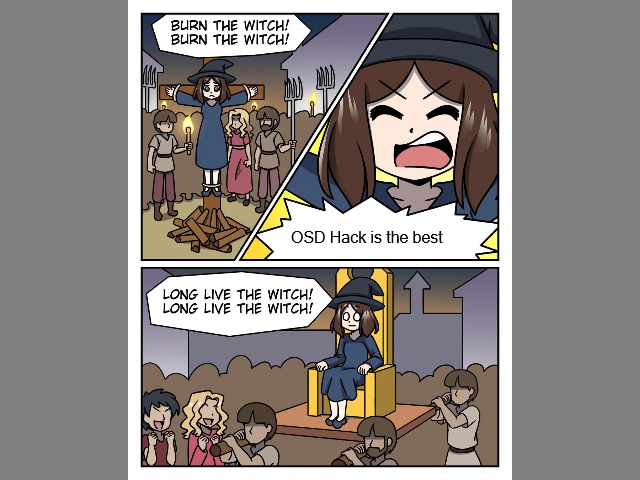
made this meme with our retro-paint++
🎨 retro-paint - Open Source Days Hackathon Submission
A nostalgic meme creation studio that brings back the golden age of MS Paint with modern collaborative features
💡 Inspiration
Remember the days when creating memes was an art form? When MS Paint was the weapon of choice for crafting rage comics, reaction images, and those beautifully crude drawings that defined early internet culture? We were inspired by the pure joy and creativity that came from those simple tools.
Our inspiration came from multiple sources:
- Nostalgia for Windows 98 era - The chunky buttons, system sounds, and that distinctive retro aesthetic
- Early meme culture - Rage comics, stick figures, and the raw creativity of pre-Instagram internet
- Collaborative creativity - The magic that happens when friends create something together in real-time
- Modern AI potential - Imagining how AI could enhance rather than replace human creativity
- Open source spirit - Making creative tools accessible to everyone, just like the original Paint
We wanted to bridge the gap between nostalgia and modern technology, creating something that feels familiar yet surprisingly powerful. The goal was to capture that feeling of opening MS Paint for the first time, but with the collaborative features we wish we had back then.
🚀 What it does
retro-paint is the ultimate retro meme creation studio that combines authentic Windows 98 aesthetics with cutting-edge collaborative features:
🎯 Core Meme-Making Arsenal
- Classic Drawing Tools - Brush, eraser, shapes, and fill tools with pixel-perfect precision
- Text Engine - Add impact font-style captions with authentic MS Sans Serif typography
- 16-Color Palette - The exact Windows 98 color palette for maximum authenticity
- Canvas Management - Resizable canvases optimized for different meme formats
🤝 Real-Time Collaboration
- Live Drawing Sync - Watch friends create memes together in real-time across the internet
- Multi-User Cursors - See exactly where each collaborator is working and what tools they're using
- Built-in Chat - Coordinate your collaborative shitposting with integrated messaging
- User Presence - Know who's online and ready to meme at any moment
🤖 AI-Powered Creativity
- Smart Meme Generation - Describe your vision and let AI create the perfect meme base
- Multiple Art Styles - From cursed AI art to clean digital illustrations
- Template Creation - Generate reaction images and meme templates on demand
- Seamless Integration - AI content loads directly for immediate editing and captioning
🎵 Authentic Retro Experience
- Pixel-Perfect UI - Every button, border, and dialog recreated with Windows 98 accuracy
- Classic Sound Effects - Authentic Windows system sounds for maximum nostalgia
- Retro Typography - MS Sans Serif throughout for that genuine early internet feel
- Performance Optimized - Smooth drawing even on modern high-DPI displays
💾 Modern Conveniences
- Clipboard Integration - Paste images directly from anywhere with Ctrl+V
- Fullscreen Mode - Immersive meme creation without distractions
- Unlimited Undo/Redo - Fix mistakes without fear
- Instant Export - Download your masterpieces for immediate sharing
🏗️ How we built it
Building retro-paint was an exciting journey that combined retro aesthetics with modern web technologies:
🎨 Frontend Architecture
- React 18 + TypeScript - For type-safe, component-based UI development
- Vite Build System - Lightning-fast development with hot module replacement
- Canvas API - High-performance drawing operations with pixel-perfect rendering
- Tailwind CSS + Custom CSS - Utility-first styling combined with authentic Windows 98 theming
🔧 Drawing Engine
- Custom Canvas Management - Built from scratch to handle multiple drawing tools
- Flood Fill Algorithm - Implemented efficient bucket fill using stack-based traversal
- Real-time Preview - Shape tools show live previews during drawing
- History System - Canvas snapshots for unlimited undo/redo functionality
🌐 Collaborative Backend
- Go WebSocket Server - High-performance real-time communication
- Gorilla WebSocket - Robust WebSocket implementation with connection management
- Event-Driven Architecture - Efficient broadcasting of drawing events to all connected users
- User Presence Tracking - Real-time cursor positions and tool selections
🤖 AI Integration
- Modular AI Panel - Extensible component for different AI providers
- Multiple Art Styles - Customizable prompts for various meme aesthetics
- Image Processing - Automatic scaling and integration of generated content
- Error Handling - Graceful fallbacks when AI services are unavailable
🎵 Retro Experience Engineering
- Web Audio API - Custom retro sound engine with classic Windows sounds
- CSS Animations - Authentic button press animations and hover effects
- Typography System - Pixel-perfect MS Sans Serif implementation
- Responsive Design - Maintains retro feel across different screen sizes
🧪 Quality Assurance
- Vitest + React Testing Library - Comprehensive test coverage
- Cross-browser Testing - Ensuring compatibility across modern browsers
- Performance Monitoring - Optimized rendering for smooth drawing experience
- Accessibility Features - Screen reader support and keyboard navigation
😅 Challenges we ran into
Building retro-paint presented several unique challenges that pushed us to be creative:
🎨 Recreating Authentic Windows 98 Aesthetics
- Pixel-Perfect Recreation - Getting the exact button styles, borders, and shadows required meticulous CSS work
- Sound System Integration - Browser audio policies made it tricky to implement classic Windows sounds
- Typography Challenges - Ensuring MS Sans Serif renders consistently across different operating systems
- Color Accuracy - Matching the exact Windows 98 16-color palette and ensuring proper display
🔄 Real-Time Collaboration Complexity
- WebSocket State Management - Synchronizing drawing state across multiple users without conflicts
- Event Ordering - Ensuring drawing events are applied in the correct sequence
- Connection Resilience - Handling network interruptions and reconnections gracefully
- Performance Scaling - Optimizing for multiple users drawing simultaneously
🖌️ Canvas Drawing Engine
- Tool State Management - Coordinating between different drawing tools and their unique behaviors
- Flood Fill Performance - Implementing efficient bucket fill without freezing the browser
- Memory Management - Handling large canvases and extensive undo history
- Cross-Browser Compatibility - Canvas API differences between browsers
🤖 AI Integration Hurdles
- API Rate Limiting - Managing AI service quotas and implementing proper fallbacks
- Image Format Handling - Converting between different formats for seamless integration
- Prompt Engineering - Crafting prompts that generate meme-appropriate content
- Loading States - Creating engaging UI while waiting for AI generation
📱 Modern Browser Constraints
- Clipboard API Limitations - Browser security restrictions on clipboard access
- Fullscreen API Differences - Handling various browser implementations
- Touch Device Support - Making the interface work on tablets and touch screens
- Performance Optimization - Maintaining 60fps drawing on lower-end devices
🚀 Deployment Challenges
- WebSocket Hosting - Finding platforms that support WebSocket connections
- CORS Configuration - Proper cross-origin setup for API calls
- Static Asset Optimization - Ensuring fast loading of fonts and sounds
- Environment Configuration - Managing different settings for development and production
🏆 Accomplishments that we're proud of
We're incredibly proud of what we achieved during this hackathon:
🎨 Authentic Retro Experience
- Pixel-Perfect Recreation - Successfully recreated the Windows 98 interface with stunning accuracy
- Sound Design - Integrated classic Windows sounds that transport users back to the 90s
- User Experience - Captured the nostalgic feel while maintaining modern usability standards
- Performance - Achieved smooth 60fps drawing even with the retro aesthetic
🤝 Seamless Collaboration
- Real-Time Synchronization - Built a robust system where multiple users can draw together without lag
- Live Cursors - Implemented real-time cursor tracking that shows exactly what each user is doing
- Conflict Resolution - Created a system that handles simultaneous edits gracefully
- User Experience - Made collaboration feel natural and intuitive
🤖 AI Integration Excellence
- Smart Generation - Successfully integrated AI that understands meme context and style
- Multiple Art Styles - Implemented support for various aesthetic choices
- Seamless Workflow - AI-generated content integrates perfectly with manual editing
- Error Handling - Built robust fallbacks when AI services are unavailable
🔧 Technical Achievements
- Custom Drawing Engine - Built a complete drawing system from scratch using Canvas API
- Advanced Algorithms - Implemented efficient flood fill and shape preview systems
- TypeScript Excellence - Achieved 100% type safety across the entire codebase
- Testing Coverage - Comprehensive test suite covering all major functionality
🌐 Open Source Excellence
- Clean Architecture - Created a well-structured, maintainable codebase
- Documentation - Comprehensive README and setup instructions
- Accessibility - Built with screen readers and keyboard navigation in mind
- Extensibility - Designed the system to easily add new tools and features
🎯 Innovation in Nostalgia
- Bridging Eras - Successfully combined 90s aesthetics with modern web technologies
- Meme Culture Celebration - Created a tool that truly understands and celebrates internet culture
- Community Building - Built features that encourage collaborative creativity
- Educational Value - Demonstrated how retro interfaces can inspire modern design
📚 What we learned
This project was an incredible learning experience across multiple domains:
🎨 UI/UX Design Lessons
- Retro Design Principles - Learned how older interfaces prioritized functionality and clarity
- Accessibility Through Simplicity - Discovered how clear visual hierarchies improve usability
- Sound Design Impact - Experienced how audio feedback enhances user experience
- Nostalgia Engineering - Understood how to recreate feelings and emotions through design
🔧 Technical Deep Dives
- Canvas API Mastery - Gained expertise in high-performance 2D graphics programming
- WebSocket Architecture - Learned to build scalable real-time applications
- State Management - Developed skills in managing complex application state
- Performance Optimization - Learned techniques for smooth 60fps applications
🤝 Collaboration Technologies
- Real-Time Systems - Understood the complexities of multi-user synchronization
- Event-Driven Architecture - Learned to design systems around event streams
- Conflict Resolution - Developed strategies for handling simultaneous user actions
- Network Resilience - Built systems that gracefully handle connection issues
🤖 AI Integration Insights
- Prompt Engineering - Learned to craft prompts that generate appropriate content
- API Integration - Gained experience with modern AI service architectures
- User Experience Design - Understood how to integrate AI without disrupting workflow
- Error Handling - Learned to build robust systems with external dependencies
🧪 Testing and Quality
- Test-Driven Development - Experienced the benefits of comprehensive testing
- Cross-Browser Compatibility - Learned to handle differences between browser implementations
- Performance Profiling - Gained skills in identifying and fixing performance bottlenecks
- User Testing - Understood the importance of real user feedback
🌐 Open Source Development
- Community Building - Learned how to structure projects for external contributors
- Documentation Importance - Experienced how good docs make or break adoption
- Version Control Best Practices - Developed skills in collaborative Git workflows
- Release Management - Learned to package and deploy complex applications
🎯 Product Development
- Feature Prioritization - Learned to balance nostalgia with modern functionality
- User Story Mapping - Developed skills in understanding user needs and workflows
- MVP Development - Experienced the importance of shipping early and iterating
- Community Feedback - Learned to incorporate user suggestions effectively
🔮 What's next for retro-paint
The journey has just begun! Here's our exciting roadmap for the future:
🎨 Enhanced Meme Creation Arsenal
- Meme Template Library - Curated collection of popular formats (drake pointing, distracted boyfriend, expanding brain)
- Rage Comic Generator - Pre-made faces and expressions for classic rage comics
- Speech Bubble Tools - Professional comic-style bubbles with various styles
- Animation Support - Timeline-based animation for creating GIF memes
- Layer System - Advanced composition with blending modes for complex memes
🤝 Next-Level Collaboration
- Voice Chat Integration - Talk while you create for better coordination
- Video Calls - Face-to-face collaboration during meme sessions
- Meme Battle Rooms - Competitive creation with voting and tournaments
- Screen Sharing - Tutorial mode for teaching techniques
- Session Recording - Save and share time-lapse videos of creation process
🌍 Community & Social Features
- Meme Galleries - Public showcase of community creations
- User Profiles - Artist portfolios with favorite works and statistics
- Social Sharing - Direct integration with Discord, Reddit, and social platforms
- Collaborative Campaigns - Team workspaces for coordinated meme projects
- Achievement System - Unlock badges for various creation milestones
🤖 Advanced AI Integration
- Style Transfer - Apply famous art styles to your memes
- Smart Templates - AI-generated meme formats based on trending topics
- Content Suggestions - AI recommendations for improving your memes
- Automated Captioning - AI-powered text suggestions for your images
- Meme Trend Analysis - Insights into what's popular and emerging
📱 Platform Expansion
- Mobile Apps - Native iOS and Android apps with touch optimization
- Desktop Applications - Electron-based desktop versions for offline use
- Browser Extensions - Quick meme creation from any webpage
- API Development - Allow other applications to integrate meme creation
- Plugin System - Community-developed tools and features
- Cloud Sync - Automatic backup and cross-device synchronization
🎓 Educational & Professional Features
- Tutorial System - Interactive lessons for digital art techniques
- Art History Mode - Educational content about meme culture evolution
- Professional Tools - Advanced features for serious digital artists
- Enterprise Features - Team management and brand compliance tools
- Plugin Marketplace - Community store for custom tools and features
- Translation Project - Multi-language support for global accessibility
- Developer SDK - Tools for building retro-paint extensions
- Community Events - Regular hackathons and creation challenges
- Educational Partnerships - Collaborate with schools and coding bootcamps
The future of retro-paint is bright, and we're excited to continue building the ultimate creative platform that celebrates both internet culture and human creativity. Join us in recreating the magic of the early internet while pushing the boundaries of what's possible with modern technology!
Built with ❤️ during Open Source Days Hackathon - where nostalgia meets innovation
Built With
- netlify
- react
- typescript
- websockets


Log in or sign up for Devpost to join the conversation.