-
-
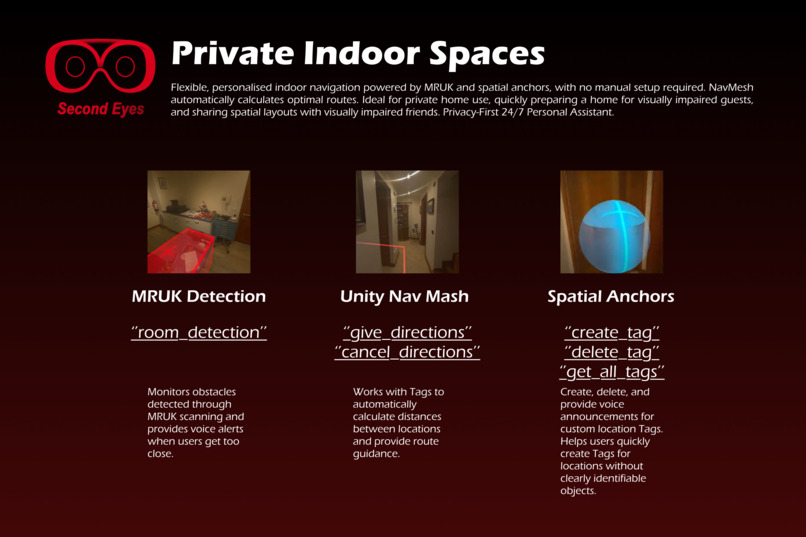
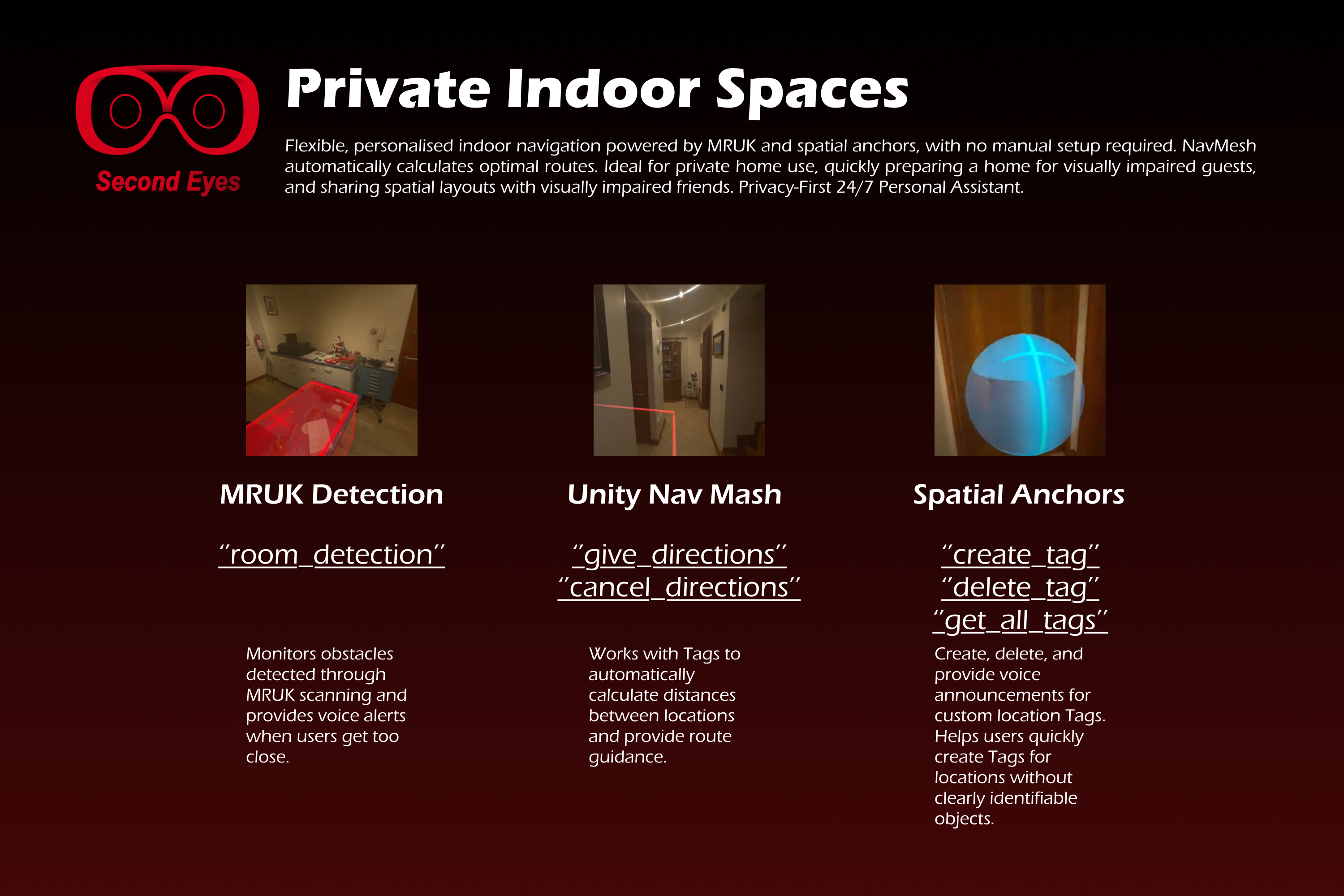
Private Indoor Spaces
-
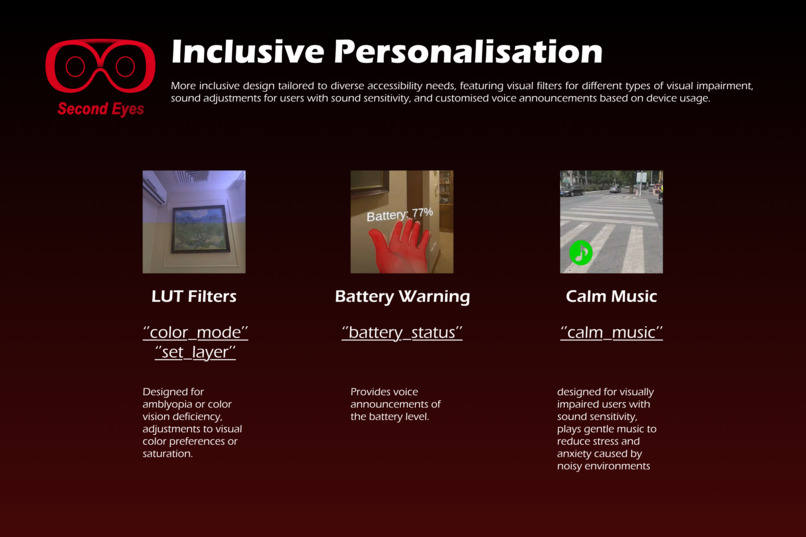
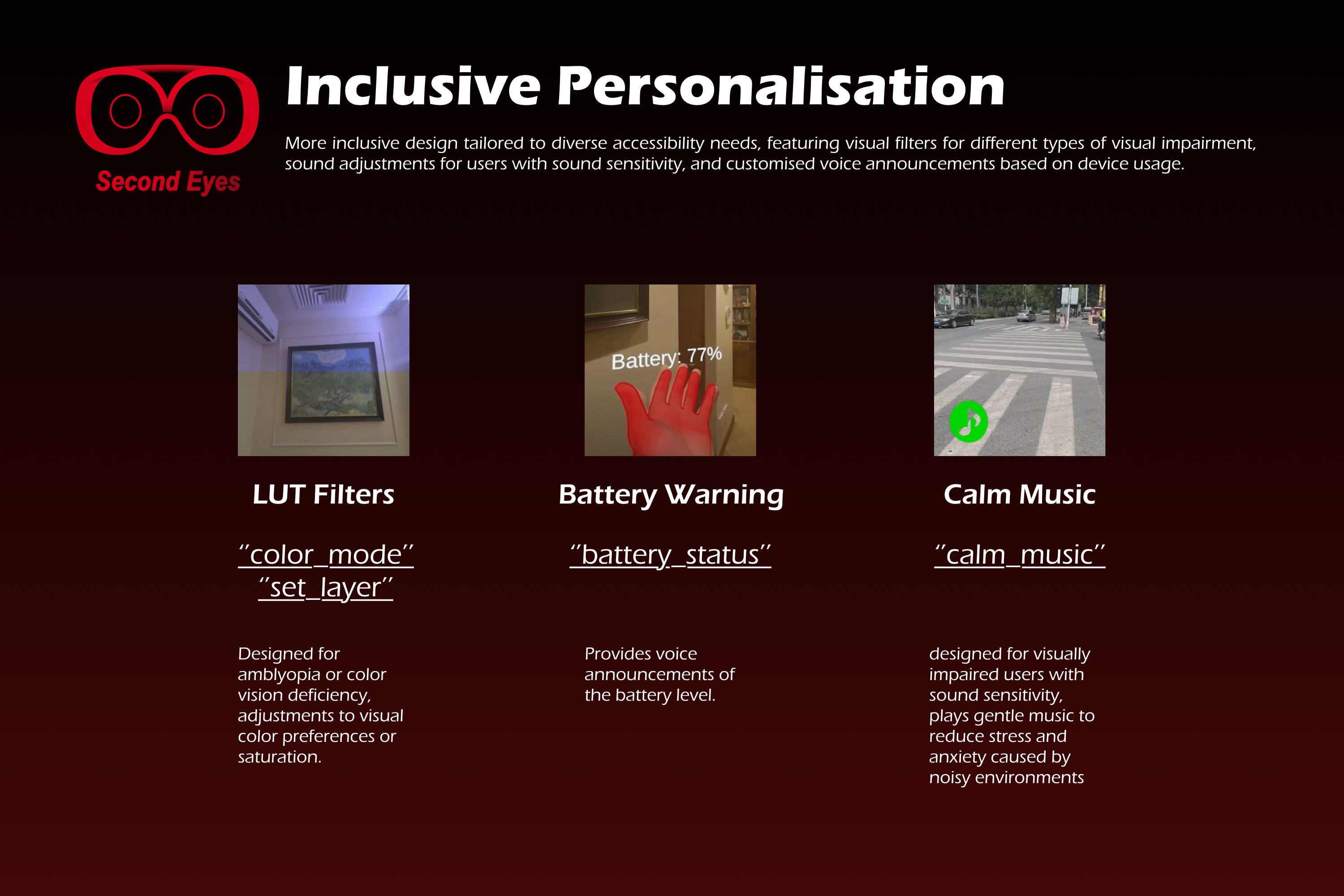
Inclusive Personalisation
-
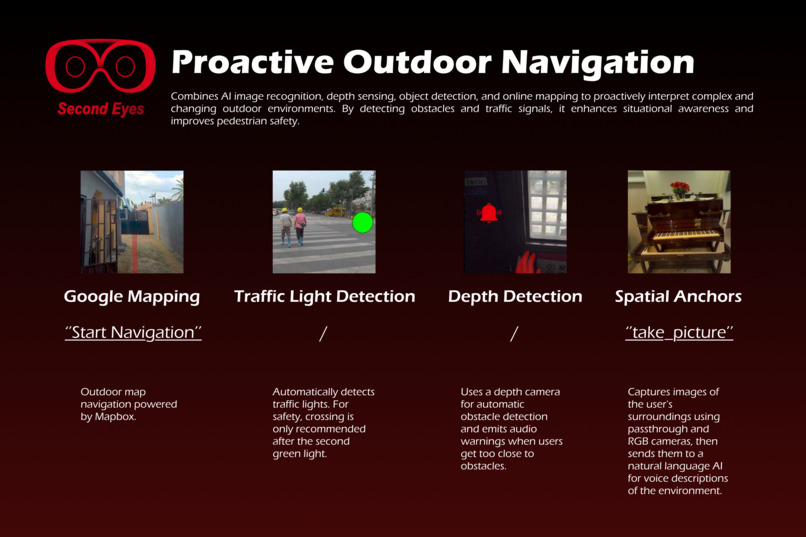
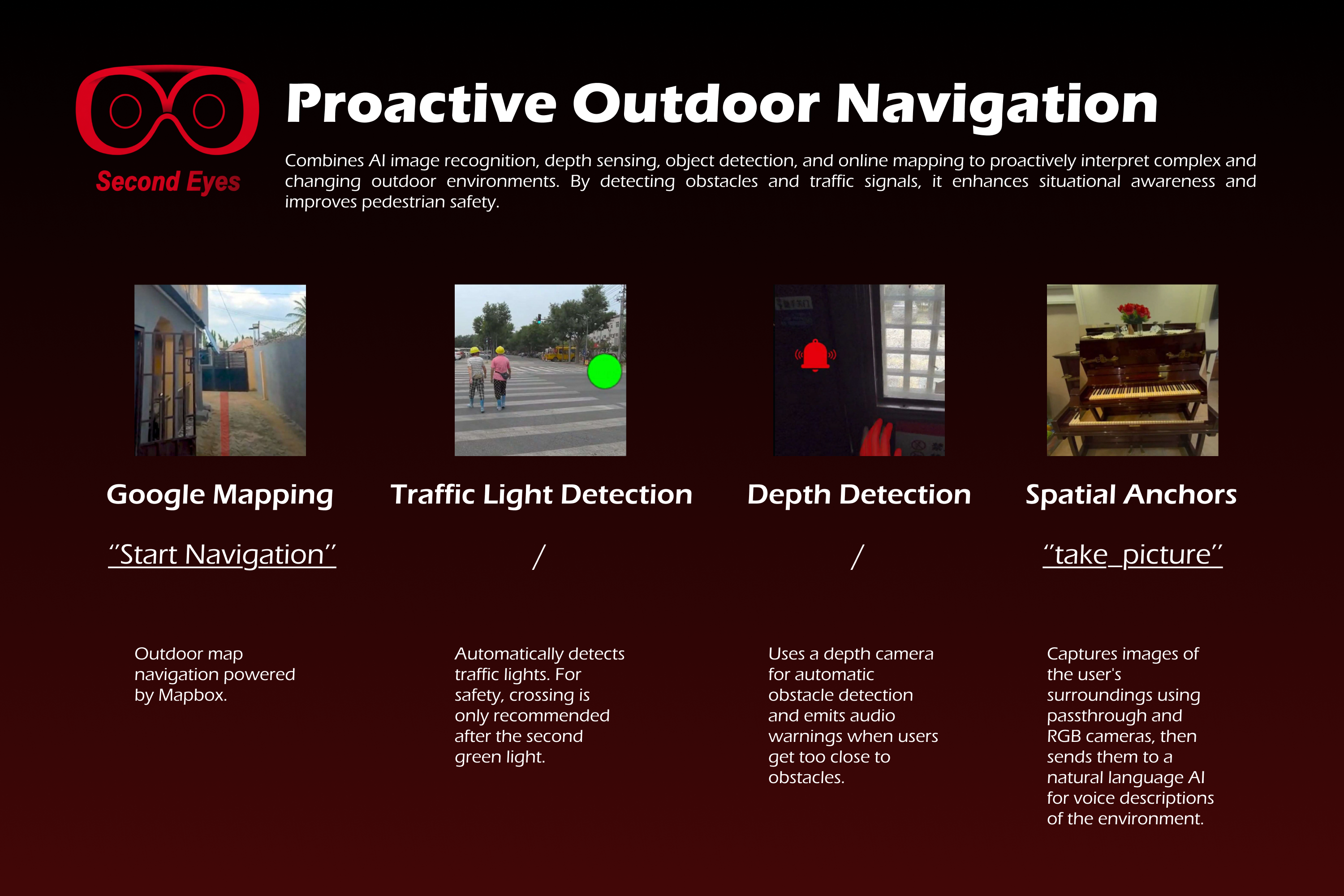
Proactive Outdoor Navigation
-
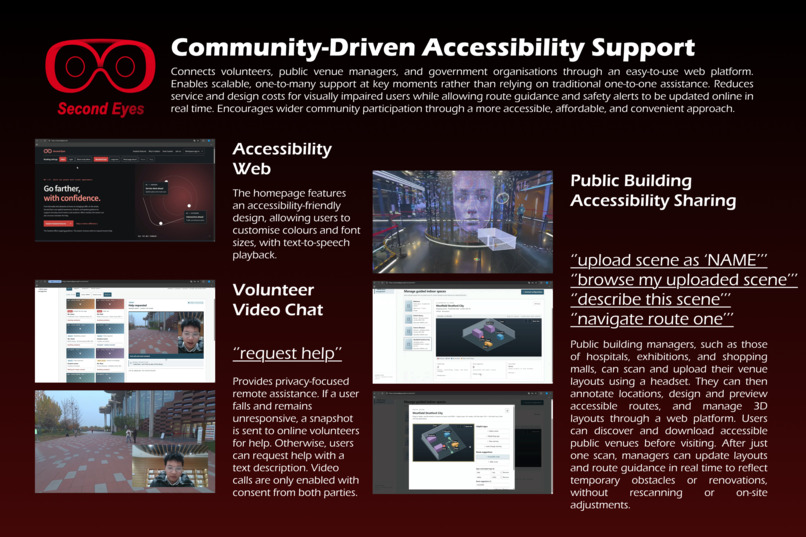
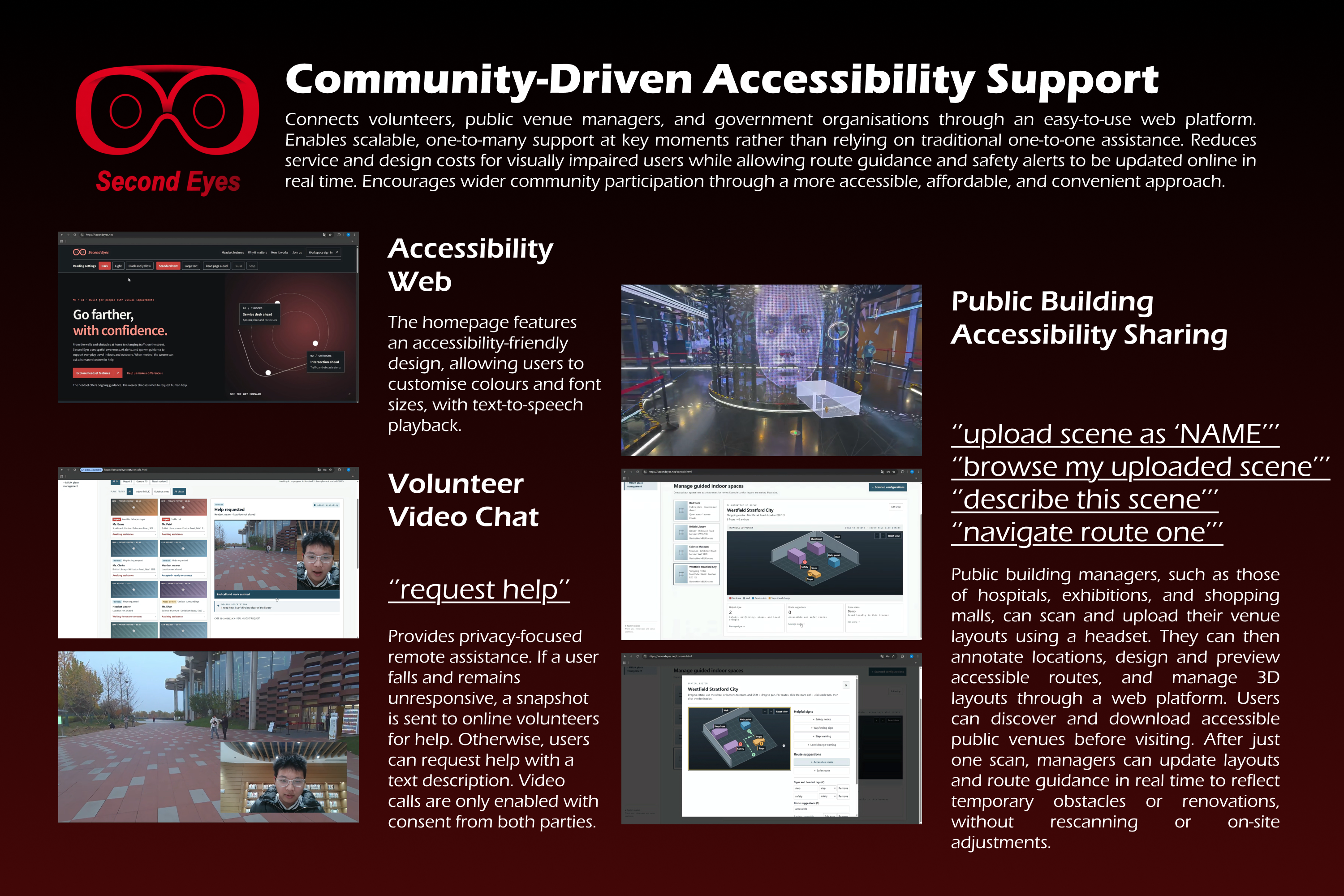
Community-Driven Accessibility Support
Inspiration
The inspiration for SecondEyes came from my own experiences with people around me who have been affected by visual impairment.
My great-grandmother developed cataracts when she was in her eighties. Her vision gradually became blurred, as if the world around her were covered by a layer of fog. Back then, cataract surgery wasn't as accessible as it is today, and her physical condition made surgery a difficult option. During the last two or three years of her life, she relied almost entirely on a live-in caregiver, as moving around independently had become too dangerous.
About twenty years after her passing, my grandmother began experiencing similar vision problems. Fortunately, she was able to undergo cataract surgery before her condition became more severe, although the procedure still involved certain risks.
As I grew older, I encountered other forms of visual impairment. Some of my friends had red-green colour vision deficiency and misidentified the traffic signals, sometimes relying on other pedestrians when crossing roads.
These experiences made me realise that visual impairment isn't simply about being completely blind. Some people can only perceive blurred shapes, others struggle to distinguish certain colours, and some rely heavily on assistance to navigate everyday environments. Even ordinary activities, such as travelling independently or using a smartphone, can become challenging. And not everyone can access medical treatment, nor can every visual condition be corrected through surgery.
The idea for SecondEyes first emerged during my studies, when I was first time exploring XR technologies and had the opportunity to develop a project based on my own ideas. At that time, I was still discovering what XR could do and how it might work with AI. But I had a feeling that XR could offer something fundamentally different from VR.
If VR allows us to enter an entirely new world, perhaps XR can help us rediscover the world we already live in and improve our everyday lives.
This thought changed how I looked at XR headsets. With their cameras and environmental sensing capabilities, combined with AI-powered recognition and interpretation, they could potentially become more than devices for displaying virtual content. They could observe the physical world, recognise objects, and help people understand their surroundings.
In a way, an XR headset already resembled another pair of eyes.
That led me to a question:
Could we turn an XR headset into a second pair of eyes for people who need visual assistance?
With this idea in mind, I developed the first demo of SecondEyes. It was a simple prototype that used the headset's cameras to capture the surrounding environment, recognise objects and obstacles, and provide AI-generated suggestions. I also explored detecting vehicles, traffic conditions, and potential hazards on the street.
Although the initial demo was basic, the idea received positive feedback from my peers. Several of them expressed interest in joining the project, and we gradually formed a team, bringing together our different technical skills to develop SecondEyes further.
It was initially just a personal reflection on my family's experiences, but gradually it became a collaborative exploration with more kindful friends of how XR and AI could help people better perceive, understand, and navigate the world around them.
What it does
SecondEyes is an AI-powered Mixed Reality (MR) assistant for people with different forms of visual impairment. It helps them get around everyday environments more independently.
Our starting point: visual impairment should not mean losing the freedom to move.
Daily life happens in three kinds of spaces — private indoor, public indoor, and outdoor. Each has its own challenges.
At home, people rely on memory to get around, but furniture that gets moved can become a hazard. In public buildings, unfamiliar layouts and limited accessibility make independent navigation hard. Outdoors, obstacles, traffic, and inaccessible infrastructure add risk.
SecondEyes helps users move more confidently within and between these spaces in everyday 24 hours.
Private Indoor Spaces — Making Home More Accessible
Users, family members, or caregivers scan indoor spaces with Mixed Reality Utility Kit (MRUK) to create spatial maps.
Moving into a new home or visiting a friend? Scan the space in advance. Tag entrances, staircases, dining tables, and rooms manually, or let MRUK's scene understanding pick them up.
As users approach tagged objects or areas, SecondEyes shows red visual highlights and gives spoken notifications for nearby landmarks. Indoor route guidance helps users move between selected locations in unfamiliar or complex spaces.
Objects move. When users approach a possible obstacle, depth-based proximity detection warns them. They can then capture an image and ask the AI assistant to identify objects, interpret the situation, and suggest what to do.
Public Indoor Spaces — Building Accessible Environments Together
Public buildings — hospitals, shopping malls, museums — can use the same spatial mapping as the home. To make that manageable, we built a web-based workbench with two functions: one for building managers to manage 3D MRUK scenes, and one for remote volunteer assistance.
Managing 3D MRUK scenes
The workbench gives authorised contributors a 3D view of scanned environments, where they can edit spatial information and update navigation guidance. Building managers and volunteers can mark important locations, stairs, hazards, and recommended routes without rescanning the whole building each time. Maps can then be published through SecondEyes, so users can find participating public facilities and download navigation information before visiting.
Remote volunteer assistance
Users can request real-time video guidance from online volunteers. Privacy comes first: when a request is sent, the camera feed stays hidden. Volunteers can't see anything just because a request came in. A video session starts only after the user selects and confirms a volunteer, and both sides agree to connect.
Fall detection and an emergency workflow are built in. When a possible fall is detected, the system asks whether the user needs help. If they say they're fine, the request is cancelled. If they ask for help or don't respond within a set period, an urgent connection request goes out. Users stay in control of their camera feed at all times.
Outdoor Spaces—Navigating Streets with Greater Confidence
Outdoor navigation runs on Google Maps, with prominent red visual routes and turn-by-turn directions. Depth-based proximity detection flags nearby obstacles along the way.
AI-powered traffic light recognition uses camera-based visual analysis to read traffic signal states — no integration with traffic management infrastructure needed.
Visual needs differ, so this works alongside different levels of assistance. People with partial vision or colour vision deficiency get an extra layer of information to support their own reading of the road. Users with severely blurred vision or very limited sight can combine AI environmental recognition with real-time volunteer assistance — capture images for AI interpretation and ask a volunteer for guidance when road conditions are hard to judge.
Existing mobility practices stay in place. SecondEyes adds information and human support when environments are uncertain.
4. Personalised Assistance — Supporting Different Visual Needs
Customisable Visual Filters Adjust colours, visual clarity, and other display characteristics to suit remaining vision.
Visual and Audio Landmarks Red visual highlights and spoken notifications for recognised locations and nearby objects, available across the system. Users with no functional vision may rely mainly on audio; visual highlights are particularly useful for those with partial vision.
Calming Audio Support Crowded or noisy environments can cause stress, especially for users who depend heavily on sound. An optional nature-inspired calming audio feature can be turned on when needed.
AI Environmental Assistance Capture images of the surroundings and get AI-generated descriptions, object recognition results, and contextual suggestions for unfamiliar situations.
Second Eyes – a better-designed system for helping people, an MR+AI bridge that connects a person to the world, to others.
How we built it
| Module | Key Technologies | Role |
|---|---|---|
| Development Platform | Unity | Unified development environment |
| Headset Platform | Meta Quest 3 / Quest 3S / VR Glasses | Runtime environment |
| MR & Spatial Computing | MRUK, Spatial Anchors, Unity NavMesh, Mapbox, Depth Camera, Passthrough RGB Camera | Scene understanding, spatial mapping, navigation, obstacle detection, environmental picture |
| Interaction | Hand Tracking, Gesture Recognition, Voice SDK | Controller-free interaction and voice communication |
| Object Detection | YOLO | Traffic light and traffic-related object recognition |
| Visual Understanding | OpenAI | Image description and contextual suggestions |
| Remote Video Chat | LiveKit | Real-time video communication |
| Visual Accessibility | LUT-based Processing | Personalised contrast and colour adjustment |
Challenges we ran into
Many researchers and developers have already explored AI and MR for visual assistance. Recognising the environment was never the hard part for us. The real challenge was balancing safety, independence, and dignity — all three at once.
Safety vs. autonomy.
My great-grandmother had a live-in caregiver after losing much of her vision. The caregiver kept her safe, but she often pushed them away. Constant supervision made her feel she had lost control over her own life. She grew frustrated and increasingly unwilling to go outside. Being cared for is not the same as being independent, so we paired AI assistance with optional volunteer support and privacy-controlled connections — users decide when and how they get help.
Hardware and everyday wearability.
We started building SecondEyes last year on Quest 3 and 3S, but we always don't think conventional headsets weren't the end goal, until this year's early reviews of Meta's glasses-style XR devices showed us a possible breakthrough. A sunglasses-like form factor could make extended use more comfortable and help users feel confident rather than self-conscious. We want assistive eyewear to be something people as popular style — a technical OOTD. That was a big reason we decided to push SecondEyes further this year.
From connecting paths to connecting people.
Our scope grew in stages, and each stage answered a different question. Version 1.0 was about the basics: can the system help someone recognise their surroundings and get through them? Version 2.0 split that into indoor and outdoor, with solutions tailored to each — more specific, and more attentive to what people actually feel and need in those spaces. Version 3.0 opened it up to public buildings and added a web backend, inviting the wider community to take part in mutual support. The project moved from connecting people to roads, to connecting with what visually impaired users need inside, to connecting them with society's care.
What all of this comes down to is giving control back to the user. The right to live their own life, the dignity to live it on their own terms, and the encouragement to connect with the world the way anyone else does.
Accomplishments that we're proud of
When SecondEyes was still at version 1.0 — just an AI assistant that could analyse photos and recognise objects — I was happy to have finished a project on my own, but I quietly doubted whether it was worth much. It felt like something a pair of AI glasses could do just as well.
Version 2.0 changed that. The team brought in possibilities I couldn't have reached alone. We leaned heavily on MRUK and hand tracking, and that's what pulled the project away from being just another AI glasses demo. For the first time I could see a path toward a system that actually responds to its environment. At the time I thought we'd built good teamwork but still left it there — only interaction betwen user and headset make it just a tool but not friend, the heavy hardware limited how far we could go as well.
But when I showed the demo video to my grandfather, and for the first time he said, with real pride, "My granddaughter is a scientist, an inventor." I was shocked while plenty of projects before — education, other directions — and never got a reaction like that.
Projects should carried a strong, genuine desire to help people, with human-centred, technology-for-good we updated version 3.0. I started adding more of the human side instead of piling on more machine features — serving more social connection not just for visually impaired users: we add tech for volunteers and public support, hoping that people without visual impairment would join the cycle of mutual help and care too, and make the project from people to tech then back for people.
SecondEyes uses a lot of technology, and every engineer on the team delivered work that was outstanding — beyond what they thought they could do, myself included. But what we are proudest of is that the best part of it isn't the technology. It's the care between people, the consideration for each other, the empathy in this project goals.
What we learned
Technically, we explored how XR and AI could work together to make environments actively respond to users, rather than requiring users to constantly adapt to their surroundings. We also experimented with cross-platform communication and data sharing, connecting MR experiences with web-based services.
Through iteration and teamwork, we learned to navigate uncertainty, reflect on real-world needs, and continuously rethink our designs. More importantly, we began to question the relationship between humans and technology, discovering how technical innovation and human care could come together to create more meaningful experiences.
What's next for SecondEyes
Our next step is to conduct further user research and usability testing to better understand real-world needs and evaluate how well SecondEyes meets them. Through multiple rounds of feedback and iteration, we aim to improve the system until it is reliable and practical for everyday use.
We also hope to collaborate with public facilities, community organisations, and volunteer networks, integrating their support into our service platform and building a sustainable network of mutual assistance.

