-
-
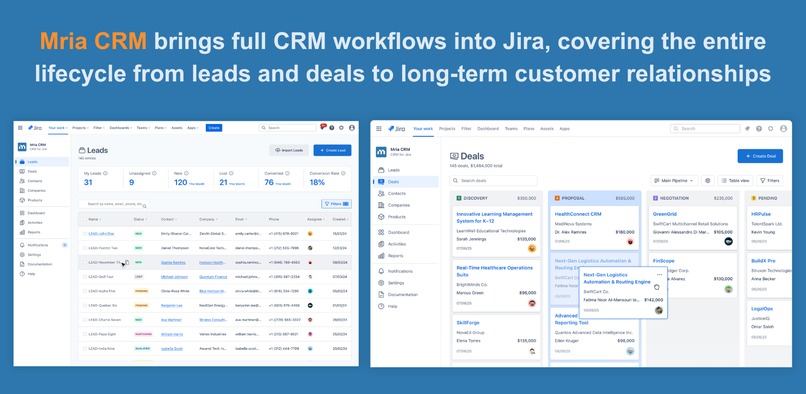
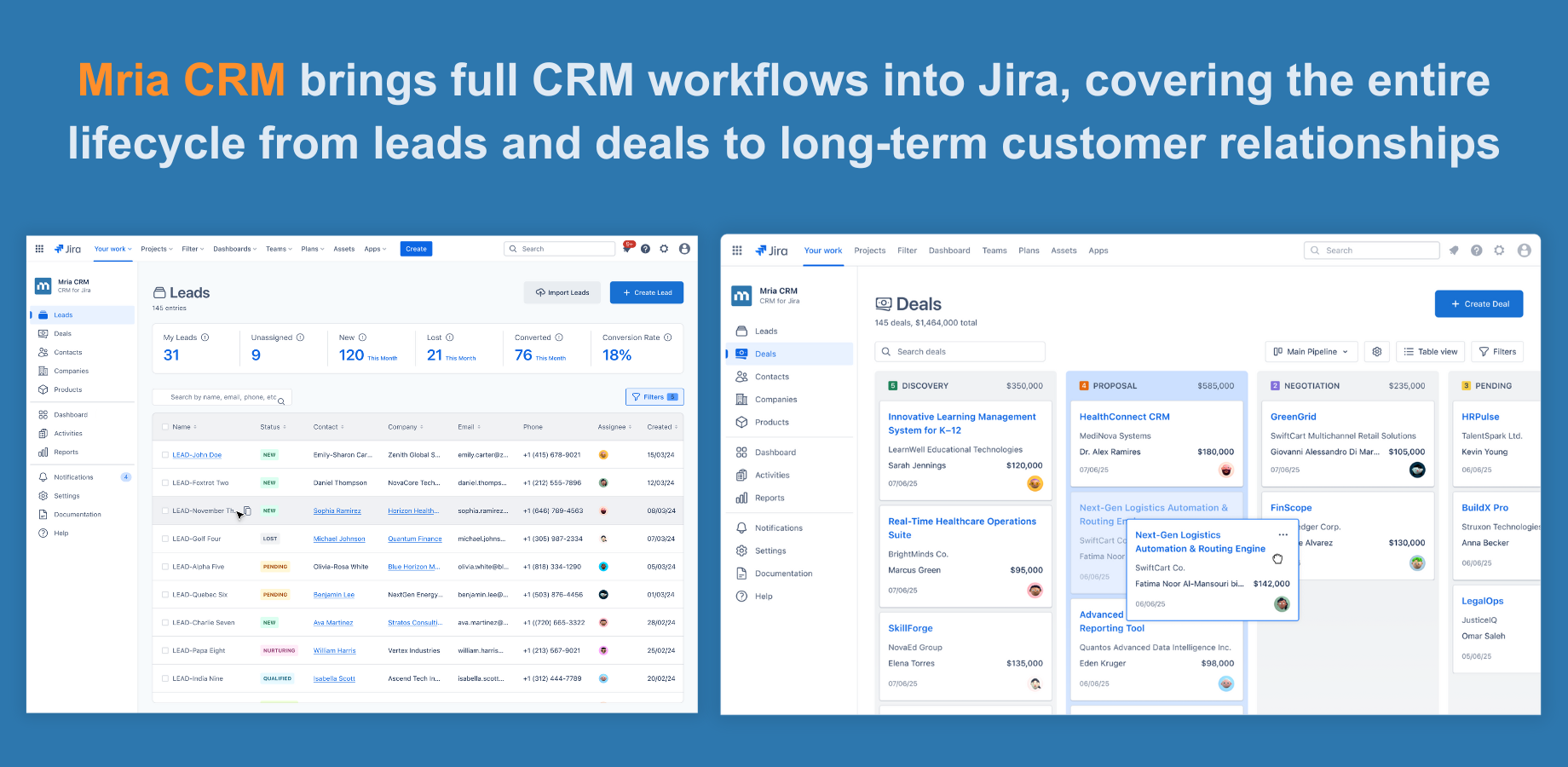
Full CRM workflows inside Jira with Mria CRM
-
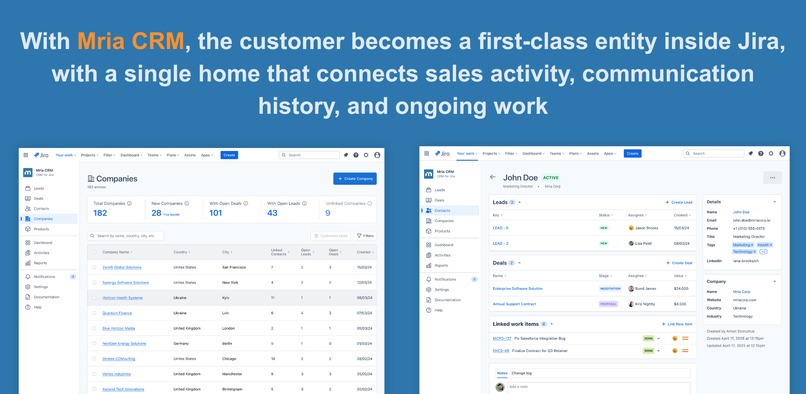
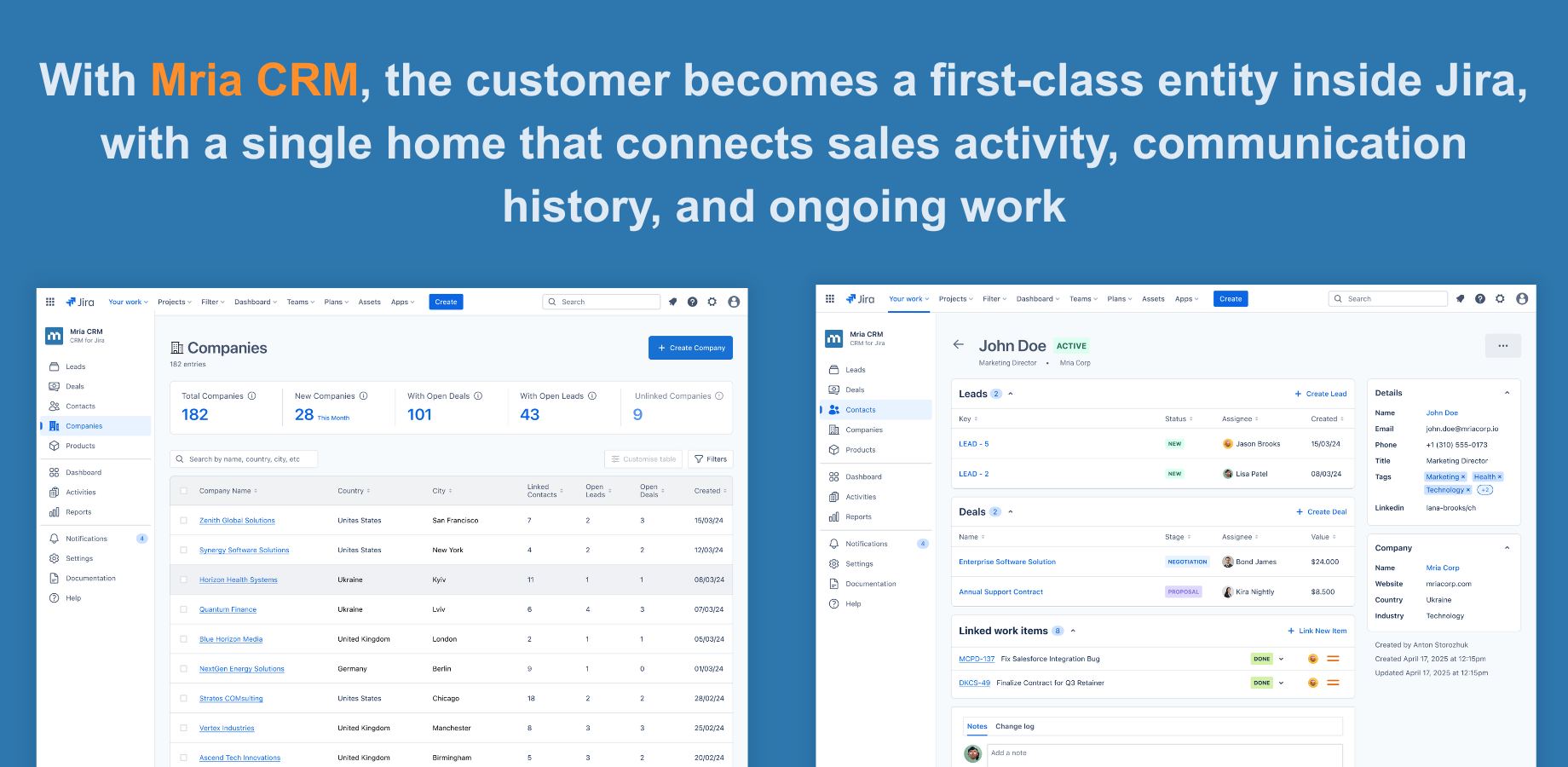
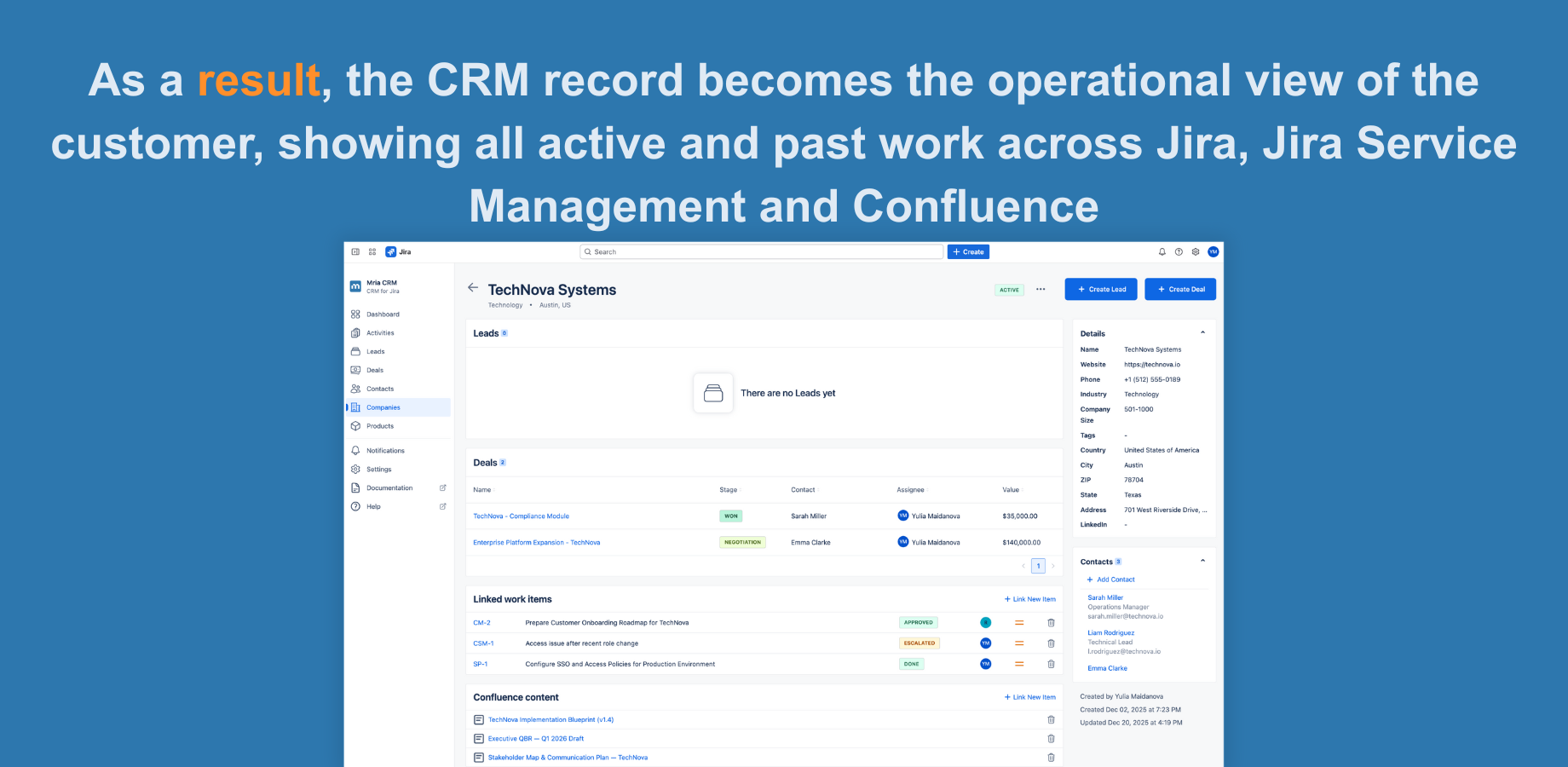
The customer as an operational record in Mria CRM
-
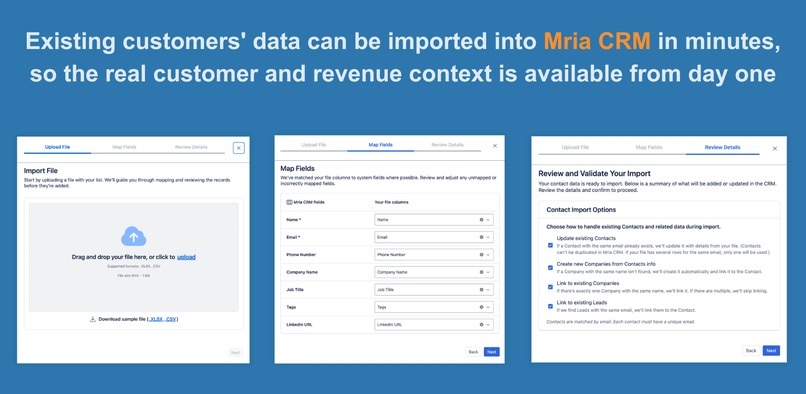
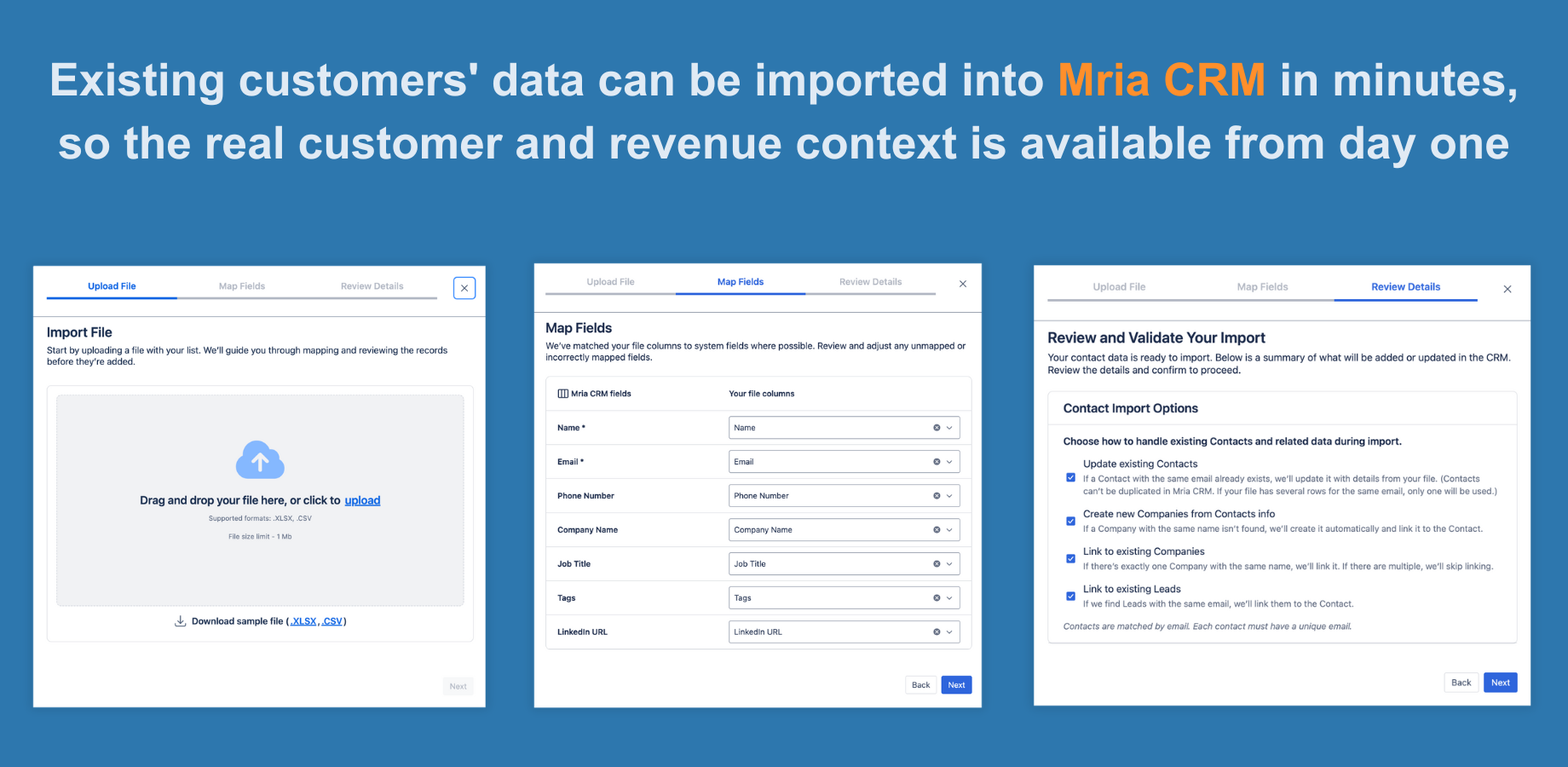
Mria CRM Import - Bringing existing CRM data into Jira
-
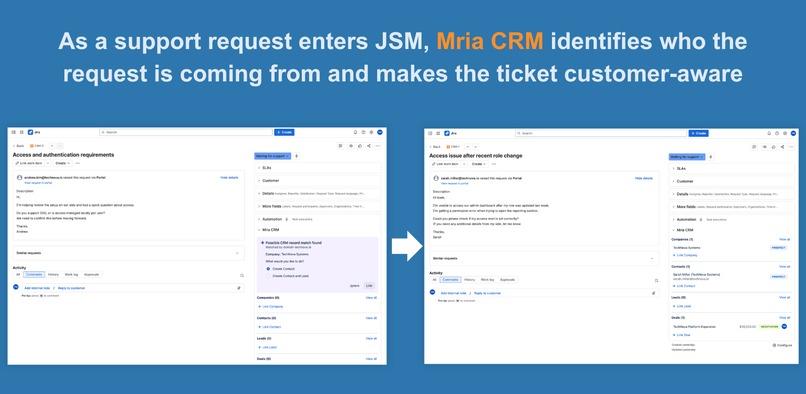
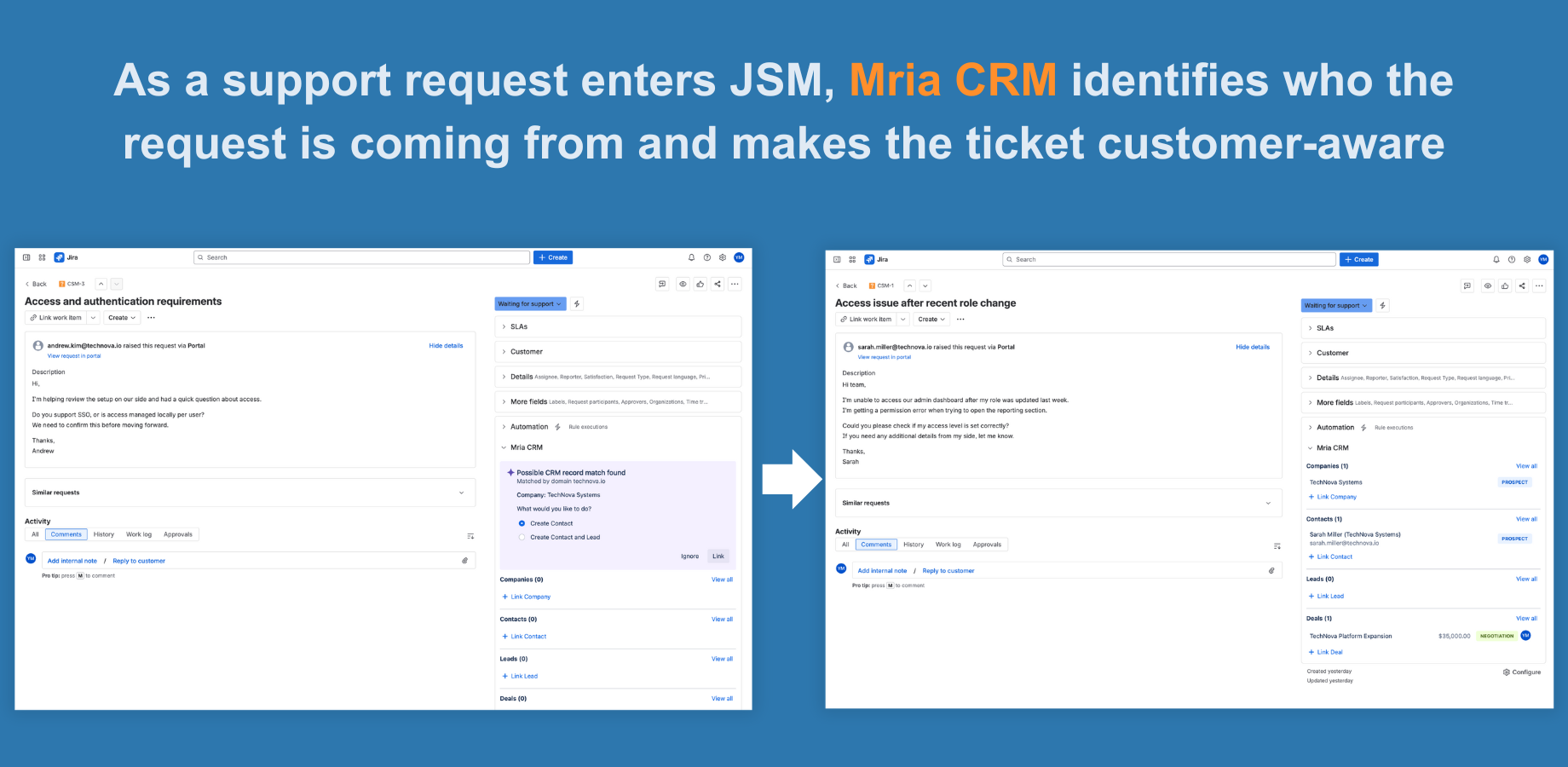
Customer requests enter Jira Service Management with customer identification and context inside the ticket
-
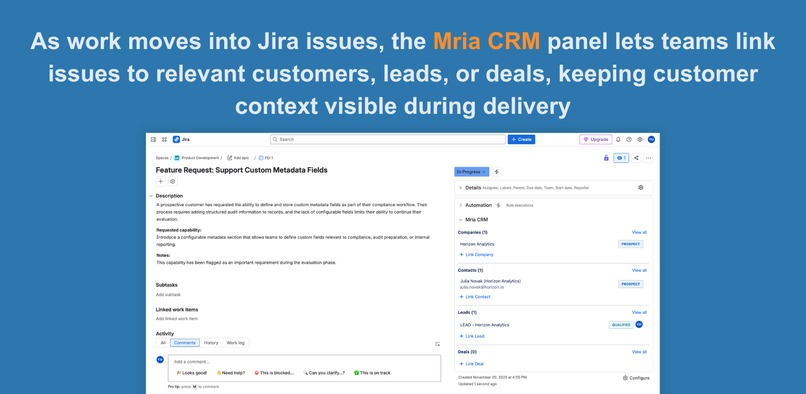
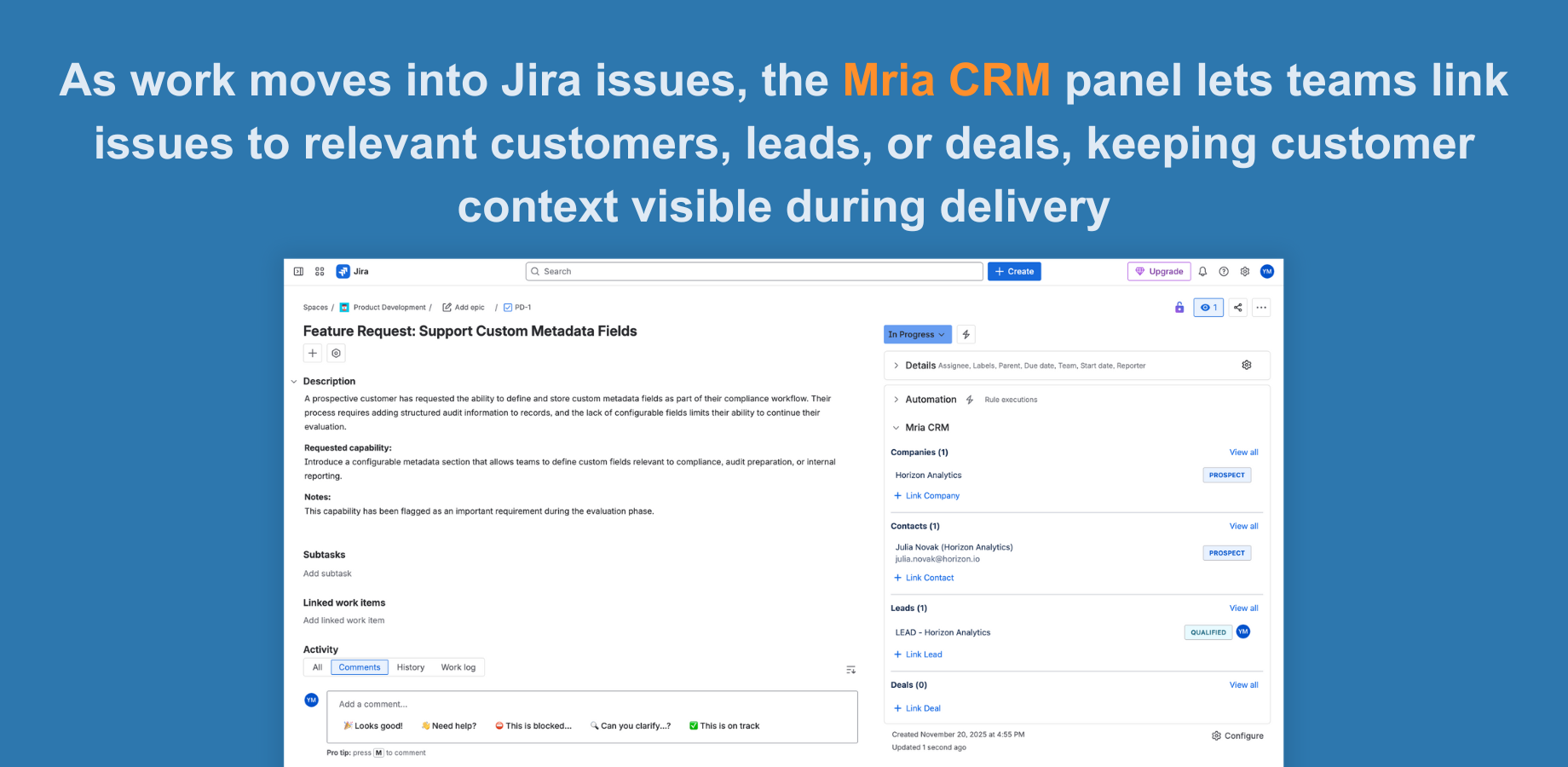
Jira issue with Mria CRM panel - customer context available in Jira issues
-
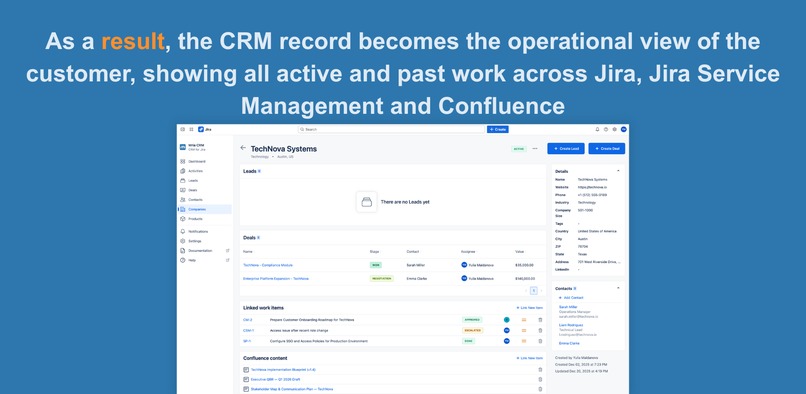
The result - CRM record as the operational customer view
Inspiration
As a software company with multiple products and a growing customer base, we rely heavily on Jira to run our business. Jira Software, Jira Service Management, and Confluence are where product delivery, support, and internal collaboration happen every day.
Over time, we noticed a fundamental gap. While teams worked on customer-related issues in Jira and handled support requests in Jira Service Management, the customer itself was not represented as a first-class entity. Support requests arrived as messages. Product issues existed without customer ownership. Critical business context lived outside Jira.
We initially tried to close this gap by configuring Jira as a CRM. With custom workflows, boards, and issue types, we created shared visibility across teams. This approach worked temporarily, but it broke down as we scaled. Jira was not designed to manage structured CRM data, relationships, or lifecycle states. Context became fragmented, reporting difficult, and coordination fragile.
This experience led us to a clear conclusion: Jira does not need to become a CRM - it needs a native CRM layer that works the way Jira teams already work.
What it does
Mria CRM brings customer and revenue workflows directly inside Jira, eliminating tool switching and data gaps between business and delivery teams. It introduces core CRM objects - Leads, Contacts, Companies, Deals, and Activities - as native Jira experiences rather than external systems or embedded iframes. To establish this customer data foundation, Mria CRM includes import capabilities for Leads, Contacts, and Companies, allowing existing customer databases to be brought into Jira in minutes.
Teams can capture leads, manage customers, track deals, and maintain a shared history of customer interactions directly in Jira. Customer data follows Atlassian permissions and UI patterns, so CRM work happens in the same environment as product delivery and support.
Mria CRM connects customer records to Jira issues, making it clear which customer or account work belongs to. CRM records and Jira issues are linked bidirectionally, so customer context is visible throughout delivery and execution.
In Jira Service Management, Mria CRM changes how support work starts. When a request is opened, the system automatically checks the requester against CRM data and shows the result inside the ticket. Each request is immediately resolved to a clear state - known customer, known company, or new contact - with the next action available directly in the request view.
In practice, this turns Jira into a unified workspace where product, sales, support, and leadership operate with a shared customer context and a single source of truth.
What we learned
Building a CRM directly inside Jira taught us that the biggest productivity gains come from eliminating context gaps at the moment work begins. Customer context is most valuable not after investigation, but immediately - when a support request is opened or a Jira issue is created.
We also learned that support teams are the first to feel the cost of missing context. In Jira Service Management, agents often need to decide how to prioritize a request without knowing who the customer is, which account they belong to, or what relationship already exists. This leads to guesswork, tool switching, and internal questions before any real support work can begin.
Working with Atlassian Forge reinforced the importance of building secure, performant, and native solutions that respect Jira’s UI patterns, permission model, and workflows. We learned that adoption only happens when CRM functionality feels like a natural extension of Jira, not an external system layered on top.
How we built it
We built the project on Atlassian Forge to ensure a secure, scalable, and fully native Jira experience. Our goal from the start was to create CRM objects that live inside Jira in a natural way, so we designed data models, views, and UI states that align with Atlassian interface patterns and feel familiar to users.
The backend uses Forge storage for CRM records, including leads, contacts, companies, deals, and activities. We created a structured data model and clean logic for linking CRM objects with Jira issues and JSM requests to keep context synchronized and accessible.
For the frontend, we used Forge UI components to build forms, tables, detail views, and interaction patterns that support business workflows inside Jira. We focused on speed, clarity, and consistent user experience so teams can move through CRM tasks without learning a new interface.
Throughout development, we tested flows to ensure data validation, duplicate checks, and permission logic work reliably for different roles. Our goal was to keep the app both lightweight and powerful while staying fully aligned with Jira behavior and security principles.
Challenges we ran into
One of the biggest challenges was building CRM logic that feels fully native to Jira instead of appearing as an external layer. We needed to align with Atlassian UI patterns, permission models, and navigation flows so users would instantly feel at home inside the product.
Working within Forge introduced architectural decisions around data storage, performance, and request limits. We had to design an approach that keeps CRM records available in context without slowing down the Jira experience or compromising security.
Another challenge was connecting CRM objects with Jira issues & JSM tickets in an intuitive and reliable way. Teams expect real-time visibility, seamless linking, and zero friction when moving between customer context and ongoing work. Achieving this required thoughtful UX, smart data mapping, and careful handling of duplicates and validations.
Another challenge was designing clear outcomes for every JSM scenario. Support teams need certainty, not ambiguity. Ensuring that every ticket returns a clear state and next action was a core design requirement.
Finally, designing a system that works for both technical and business users demanded clear interfaces and predictable behavior. CRM workflows are complex, and our goal was to deliver power without creating confusion. Balancing simplicity with capability was a core part of the challenge.
Accomplishments that we're proud of
We are proud that we created a true CRM experience inside the Atlassian ecosystem, not a workaround or an external integration. The project brings customer management, deal tracking, and activity history directly into the same platform where teams already plan, deliver, and support customers. This was our vision from the start, and seeing it work smoothly in real environments is a major achievement.
We are especially proud that the solution is built on Forge from the day one and qualifies for the Runs on Atlassian program. This ensures a secure, scalable architecture with data hosted and processed within Atlassian's cloud, giving teams confidence to manage sensitive customer information without leaving the platform they trust.
One of the most important accomplishments is the seamless connection between CRM records and both Jira issues and Jira Service Management tickets. Teams can instantly access customer context, link deals and contacts to support cases, and maintain full visibility into every relationship from first touch to ongoing service. Enabling this level of continuity inside Atlassian tools required careful architecture and UX decisions.
Finally, we are proud that this project solves a real problem we have experienced ourselves. When product, support, and business teams share the same workspace and the same view of customer activity, work becomes smoother and more coordinated. Seeing that outcome in practice validates our approach and motivates us to keep building.
What's next for Mria CRM: CRM for Jira Teams
Next, we are expanding reporting and analytics so teams can better understand customer health, pipeline progress, and the impact of support and delivery work.
We are also working on automatic lead capturing, bulk operations, and custom fields and UI configuration, allowing teams to adapt Mria CRM to their processes while keeping the experience fully Jira-native.
These improvements build on the existing foundation and further strengthen Mria CRM as a practical, scalable CRM solution for Jira-centred teams.
As we continue building on Forge with full Runs on Atlassian compliance, our priority remains simplicity, security, and performance. We will keep improving the product in close collaboration with real users, because the future of CRM is not a separate system. The future is a unified workspace where customer relationships and operational execution live together inside Atlassian.
Built With
- eslint
- forge
- forge-sql
- inversifyjs
- jest
- kvs
- mobx
- prettifier
- react
- typescript
- vite


Log in or sign up for Devpost to join the conversation.