



Inspiration
The idea for Mria Contacts came from a problem we repeatedly ran into ourselves, and later saw reflected again and again in the Atlassian Community.
Teams using Jira Service Management often have a real customer base long before they start using JSM: customers stored in spreadsheets, CRMs, legacy systems, or other tools. But when they try to move this data into Jira Service Management, they quickly discover there’s no practical way to do it. New or external customers and their related details can’t be imported directly from a CSV file. As a result, teams are forced to start support with an empty or incomplete customer list.
We’ve experienced this firsthand. Support requests start coming in, but Jira only shows an email address and a message. The customer exists somewhere else, but not inside Jira. To understand who is asking for help, teams switch tools, search spreadsheets, or ask around internally. This slows down support, creates uncertainty, and fragments customer knowledge.
When we looked at Atlassian Community discussions, we realized this wasn’t an edge case - it’s a common, long-standing gap. Teams want a simple, no-code way to bring their customers into Jira and use that data consistently across support and delivery.
Mria Contacts was created to close that gap by making contacts and companies real, reusable entities inside Jira and Jira Service Management, starting with the ability to import existing customer data and use it immediately where work happens.
What it does
Mria Contacts adds structured Contacts and Companies to Jira and Jira Service Management.
Import contacts and companies from CSV files, including relationships in a single file, so contacts are automatically linked to the correct companies without manual work.
Maintain searchable and filterable tables for contacts and companies, with a metrics panel that provides quick visibility into totals, new records, and unlinked entries.
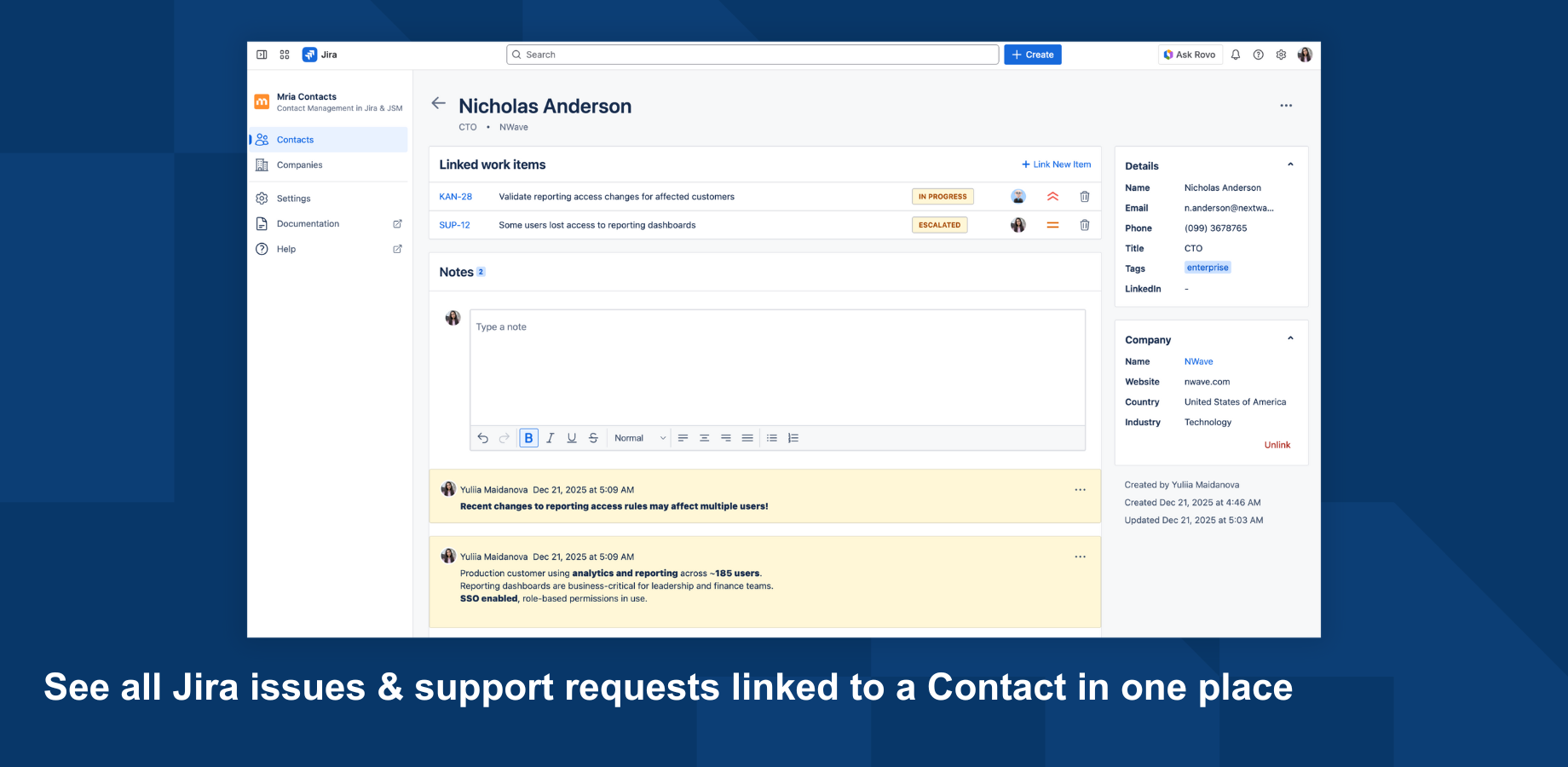
Open full record views for contacts and companies with detailed information, linked companies or contacts, notes, linked Jira issues, Jira Service Management requests, and Confluence pages.
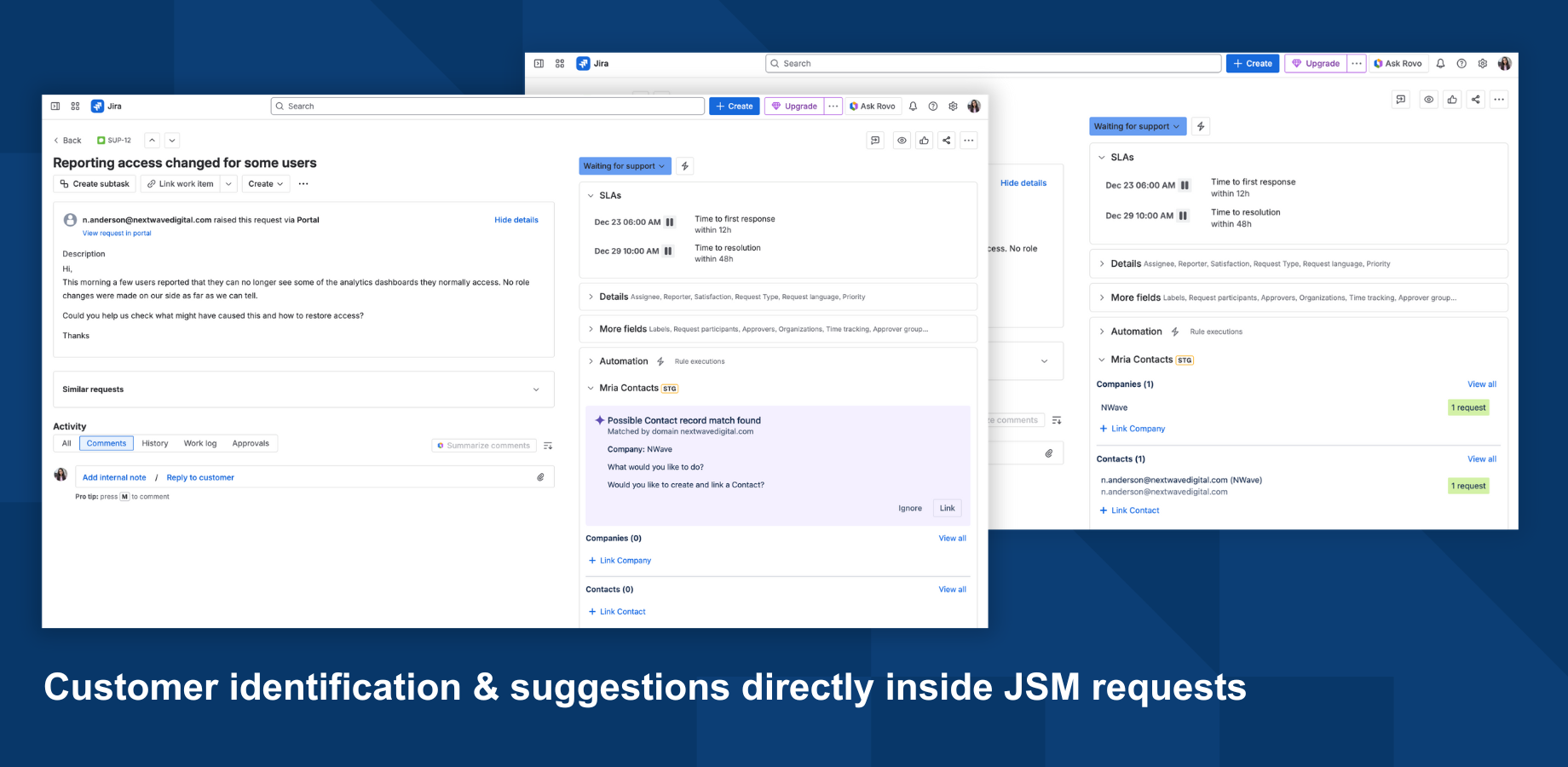
Automatically suggest matching contacts and companies inside Jira Service Management requests based on the requester’s email and company domain, with one-click linking to the request.
Create new contacts and companies directly from support requests when no match is found, capturing new customers or stakeholders at the moment they first reach out.
Use the same panel in Jira issues to search for and link one or multiple contacts or companies to work, with bidirectional visibility so linked issues and requests appear on contact and company records.
How we built it
Mria Contacts is built as a Forge-based Jira app, using Forge UI and Jira platform modules to integrate directly into Jira and Jira Service Management.
We use Jira issue and request panels to surface contact and company context directly inside Jira issues and JSM requests, without redirects or external iframes. The application stores contact and company data using Forge storage, with a structured data model that supports relationships between Contacts and Companies, notes, and linked work items (issues and tickets) and Confluence links.
CSV import is implemented with a guided mapping flow and supports repeatable imports. On re-import, existing records are updated when values change, and new contacts or companies are created as needed. Relationships between contacts and companies are established automatically during import.
Access control is handled through role-based permissions, with distinct view, edit, and admin levels enforced at the application level. This ensures customer data remains governed while still being accessible to support and delivery teams inside Jira.
Challenges we ran into
Keeping the data model minimal without losing real-world usefulness. We wanted Contacts and Companies to feel lightweight and Jira-native, but still support the things teams immediately need in practice: relationships, notes, and many linked issues or requests per record. The challenge was avoiding a “mini-CRM” while still making the records genuinely actionable.
Making CSV import safe, repeatable, and predictable. Import isn’t just “create records once.” Teams re-import updated files, often with inconsistent formatting. We had to handle updates vs new records carefully, preserve existing relationships, and ensure the import never creates messy duplicates or breaks links between contacts and companies.
Delivering customer context inside tickets without slowing the workflow. In Jira Service Management, support agents need an answer in seconds. The panel had to be clear enough to understand instantly, but also powerful enough to link records or create new ones without turning the ticket view into a form or a separate workflow.
Getting governance right without adding friction. Contact data is sensitive and shared across teams. We needed permissions that are strict enough for enterprise governance, but not so restrictive that support and delivery teams can’t do basic work. Finding the right balance between view, edit, and admin roles was a core design challenge.
Accomplishments that we're proud of
Closed a long-standing Jira Service Management gap. We delivered a practical, no-code way to bring real customer data into Jira and JSM, solving a problem teams have been struggling with for years.
Made customer context operational, not theoretical. Contacts and companies are no longer passive records. They actively connect support requests, Jira issues, and internal work into a single, navigable context.
Delivered a production-ready Forge app during the hackathon. The app is not a prototype. It includes permissions, repeatable imports, bidirectional linking, and a consistent experience across Jira and JSM.
Created a strong foundation for future Jira-native extensions. By establishing Contacts and Companies as first-class entities, we unlocked a clean base for future capabilities without redesigning the core architecture.
What we learned
In-ticket performance matters more than feature richness. Jira Service Management panels must load fast and communicate state instantly. Any hesitation or over-rendering breaks the support workflow, so simplicity and speed were critical technical constraints.
Data modeling inside Forge storage requires careful upfront design. Supporting relationships between Contacts, Companies, and multiple linked work items forced us to think early about identifiers, updates, and consistency, especially when imports are re-run.
Repeatable imports are harder than one-time ingestion. Handling updates safely without duplicating records or breaking relationships required deterministic matching logic and cautious update strategies.
Permissions are not an afterthought. Implementing role-based access early influenced both UI structure and backend logic. Treating permissions as a core system concern avoided costly refactoring later.
Jira-native UX expectations are high. Users expect apps to behave like Jira, not beside it. Matching Jira interaction patterns and mental models was just as important as backend correctness.
What's next for Mria Contacts: Contact Management in Jira & JSM
Bulk operations for contacts and companies, including bulk edit, merge, and cleanup to support larger datasets. Custom fields for contacts and companies, allowing teams to capture industry-specific or process-specific information. Customizable record layouts and UI, so teams can adapt views and sections to how they work. Independent company imports, enabling teams to import or update companies without requiring contact data in the same file. Custom statuses for contacts and companies to reflect lifecycle or engagement states. Advanced filtering of Jira issues and JSM requests based on linked contact and company data, enabling customer-aware queues and views. Export capabilities for contacts and companies.
Built With
- eslint
- forge
- forrge-sql
- inversifyjs
- jest
- kvs
- mobx
- prettifier
- react
- typescript
- vite


Log in or sign up for Devpost to join the conversation.