-
-
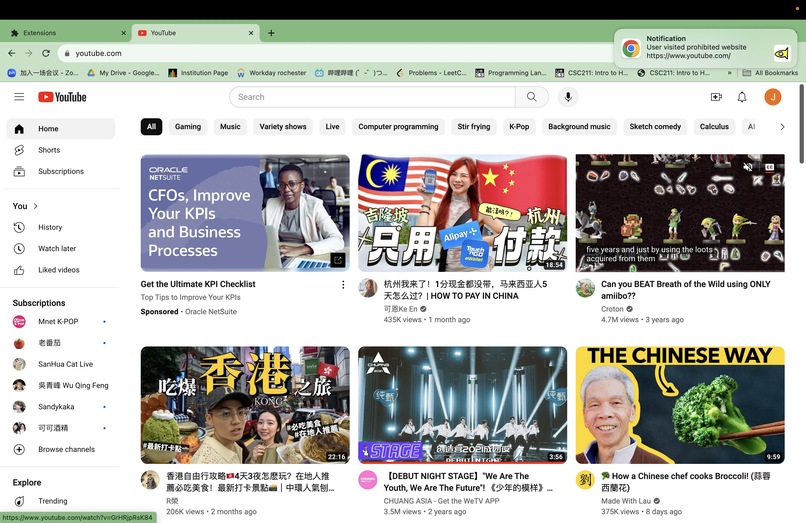
Notification Demo picture
-

GROUP NOTIFICATION


Inspiration
When we're striving to be productive, numerous digital distractions beckon us, pulling our attention away from the task at hand. Popular websites like YouTube and Instagram can become major productivity pitfalls. This realization drove us to create a tool that not only helps individual users avoid such distractions but also adds a layer of group accountability. Instead of worrying about whether a team member is playing all day, Enter MOYU: the tool that sends notifications to the whole team when someone strays into the digital "forbidden zone". This way, a momentary lapse in one person's focus can serve as a timely reminder for everyone to stay on track.
What it does
MOYU operates as a Chrome extension, allowing users to specify a list of websites they find distracting. Once set up, this plugin monitors user activities in accordance with the website list provided by the user. Anytime a team member navigates to one of these prohibited websites, a notification is sent to the entire team. This serves as a nudge, a gentle reminder of the commitment they made to stay focused, promoting a collective culture of productivity and responsibility.
How we built it
We used the Chrome Extension API to integrate with the Chrome browser, monitoring user activity. The Node.js backend communicates with a server, ensuring notifications are broadcast in real time to all connected team members. We also utilized Chrome's local storage to keep track of each user's group ID and list of prohibited websites, ensuring a seamless user experience. HTML files are used to structure the display for this extension, javascripts are used to handle the key logic.
Challenges we ran into
The primary backend challenge revolves around importing the socket.io package and tackling cross-origin issues within the plugin's runtime environment. On the frontend, the key challenge lies in seamlessly transmitting and storing data across different pages and JavaScript components, all while adhering to the unique rules and constraints of the Chrome extension framework.
Accomplishments that we're proud of
- This Chrome extension can run successfully for an individual user, all functionalities are working fine and tested out.
- We officially started coding this project yesterday 2 p.m., so we're proud of how much progress we've made so far since we didn't stay over night.
What we learned
- How to make a Chrome extension
- How Chrome Extension is structured, different levels servers different functionalities, so you have to make sure functions are put in the correct place.
- Handling logic in javascripts
What's next for MOYU
Make it available for multiple users & groups!



Log in or sign up for Devpost to join the conversation.