Inspiration
Traditional physical activity technologies and exergames often exclude older adults and adaptive users. Clinical assessments require travel to specialized facilities, commercial wearables are costly and complex, and standard standing web-games completely exclude seated wheelchair users.
We were inspired by gold-standard functional movement assessments—specifically the CDC’s 30-Second Chair Stand test for lower-body strength and the Functional Reach Test. We asked: Can we turn these clinical constructs into an inclusive, webcam-only browser exergame that older adults can use at home, ending in a plain-language report for their caregivers? The answer is MotionQuest.
What it does
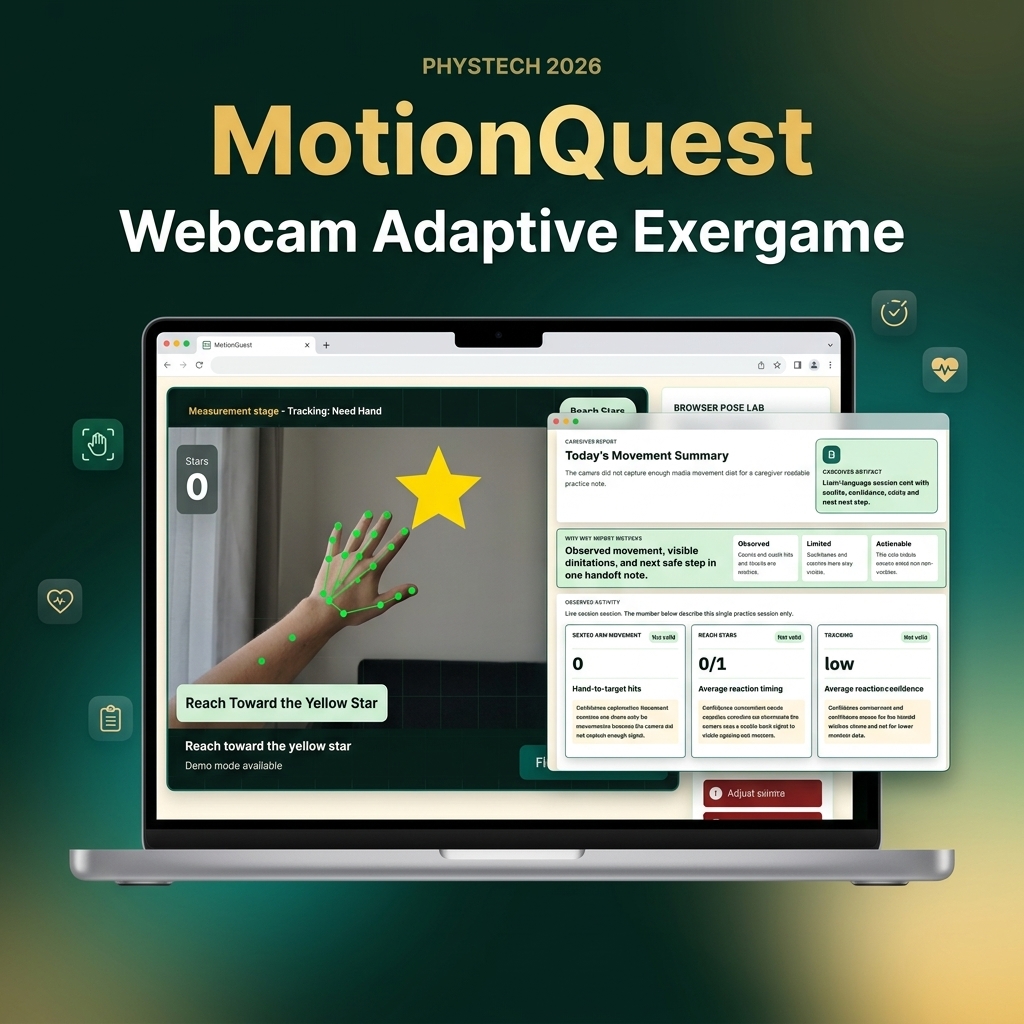
MotionQuest is a browser-based, client-only functional movement lab. Key features include:
- Adaptive Path Selection: Users choose between "I can stand safely" (full-body tracking) and "Seated adaptive" (hand-only tracking).
- Dwell-Based Exergame (Reach Stars): A gamified reach exercise where a hit is counted only when the user holds their hand over a target for 500ms. This dwell filter filters out tremors and shaky joints to avoid cognitive load.
- 100% Local Privacy: All MediaPipe landmark processing runs locally in the browser. There are no user accounts, databases, or cloud video uploads.
- Caregiver-Readable Report: Instead of cryptic high scores, the app outputs actual movement counts, reach hits, average reaction speed, tracking validity flags, and caregiver confidence interpretations.
- Safe Demo Fallback: A labeled demo pathway allows judges and users to verify the report output format even if camera permissions are blocked.
How we built it
We engineered MotionQuest as a client-side Next.js web application built with TypeScript, Tailwind CSS, and HTML5 Canvas. We integrated Google MediaPipe's lightweight vision models (@mediapipe/tasks-vision) using WebGL acceleration for fast real-time inference in the browser.
We validated the application using Playwright E2E suites to automate accessibility audits (enforcing a 16px text minimum and 56px click-target size for older adults) and verify multi-stage user flows.
Challenges we ran into
Webcam angles and lighting in ordinary rooms vary greatly. Initially, seated users on laptop webcams suffered from unstable skeletal landmark detection because their hips and knees were out of frame.
To solve this, we decoupled our seated and reach stages from whole-body pose skeletons. We restructured them to rely strictly on hand-landmarker wrist data. We also implemented a consecutive-frame stability lock, a frame-to-frame smoothing filter, and automated session pauses when standing users stepped too close to the camera.
Accomplishments that we're proud of
We successfully built a zero-cost, setup-under-a-minute functional movement lab that runs smoothly at high FPS entirely on the client side. We are proud of our "visible trust" visual language, which prioritizes older adult dignity and avoids clinical overclaims.
What we learned
Web accessibility goes beyond simple color contrast. True accessibility for older adults means providing clear physical safety boundaries (e.g., fallback options to prevent falls) and reducing cognitive fatigue.
What's next for MotionQuest: Adaptive Home Movement Lab
Our roadmap includes running a community pilot program in senior wellness centers, publishing our thesis in the Binnovative Book Series, and training even lighter-weight hand tracking models to optimize performance on older mobile browsers.
Built With
- ffmpeg
- html5
- mediapipe
- next.js
- playwright
- react
- tailwind-css
- typescript
- webgl
Log in or sign up for Devpost to join the conversation.