MOTION — Your Body is the Brush
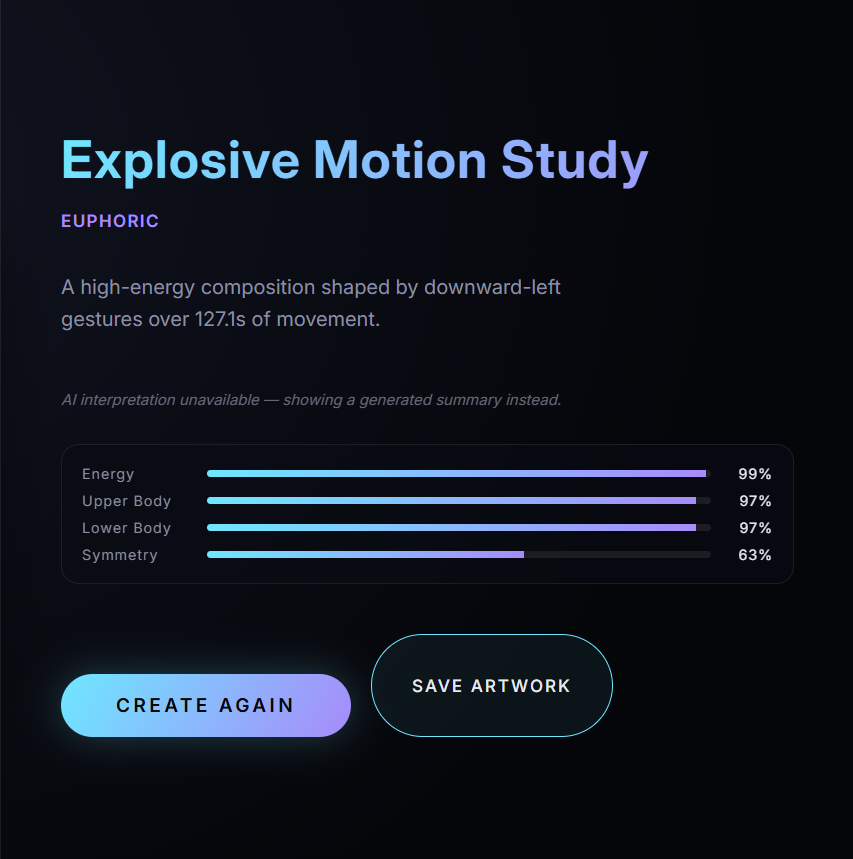
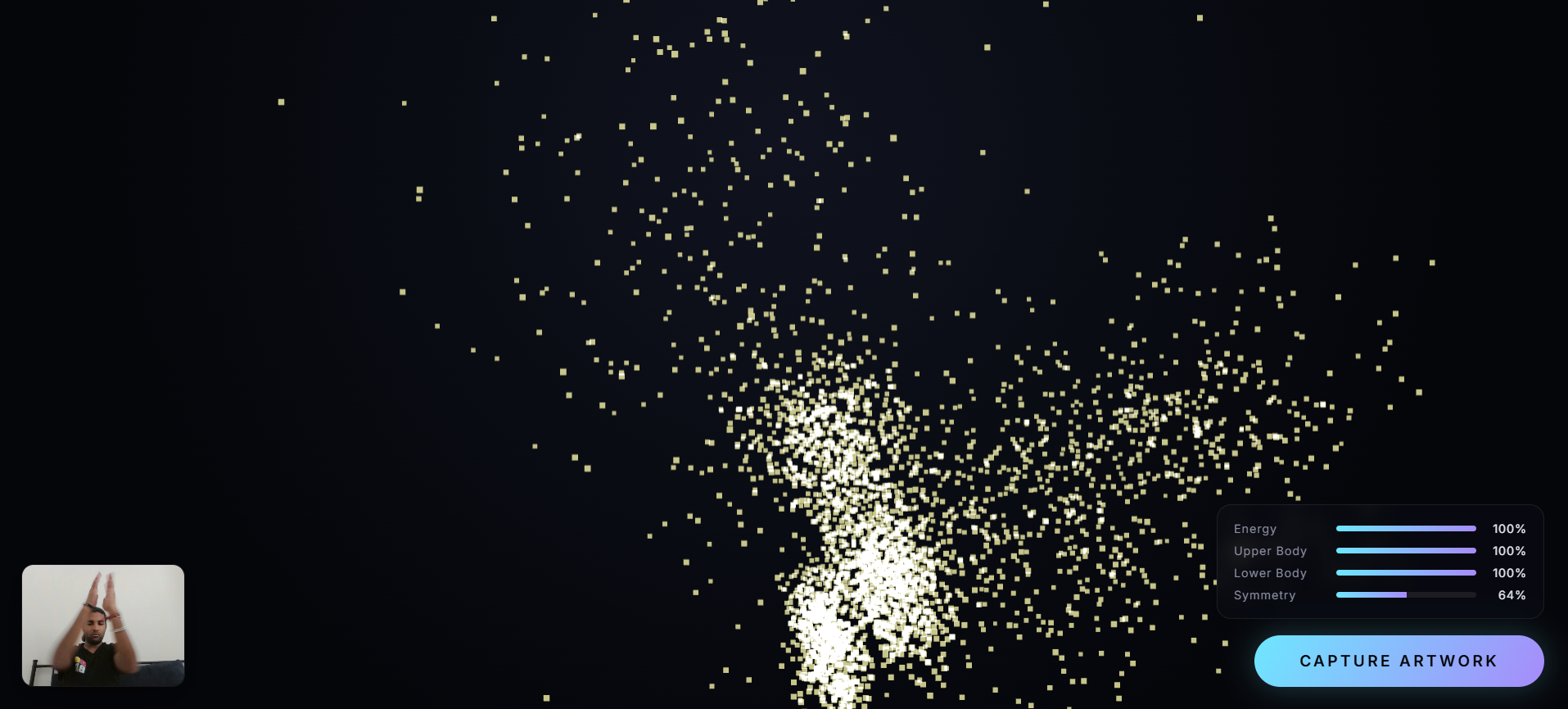
MOTION is an interactive generative-art application that transforms human movement captured through a webcam into dynamic digital artwork.
Instead of simply recording video, MOTION interprets movement and converts it into visual properties such as particles, colors, shapes, motion trails, and other generative effects.
The project was built for a hackathon and explores the intersection of computer vision, real-time interaction, and generative art in an interactive browser experience.
✨ What It Does
MOTION uses a webcam to detect and interpret a person's movement.
As the user moves:
- The webcam captures the user's movement.
- Movement information is analyzed in real time.
- The detected movement influences the generative-art system.
- The application continuously produces and modifies visual artwork.
- The result is a digital artwork that evolves with the user's movement.
The goal is to make the user an active part of the creative process rather than simply viewing a static piece of art.
🎨 Key Features
Real-time movement interaction
- Uses webcam input to respond to human movement.
Generative artwork
- Movement is translated into dynamic visual effects.
Interactive experience
- The artwork changes as the user moves.
Camera permission fallback
- Provides an alternative experience when webcam access is unavailable or denied.
Demo mode
- Allows the experience to be explored without requiring a working webcam.
Responsive interface
- Designed to work across desktop and smaller screen sizes.
Client-side experience
- Designed as an interactive browser-based application.
🧠 How It Works
At a high level, MOTION follows this pipeline:
                 Webcam
                    │
                    ▼
           Movement Detection
                    │
                    ▼
          Movement Interpretation
                    │
                    ▼
        Generative Art Engine
                    │
                    ▼
          Dynamic Visual Output
The application continuously processes movement and uses it as an input to the visual generation system.
Different movement characteristics can influence the behavior of the artwork, allowing the user to effectively "paint" through motion.
🛠️ Tech Stack
Frontend
- React
- TypeScript
- Vite
Development
- Vite
- ESLint
- Oxlint
Testing
- Browser-based end-to-end testing
- Movement logic tests
- Art-director / fallback logic tests
🚀 Running Locally
Prerequisites
Make sure you have installed:
- Node.js
- npm
You can check your versions with:
node -v
npm -v
1. Clone the Repository
git clone https://github.com/takshp2024-sys/motion-generative-art.git
2. Enter the Project Directory
cd motion-generative-art
3. Install Dependencies
npm install
4. Start the Development Server
npm run dev
Vite will provide a local URL, typically:
http://localhost:5173
Open the URL in your browser.
🖥️ Using MOTION
With a Webcam
- Open the application.
- Allow camera access when prompted.
- Stand in front of the camera.
- Move your body or hands.
- Watch the artwork respond to your movement.
If Camera Access Is Denied
MOTION provides a fallback experience so the application can still be explored without webcam access.
Demo Mode
The application also supports a demo experience for testing and showcasing the generative-art system without depending on live camera input.
🧪 Testing
The project includes automated tests for important parts of the application.
The test suite covers areas including:
- Movement-processing logic
- Generative-art decision logic
- Camera fallback behavior
- Browser-based end-to-end interaction
Relevant tests include:
browser-test.mjstest-art-director.tstest-movement-logic.ts
Run the project's available checks using the scripts defined in package.json.
If a test script is available, you can run:
npm test
📁 Project Structure
A simplified overview:
motion-generative-art/
│
├── src/
│   ├── components/
│   └── ...
│
├── public/
│
├── tests/
│
├── package.json
├── vite.config.ts
├── tsconfig.json
└── README.md
The exact structure may evolve as the project continues to be developed.
🔐 Privacy
MOTION is designed around an interactive browser experience.
Camera access is requested through the browser and requires explicit user permission.
If camera access is denied, the application provides a fallback experience rather than preventing the user from exploring the project.
⚠️ Current Limitations
- Webcam-based interaction depends on browser camera permissions.
- Movement detection can vary depending on lighting and camera quality.
- The experience is optimized primarily for modern desktop browsers.
- The generative artwork is driven by the movement-processing system implemented in the project.
🔮 Future Improvements
Potential improvements include:
- More advanced pose and body tracking
- Additional generative-art styles
- Custom color palettes
- User-controlled artistic parameters
- Export artwork as images or video
- Save and replay movement sessions
- More sophisticated movement-to-art mappings
- Mobile camera support
- Improved accessibility controls
🏆 Project
MOTION — Turn Human Movement Into Digital Art
Built as a hackathon project.
The project explores the intersection of:
- Computer Vision
- Human-Computer Interaction
- Generative Art
- Creative Technology
- Interactive Web Applications
📄 License
See the repository for licensing information.

Log in or sign up for Devpost to join the conversation.