-
-
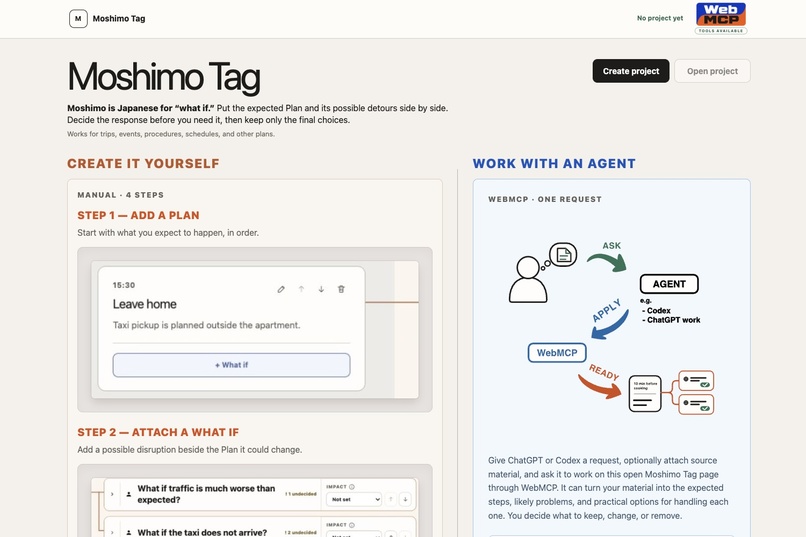
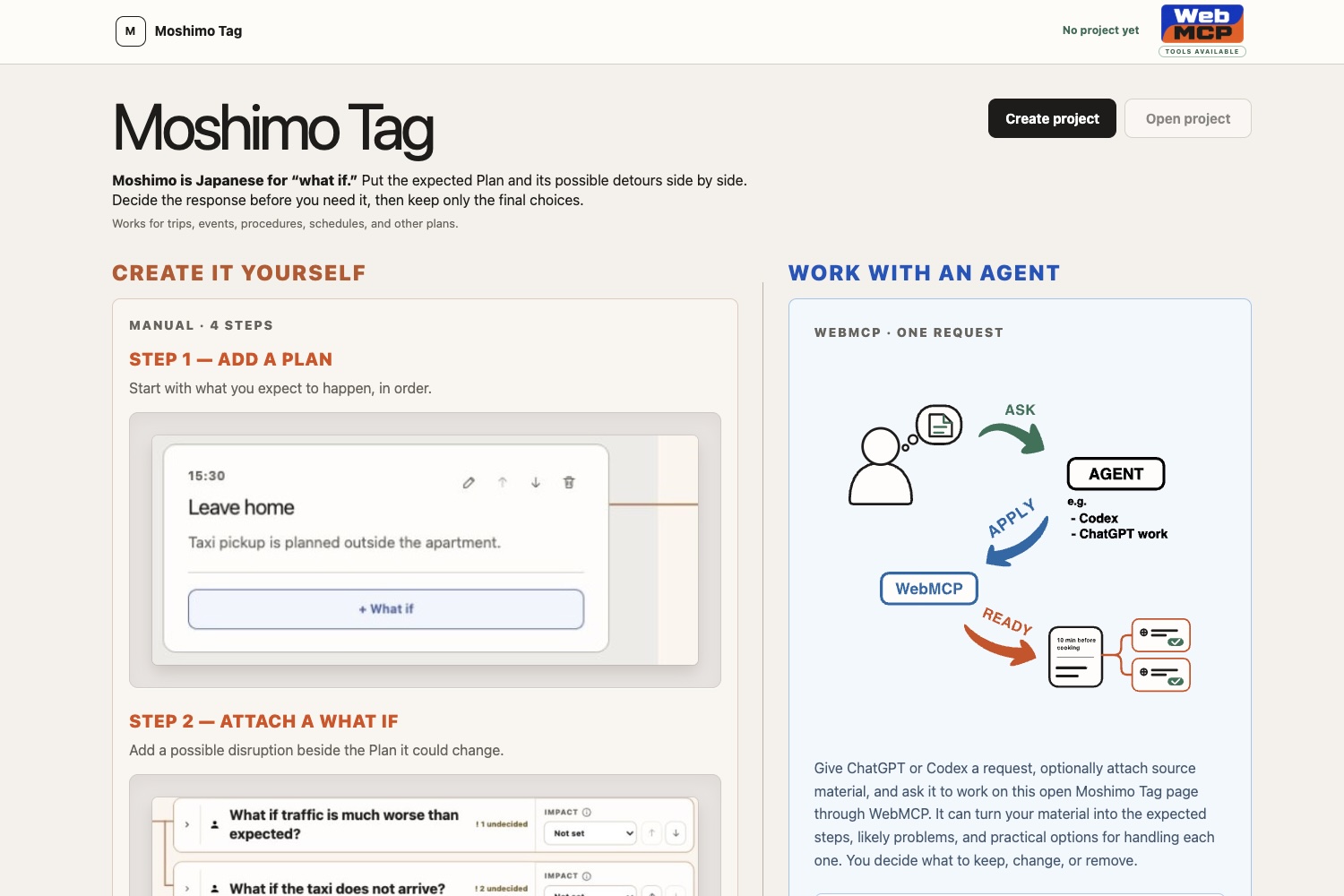
Start a Project and build the expected Plan
-
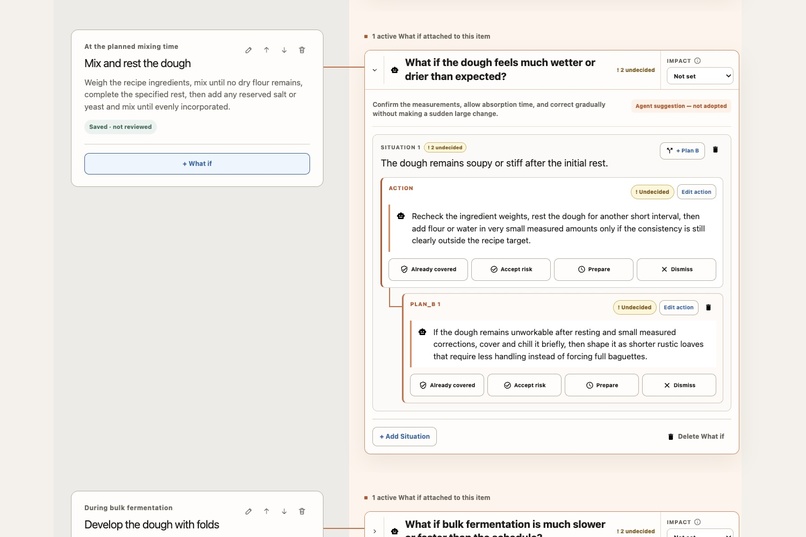
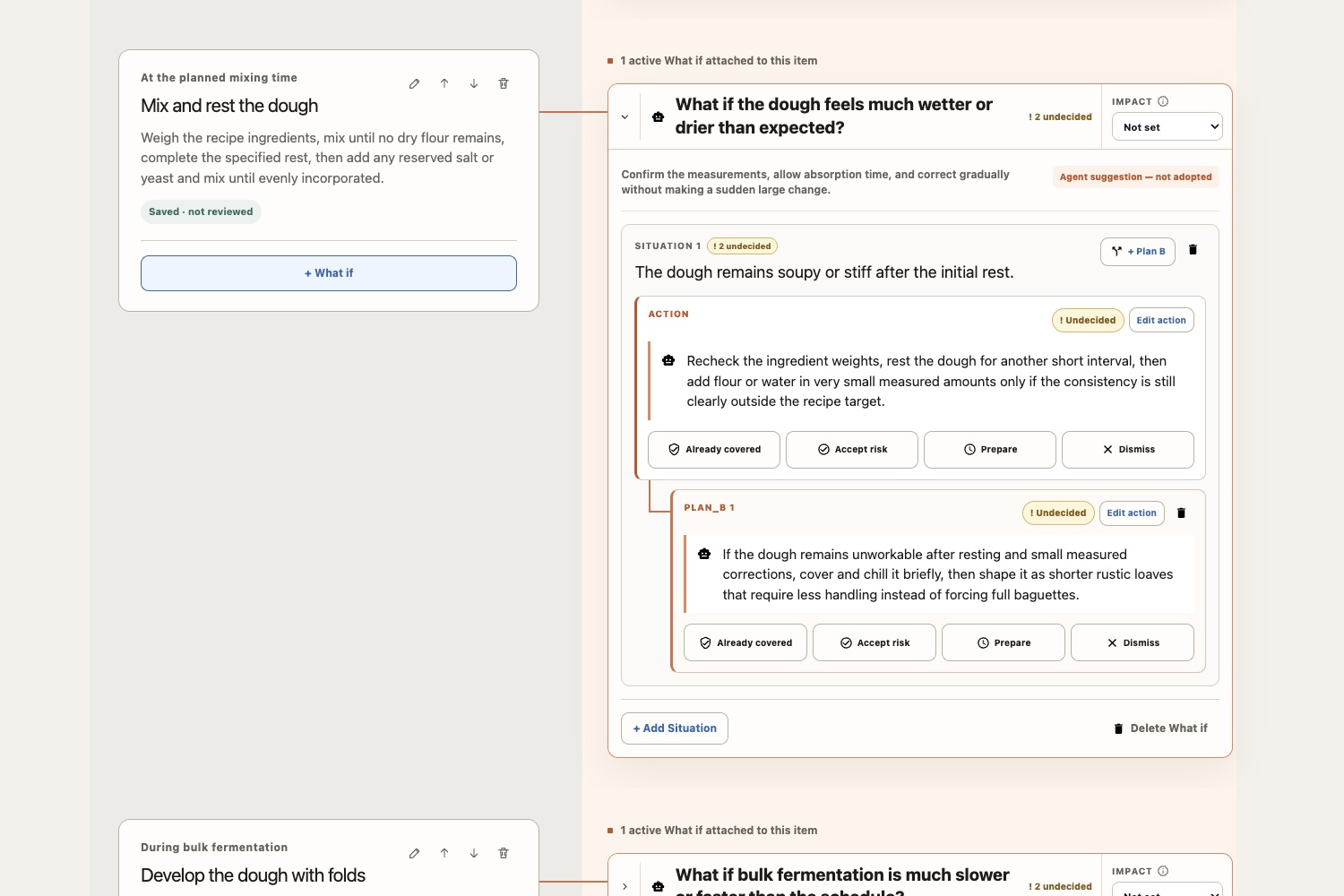
Attach What-ifs to the Plan moments they affect
-
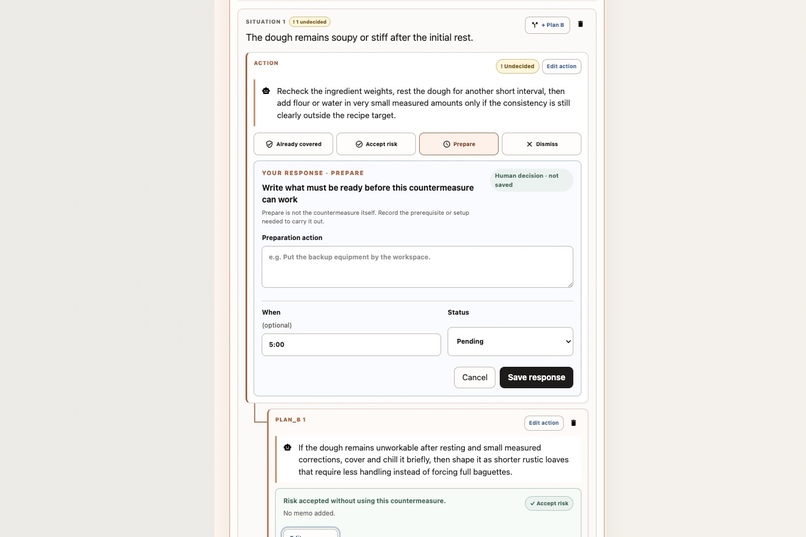
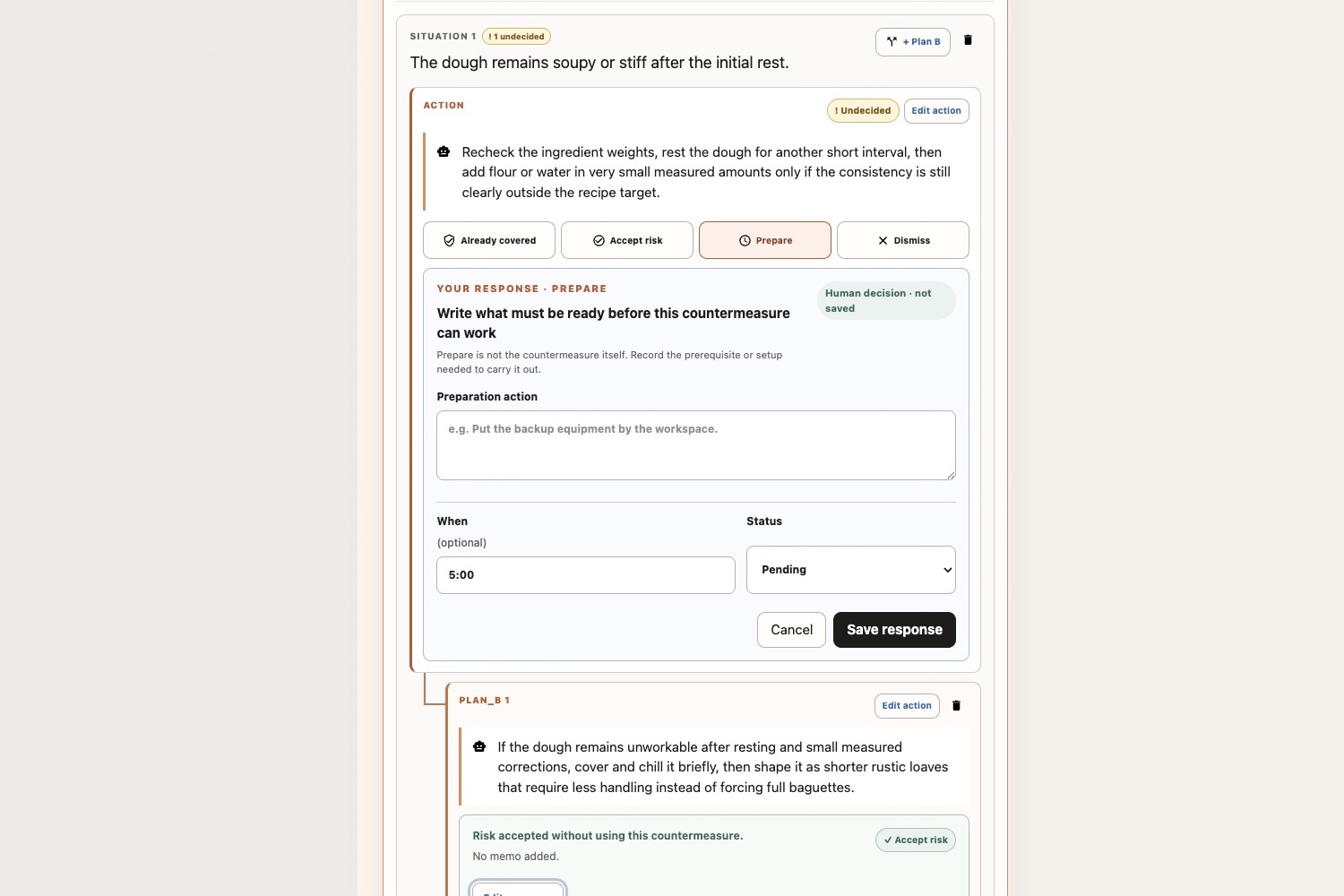
Review Situations, countermeasures, and Plan B options
-
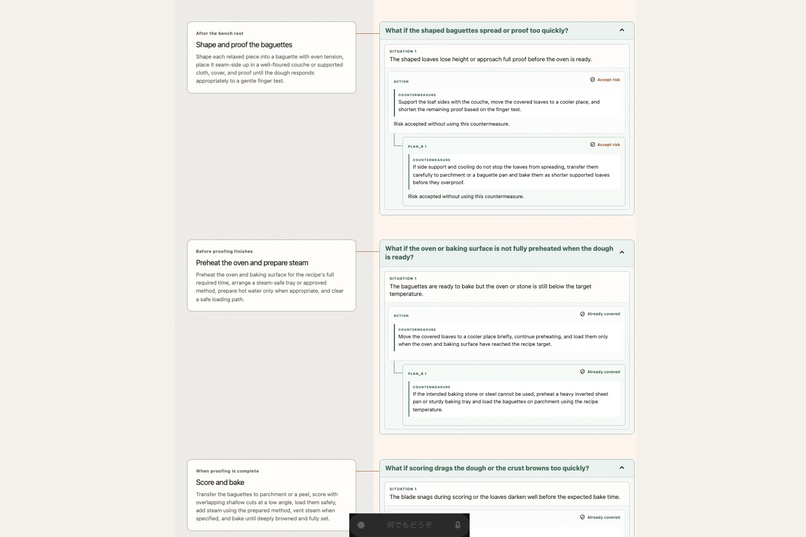
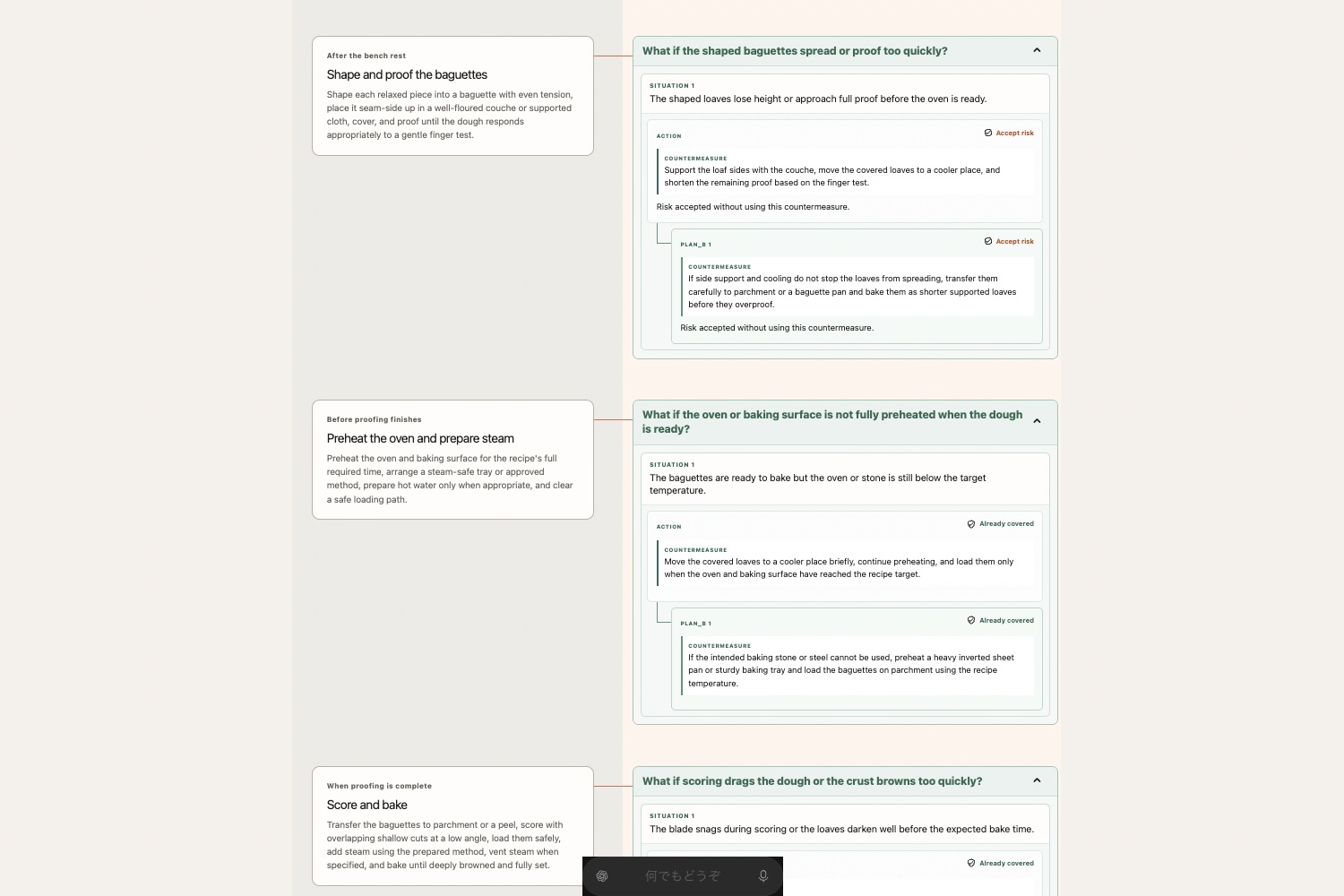
Review only the responses selected by the human
Inspiration
When I first heard about WebMCP, the first thing that came to mind was a stage I once performed on. In that Japanese-style stand-up comedy performance, I had to change which line I delivered depending on the audience’s reaction. At every branch, I made sure to prepare at least three lines: one for a good reaction, one for a bad reaction, and one for a reaction that was hard to read. I had not always worked that way. Countless times, when the audience did not respond as expected, I forced myself to continue with the material exactly as I had prepared it and lost heart partway through. The method above grew directly from reflecting on those failures. Strangely, once I began preparing responses for several plausible cases, I sometimes found that I could hold the audience’s attention with improvisations I had not prepared at all.
However, that kind of advance planning had several drawbacks.
- Writing down all the branches in text documents or data files was cumbersome.
- Listing several options at a single branch point quickly made the page cluttered.
- I could not always cover all the Situations that might arise at each branch point.
From one person’s perspective, it is easy to overlook things.
I thought WebMCP might be exactly the right mechanism for solving these problems.
That idea led me to create Moshimo Tag: I felt that if this kind of preparation could be applied to a broader range of events, it might help many people.
Most people do not examine multiple scenarios carefully enough. Even among the performers who shared the stage with me, many imposed a self-centered, single-track script that created a divide between the stage and the audience. People in general likewise tend to write schedules around the path where everything goes as planned and stop there. Yet even in real events such as trips, interviews, and dates, lateness, forgotten items, weather, and reactions that differ from expectations often force plans to change. Even when people understand the importance of advance planning, it takes effort to think through these possibilities beforehand, identify where each one relates to the Plan, and write a countermeasure for each. It is only natural that people would rather avoid such meticulous preparation. If WebMCP can make it easier, I believe more people may be able to avoid failure.
What it does
In Moshimo Tag, the user creates a Project and arranges schedules, procedures, scripts, and similar content as a Plan in chronological or execution order.
Project: Flight to San Francisco.

Plan 1: Research airlines.
Plan 2: Book a seat.
Plan 3: Leave home.
Plan 4: ...
Each Plan item can contain the following structure.
Plan
└─ What-if
   ├─ Situation 1
   │  ├─ main countermeasure
   │  ├─ Plan B 1 countermeasure
   │  ├─ Plan B 2 countermeasure
   │  └─ ...
   └─ Situation 2
      ├─ main countermeasure
      └─ ...
For example, the user can attach the What-if “What if I leave late?” to the Plan “Leave for the venue.” Under it, the user can separate Situations such as “I am 15 minutes late” and “I am more than 30 minutes late,” then prepare a main countermeasure and Plan Bs for each.
Users can enter all of this manually. Compared with writing in a blank notebook, it is much easier to build a plan in an organized form. Alternatively, when asked, a WebMCP-capable agent can read the current Project and add or edit Plans, What-ifs, Situations, and countermeasures on the same screen the user already has open. This is far faster and easier than entering everything by hand.
However, everything the agent creates remains a candidate. The agent cannot edit or save the following final decisions:
- Already covered
- Accept risk
- Prepare
- Dismiss
That is because the most important part of advance planning is for the human to review the candidates, edit the wording when necessary, and decide how to respond.
After the user has decided each item, opening View final plan removes the noise of candidates and undecided items. It displays only the countermeasures the human selected alongside the original Plan, making the result easy to review.
When useful, the final state can also be passed to an agent as a structured projection and reused as a CSV, spreadsheet, summary, Situation matrix, runbook, or similar output.
Why WebMCP
Of course, even without WebMCP—or without Moshimo Tag itself—you could ask an AI to “list the risks,” and it would probably produce similar What-ifs. But an ordinary chat response can easily become a long list with more detail than necessary. It does not preserve which point belongs to which Plan item, what the human chose to adopt, or what became outdated after the Plan changed. Even if the result is saved to a file, unless you have a heavily customized system, the information will still tend to become scattered and cluttered, and organizing it will take additional effort.
This is where WebMCP becomes useful: it takes the AI’s answer out of the chat and connects it directly to the same Plan the human is viewing. Through WebMCP, a browser agent can read the structured state of the Project currently open on the page and use stable IDs to add likely What-ifs at the exact points in the Plan they affect. It does not need to risk typing into the wrong field or clicking a button at the wrong moment.
Because the agent uses structured page tools and performs its work as direct, visible, verifiable state changes, the human and the agent share the same screen, the same Project, and the same saved state—not separate copies or chat logs. The format of the plan does not change because of an AI’s whims or memory lapses. It can be created in the same form every time, providing a consistent user experience.
WebMCP also allows permissions to be deliberately constrained. Instead of relying only on promises in a system prompt, Moshimo Tag enforces the boundary through capabilities the tools simply do not have: the agent may prepare candidates, but it cannot take away the human’s decision about how to respond. This is essential to Moshimo Tag’s core UX of helping people feel adequately prepared before an event.
How we built it
Moshimo Tag is a web application built with TypeScript, React, Next.js, and Vite/Vinext. It is deployed and publicly available through ChatGPT Sites.
I used ChatGPT Pro to discuss the concept and draft the implementation plan. Before this challenge, I had already created guideline skills for developing implementation plans with ChatGPT and Codex for my personal projects. I used those skills to turn the draft into an implementation plan.
Codex handled most of the implementation. My main role was to review key points, request corrections, and create the SVG graphics used in the app. I also edited the code myself for design adjustments. I made trade-offs between development time and different aspects of quality with the hackathon’s timeframe in mind. Time was not unlimited, so I do not claim that the implementation is flawless. I expect to improve it incrementally as needed.
The WebMCP tools use document.modelContext.registerTool() in src/webmcp.ts.
The current implementation registers 12 tools, covering:
- listing, creating, updating, and opening Projects, as well as switching views
- reading, adding, editing, reordering, and deleting Plan items
- managing What-ifs and impact
- managing Situations and their main countermeasures
- managing Plan B countermeasures
- preparing non-binding response candidates
- reading final and export projections
The human UI and WebMCP mutations use the same application command path. There is no separate hidden state that only the agent can manipulate.
Every mutation validates IDs, entity versions, text lengths, operation limits, state, and idempotency keys. Read tools return projections bounded to their purpose rather than raw browser storage.
Project data is stored in the browser’s localStorage.
The app requires no account, API key, or dedicated backend.
Challenges we ran into
Even now that I have a working version, I still wonder whether I could have found a UI and design that were easier to read and manage. In other words, designing an excellent UX was my greatest concern from the earliest stage of the project.
WebMCP testing presented another challenge. Because I let an AI agent work autonomously, parts of the verification process became something of a black box. Did the agent really use WebMCP to make the update, or did it enter the content by manipulating the DOM through a browser-control skill? I had to distinguish between the two carefully several times, which was nerve-racking. In fact, an agent once followed an editing instruction through DOM manipulation instead of WebMCP, and I nearly missed it.
Accomplishments that we're proud of
- I completed a coherent product experience from Project creation through the final Plan, rather than stopping at a technical demo—though I do not claim it is perfect.
- I think I managed to demonstrate at least some of WebMCP’s value. Having used WebMCP together with ChatGPT’s in-app Browser myself, I found the combination wonderful.
- I created something resembling a “WebMCP” logo in the upper-right corner of the app that is just the right amount of uncool. Users will probably think it looks tacky, yet find themselves unable to forget “WebMCP.”
What we learned
- Developing the concept deepened my understanding of WebMCP. In particular, one of my biggest discoveries was that WebMCP should not be used for everything. During development, I considered using WebMCP in a browser game. But as I explored the idea, it became clear that ordinary internal processing would suit it better. That dead end had an unexpected benefit: it strengthened my confidence in the fit between Moshimo Tag and WebMCP.
- I also learned that ChatGPT’s in-app Browser and WebMCP work extremely well together. I had previously used the ability to leave comments directly on a browser page for reviews and correction requests, but I realized it is equally well suited to actually using a web app. An escape-room game played solely by leaving instructions for an agent in comments might be fun. There seem to be many other possibilities, and I am excited to see what ideas the other participants come up with.
What's next for Moshimo Tag
Ideas I am considering next:
- importing itineraries, checklists, run sheets, and similar materials
- direct export of the above
- templates for different use cases
- localization, including Japanese
- Project export and import
- expanded support for saving and managing multiple Projects
- trusted team collaboration
- explicit integrations with calendars, weather, transportation, and similar services
- reviewing diffs and rolling back changes after a Plan is edited
- continued improvements to accessibility and keyboard operation
Built With
- codex
- css
- html
- node.js
- react
- typescript
- vinext
- vite
- webmcp

Log in or sign up for Devpost to join the conversation.