Inspiration
Morgen and Akiflow are fantastic calendar + task managers, but they come with expensive subscription pricing that don't fit every engineer's workflow. As a full stack engineer, I wanted a polished, extremely fast calendar with drag-to-schedule tasks - built by an engineer, for an engineer, with zero AI features and instant interactions. Morgen's clean, minimal aesthetic with rounded corners, soft shadows, and color-coded events became the primary design reference, tempered with subtle sci-fi/cyberpunk touches: circuit board textures, monospace typography, and neon blue/purple accents.
What it does
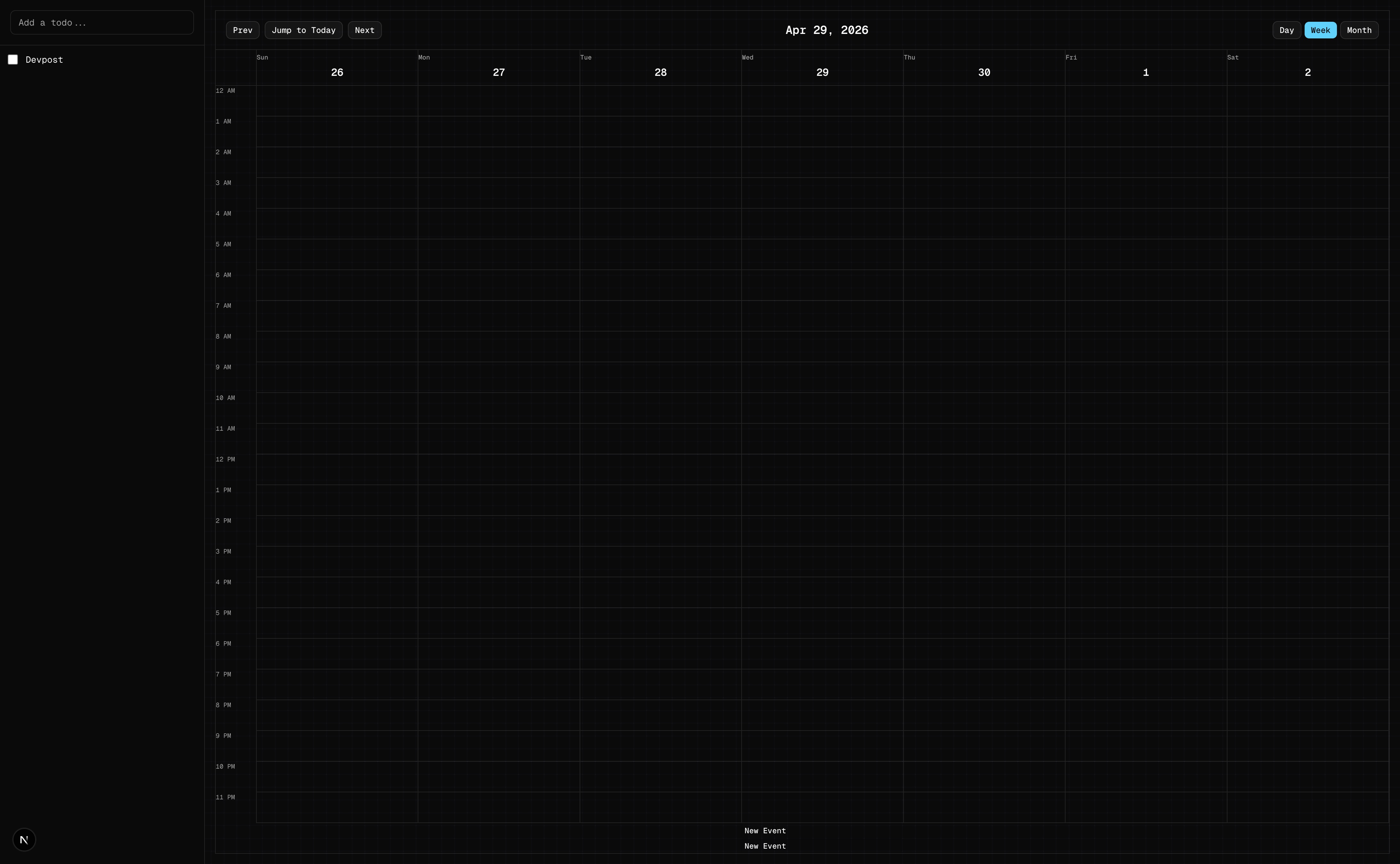
Morgen-Lite is a local-first personal calendar and task manager with:
- Three calendar views: Day (single 24-hour column), Week (default, 24-hour grid), and Month (date grid with colored event indicators)
- To-do sidebar: Create tasks via input, drag them onto the calendar to schedule
- Click-to-create: Click any empty time slot to create a new event instantly
- Full event management: Resize, drag to reschedule, edit titles, and delete events
- Buttery smooth performance: Virtual scrolling, zero loading states, instant interactions -> performance is the #1 win condition
- Dark theme: Neon blue (#00d4ff) and purple (#b44aff) accents on a dark background with subtle circuit board textures
- Local-first: Everything persists via IndexedDB (no cloud, no accounts, no sync)
How I built it
I used a spec-driven development approach - scoping the idea, writing a PRD with acceptance criteria, creating a technical spec with architecture decisions, then building against a checklist. The entire planning phase took ~30-45 minutes and paid for itself during the build.
Stack:
- Next.js (App Router) + React 18 + TypeScript - my daily driver
- Tailwind CSS + shadcn/ui - for the dark theme and clean components
- trud-calendar v0.1.4 - MIT-licensed, TypeScript-first calendar with built-in drag-drop/resize and shadcn theming
- Dexie.js v4.4.2 + dexie-react-hooks - IndexedDB wrapper with
useLiveQueryfor reactive state (no React state management library needed)
The build was done in autonomous mode - I let the agent execute all 9 checklist items sequentially, committing after each step. Total build time: ~2.5-4.5 hours.
Architecture: Split layout with a 320px sidebar (todo input + list) and a calendar area (trud-calendar with day/week/month views). Data flows through Dexie live queries - the database IS the state.
Challenges I ran into
- trud-calendar v0.1.4 is extremely new - v0.1.4 with 0 GitHub stars means small community and undiscovered bugs. I hit a
useCalendarContexterror (cannot be called outside the Calendar provider) and had to hardcode values, plus some TypeScript type mismatches required handler adjustments. - Scaffolding hiccup -
create-next-appfailed initially becauseprocess-notes.mdalready existed in the root directory. Resolved by temporarily moving the file. - Overlapping event readability - ensuring layered events remain readable required custom CSS tuning (z-index, opacity, width adjustments based on overlap position).
Accomplishments that I'm proud of
- The performance target hit - drag-to-schedule is genuinely buttery smooth, virtual scrolling works, and there are zero loading states. The #1 win condition succeeded.
- The aesthetic - dark theme with neon accents and subtle circuit board textures strikes the right balance: clean like Morgen, with just enough high-tech sensibility to feel personal.
- The spec-driven workflow - planning thoroughly before touching code meant the autonomous build completed all 9 checklist items without major blockers. The context was so clear the agent never got lost.
- Local-first reactive state - Dexie +
useLiveQueryeliminated an entire layer of state management. The database drives React updates directly.
What I learned
- Context is everything - the planning docs (scope, PRD, spec, checklist) built a shared understanding that made the build phase effortless. The agent never had to "guess" what I wanted.
- Planning is fast - I spent ~30-45 minutes planning and it saved hours during the build. The autonomous build just worked because the context was thorough.
- Steering happens before coding - the real "prompting" technique isn't about crafting the perfect prompt mid-build, it's about having rock-solid specifications beforehand.
- Next time: deeper dives - I skipped deepening rounds in /prd, /spec, and /checklist. More time in planning = even smoother execution.
What's next for Morgen-Lite
- Google/Outlook Calendar integration - sync with external calendars for a complete picture
- Keyboard shortcuts - vim-style or Morgen-style hotkeys for power users
- Recurring events - daily/weekly/monthly repetition without manual re-creation
- Event categories/tags - beyond color-coding, add semantic labels (work, personal, health)
- Search - find events and to-dos across the calendar by keyword
- Subtasks - break to-dos into smaller actionable items with their own checkboxes
- Multi-user support - auth, sharing, and collaborative scheduling (longer-term)


Log in or sign up for Devpost to join the conversation.