-
-
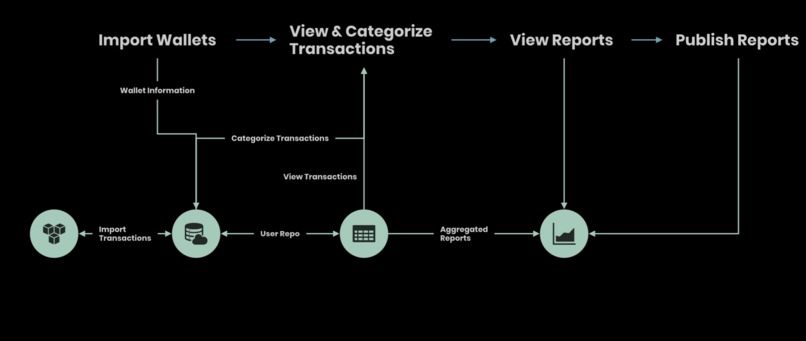
MoonLight User Flow
-
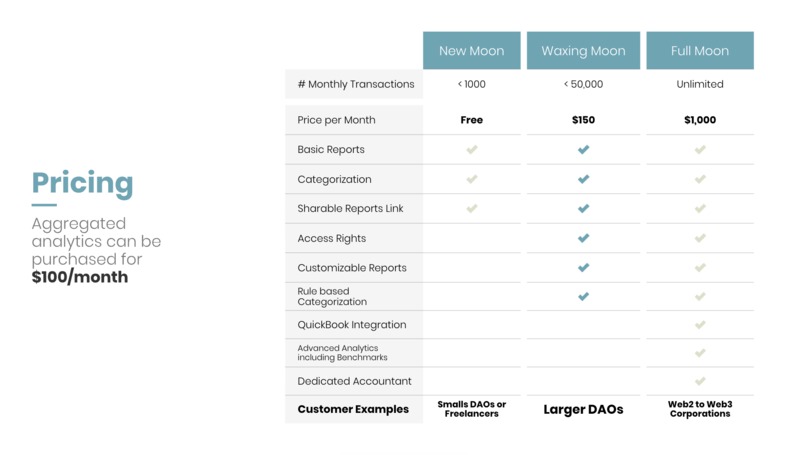
Pricing Model Draft
Overview
The Problem
Existing and prospective shareholders lack an understanding of a decentralized platform’s financial health causing an absence of insight into its performance, treasury, revenue, expenses, and cash flow.
Getting to the roots of the current problem:
Too many transactions to manage financial reporting - As a financial/accounting contributor, hours can be spent in spreadsheets attempting to track what is happening, where the money is going, and to calculate the protocol’s gain and loss. This method is unmanageable and complicated.
Ambiguity to transactions on the blockchain - While blockchains provide transparency to transactions, there is a lack of context which is exacerbated by the number of transactions. Without context, shareholders have no insight into financial health.
Investors & Contributors lack transparency with projects - Stakeholders have no insight into how their money is being put to use and when they might expect a return leading to a lack of visibility into sustainability or the performance of the decentralized organization.
The Solution
MoonLight is a platform that reports financial data for decentralized organizations and allows them to convey their financial health. MoonLight specifically reports on treasury, expenses, revenue, and profitability giving stakeholders active insights into a DAO’s current and projected performance.
Why Now?
Scam projects create a lack of distrust for all web3 projects, and as more users come into web3, they need to be able to understand the risks and opportunities of the organization before and after they invest.
Reporting leads to more capital efficiency for both grant programs and investors. Currently, donors and investors don’t have visibility into how their money is being put to use; however, by reporting, we can not only provide insight into where their money is going but also the value their money is bringing.
In the future, with the rise of regulation, it is more important than ever for protocols to self-report on financials. Transparency is the backbone for web3, and by DAO's self-reporting, we can influence and improve the current standard.
How it works:
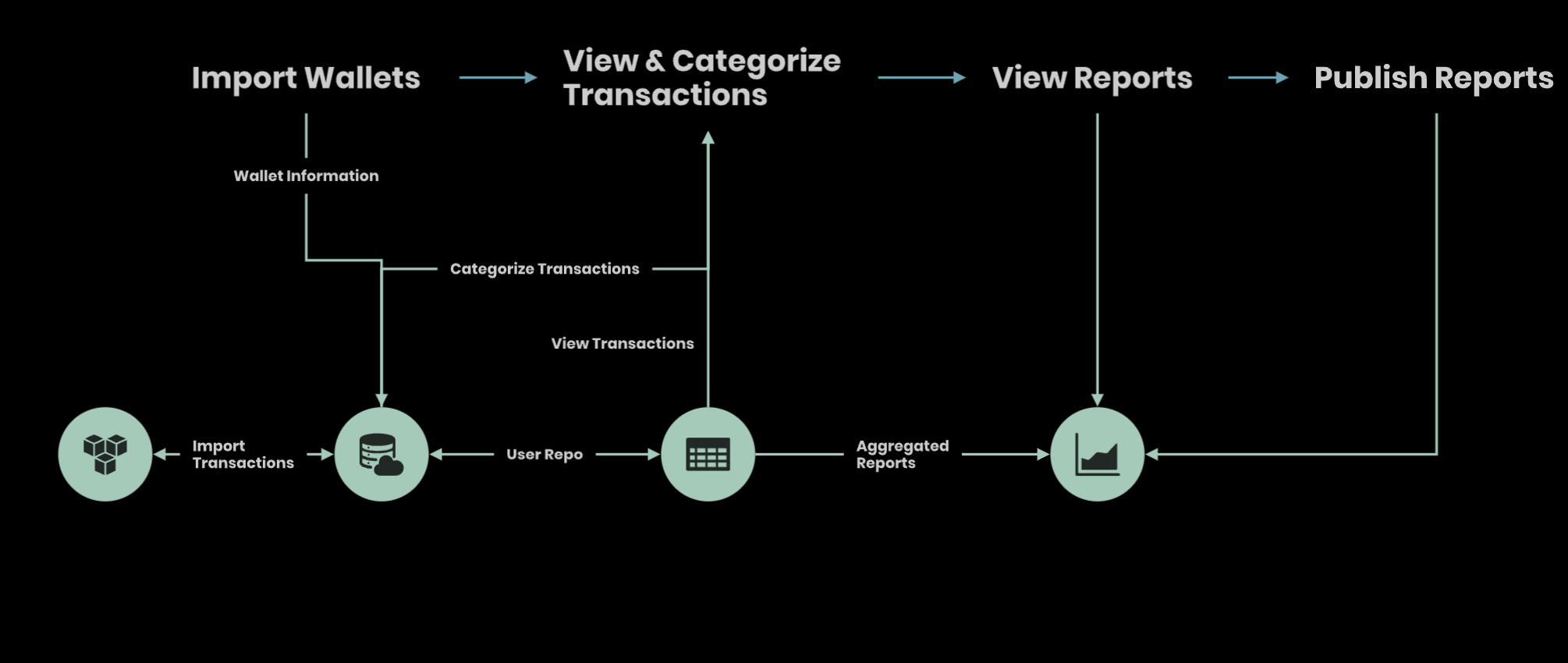
MoonLight is simple. There are four main steps in the user flow (see diagram under "Project Media"):
- Import wallets
- Categorize transactions
- View Reports
- Publish Reports

Import wallets
This step is simple. Users are asked to insert three different wallets into their account:
- Treasury Wallet(s)
- Expense Wallet(s)
- Revenue or Fee Wallet(s)
If users only have one or two wallets, they check boxes that would indicate that the expense and revenue wallet is the same as the treasury wallet.
Categorize transactions
After importing their wallets, users can categorize the incoming/outgoing transactions as well as name the receiving/sending wallet. The listed transactions would include the following info:
- Outgoing or incoming
- Time of transaction
- Link to transaction on blockchain scanner
- To wallet address or label (Click to label)
- From wallet address or label (Click to label)
- Token sent or received
- Token value at the time of transaction
- Dropdown for category
The user can then categorize incoming fees/revenue and outgoing expenses. The categories and sub-categories are as follows:
Income
- Grants
- Token Sale
- Sales
- Fees
- Farming
Expenses
- Talent
- R&D
- Marketing and Community Building
- Workspace
- Events and Travel
- Technology
- Admin
- Professional Services
- Liquidity Incentives
- Tokens Distributed
- Incurred losses due to hacks
Transfers to Revenue, Expense, or Treasury Wallets
In later version of the paid product, users can set rules to automate and streamline the categorizations of transactions. Some conditions that could be used for rules might include:
- Reoccurring wallets - Categorizes based on the wallet that received or sent the transactions
- Categorize based on amount
- Categorize based on token
- Categorize based on chain
- Categorize on timeframe between transactions
View Reports
Once the transactions are categorized, reports can be viewed. Additionally, reports can be exported and shared or viewed through a public link. Reports can be viewed by 30 days, 90 days, 180 days, and one year, and would show the following:
- Treasury Asset Breakdown (i.e. what tokens are in the treasury)
- Pie Chart with current assets
- Trend line (7, 30, 90, 180 days)
- Expense report can be breakdown down from above categories
- Pie Chart with type of expenses
- Trend line of total expense amount
- Revenue report can be breakdown down from above categories
- Pie Chart by assets
- Trend line over time
- Profitability or Loss Report
- Broken down by categories
- Total trend line over time
For V2 of the product, we would look to implement a Cash Flow Statement, Balance Sheet, and include the following details:
Assets
- Tokens Held in Wallet
- Liquidity or tokens in Smart Contracts
- Protocol Owned Liquidity
Liabilities
- Loans
For V3 of the product, we would include customized reports and accounting software integration (e.g. Quickbooks).
Publish Reports
DAOs will be able to publicly share their reports with stakeholders or other organizations, such as grant foundations and partners, through a shareable link. This link can be put on the DAO’s website & social media in order to increase accessibility.
*Additional features and functionality will be added to later versions. See below:

How do you envision it being built?
User Flow and Technical Considerations:
- Sign Up and Wallet Imports: Users sign up with their email and import their wallets into the web application which are stored in the database
- The user then verifies their email which will redirect them back to the site. We will then send a follow-up email once all of their transactions have downloaded with a Notification API.
- Once the wallets are imported, a TransactionGetter makes web3 calls across various blockchains to grab all the transactions and feed them into the database.
- At the same time, a PriceGetter will grab all the price information and store this in the database.
- During these steps, a pop-up shows at the bottom right corner of the screen on the site to signal downloading. A confirmation message will ask them to then categorize the transactions.
- The data would then be fed into a user repo in a data warehouse such as Snowflake. Afterwards, the PriceGetter and TransactionGetter would update data based on hourly intervals to the database and added to the user repo on the same intervals.
- Categorize Transactions:
- When a user makes new categorizations to their transactions, these categories would be updated in the user repo.
- Business logic will also be applied for different category rules and suggestions.
- View Reports
- Analytics and dashboard layers will then aggregate the data from the data warehouse making the data easy for users to understand.
- Publish Reports
- A public link is provided for the user to share with stakeholders and on their site.
Go to market strategy
Initial Validation Start by reaching out to chains, grant programs, and incubators to validate the product idea. Then ask the organizations if they have a project that they could connect us to that would benefit. We would give free service to those who would use it as they go through the process with us.
Customers
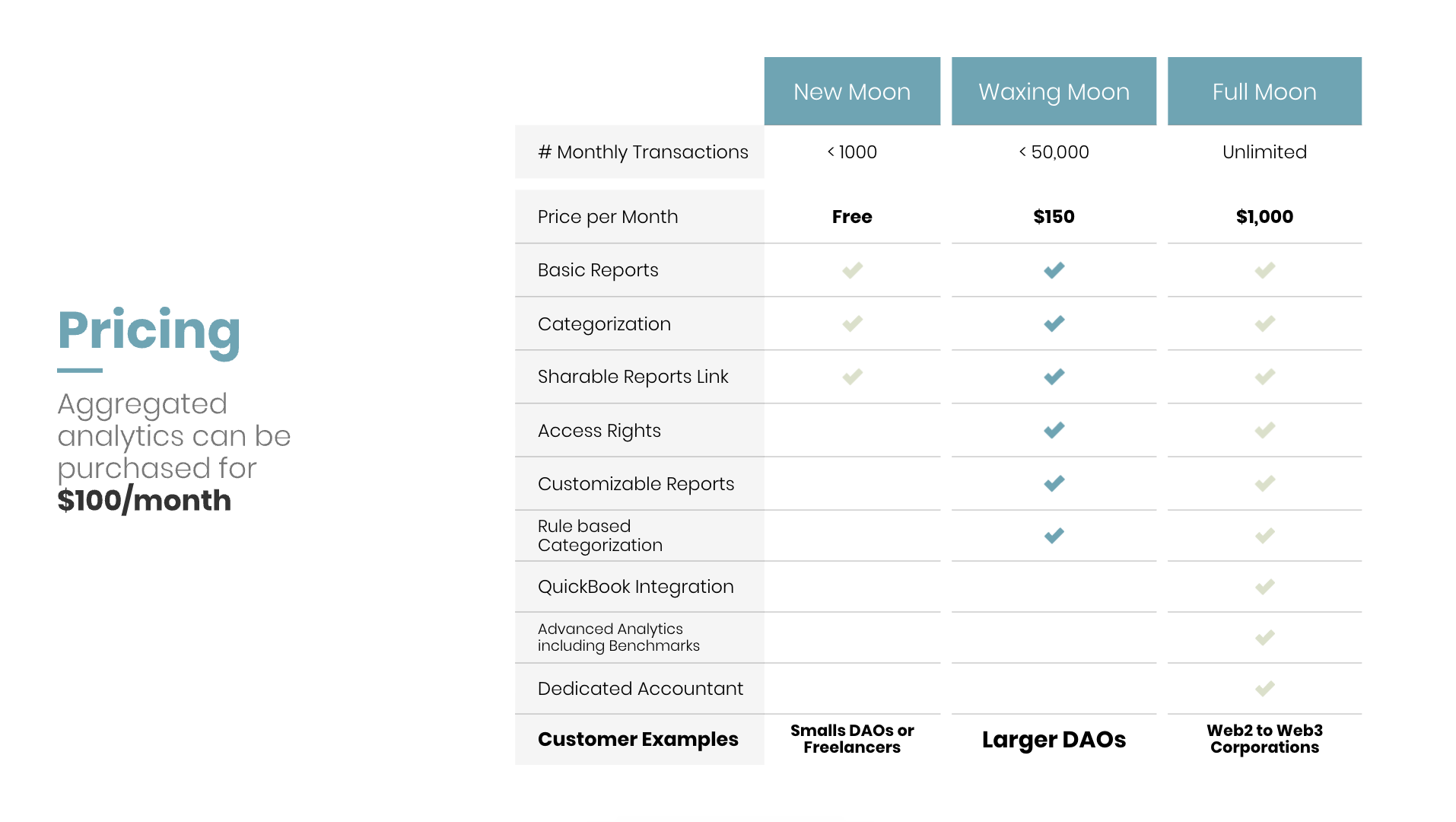
Initially, it would be a freemium model allowing for basics to be used to import wallets, categorize transactions, view and publish reports. Additionally features, could be paid for as seen below:
Finances
Built With
- amazon-web-services
- echarts
- nextjs
- node.js
- react
- typescript
- vercel


Log in or sign up for Devpost to join the conversation.