-
-
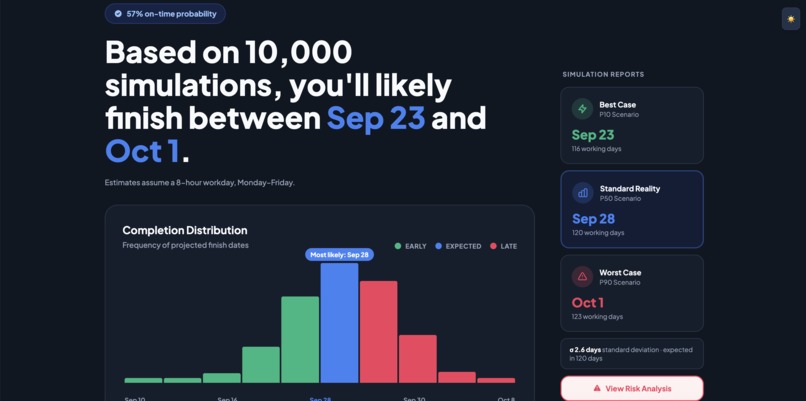
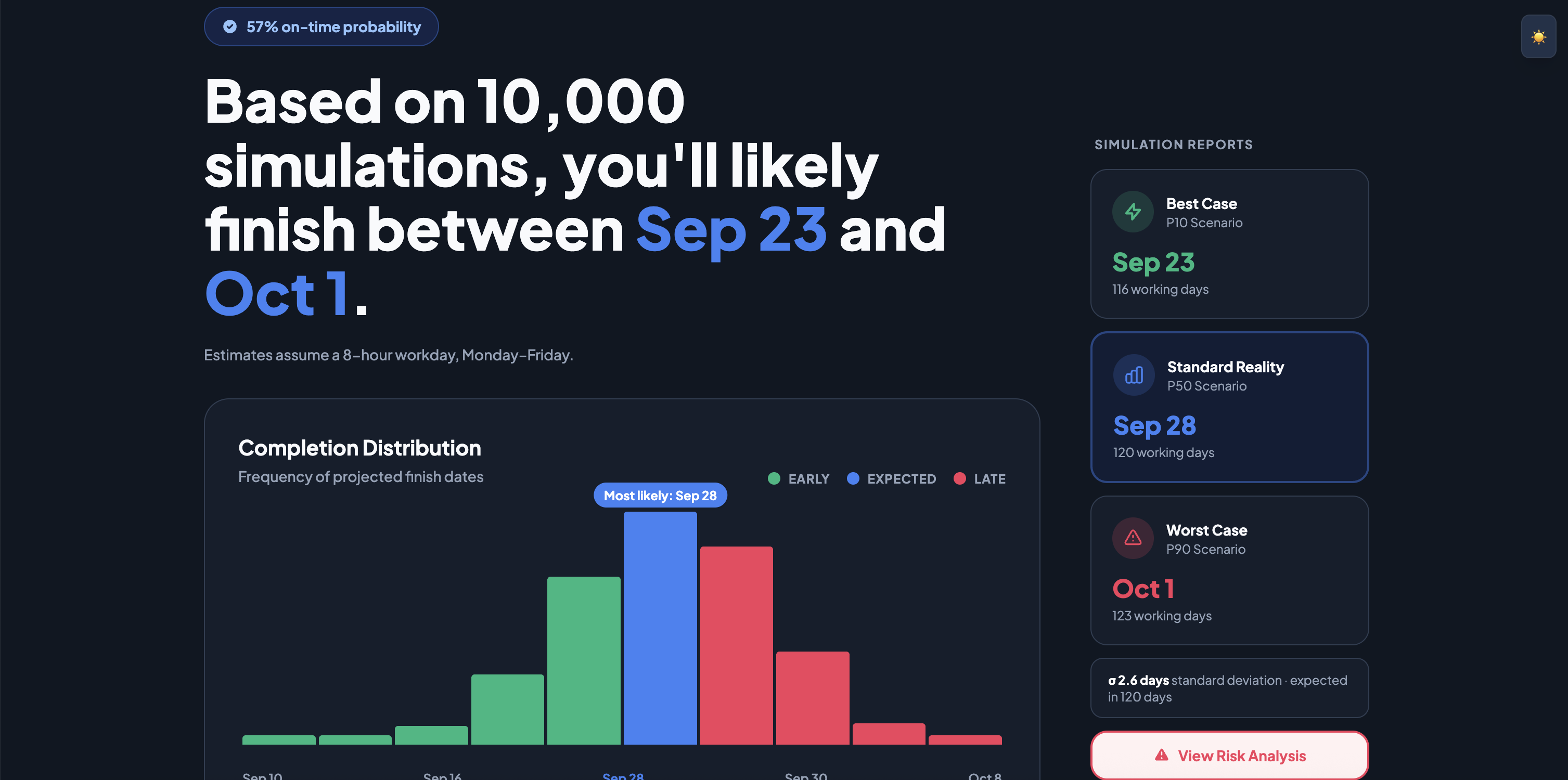
Dashboard summary of project simulation
-
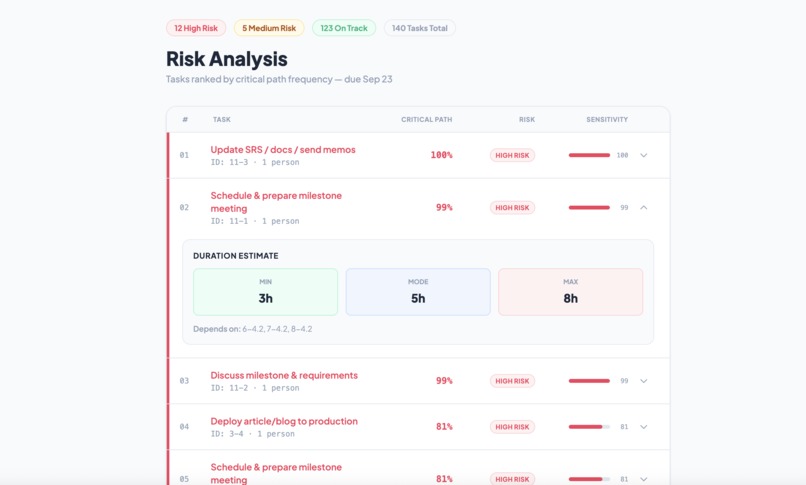
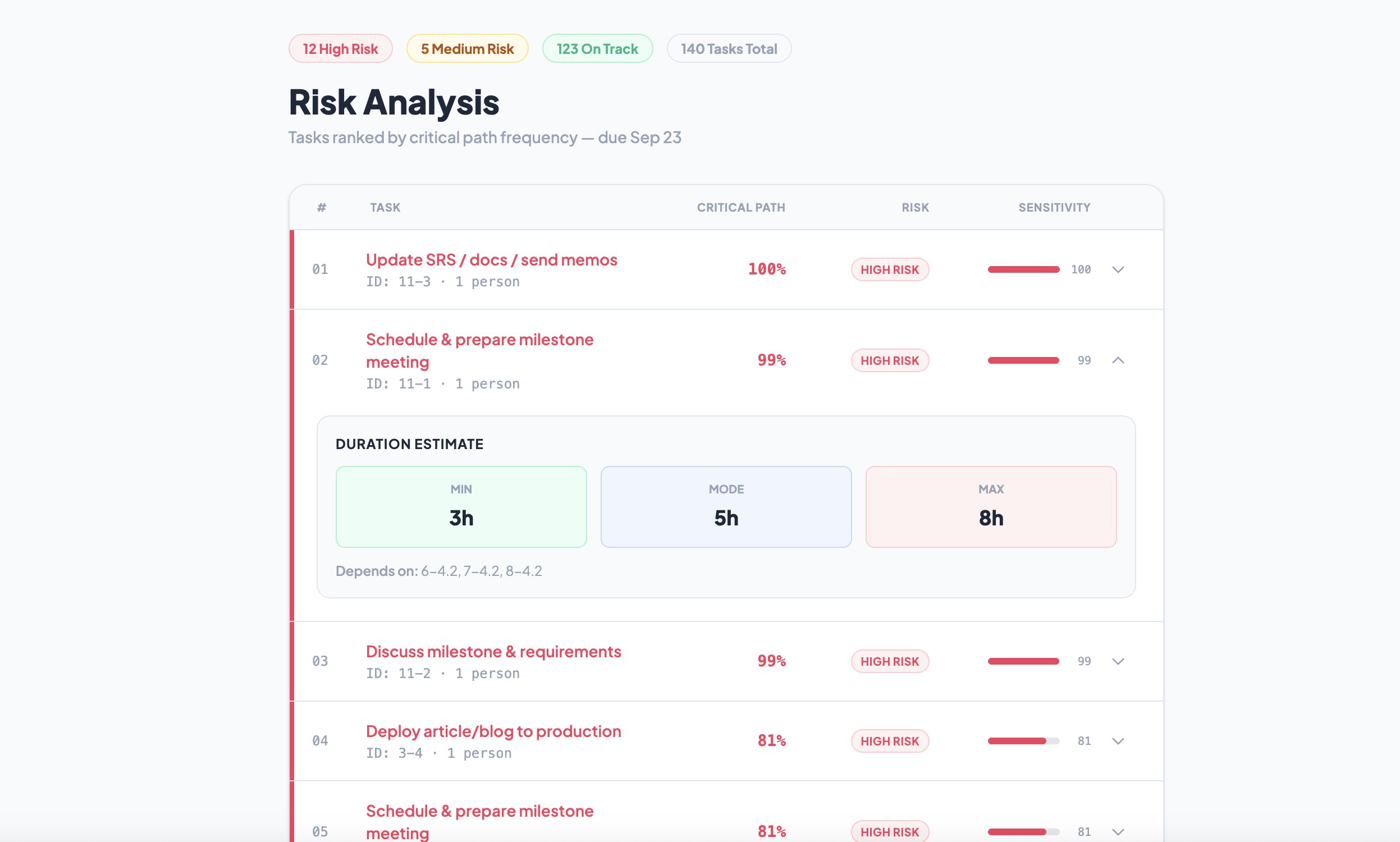
Task Criticality Analysis
-
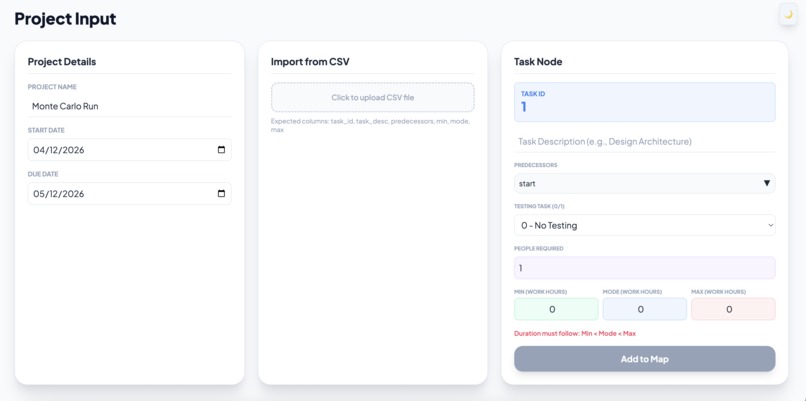
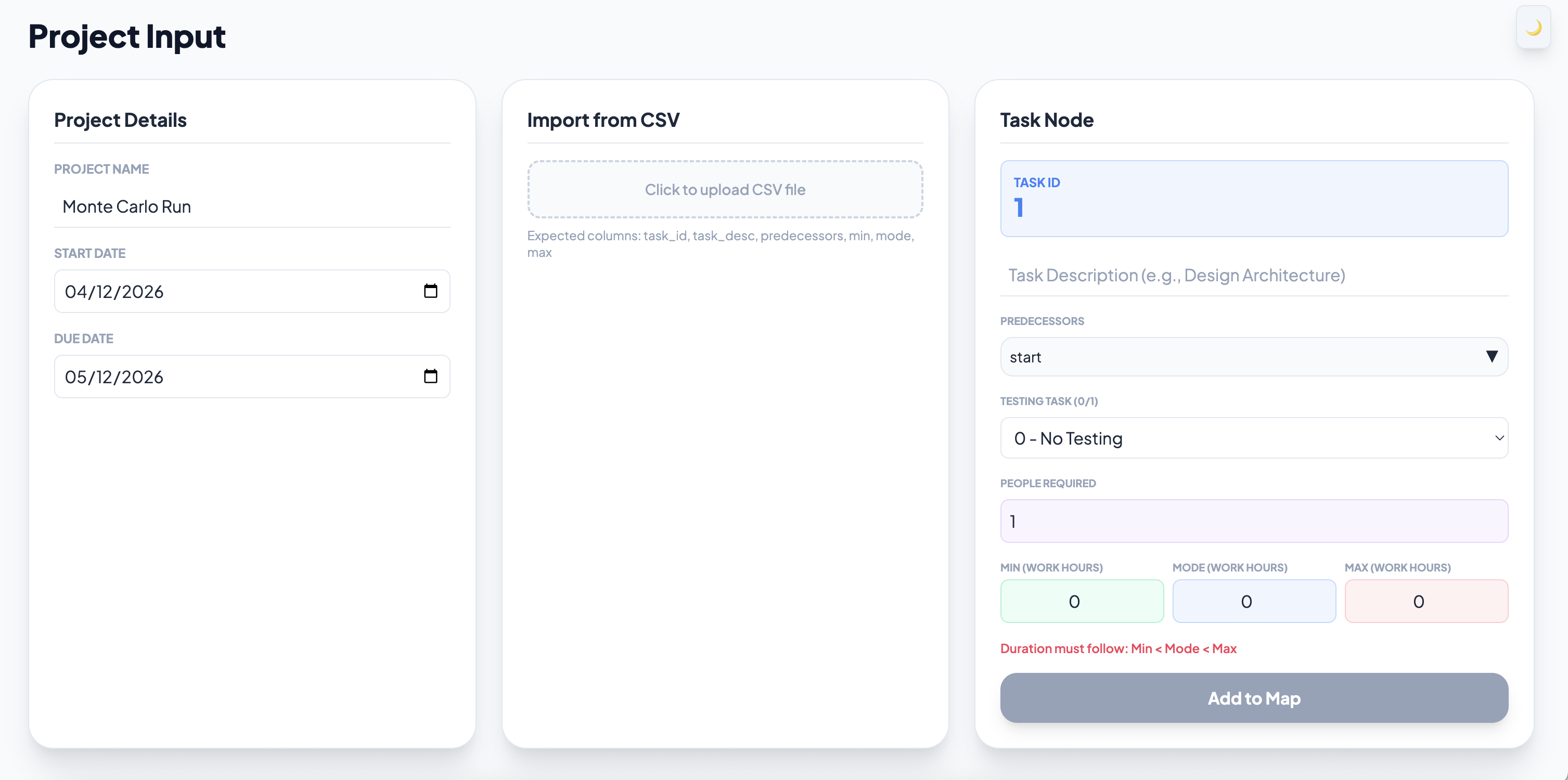
Task Input Page
-
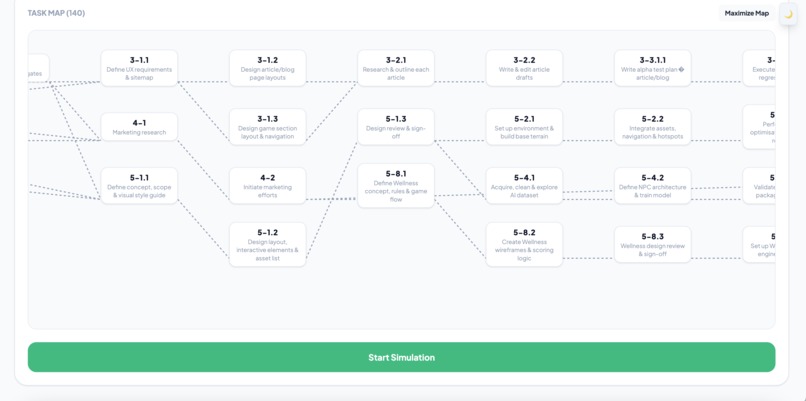
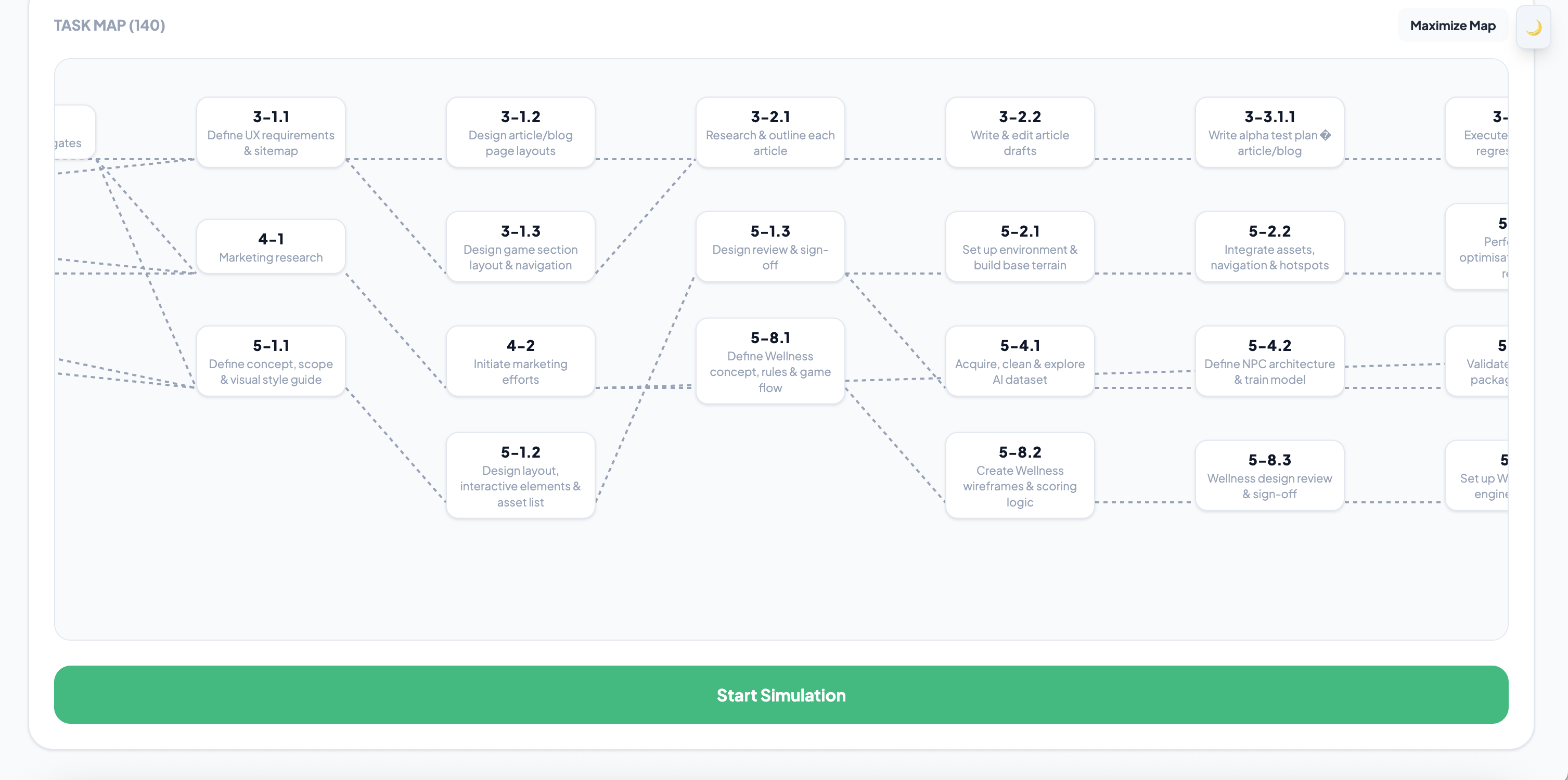
Task Map
Inspiration
Have you ever planned a large project? One spanning 6+ months, 20+ teammates, and 100+ tasks? Where the stakes are high and leadership wants a concrete deadline with guarantees that your project meets that deadline? Project managers at large companies deal with these sorts of planning tasks non stop. Why, when project scheduling is so critical to project success, are there no good tools to plan a project? Current tools out there like CPM schedules give point estimates for task durations (e.g. this task takes 15 minutes) instead of work content distributions (e.g. this task taskes between 10 to 20 minutes, but most often 15minutes). PERT uses distributions, but only focuses on one possible path. Neither of these methods truly estimate the risk within a project in the schedule. Instead, you can create large simulation spreadsheets that take hours to build and even more hours to debug. Megan ran into this first hand in her Project Management Class when learning about Monte Carlo simulation as an alternative that accounts for risk in a project plan. This planner allows for a project manager to give confident, statistically-backed estimates in their project approach. They can now account for risks that can delay a project and continue to monitor the project once it starts.
What it does
The Monte Planner is a scheduler that simalutes a project with random variables thousands of times to find the expected problem duration. The landing page takes minimal user input like Task ID, Task Linkages (predecessor tasks), Task Work Content (min, max, mode) in work hours, and number of resources. A user may manually input this data, or upload it from a pre-prepared .csv file. As the tasks are uploaded, they will populate in a visual graph map showing how each task is connected. This provides an easy way to check that your tasks are uploaded correctly. Finally, the user should set a start and end date for the project before pressing the start simulation button.
After running 10,000 simulations of the project, the planner then finds the expected project duration by taking the average and the probability of the project ending on time. Since each task's duration is randomly generated, the tasks have different probability of being critical. Now, a manger can give a task duration with a probability when giving a project pitch. There will be no more "give or take two months...". With Monte Planner, a manager can say "This project will be completed by September 23 and has a 90% probability of being on time." The planner will also provide a visual on the duration distributions, so you can see the earliest a project can complete, the expected completion date, and the latest completion date.
That means the task has no slack, it must start when it is scheduled to start. This is a highly valuable tool for project managers to locate blockers in their project plan and plan around it. (e.g. Project managers can add buffer times to tasks that are highlighted as critical.)
How we built it
Implementing a Monte Carlo simulation that accepts custom or CSV data and outputs a user friendly analytics dashboard in under 24 hours.... Not an easy task. But our team was up for it. Our motto: Plan first, execute fast, test well, and iterate. From the very beginning we were able to split the project into small, manageable tasks. Barbuchi burned through the frontend input and task map. Megan hand coded the core simulation logic. Anna made the design beautiful and the simulation output both useful and readable. Fedya glued everything together and optimized the simulation to run 10,000 trials in 4 seconds instead of minutes. Our tech stack? Simple, but reliable. Javascript, React, Vite, Tailwind CSS frontend. Python, Flask backend. Numpy for running the simulation FAST (and I mean FAST). Overall, things went smooth, the demo got finished. Everything came together beautifully. Sure, we called our buddy Claude for help here and there, but the core of our project came directly from the human heart.
Challenges we ran into
Right from the start, the hardest part of this project was hand coding the Monte Carlo simulation. We wanted to make sure that the logic and math was correct every step of the way. It was a difficult challenge, but also the most rewarding.
An early issue was making the frontend input feel user friendly while still getting clean, structured data that the simulation actually needed. It was pretty tricky to balance both.
Claude was nice for the most part but naughty at times. We had to be careful and precise with our prompts to avoid buggy slop code.
Saturday at 3pm we went to get Cathedral Coffee. We mixed up the sugar and the salt. Salty cappuccino does not taste good.
After dinner we had a couple git merge conflicts when fixing how dark mode works.
By 2am we had everything working, but the simulation took too long. We used Numpy vectorization to optimize it.
Accomplishments that we're proud of
Monty Planner is the first tool to combine automated Monte Carlo project scheduling with a human-readable critical task report. We broke the wall between large excel sheet and user friendly, intuitive interfaces and provided a prescriptive tool for project managers that can be used across industries.
Within the simulation, we were able to incorporate conditional execution paths. That means, a manager can schedule 8 rounds of testing, but if a test were to pass before reaching the last task, all following tasks will not be run. That way, more variability and testing uncertainty can be incorporated into the simulation.
What we learned
Our team was formed on Saturday morning and we never knew each other before. Each of us learned a ton, we worked shoulder to shoulder, back to back. We learned new tools from each other, we learned that using GitHub desktop causes significantly less issues than using git terminal commands. Over the course of this project, we formed genuine friendships and spoke to industry leaders on how to deliver a project pitch or narrow the scope of an idea.
What's next for Monty Planner
The biggest addition would be to display expected number of tests run in each project. We discussed that the tests (conditional execution paths) were incorporated into the model, but what if a project managers plans 8 tests when only 3 are needed? The simulation will be able to tell you the expected number of tests so that project managers can better plan their resources.
In our plans we want to see Monty Planner have AI task analysis, where based on 10,000 simulations of the same project AI would make comments about the schedule and suggest tasks that should be done earlier that stated in the schedule. So instead of
This task was on the critical path in 73% of simulations.
We want
This task was on the critical path in 73% of simulations, consider starting it 2 days earlier to cut your deadline risk in half.
We also want to add in the resource cost per task and to generate a project cost. Attach cash inflows to certain tasks (end of major phase that delivers value to the company) and now we can also generate a cash flow statement. We can add a section to simulate risks post production: what is the probability of market success? With the same simulation set up, this can be a tool that helps a project manager get a big picture of every major aspect in a project plan.
The other goal for us is to deploy our website, however if a big company uses the tool we don't want their precious information to ever be at risk. That's why deploying is not important to us at all, the simulation runs locally for anyone who has GitHub repo.


Log in or sign up for Devpost to join the conversation.