
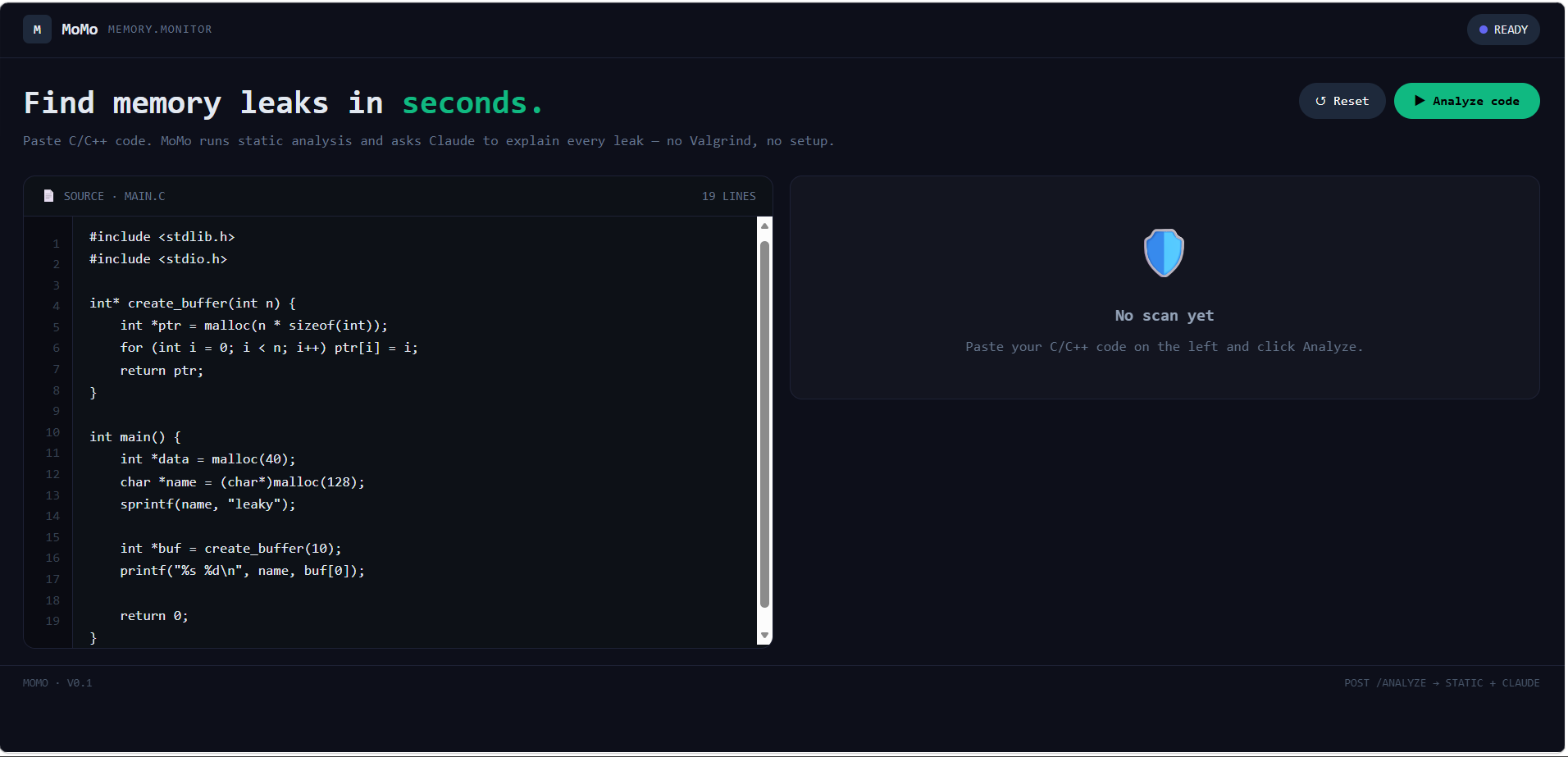
Inspiration: Our inspiration for MoMo came from the frustration we experienced firsthand in CS010C, where memory management is one of the most challenging concepts to grasp. Working with C++, we constantly encountered segmentation faults, and it was difficult to pinpoint where they were coming from. Tools like Valgrind are not beginner-friendly and do not provide an in-depth analysis of the issues. We wanted a tool that helped us understand memory leaks much better.
What it does: MoMo is a web application designed to make memory leak detection an educational experience rather than a debugging chore. To use it, you simply paste your C++ code into the editor and let MoMo do the rest. MoMo does a fast local prescan to identify obvious problem patterns, followed by a deeper AI-powered analysis to catch more subtle issues and understand the context of your code. The results are presented in several ways to reinforce understanding from multiple angles. MoMo highlights the exact lines where leaks occur and plays an animation that visually demonstrates what is happening in memory. Second, it provides a plain-English explanation of each leak, describing not just where the problem is but why it is a problem and what concept it relates to, whether that is a missing delete, a lost pointer, or an early return that bypasses cleanup. Third, MoMo generates a corrected version of your code with the leaks fixed, so you can compare it side by side with your original and understand exactly what changed and why. Finally, it caps the experience with a short multiple-choice quiz tailored to the specific leaks found in your code, reinforcing the concepts while they are still fresh and giving you a way to test whether you actually understood the feedback, not just read it.
How we built it: MoMo is built on a full-stack architecture split between a Python backend and a React frontend. For the backend, we used Python with FastAPI to handle incoming code submissions and orchestrate the analysis pipeline. At the core of this pipeline is Claude, Anthropic's AI model, which we access through the Anthropic API. We structured our prompts to get consistent, structured output from Claude, which is the code explanation, the fixed version, the animation data, and the quiz questions, all generated through separate, purpose-built prompts that instruct Claude to respond in strict JSON format, making the responses easy to parse and pass to the frontend. We also implemented a prescan layer using pattern matching that runs before the AI call, giving Claude focused hints about where to look rather than starting from scratch on every submission. For the frontend, we used React to build a dynamic, component-driven UI that renders the analysis results interactively. State management is handled within React, allowing the app to move fluidly between the code input, analysis, animation, and quiz stages without full page reloads. For styling, we used Tailwind CSS with a custom dark theme design system, defining our own color tokens for surfaces, accents, and semantic colors like destructive red and mint green, which are used consistently across the entire interface to give MoMo a distinct visual identity. The two sides communicate through straightforward HTTP requests. The frontend posts code to the backend, and the backend responds with structured JSON that React uses to drive the UI.
Challenges we ran into: Our original plan was to use Google's Gemini model as the AI backbone for MoMo. However, we ran into repeated issues trying to get a working Gemini API key. This made us switch to Claude through Anthropic's API. The API was straightforward to set up, the documentation was clear, and Claude proved to be particularly well-suited for our use case. Its ability to follow strict output instructions and respond in structured JSON format consistently made it reliable to integrate into our pipeline, where predictable, parseable responses were essential. What started as a forced workaround ended up being a core part of what made MoMo work as well as it did.
Accomplishments: We're proud that MoMo actually works end to end . A user can paste their code, and within seconds they get highlighted memory leaks with clear AI-generated explanations and fixes. Pulling that off in a single hackathon day is something we're really proud of. We also overcame an early setback when our original AI integration fell through, forcing us to pivot and rebuild that layer under time pressure, and it worked out better than expected. Most of all, we're proud of the real-world impact MoMo could have, making memory leak detection accessible to developers who don't have specialized tools like Valgrind set up, lowering the barrier for writing safer, cleaner code.
What we Learned: Building MoMo pushed us all to learn something new. It was our first time integrating the Claude API, and we quickly learned how to craft effective prompts and handle structured AI responses in a real application. For some of our team members, this was also their first time using GitHub collaboratively, and they walked away comfortable with the fundamentals of version control and working on a shared codebase as a team. A skill that will stick with them well beyond this hackathon.
What's next for MoMo: Now that MoMo is working, we want to keep building on it. The next step is expanding language support beyond C/C++ and Python so more developers can benefit from it regardless of what they code in. We also want to invest in making the static analysis significantly smarter, moving beyond pattern matching to catch more complex, real-world memory issues that a simple regex approach would miss. Ultimately, we want MoMo to be a tool that any developer can rely on to write safer, cleaner code.
Built With
- claude
- fastapi
- github
- react
- tailwind-css-backend:-python
- tailwindcss
- typescript
- vite
- vscode


Log in or sign up for Devpost to join the conversation.