Inspiration
Every subreddit moderator knows the grind: the same spam post appears for the 30th time today, and you're manually typing the same removal message, clicking the same buttons, executing the same mod action — again. Multiply that across a team of 10 mods managing a community of 500K+ subscribers, and you get thousands of hours lost to pure repetition every year.
We realized that moderators don't need more tools — they need fewer clicks. The idea was simple: what if every repetitive mod action could be reduced to a single right-click? A shared library of macros that any mod on the team can trigger in 3 seconds flat, with auto-filled variables and instant action execution. No copy-pasting. No inconsistent messaging. No friction.
That's ModMacros — one-click moderation for Reddit.
What it does
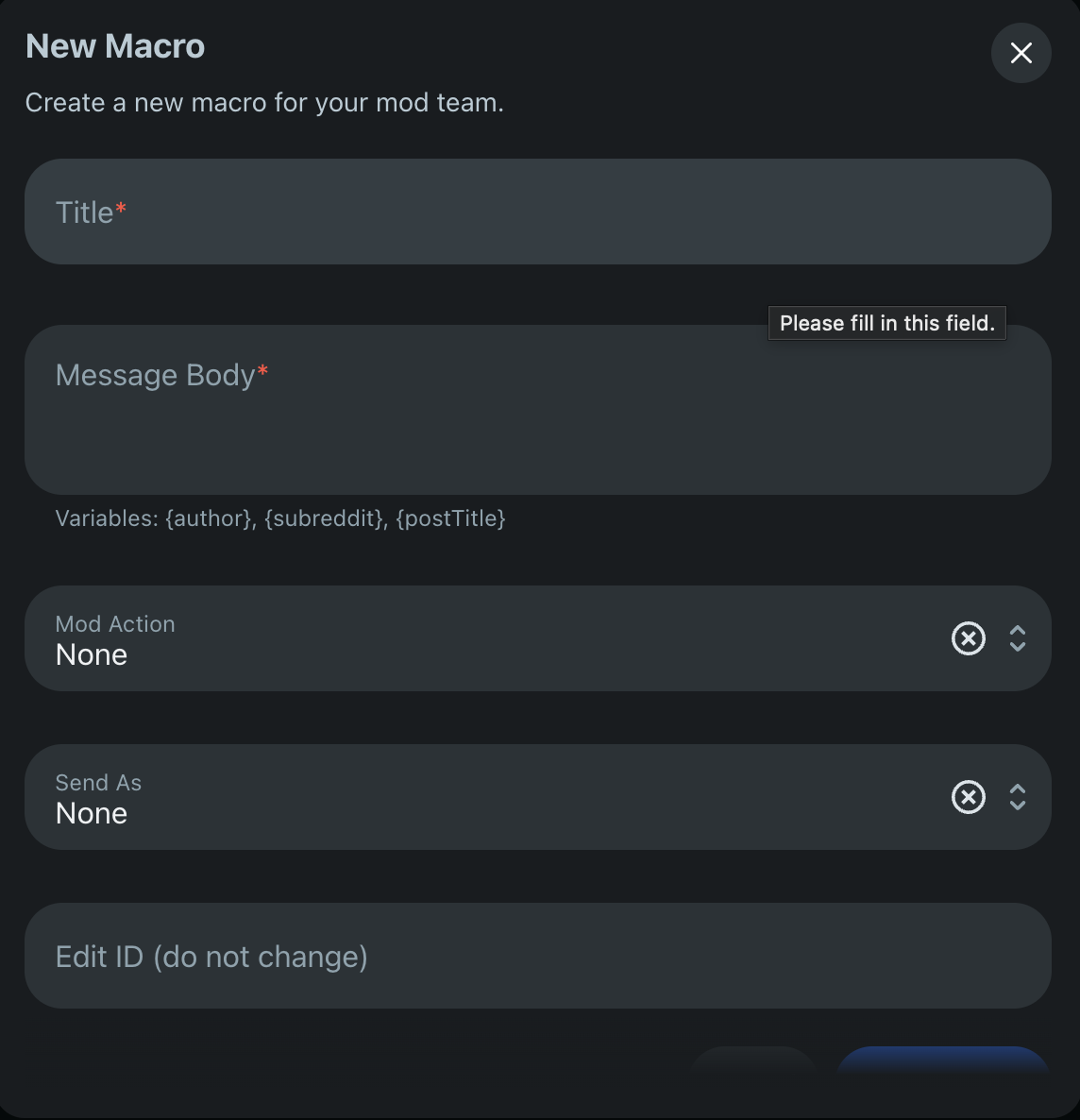
ModMacros gives every mod team a shared macro library embedded directly into Reddit's native UI. A macro is a reusable template that bundles three things together:
- A message body — with dynamic variables like
{author},{subreddit}, and{postTitle}that auto-fill at execution time - A mod action — Remove, Lock, Approve, or None
- A notification target — Reply as a mod comment, send via Modmail, or skip notification entirely
How a mod uses it:
- Right-click any post or comment → "⚡ Use a Macro"
- Pick a macro from the dropdown (e.g., "Remove: Spam")
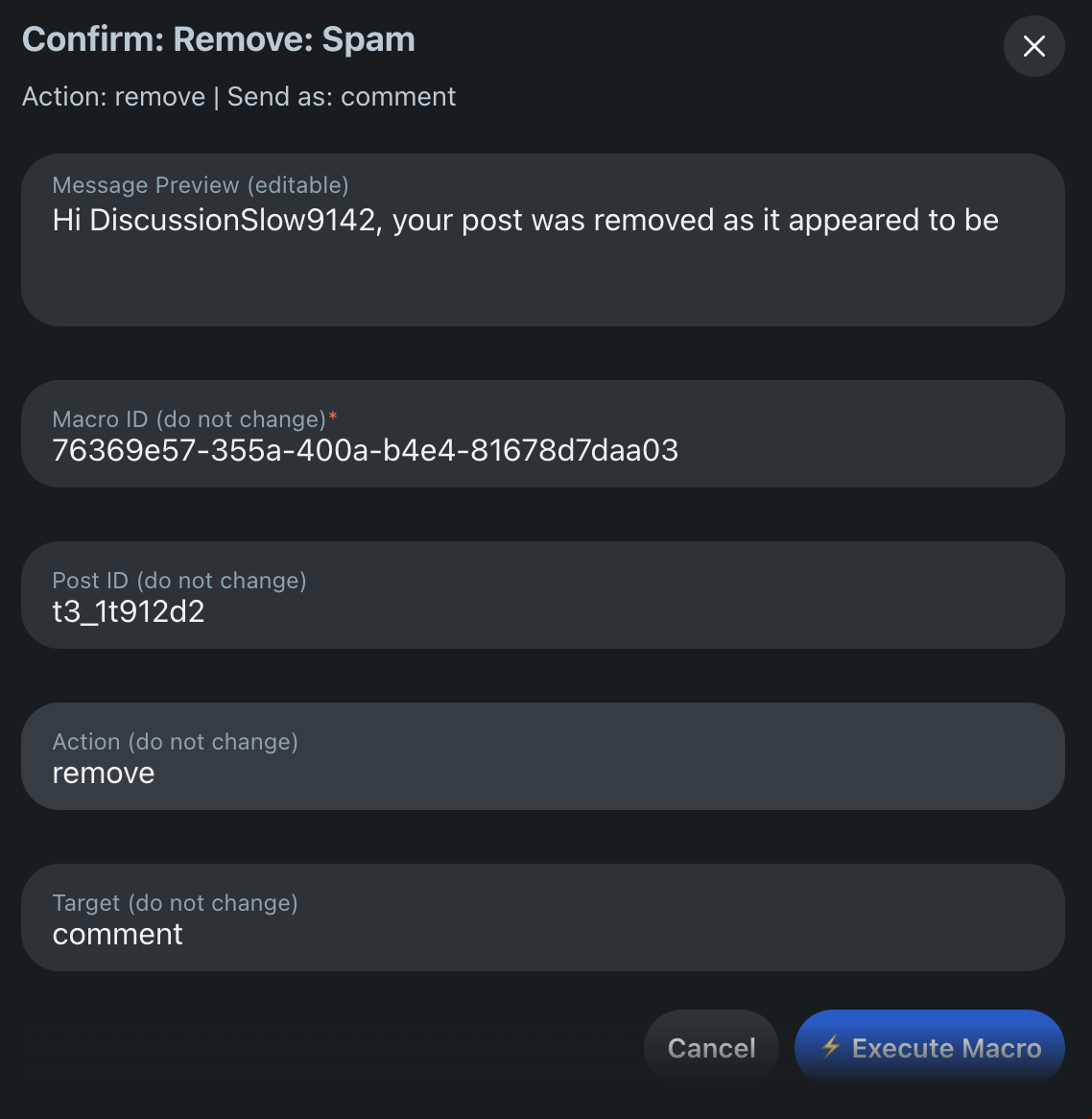
- Preview the auto-filled message → one click to execute
- The post is removed, the author is notified, and the macro's usage counter increments — all in under 3 seconds
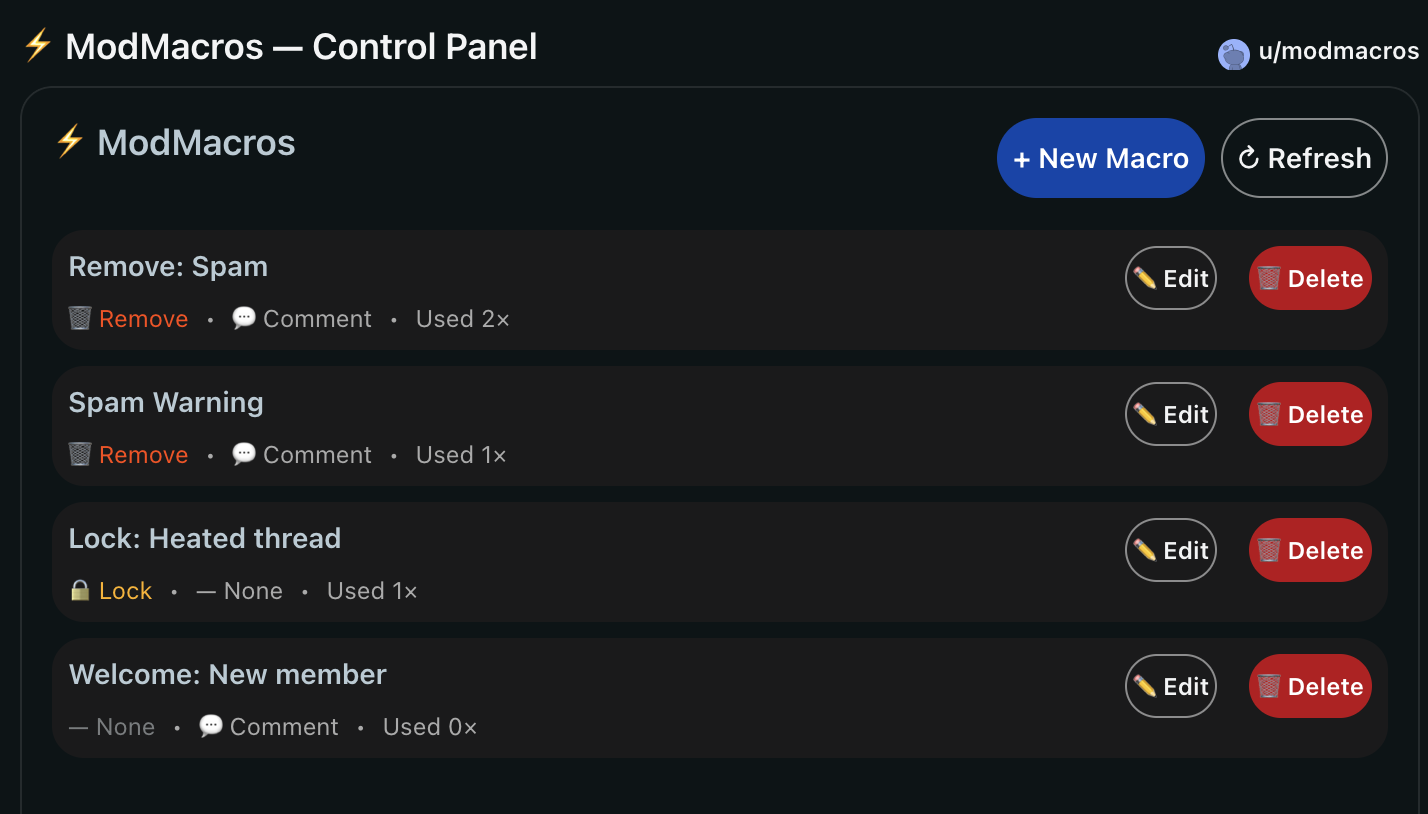
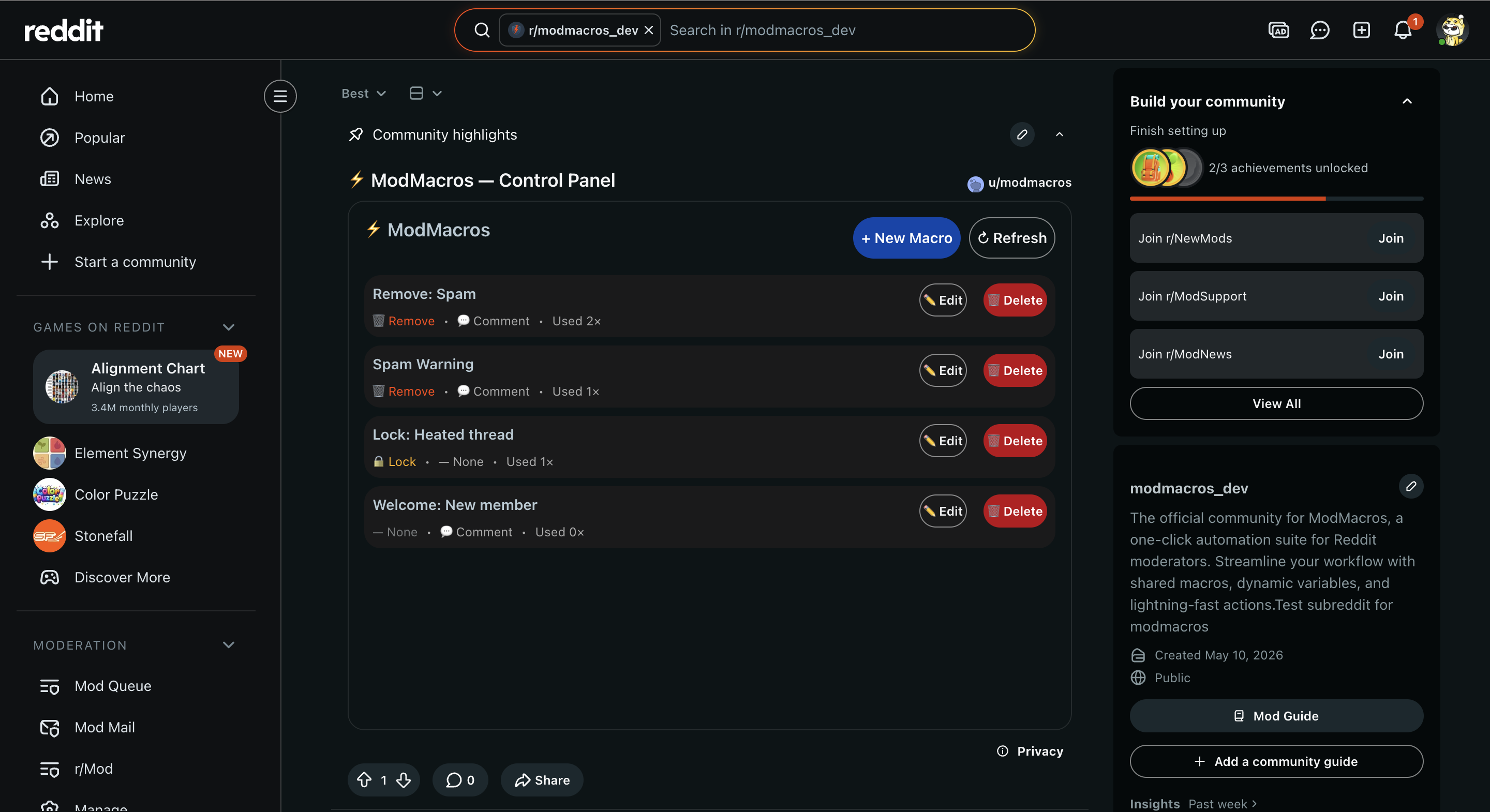
The Control Panel is a pinned custom post that serves as the team's macro management hub. Mods can create, edit, and delete macros. Usage analytics show which macros get used most, automatically sorting the most popular ones to the top.
On first install, ModMacros seeds the library with 4 starter macros (Remove: Spam, Lock: Heated thread, Welcome: New member, Approve: Verified) so teams can start using it immediately.
How we built it
ModMacros is built entirely on Reddit's Devvit platform — no external servers, no databases, no API keys. Everything runs inside Reddit's sandboxed runtime.
Architecture:
- Frontend: Devvit's Blocks UI framework (
<vstack>,<hstack>,<button>,<text>) — not React, not HTML. A completely custom component system with its own state management viacontext.useState() - Storage: Reddit's built-in Redis KV store (
context.kvStore) with a JSON-serialized persistence strategy —macro:{id}for individual objects andmacro:indexfor ordered lists - Forms: Devvit's
context.useForm()API for the two-step "Select → Preview & Confirm" workflow - Triggers:
Devvit.addMenuItem()for the right-click integration on posts and comments, plusDevvit.addTrigger('AppInstall')for first-run setup - Security: O(1) moderator verification using
context.reddit.getModerators()with username comparison — non-mods see a lock screen
Key technical decisions:
- Used a form-chain pattern (Select Form → Confirm Form) with Redis as the state bridge between form submissions, since Devvit forms are stateless
- Implemented smart sorting: macros are ranked by usage count (most popular first), with a secondary sort by creation date so new macros don't get buried at the bottom
- Built a custom UUID generator using
Math.random()hex strings because the Devvit sandbox doesn't expose thecryptoglobal
Challenges we ran into
1. The Devvit sandbox is not Node.js.
Our first crash was a ReferenceError: crypto is not defined — something that works in every modern JS runtime. Devvit's sandboxed environment strips out many Node.js globals. We had to replace crypto.randomUUID() with a manual hex-string generator using Math.random().
2. Form registration lifecycle.
Our initial approach used Devvit.createForm() at the top level, but the confirm form needed dynamic data (the selected macro's preview). Devvit threw Form not registered errors when we tried to create forms inside event handlers. The fix: migrate to context.useForm() inside the custom post's render() function, which registers forms within the correct lifecycle scope.
3. Race conditions in multi-mod environments.
The original form chain wrote pending_post_id to Redis in both the menu handler and the select form handler. If two mods triggered macros simultaneously, the second write would overwrite the first mod's post ID. We eliminated the redundant write so the value is set once (by the menu onPress) and read once (by the confirm handler).
4. No hidden form fields. Devvit forms don't support hidden fields. To pass the macro ID and post ID through the confirm form, we had to use visible "do not change" text fields — not ideal UX, but functional within the platform's constraints.
5. Comment vs. Post ID ambiguity.
When a macro is triggered from a comment's context menu, the event provides a comment ID (t1_xxx), not a post ID (t3_xxx). The lock() API only works on posts, so locking from a comment context silently fails. We documented this as a known platform limitation.
Accomplishments that we're proud of
- Zero external dependencies — the entire app runs on Devvit's native runtime with no external servers, APIs, or databases
- 3-second execution — from right-click to completed mod action, the entire flow takes under 3 seconds
- 5/5 QA tests passed — we built a comprehensive 21-test QA checklist and validated the critical path (trigger flow, remove, lock, access control, variable substitution) with automated browser testing
- Production-ready security — the mod-only guard ensures non-moderators see a lock screen instead of the control panel, and the menu item is scoped to moderator-only visibility
- Smart defaults — the app seeds 4 starter macros on install, so teams get value immediately without any configuration
What we learned
- Devvit is powerful but opinionated. The Blocks UI system, Redis-only storage, and sandboxed runtime force you to think differently about state management. There's no
useEffect, nofetch, nolocalStorage. Every pattern from web development needs to be reimagined. - Form chains need careful state management. Passing data between Devvit forms requires an explicit storage bridge (Redis), and you have to guard against race conditions when multiple users can trigger the same flow simultaneously.
- Defensive coding matters in sandboxes. You can't assume any global API exists. We learned to test every runtime feature individually before building on it.
- Usage analytics drive better UX. By tracking
usageCountper macro and sorting by popularity, the most useful macros naturally float to the top — reducing cognitive load for the mod team over time.
What's next for ModMacros
- Macro categories & folders — organize macros by type (Spam, Quality, Welcome) for teams with 20+ macros
- Flair-based auto-suggestion — detect post flair and suggest relevant macros (e.g., a "Meme" flair auto-suggests the "Low Effort Meme Removal" macro)
- Scheduled macros — set a macro to auto-execute on posts matching certain criteria (keyword, flair, report count)
- Audit log — track which mod executed which macro on which post, with timestamps, for team accountability
- Import/export — let mod teams share their macro libraries across subreddits with a JSON import/export flow
- Bulk execution — select multiple posts from the mod queue and apply the same macro to all of them in one action
Built With
- devvit
- node.js
- typescript


Log in or sign up for Devpost to join the conversation.