Inspiration
I run AI models at home. My disks became full more than one time this fall. The files had names like model.safetensors and final_v2.gguf. I did not know which file was which model. Some models were on the disk two or three times. Each tool, such as Ollama or ComfyUI, sees only its own folder.
Then a cleanup command deleted my data without my approval. After that, I made a rule for myself. Archive, never delete. Show the exact list with sizes. Wait for a yes.
What it does
An AI NAS is a home for AI models. Model Shelf is for every owner, with many models or with none.
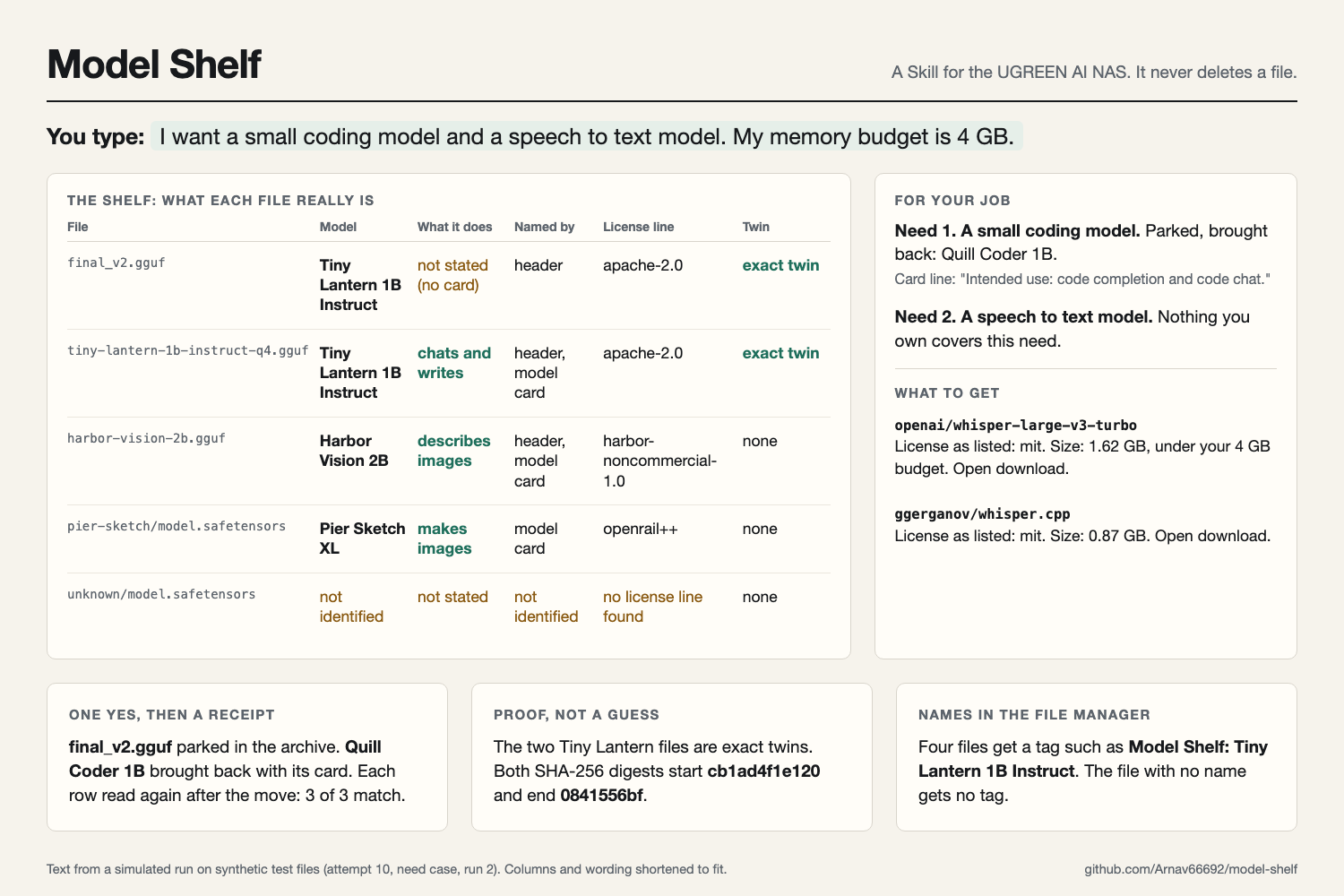
You type a job in plain words, for example "turn my voice memos into text". If you have no models, Model Shelf tells you which model to get. If you have models, it looks at the folders that you name and gives you one table, one job answer and one plan. You answer yes once. Then it does the plan and shows a receipt.
All features
Start from zero
- You do not need a model to start. You name a folder and a job.
- Model Shelf tells you which model to get for the job, with the license as listed, the size and the access note.
- It compares each size with your memory budget.
- In this mode it asks nothing, moves nothing and saves nothing.
Plain words
- You name a job, not a kind of model. For example, "describe my photos" or "search my notes by meaning".
- The table has a "What it does" column. It uses short fixed phrases such as "chats and writes", "describes images" and "turns speech into text".
- The phrase comes only from the use line of the model card. If the card does not state the use, the column shows "not stated".
Name each file
- It reads the first 4096 bytes of each model file. A GGUF file holds its name, family and license there.
- If the header has no name, it reads the model card next to the file.
- If it finds no name, it writes "not identified" and shows the folder name only as a hint.
- The table shows how it found each name: header, model card or not identified.
- The table shows the quant from the file name, for example Q4_K_M.
Match the job
- It splits your job into needs. For example, "a coding model and a speech model" holds two needs.
- The NAS local model reads each model card and quotes the lines that fit each need.
- If you give a memory budget, it compares the file size with the budget.
- It lists models that do not fit, with the card line that shows why.
Bring back and what to get
- If a parked model in your archive fits a need, it plans to bring the model back with its card.
- If nothing that you own fits a need, it tells you what to get.
- It takes these models only from a list of ten models that I checked on their model pages. It shows the task, the license as listed, the size and whether you must accept terms first.
- It never names a model from memory, and it never downloads a model.
Licenses
- It quotes each license line as the header or the card writes it.
- If the header and the card do not agree, it shows both.
- If it finds no license line, it says so. It never says that a license allows or forbids a use.
Find twins
- It compares sizes first. Then it calculates the full SHA-256 digest only for files with the same size.
- It shows both digests in full, so you can check them.
- It finds a copy inside an Ollama store from the digest in the blob name, without a new hash.
Protect tool stores
- It finds the folders that Ollama and the Hugging Face cache manage, at any depth.
- It lists the files in these stores, but it never moves them. It tells you to use the tool's own remove command.
Park and move safely
- It never deletes, overwrites or renames a file.
- It parks a copy only for two reasons: the copy is a proven twin, or you picked it.
- It keeps the twin that has a model card next to it. If it cannot tell, it asks you.
- It moves a split model set, such as model-00001-of-00004, as one set or not at all.
- It does not move two files with the same name to one folder.
- It moves a maximum of five files in one run.
Ask first, then prove
- It asks one question for all the writes in the plan. A plain "no" stops the run.
- The NAS asks you to confirm each write. Model Shelf tells you to use "Allow once", so no folder stays open.
- After the moves, it reads each file again. The receipt shows the expected and the actual state of each file.
- If one row does not match, it stops all other moves.
- It says "bytes parked", not "bytes freed", because a parked file still uses space.
Show names in the File Manager
- After your yes, it adds a tag such as "Model Shelf: Tiny Lantern 1B Instruct" to each named file.
- You then see the real model name in the UGOS File Manager, not only in the chat.
- It tags only files that it named. It does not tag files in tool stores or parked files.
Space summary
- It shows the total size of the loose files, the tool stores and the archive.
- It shows how much space the proven twins use, so you see what a park can give back.
Ask the shelf
- Later, you can ask a short question. For example, you can ask which of your models have the apache-2.0 license.
- The document expert answers from your newest shelf file and quotes the lines that it used.
- This mode writes nothing and scans nothing. It tells you the date of the shelf file.
Remember
- It saves a dated shelf file in a folder that you choose.
- On the next run, it shows the files that are new, gone or moved since the last shelf file.
Privacy and limits
- It reads only the folders that you name.
- It never opens token files or .env files.
- It uses the NAS local model and calls no outside service.
- It stops and asks you for a smaller folder when a folder holds more than 50 model files.
- If a file has an apostrophe in its path, it asks you before it continues.
How I built it
A UGREEN Skill is a set of Markdown instructions. The Skill sends tasks to experts on the NAS. Model Shelf uses three experts:
- The file expert lists folders, reads headers, calculates hashes, moves files and adds File Manager tags.
- The document expert reads the model cards, matches the job and answers questions about the shelf.
- The knowledge expert saves a dated shelf file. The next run uses this file to show what changed.
I used the official Uliya skill kit. Its checker shows no errors and no warnings for Model Shelf.
I also built a test bench on my Mac. It has a small mock of the NAS file actions and a set of synthetic model files with real GGUF and safetensors headers. The mock stops and logs each unsafe action. A small AI model followed the Skill as the NAS assistant. A scorer checked each run against nine pass bars. I wrote these bars before the first run.
Try it
The repository has the Skill, the test bench and the record of each simulated run. Run the tests with one command. The README shows how.
Challenges I ran into
The first problem was the platform. A UGREEN Skill can only send tasks to experts. It cannot run code, call the internet or download a model. Thus, the Skill cannot install a model. Instead, it brings back parked models and tells you what to get.
The second problem was the small model. In my first tests, it lost the last quote mark of a long instruction. I rewrote each instruction to end with a fixed sentence. After that change, every instruction kept its format.
My first test bench also had a fault. A helper agent did not want to record the scripted yes. Thus, the mock NAS refused each move. I fixed the bench, not the pass bars.
In total I ran ten rounds of simulation. Some rounds missed a bar, and I fixed the Skill text each time. In the last round, three cases ran three times each. All nine runs passed every safety bar. The full record is in the repository, with the misses.
Accomplishments that I am proud of
- In the field of entries that I checked, no other Skill finds the AI model for a job or manages AI model files.
- The Skill names a model from the bytes in the file, not from the file name.
- The Skill never deletes a file, and it shows a receipt after each move.
- A new owner with no models gets a useful answer. In that case the Skill writes nothing.
- In the last round, every safety bar passed in all nine simulated runs.
What I learned
A small model follows short and exact instructions well. It makes mistakes with long instructions that end with filled-in text. A model also likes to answer from memory. Thus, the guide gives it a fixed list, and the Skill tells it to name nothing else.
What's next
- Test Model Shelf on a real UGREEN AI NAS, with large files and linked cache folders.
- Add more models to the guide, and check each model page again.
- Let you bring back a full set of split model files in one step.
