Inspiration
Big companies have whole security teams watching their networks all day. They catch strange traffic, stop attacks, and fix problems fast. People at home have nothing like that. Most of us just have antivirus, and it can miss malware that hides inside normal looking traffic. When something does get caught, the warning is usually full of words most people do not understand.
So we asked ourselves a simple question. What if every home PC had its own small security team? Something you install like a VPN, turn on, and forget about until it finds a real problem. That idea became MoCat HomeSOC.
What it does
MoCat HomeSOC is a security app for Windows home PCs. Once you turn it on, it watches every network connection your PC makes and tags it with the app that made it, whether that is Chrome, Discord, or some unknown program sitting in your Downloads folder.
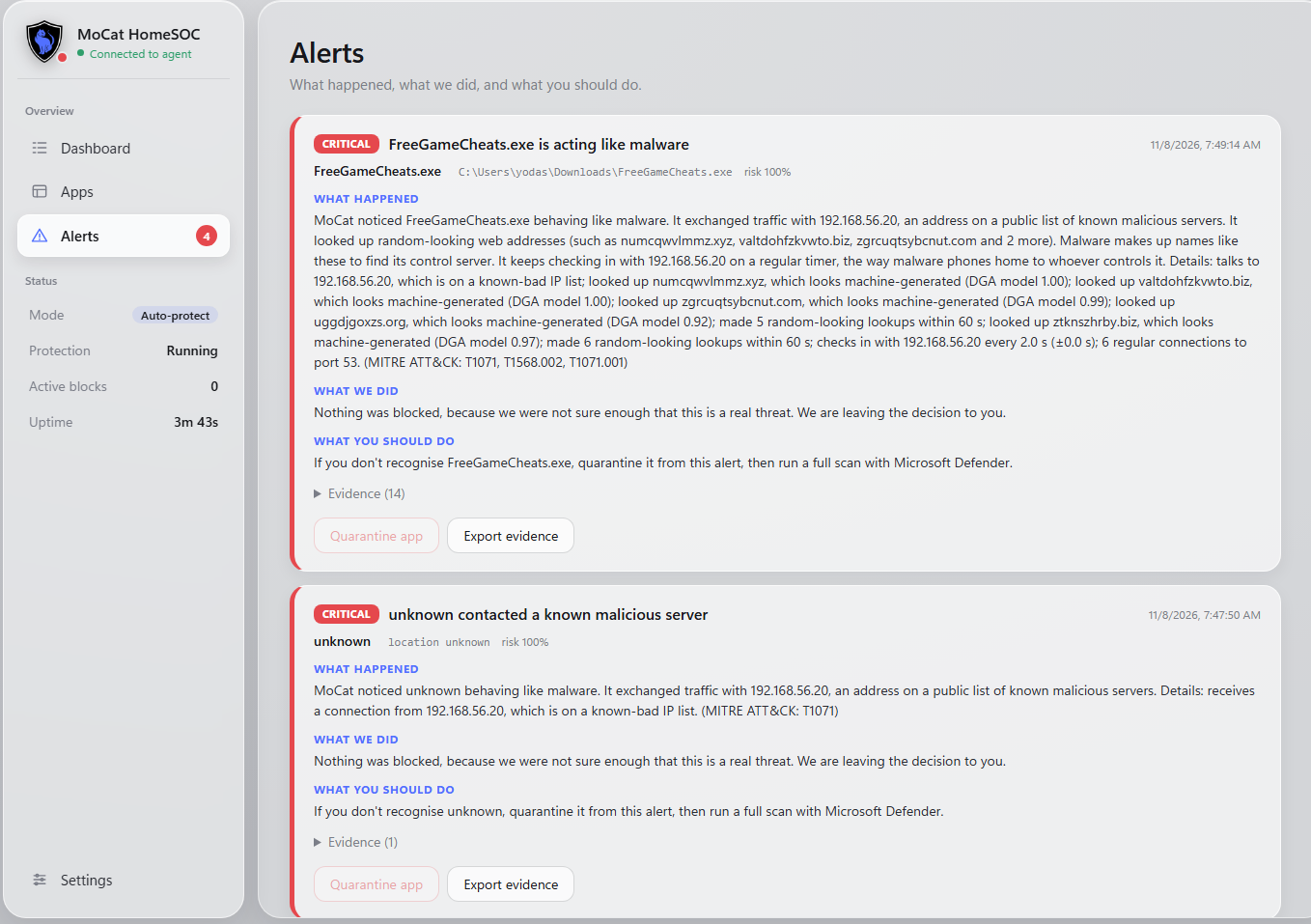
It uses AI models and rules to look for signs of malware. It catches random looking domain names that malware uses to find its servers, programs that check in with a server on a steady timer, known bad IP addresses, large unusual uploads, and attacks coming into your PC like port scans and password guessing.
When a threat is clear, MoCat HomeSOC adds Windows Firewall rules to block the bad IP or cut the app off from the internet. Every action can be undone with one click, even after a restart.
Every alert is written in plain English and broken into three parts: what happened, what we did, and what you should do. There is also a desktop app with Home, Apps, Alerts, and Settings screens, a tray icon that turns green, yellow, or red, and pop up notifications for serious threats. If you want proof, MoCat HomeSOC can export the network traffic for any alert so you can open it in Wireshark.
Everything runs on your own PC. MoCat HomeSOC never uploads your data. The only thing it downloads is an updated list of known bad IPs.
How we built it
We built MoCat HomeSOC in Python 3.12 for Windows 10 and 11. NFStream and Npcap capture the network traffic and group it into flows, and we match each flow to the app that made it using its process ID.
We wrote five detectors. The first checks IPs against the abuse.ch Feodo Tracker list. The second uses a scikit-learn model we trained on 100,000 real domains and 100,000 malware style domains to catch random looking names. The third finds steady check ins by measuring the time between connections. The fourth uses an Isolation Forest that learns your normal traffic and flags big unusual uploads. The fifth uses a Random Forest we trained on our own lab traffic to catch port scans, brute force, and flood attacks.
All the signals for each app get combined into one risk score. Unsigned programs and programs in risky folders like Downloads get a higher score. The user picks a mode: off, notify, or auto protect.
For the response side, PowerShell creates Windows Firewall rules that all live in their own group, so we never touch anyone else's rules and can always undo ours. SQLite saves alerts and actions, and a FastAPI server that only listens on the local machine sends live updates to the app over a WebSocket. The app uses pywebview for the window, pystray for the tray icon, and winotify for Windows notifications. Finally, PyInstaller and Inno Setup turn everything into one installer.
To test safely, we wrote a harmless fake malware program. It only runs inside our lab network and only does three things: it looks up random domains, checks in with our test server every 5 seconds, and uploads 20 MB of random data once. We never used real malware at any point.
Challenges we ran into
Figuring out which app made each connection was harder than we expected. Windows does not make it easy, so we had to combine NFStream's process info with a backup lookup through psutil.
False alarms were another big one. We recorded an hour of normal PC use and replayed it through MoCat HomeSOC. It showed us that long downloads and chat apps looked like malware check ins, because the capture tool cuts one long connection into many pieces. We fixed the detector so it only counts truly new connections.
Running firewall commands safely also took a lot of care. App names and file paths can have strange characters in them, so we had to quote everything carefully so no text could ever turn into a harmful command. We also made sure undo always works by saving every rule name, so it still works after a restart and a failed undo is never marked as done.
Training good models in a short time was tough too. We had to create lab traffic, label it, and balance the data so the models did not just guess the most common answer. And on top of all that, we only had 36 hours and two people, so we had to be smart about what to build and what to skip.
Accomplishments that we're proud of
We are proud that two people built a full working app with a real installer in 36 hours. The whole demo works from start to finish. Our fake malware runs, MoCat HomeSOC catches its strange domains and its check ins, blocks the app, shows a clear alert, and one click undoes everything.
We are also proud that every alert explains itself in plain English instead of security jargon, and that we actually tested for false alarms on normal use and fixed what we found. We kept strong safety rules the whole way through. Everything stays on the PC, the API only talks to the local machine, and every firewall change can be undone. We also wrote hundreds of automated tests, including a smoke test that runs the full path from detection to undo.
What we learned
We learned a lot about how malware really talks to its servers, and how things like timing, domain names, and upload size can give it away. We learned how to train machine learning models on network traffic, and why you should never use IP addresses or ports as features.
We also learned that catching threats is only half the job. Cutting false alarms matters just as much, because if an app cries wolf, people will just turn it off. Clear and simple words make security useful for normal people.
Finally, we learned how to split the work between two people. We agreed on a shared data format early, which let us build in parallel without breaking each other's code.
What's next for MoCat HomeSOC
Next we want to add more threat intel feeds with faster updates and bring MoCat HomeSOC to Mac and Linux. We want the models to learn from user feedback, so if someone marks an alert as wrong, MoCat HomeSOC gets smarter. We also want to add a simple weekly report so families can see their PCs are safe, and a way to watch every PC in the home from one screen. After that, we plan to sign our code and open a public beta so real users can try it.
Built With
- css
- fastapi
- feodo
- html
- inno
- javascript
- joblib
- nfstream
- npcap
- pandas
- powershell
- pyinstaller
- python
- sqlite
- tranco
- uvicorn
- websockets
- windows
- wireshark

