-
-

Mocamoco DAYS app icon (1024x1024)
-
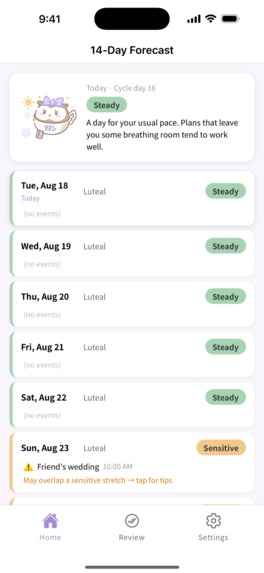
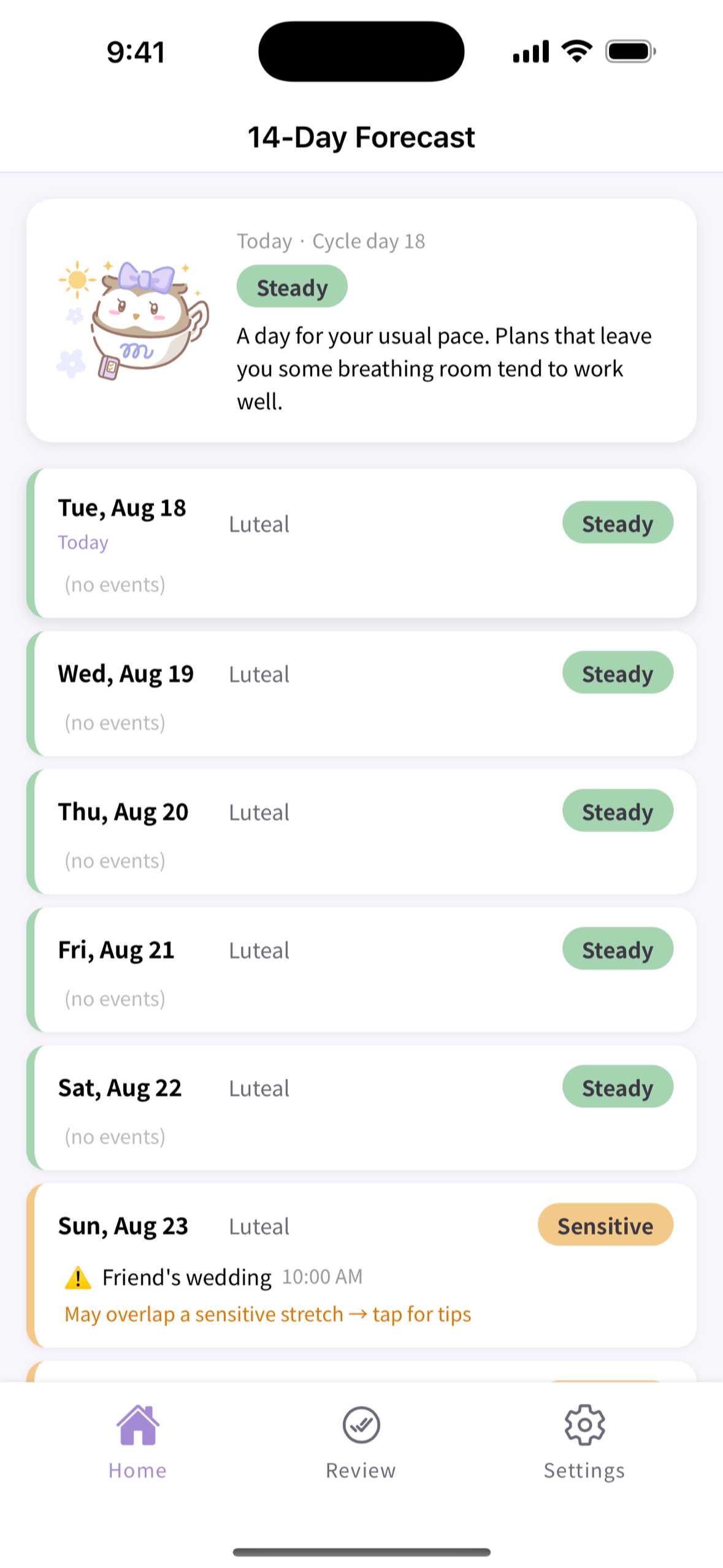
14-day forecast timeline: phase, four-level condition tendency, calendar events with overlap warnings (1179x2556, no frame)
-
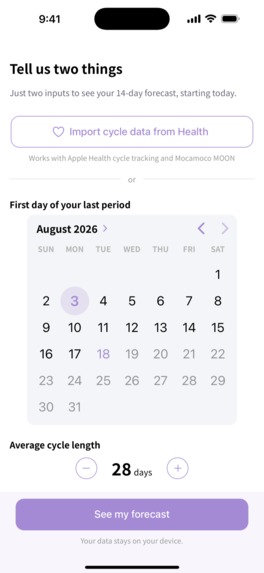
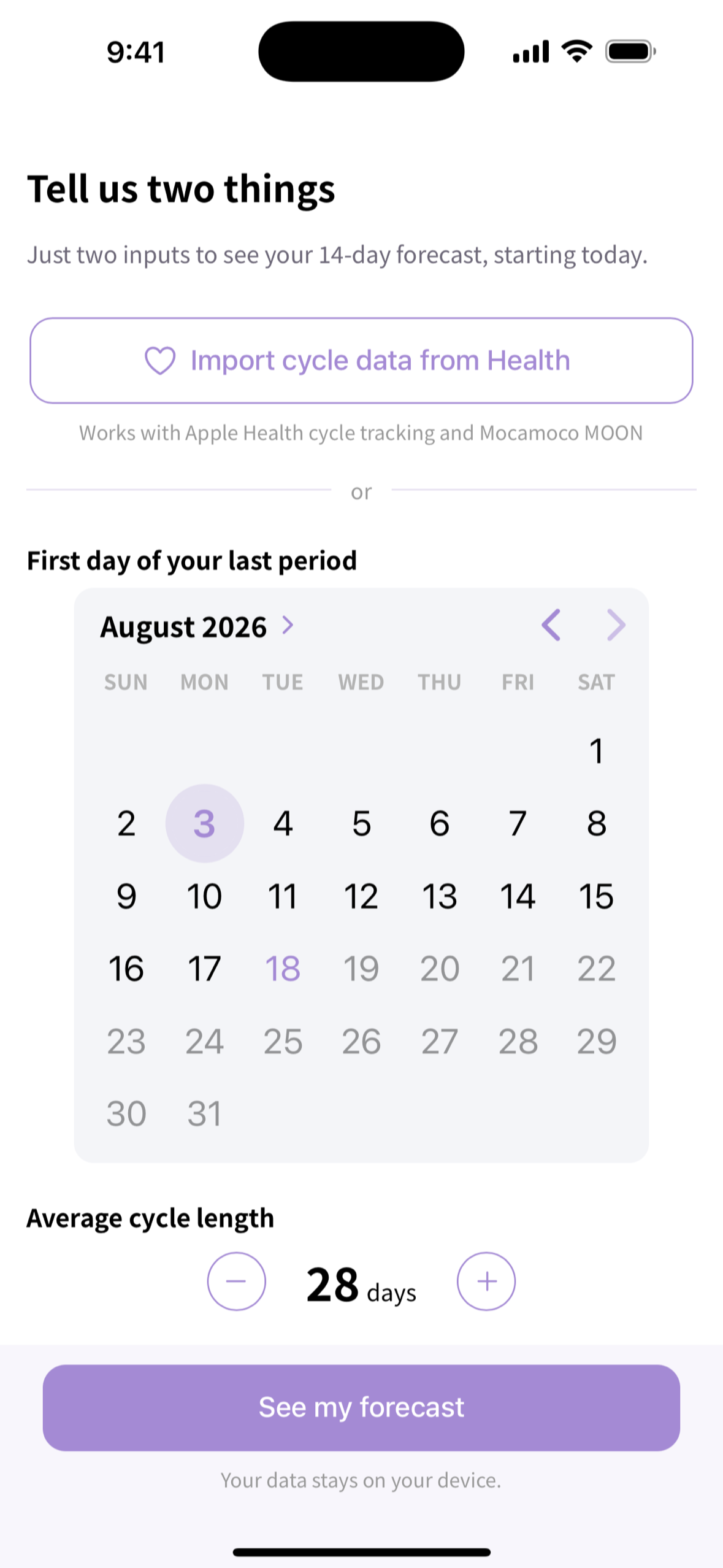
Onboarding: two inputs (last period, cycle length) or import from Apple Health / Health Connect
-
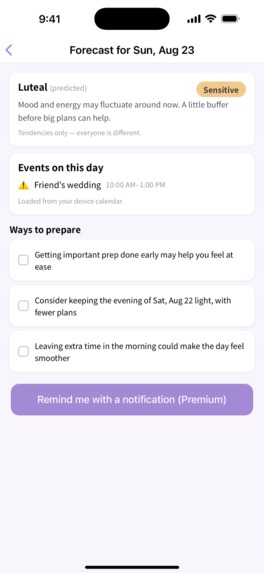
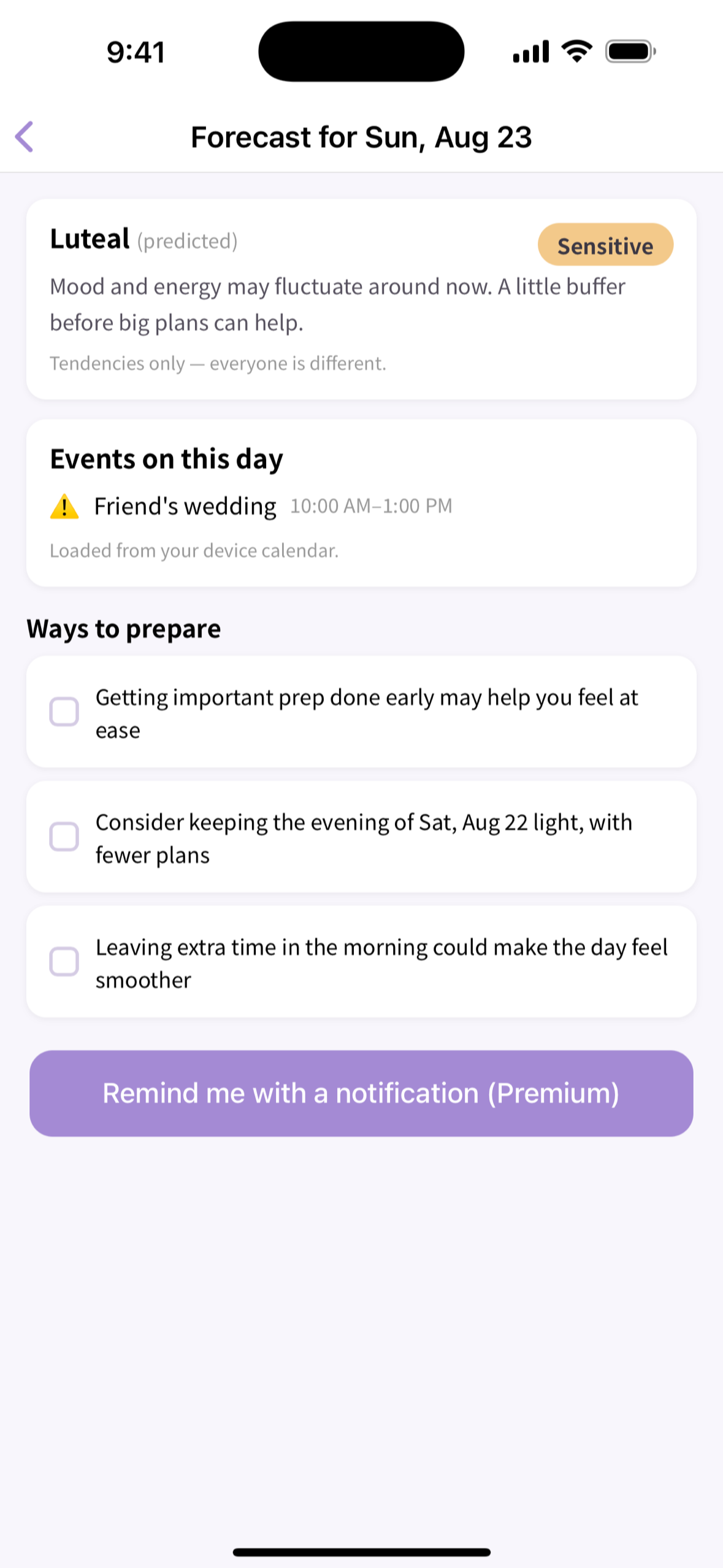
Day detail: Sensitive day with a calendar event flagged, prepare tips, and the Premium reminder button
-
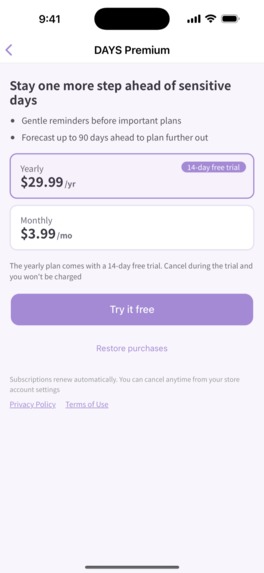
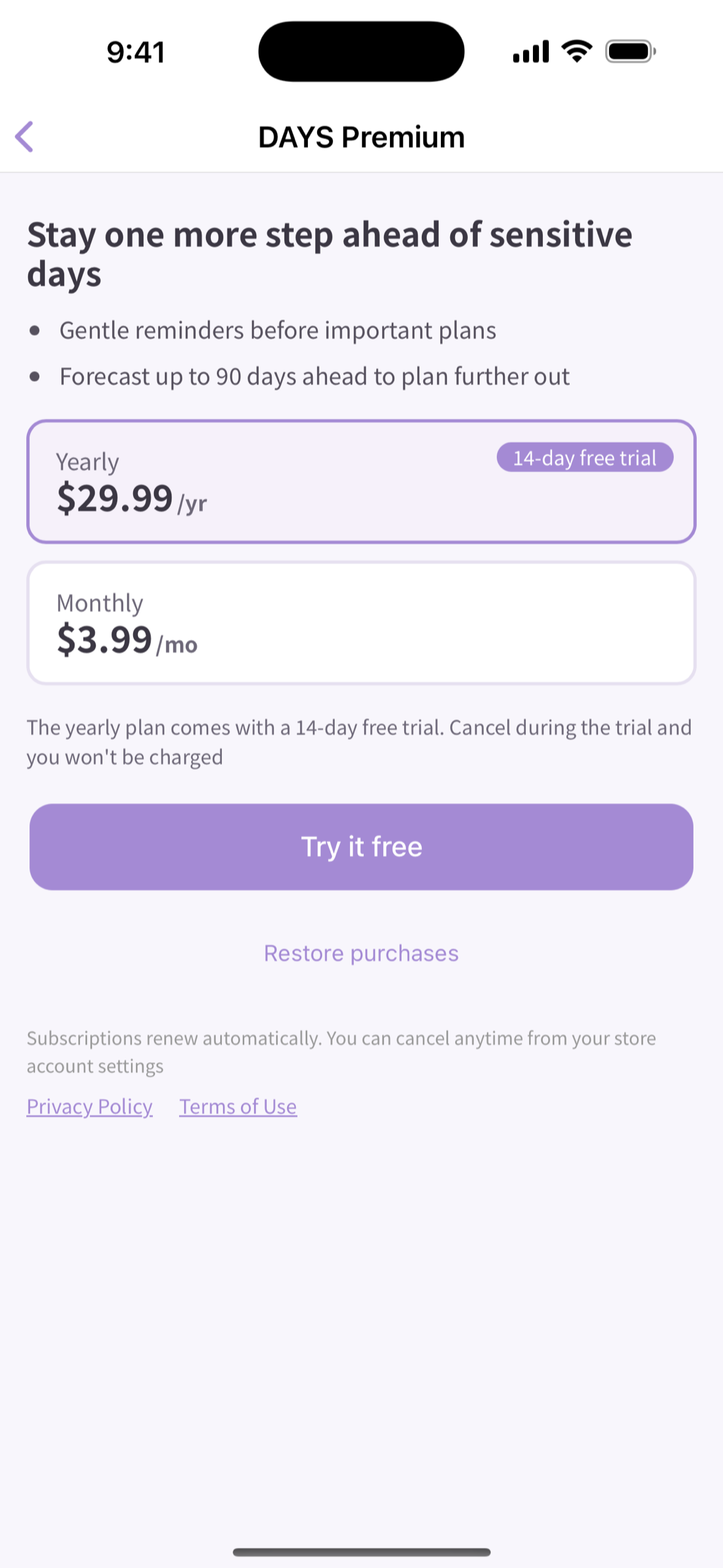
DAYS Premium paywall: yearly with 14-day free trial, monthly, restore, terms and privacy links
-
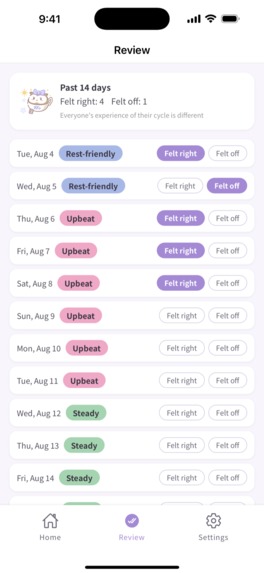
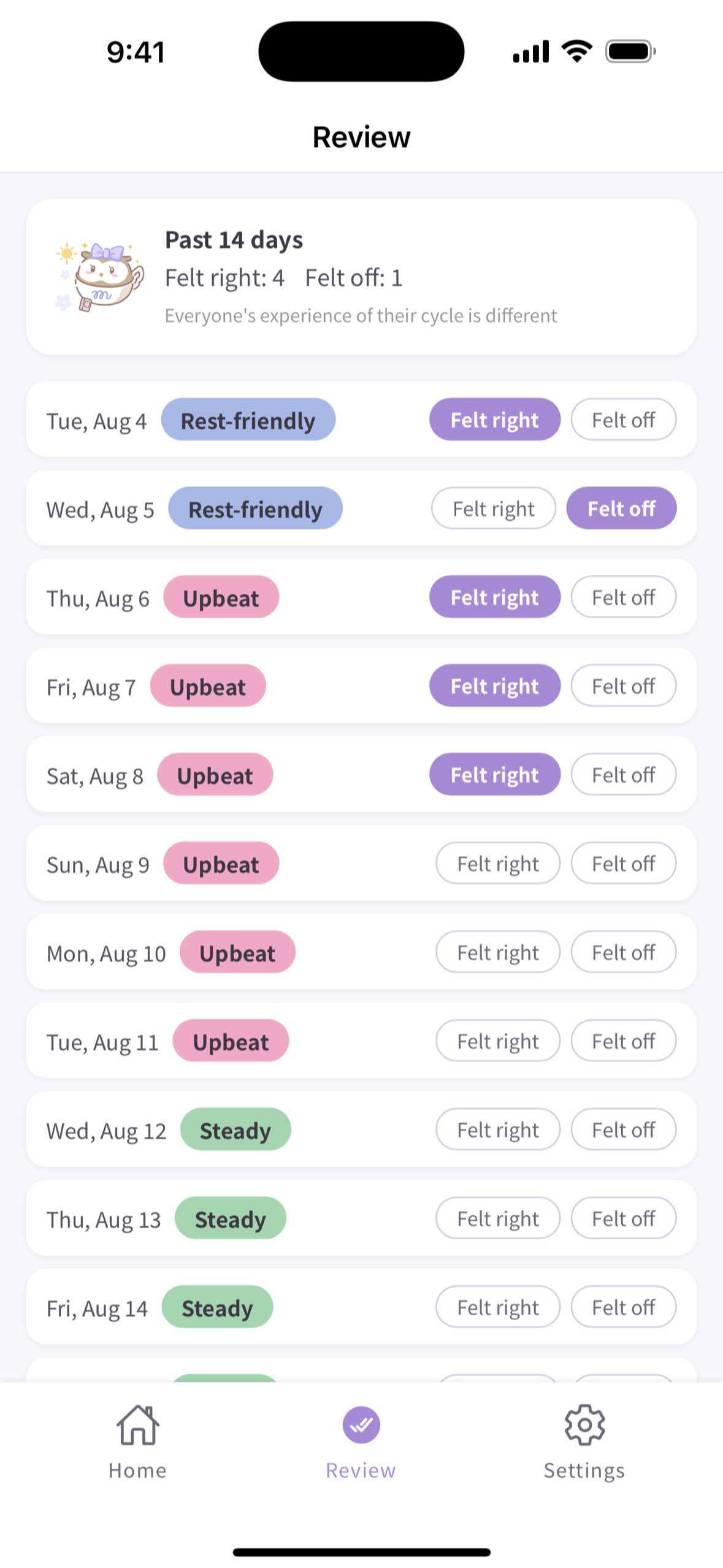
Look back: mark each past forecast Felt right / Felt off

Inspiration
Most cycle apps ask you to log, then tell you what phase you're in today. That's useful, but it doesn't answer the question we kept hearing from users of our sister app Mocamoco MOON (a period and basal-temperature tracker):
"Will I feel like myself on the day that matters — the presentation, the trip, the date?"
The answer isn't a log. It's a forecast, laid on top of the plans you already have. So we built DAYS: not a tracker, not a notification app, but an app that gets ahead of your schedule.
What it does
A 14-day condition forecast in 30 seconds. Enter the first day of your last period and your average cycle length — or import them from Apple Health "Cycle Tracking" (iOS) or Health Connect (Android). No account, no sign-up. Your day-by-day forecast appears immediately.
Four gentle levels, not a diagnosis. Each day shows your phase (period / follicular / ovulation / luteal) and a condition tendency: Good, Normal, Sensitive, or Rest. Our mascot Moca-chan changes expression with the level. Every forecast is phrased as a tendency ("may feel", "tends to"), and the app repeats that these tendencies vary from person to person. DAYS never gives medical advice.
Calendar overlap check. DAYS reads your device calendar (EventKit / Calendar Provider, read-only — it never creates or edits events) and marks any event that lands on a Sensitive day with a warning icon. Tap the day and you get "prepare" tips from a static template set: what to wrap up the day before, how to pace the day itself.
Look back. Mark each past day's forecast "Felt right" or "Felt off" and see over 14 days how well DAYS fits your rhythm.
DAYS Premium (auto-renewable subscription via RevenueCat).
- Reminders before important plans: a local notification the evening before (20:00) and the morning of (08:00) any flagged day.
- Forecast up to 90 days ahead instead of 14.
Monthly or yearly; the yearly plan includes a 14-day free trial. The 14-day forecast, calendar check and prepare tips stay free forever.
Privacy by construction. There is no server and no account. Cycle data, forecasts and calendar events never leave the device. The only third-party services are RevenueCat (receipts, anonymous app user ID), OneSignal (push subscription plus two non-health tags), Firebase Analytics (screen and tap events, ad ID collection disabled) and Sentry (crash reports, JS only). No health information — cycle dates, phases, conditions, event titles — is ever sent to any of them. "Delete all data" in Settings wipes the device store, deletes the OneSignal subscription and resets the analytics ID.
Japanese and English, on iOS and Android, from a single codebase.
How we built it
- Ionic React 8 + Capacitor 8, one TypeScript codebase for both stores. Strict layering: pages → hooks → domain + infrastructure. The domain layer (cycle engine, day-plan builder, reminder slots, review) is pure TypeScript with no React or native dependencies, covered by 180+ Vitest unit tests.
- Cycle engine = a static rule table, no ML. Phase boundaries (5-day period, ovulation at cycle length − 14 ± 2 days, luteal after that) and the phase → condition mapping live in one config file so wording and tuning stay in one place. The forecast is deterministic and explainable.
- Health import through our in-house Capacitor plugin (HealthKit / Health Connect read-only), reused from MOON. Once linked, DAYS silently re-reads on app resume and only updates the forecast when a newer period start appears — it never overwrites a manual correction with old data.
- Calendar via @ebarooni/capacitor-calendar (read-only). Overlap detection is a pure function over forecast days × events.
- RevenueCat (purchases-capacitor): one entitlement
Premium, one offering with Monthly and Yearly packages, a custom paywall, restore, and fail-closed behaviour (until the SDK reports ready, the app is free-tier). - Notifications: a hybrid. Reminders are @capacitor/local-notifications (no server needed, works offline, deterministic IDs so rescheduling is idempotent). Re-engagement is OneSignal, added on top without touching the local path.
- i18n from day one (ja/en JSON resources, locale-aware store listings, localized Info.plist permission strings).
- Firebase Analytics + Sentry are enabled only in production builds; non-production builds cannot pollute the data.
Challenges we ran into
- Which apps actually share cycle data? Before writing code we tested on real devices: Apple's built-in Cycle Tracking and Health Connect read fine; Luna Luna (Japan's biggest tracker) and Flo export nothing on either OS. Two wins, two losses — and a design decision: manual entry is the main path everywhere, so the 30-second onboarding had to be excellent.
- App Review, twice. Build 1 was rejected under 2.5.1 (HealthKit usage had to be identified in the UI, not just in the plist), build 4 under 5.1.1(iv). We rewrote the health-permission copy and the Settings entry point, and shipped build 6.
- Android 12 double safe-area. Capacitor 8's SystemBars passes real inset values through on WebView ≥ 140 even where the OS hasn't made the window edge-to-edge, so the header and tab bar grew an extra bar. Fix: make every Android version edge-to-edge (
EdgeToEdge.enable) so the CSS variables match reality. - Consent that really stops the pushes. With OneSignal's consent-required mode, revoking consent on opt-out left the unsubscribe operation stuck in the SDK queue; keeping consent and calling
optOut()instead flushes it immediately. Found on a device, documented, and turned into a single "apply consent" rule. - No tracking, but still measurable. Getting Firebase Analytics to ship without the AD_ID permission on Android and with ad-ID collection off on iOS, while keeping the store privacy declarations truthful.
Accomplishments that we're proud of
- From first commit (Aug 11) to live on the App Store (Aug 29) and Google Play (Sep 3) — one codebase, two stores, two languages.
- A cycle app that never sends a single piece of health data anywhere, and still has re-engagement, analytics and crash reporting.
- Every forecast phrase is a tendency, every screen carries the "varies from person to person" note, and nothing in the app is medical advice — and we got that through review on both stores.
What we learned
- Test the ecosystem before you design for it. The two-wins-two-losses health-data test changed our onboarding priorities in a day.
- Static rules beat clever models when the user needs to trust and understand a forecast about their own body.
- We planned to build in public and did not keep it up during the build. From Sep 18 we are publishing the build log after the fact (X: @MocaMocoDays, Japanese and English). Lesson: schedule the writing like a feature, or it does not ship.
What's next
- v2 will move calendar access to the official @capacitor/calendar plugin and add export/import of settings.
- A Mocamoco-wide premium bundle with MOON is on the roadmap once shared accounts exist.
- Home-screen widgets, calendar write-back and auto-rescheduling are deliberately out of scope: DAYS stays read-only on your calendar.
How to test (for judges)
- Install from the App Store or Google Play (available worldwide; the UI follows the device language, English or Japanese).
- Onboarding: fill in the two fields — any past date as the first day of your last period, and a cycle length (e.g. 28) — or tap "Import from Apple Health" / "Import from Health Connect" if you have cycle data there. The 14-day forecast appears immediately.
- Allow calendar access when the home screen offers it to see the overlap check — events on "Sensitive" days get a warning icon; tap a day for prepare tips.
- Premium: open Settings > DAYS Premium, or tap "See up to 90 days ahead (Premium)" at the end of the timeline. The yearly plan includes a 14-day free trial — no promo code needed. The 90-day forecast unlocks immediately, and any day's detail screen gets a reminder button (local notifications at 8 PM the day before and 8 AM that day). Restore Purchases is on the paywall.
- Settings > Delete all data wipes everything and returns you to onboarding.
No account or login exists. Nothing you enter leaves the device.

Log in or sign up for Devpost to join the conversation.