-
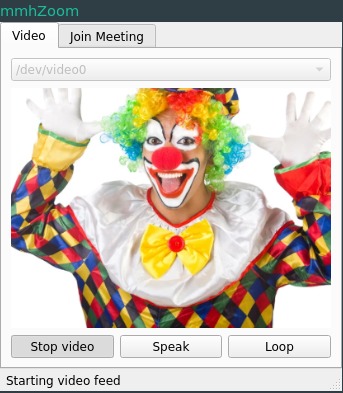
Loop your webcam feed interactively (clown not included)
-
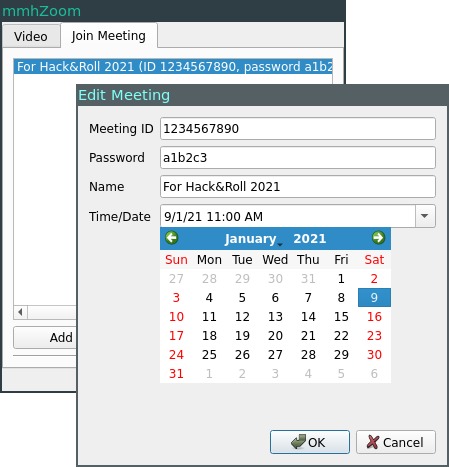
Add/edit Zoom meeting details for automatic joining
Inspiration
This project was conceived in frustration of online lectures and tutorials that seemed to stretch on forever. Since I feel that demanding a student's constant attention can be counterproductive, I made this application as a proof-of-concept to show how attendance-taking and video monitoring can be circumvented.
What it does
mmhZoom runs on Linux (mostly for several crucial Python dependencies which are not cross-platform).
mmhZoom allows the user to loop over recent video from their webcam, which is then copied to a loopback camera device. Zoom can then be configured to use this loopback device for video input instead of the original webcam.
mmhZoom can also open Zoom links and join Zoom meetings at scheduled meeting times.
How I built it
I used Python 3.9 and PyQt5 for the UI, which comprises most of the code. I also rely on the pyfakewebcam package to write frames to a loopback device, pygame to capture frames from an existing webcam, and alsaaudio to control microphone volume.
Challenges I ran into
PyQt5 is really tedious to use. There are many synchronization and state management issues that continually hamper my project.
Accomplishments that I'm proud of
Finishing this project on time in a solo team.
What I learned
Don't use Python to make GUIs unless you have to.
What's next for mmhZoom
I plan to add a more robust method of joining Zoom meetings which will support meeting links with encrypted passwords. For example, I could try to hook into Zoom's Qt5 engine to simulate click events.
In the future, I might find a use for image segmentation techniques such as Mask-RCNN in order to add a decent virtual background that Zoom for Linux still sadly lacks.
Built With
- pyfakewebcam
- pyqt5
- python

Log in or sign up for Devpost to join the conversation.