Inspiration
We are a team of Singaporean hackers that loves participating in MLH events, but converting schedules in MLH events to our timezone was getting too repetitive.
So we decided to create a Chrome extension to automate this for us!
What it does
Download the Chrome extension.
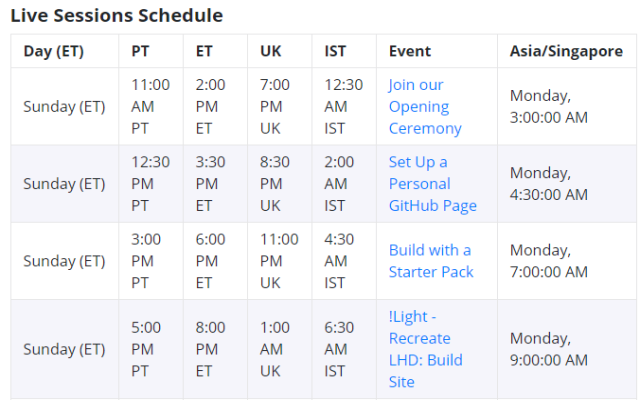
When the user goes to an MLH event page with a schedule (eg https://organize.mlh.io/participants/events/6351-lhd-build-day-2), it will create a column showing the events in your timezone.
How we built it
We used Javascript to get schedule information from the DOM, then converted that timing to UTC, before converting it to the local timezone.
Challenges we ran into
Parsing dates
The first challenge was to convert the dates into the local timezone. We explored with a lot of Date libraries but had issues importing these libraries.
Thus we decided to make use of the Date object and its functions. It was a challenge to slowly put the pieces together and create something that worked.
Creating a Chrome extension
We did not have experience in creating a Chrome extension, so we took the code from the Chrome extension tutorial and slowly modified it until we got what we wanted.
Accomplishments that we're proud of
We're happy that we managed to create something useful, by learning and experimenting with what we have.
What we learned
Dates, Times
We learnt more terminology about dates and times, like UTC, GMT, as well as tools used to handle dates and times.
What's next for MLH Time Automator
Publishing and distribution
We are trying to get it published in the Chrome web store. It's currently pending approval!

Log in or sign up for Devpost to join the conversation.