Inspiration
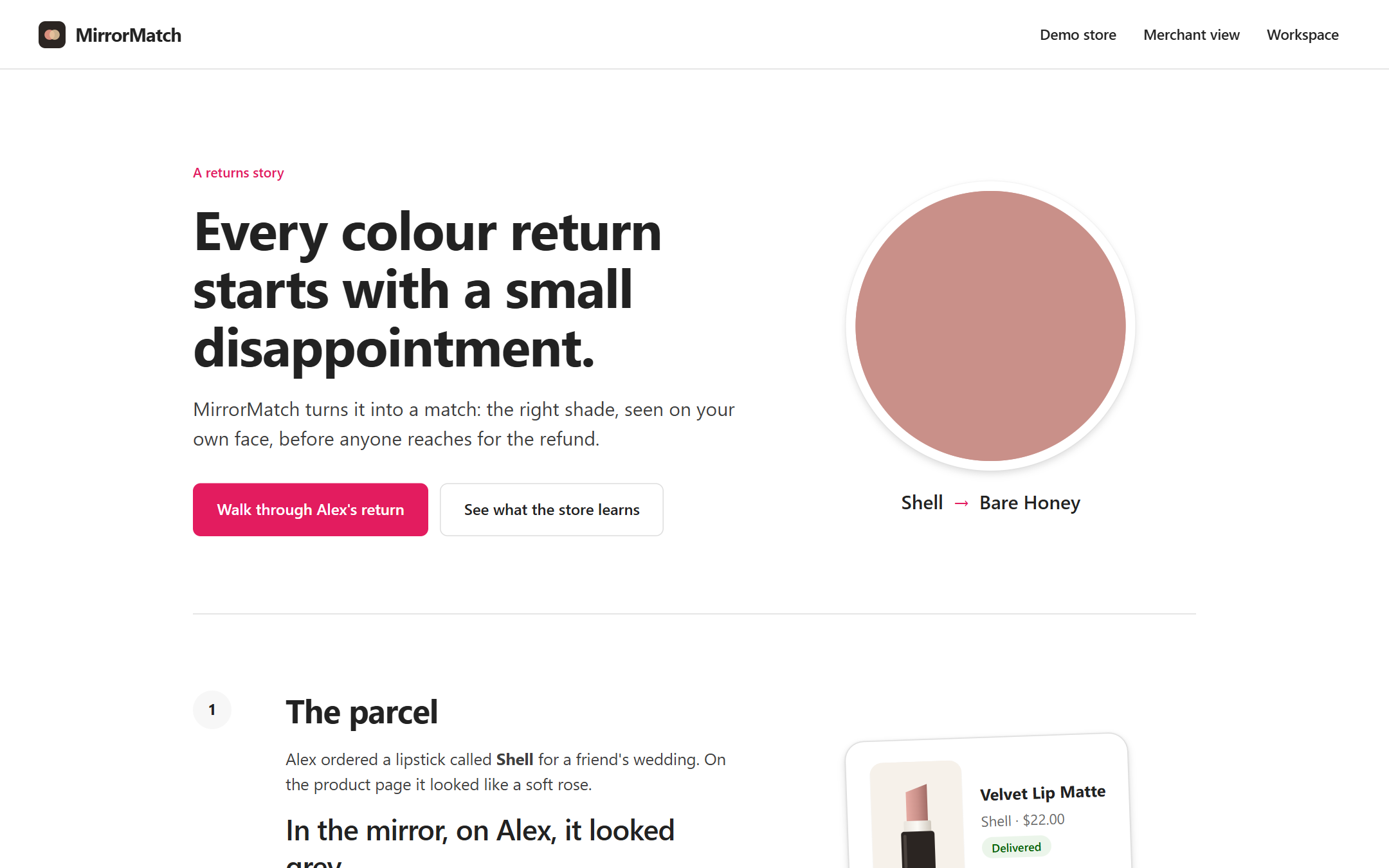
Alex ordered a lipstick called Shell for a friend's wedding. On the product page it looked like a soft rose. In the mirror, on Alex, it looked grey.
So Alex opened the returns form and ticked "the shade didn't match". Every beauty and fashion store has that box, and it marks a very specific moment:
- The shopper still wants the product. They just got the colour wrong, through a screen.
- They now know what didn't work on them. No pre-purchase quiz ever has that signal.
- The store is about to lose the sale and pay for the round trip, and nobody learns why.
Virtual try-on usually lives on the product page, before the purchase. We asked what happens if you put a mirror at the return instead: the one point where the shopper has a real reason to try again, and the merchant has a real reason to help.
What it does
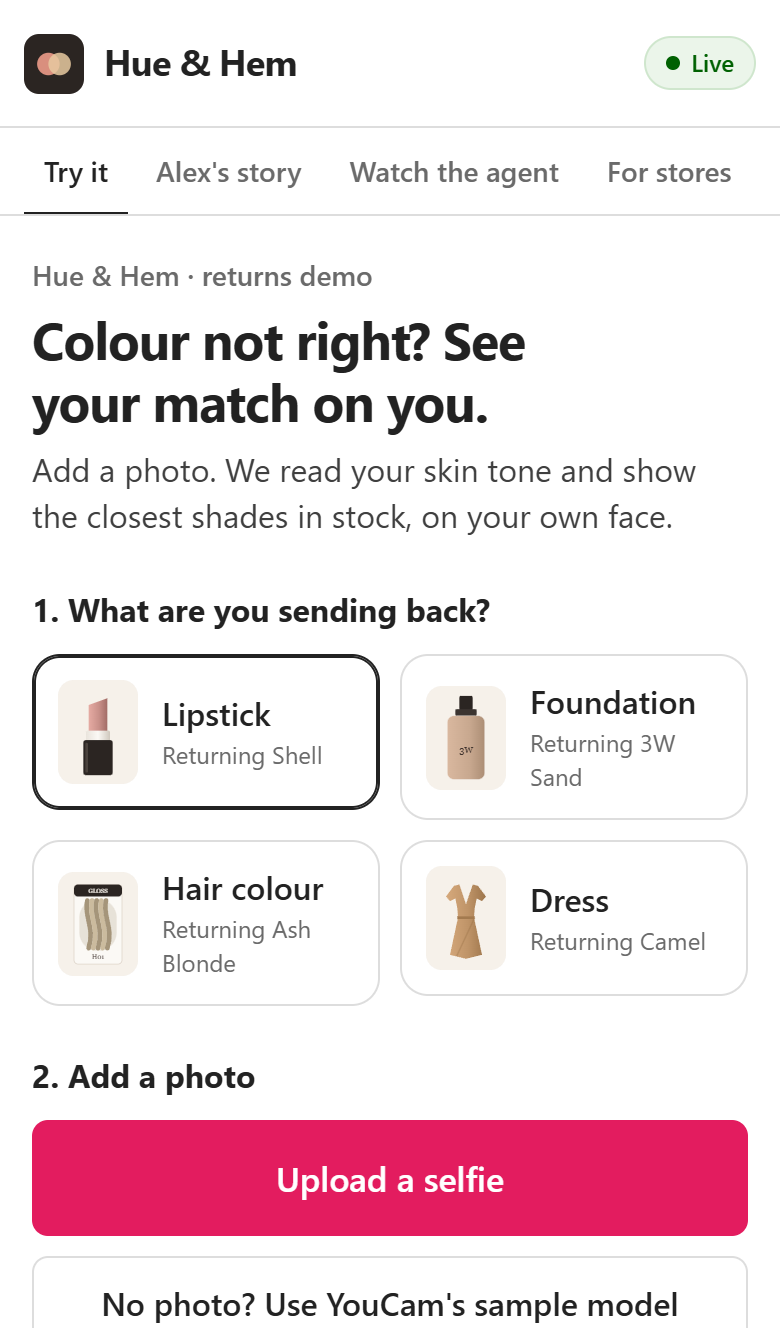
MirrorMatch is a returns desk for a demo store, "Hue & Hem" (fictional, no real brands). It covers lipstick, foundation, hair colour, dresses and skincare. When a shopper starts a return because the shade or colour was wrong, or a moisturiser didn't suit their skin:
- The offer. It opens with empathy ("Colour is hard to judge through a screen, and that's on us, not you"), then asks: "See a better match on you before you decide? About 30 seconds." "Continue to refund" is a full-width button on every screen. No dark patterns.
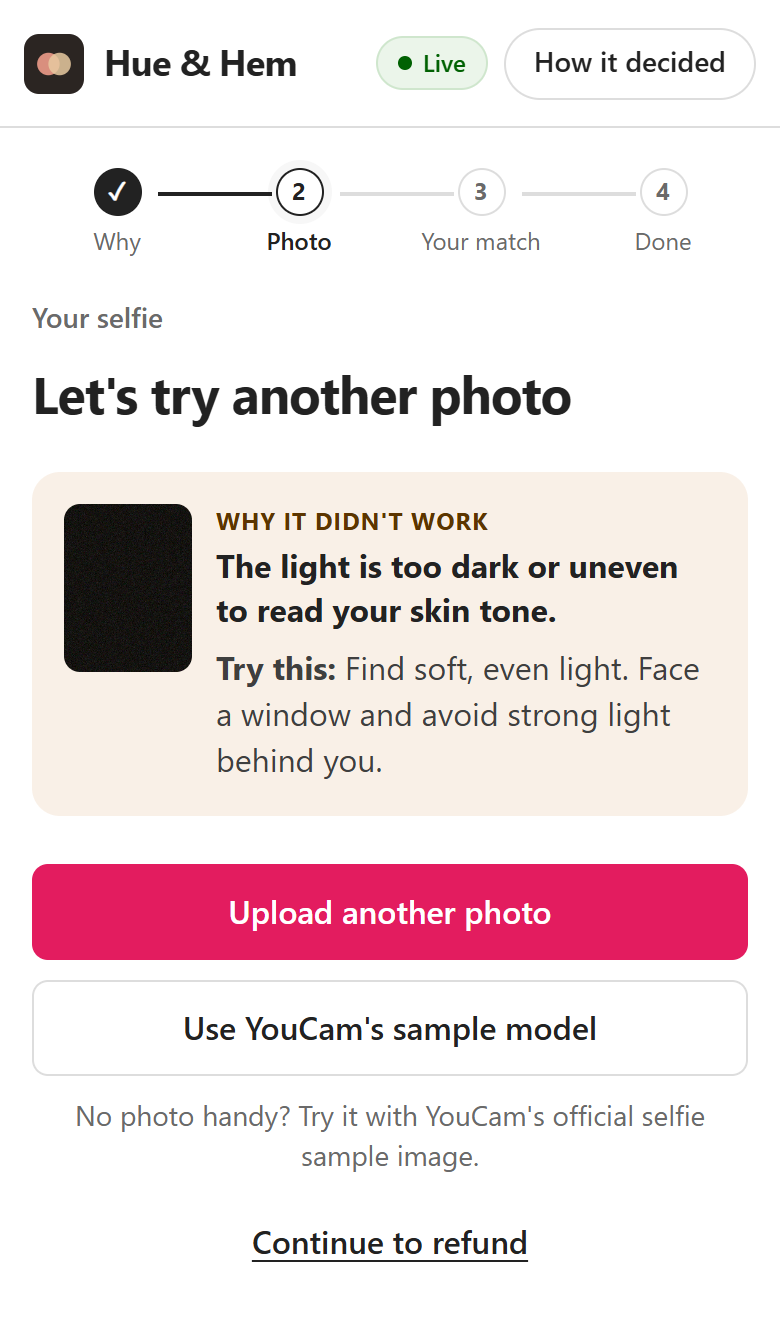
- One photo. A selfie, or one waist-up photo for a dress, with a clear consent note (or YouCam's sample model, one tap). A free pre-check catches bad lighting before any units are spent; YouCam errors become friendly retake guidance.
- The tone summary. YouCam's AI Facial Color Tones Analyzer measures skin, lip, eye and hair colour. MirrorMatch derives depth and undertone and says it kindly. "Read my results aloud" speaks it.
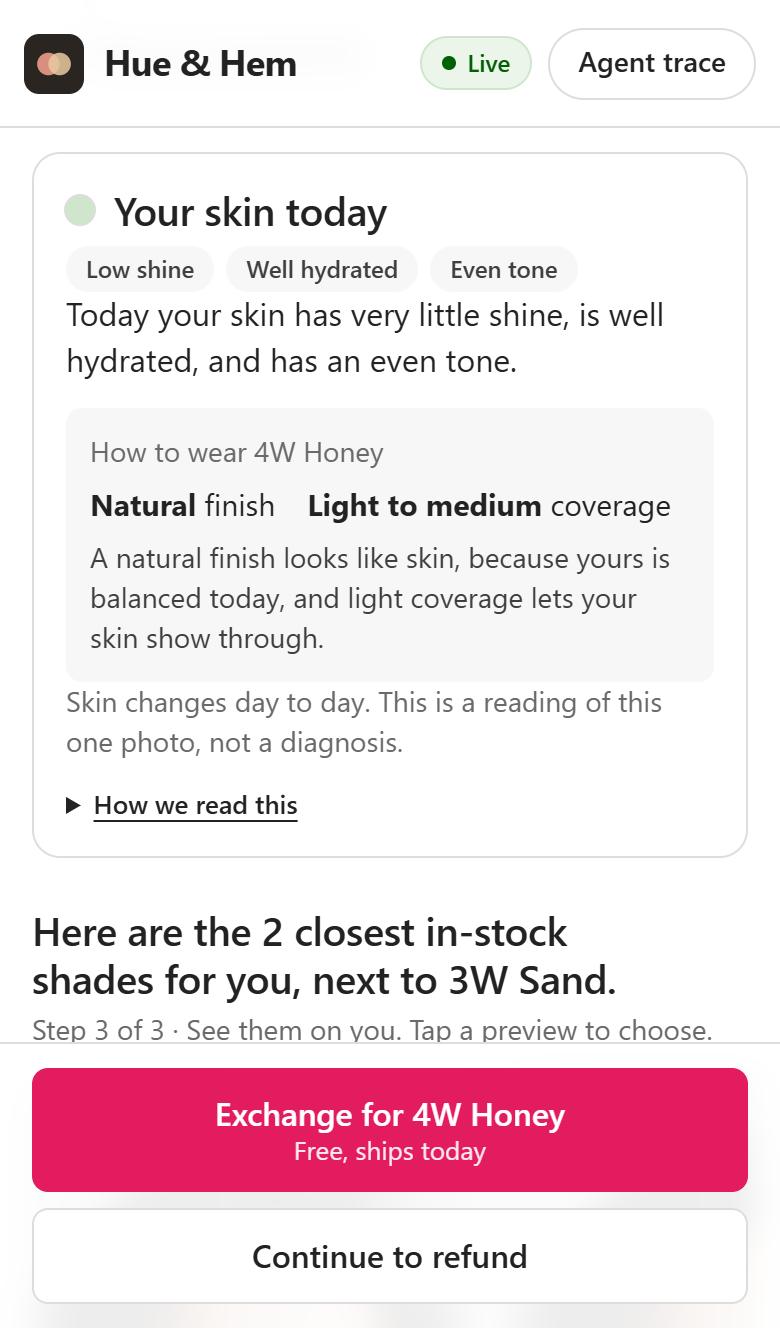
- Skin AI. For foundation, YouCam's AI Skin Analysis reads shine, hydration and redness, and a "Your skin today" card recommends the finish and coverage of the matched shade ("not a diagnosis"). For a skincare return ("It didn't suit my skin"), the same reading picks the right texture: Light gel, Balanced or Rich.
- The matching. Deterministic code ranks in-stock alternatives by CIEDE2000 colour distance in CIELAB plus explicit rules (undertone for foundation, a richer version of your own lip colour for lipstick, warm/cool and level rules for hair colour, contrast and temperature for clothes). The returned item is scored too, and every pick gets a one-line reason.
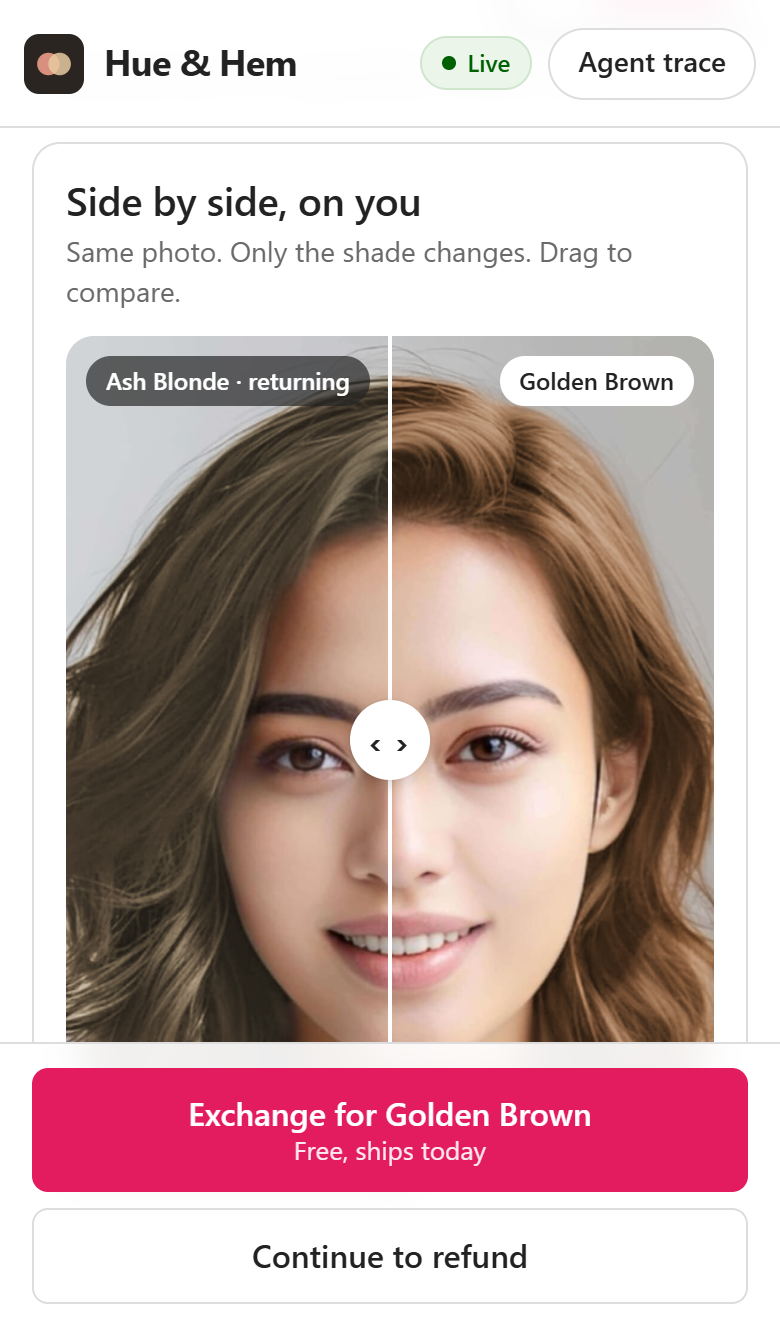
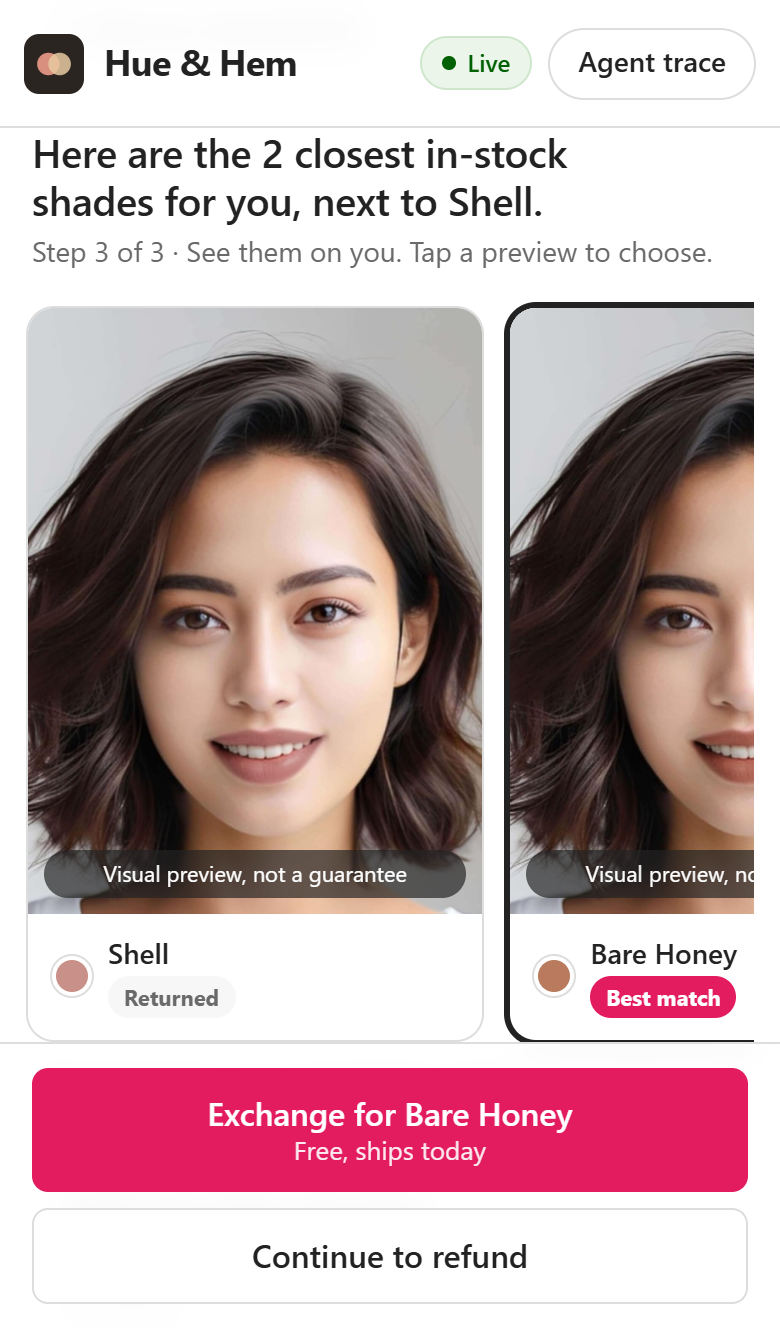
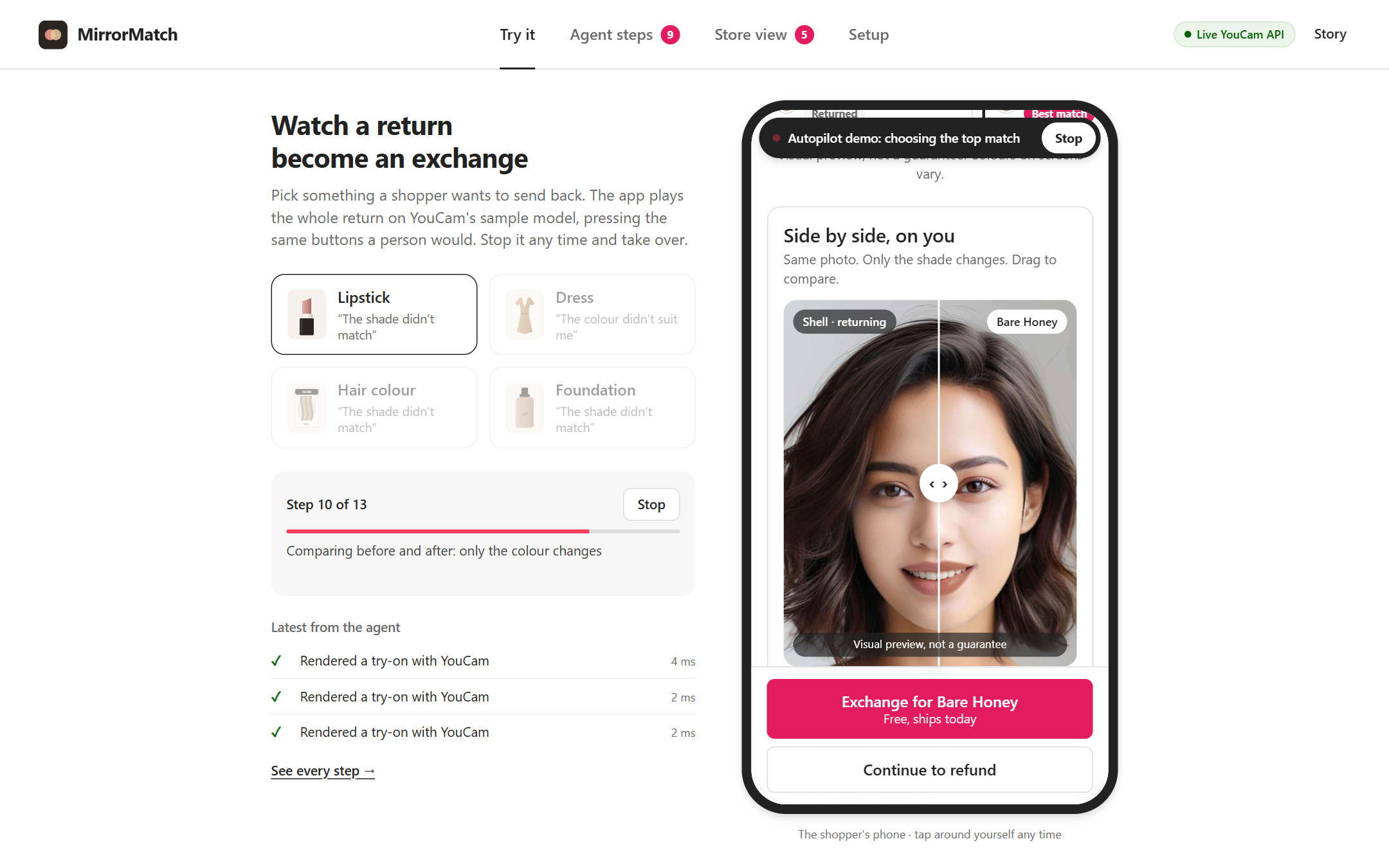
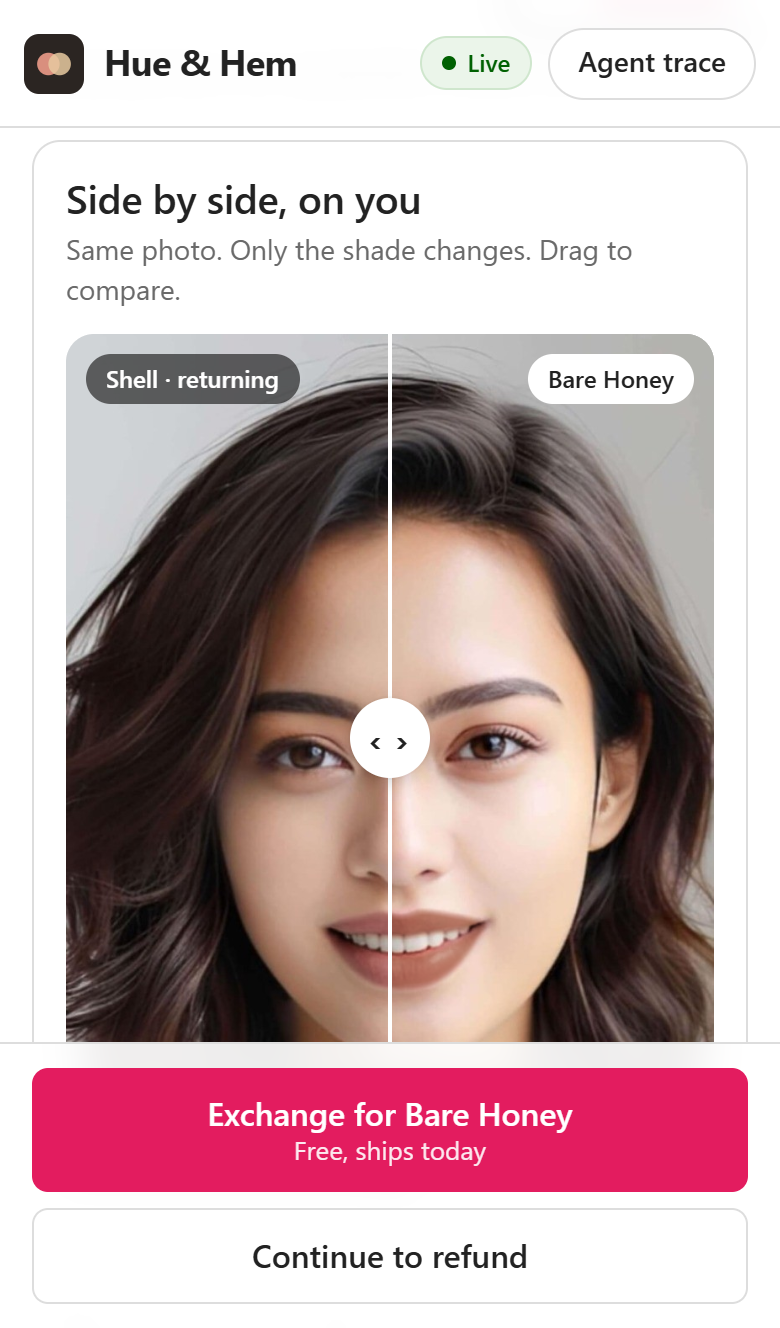
- The mirror. The returned item and the top two picks are rendered on the shopper's own photo: AI Makeup Virtual Try-On for lipstick and foundation, AI Hair Color for hair dye, AI Clothes Virtual Try-On for dresses. A before/after slider shows only the colour changing. Every image says "Visual preview, not a guarantee".
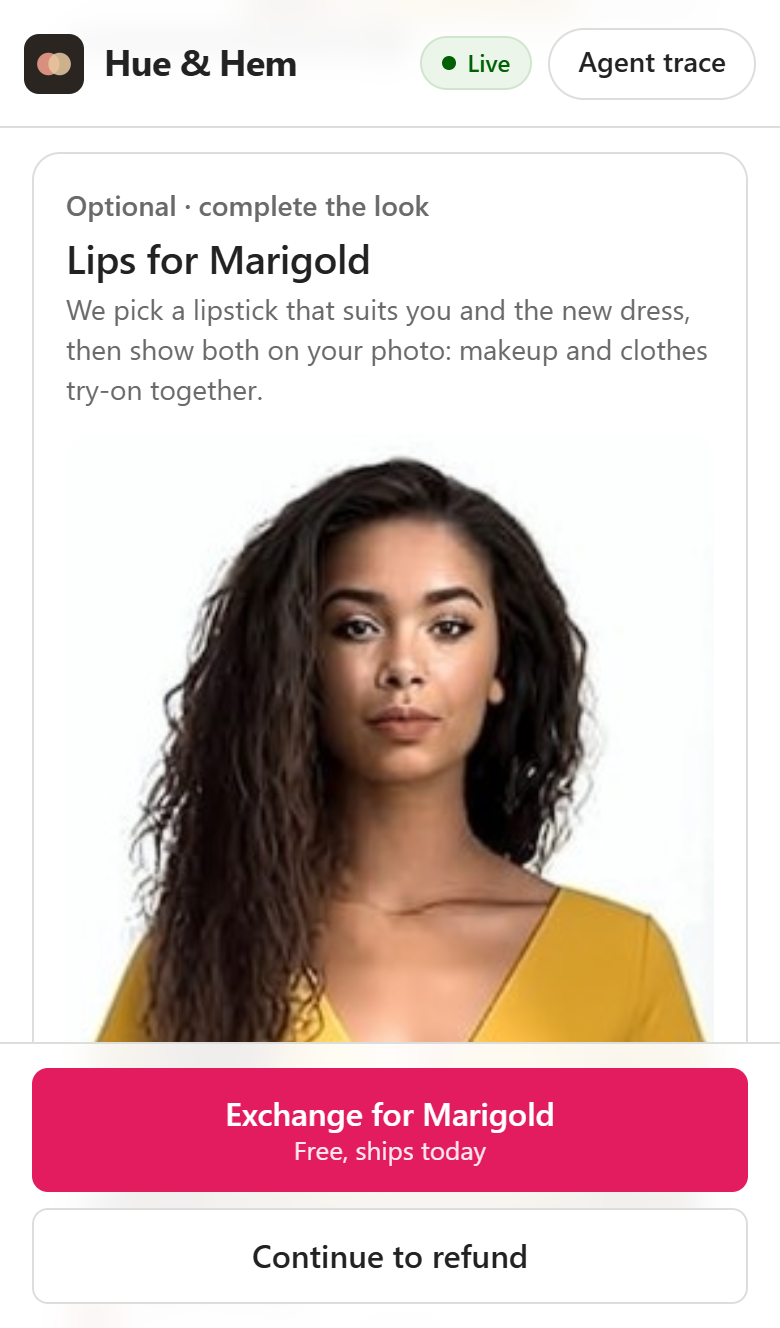
- Complete the look. Optional, one extra call each: the lipstick with a matching blush in one makeup call, and, for a dress, a lipstick picked for both the shopper and the new colour, rendered by makeup try-on directly onto the clothes try-on image: the shopper wearing the new dress and the matching lips. Adding the lipstick is a separate, unticked, clearly priced choice; the exchange stays free.
- The exchange. "Exchange for Bare Honey: free, ships today" creates the exchange and deletes the photo, here and on YouCam's side. An opt-in colour passport (tone numbers, never the photo, on the shopper's own device) makes the next order start from what worked.
For merchants:
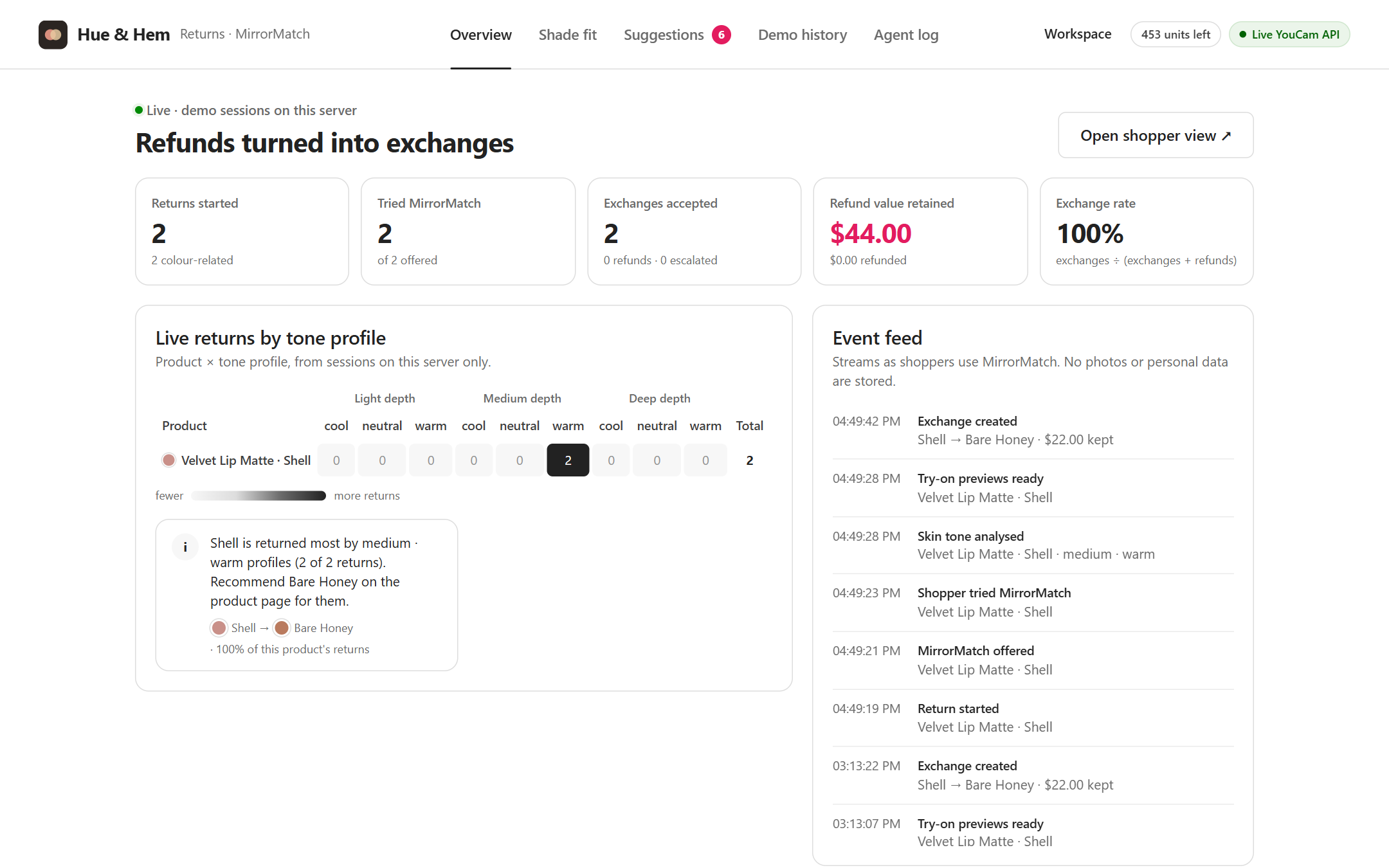
- Live: returns started, exchanges accepted, refund value kept, an event feed, and a product × tone-profile return heatmap.
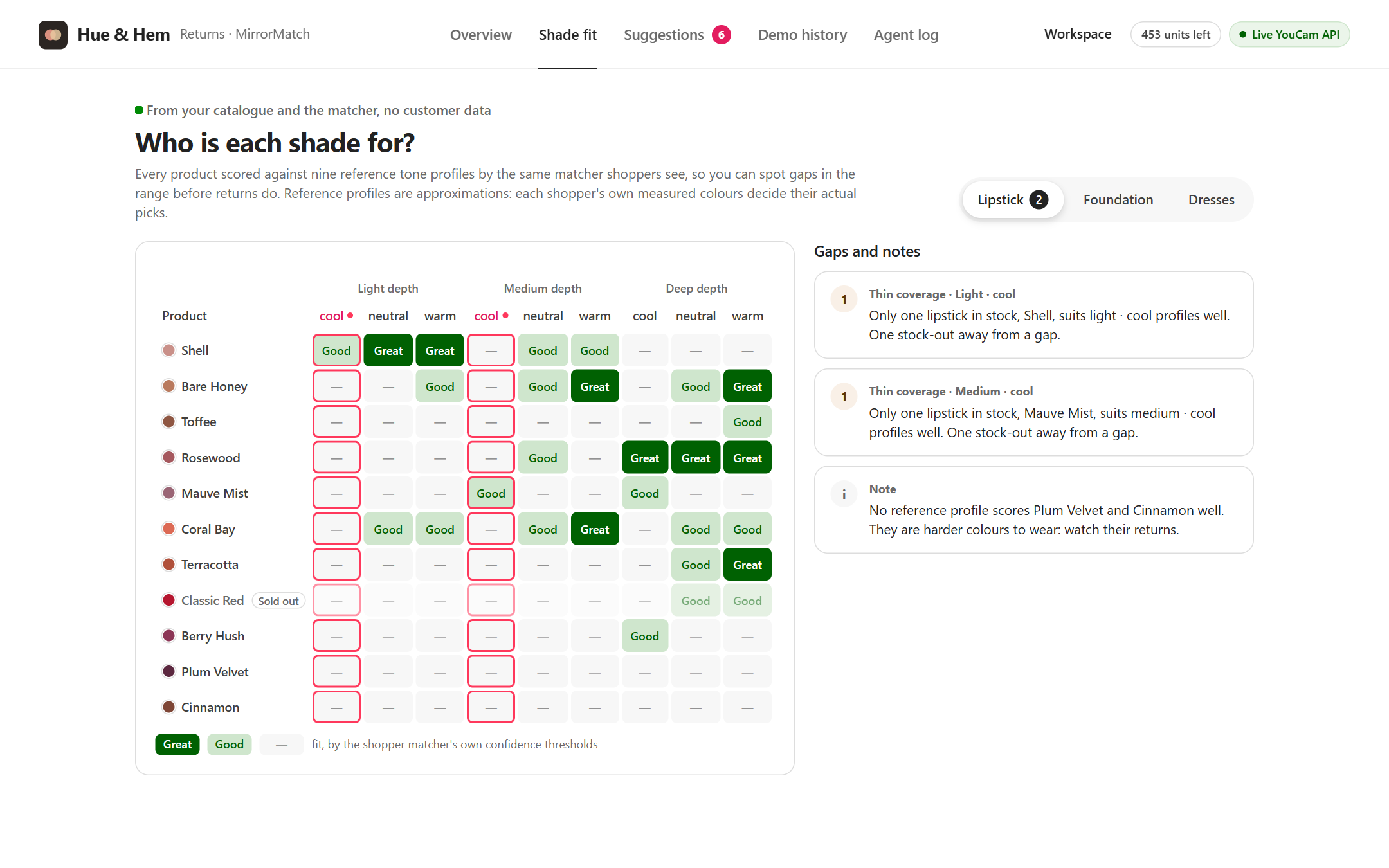
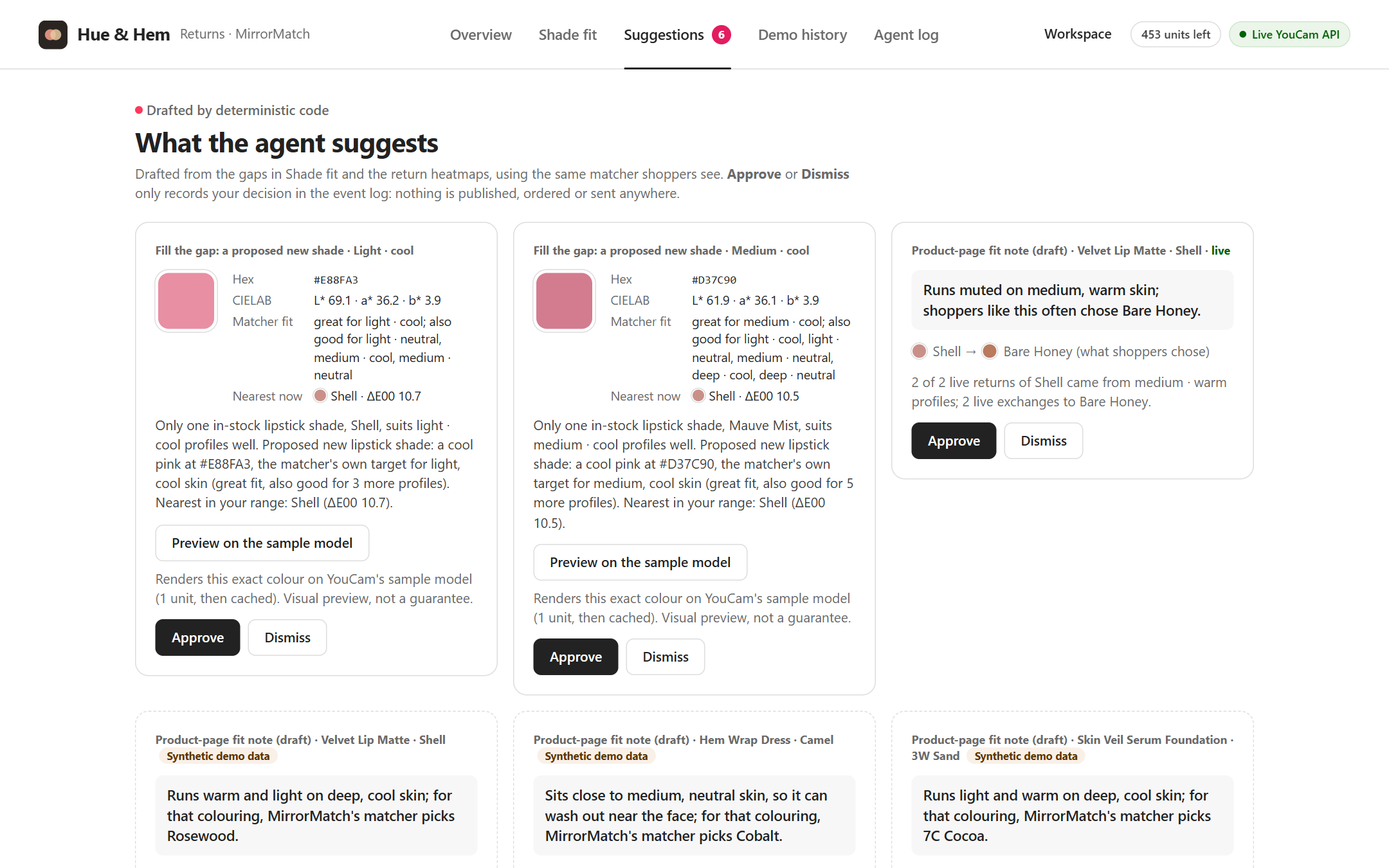
- "Who is each shade for?" Every product is scored against nine reference tone profiles by the shopper matcher itself; gap cards flag where the range serves a profile badly.
- The agent drafts the fix. For a gap, it proposes a new shade (target hex and CIELAB from the matcher's own logic) and can preview that exact colour on YouCam's sample model; it drafts product-page fit notes. A person approves or dismisses: approving only logs an event.
- Synthetic illustration data is always labelled and kept apart from live events. A returns-portal webhook lets an existing portal hand colour returns to MirrorMatch.
For shoppers: two steps. The live demo opens on Try it: pick what you're returning and add one photo, and the matches appear on your own face. If a photo can't be read, the app says why in plain words (face too small, too dark, head turned), shows what to do, and puts Upload another photo first. A reading with only soft quality flags is kept with a note instead of a paid retake, and when the demo's daily YouCam budget is used up it says your photo is fine and offers the sample model.
For judges: the connected workspace. Four calm tabs, one thing at a time: Watch a return (pick a lipstick, hair-colour, foundation or dress return and watch it play by itself in the phone, through the real UI, with a progress bar and the latest agent steps in plain words), Agent steps (every tool call, timing and unit), Store view (KPIs, live events, the agent's suggestions) and Setup (YouCam over MCP, units and caps, cache, optional LLM, webhook, privacy). Stop hands control back at any moment. The merchant dashboard is tabbed the same way, so nobody meets a wall of numbers.
Why not just do this before purchase?
Pre-purchase shade finders make a guess. A return is the only time a store finds out what actually failed: this shade, on this tone profile, didn't work. That changes three things:
- The ranking knows what went wrong. An alternative is only offered if it scores clearly better than the returned item for this shopper. Otherwise the agent hands over to a person instead of guessing.
- Every return becomes catalogue data. The heatmap, the gap cards and the agent's proposed shades all come from failures, which pre-purchase tools never see.
- It reaches people when they're paying attention. The shopper is already in the returns flow, and the merchant already has the exact product, shade and price band.
How we built it (Technological Implementation)
- Five YouCam AI APIs plus the platform APIs, end to end on the V2 server-to-server flow (File registration, PUT to the pre-signed URL, create task, poll, download,
task/delete):- AI Facial Color Tones Analyzer (20 units), AI Skin Analysis (SD, 4 concerns, 9 units), AI Makeup Virtual Try-On (1 unit; single effect, lip + blush multi-effect, and on top of a cloth-v4 output), AI Hair Color (1 unit), AI Clothes Virtual Try-On (cloth-v4, 2 units).
- All five run as tool calls on YouCam's hosted MCP servers (beauty and fashion), with an automatic REST fallback. Verified live end to end.
- Credit and feature-cost endpoints check the balance at startup and meter every call.
- Chaining two try-ons. The cloth-v4 result is uploaded as a new file and makeup-vto renders the lipstick on it, so makeup and clothes try-on genuinely work together in one image.
- A tool-using agent with a deterministic planner:
get_order,check_photo_quality,analyze_skin_tone,analyze_skin,find_alternatives,check_stock_and_policy,render_tryon,render_look,pair_lip_with_dress,pair_blush_with_lip,create_exchange,escalate_to_human. It escalates when confidence is low, and every step lands in a live trace with no photos or colour values logged. - Colour science, not vibes: sRGB to CIELAB (D65); CIEDE2000 tested against the Sharma et al. reference pairs; skin depth from the Individual Typology Angle; undertone from the hue angle (YouCam returns colours, not labels); separate, documented targets per category. Skin-analysis rules use
raw_score, because the docs sayui_scoreis inflated. - Autonomy with a human in the loop: autopilot drives the real UI; the merchant agent drafts shades and copy but never acts without approval.
- Unit budgeting: 3 core renders + 2 optional looks per return, per-session caching, a unit floor, a daily cap on the hosted demo, a free pre-check before the 20-unit analysis, and a demo cache so sample-model runs replay real results at 0 units.
- Hosting: the live demo runs on the author's workstation behind a Cloudflare quick tunnel, with a watchdog and a stable GitHub Pages link that always points at the current tunnel.
- An optional LLM, for wording only (any OpenAI-compatible endpoint; we used a local
gpt-oss:120b). Its output is validated, and the app works fully without it. - Quality: 92 unit tests (colour maths, matching, hair and skin rules, look pairing, policy, every agent decision path, MCP parsing, shade-fit gaps, suggestions, webhook, passport) and 9 Playwright end-to-end tests (lipstick, hair colour, lips on the dress, skincare, story, damaged-item refund, autopilot, Stop, merchant approval). A mock mode lets anyone run everything with no key. Plain Node + Express, no build step, MIT licensed.
Design
- A story first. Alex's one-minute story leads into the demo; the workspace shows the whole system at once.
- Mobile-first shopper flow with one decision per screen, a progress bar, a camera guide with a live lighting hint, and upload as a fallback.
- Accessible: real buttons and radio groups, keyboard navigation including the slider, focus management, alt text on every preview, reduced-motion support, read-aloud results.
- Kind language about skin, everywhere: "That's about the colour, not about you." Skin readings use gentle chips, not scores.
- A calm desktop dashboard with text labels on every colour-coded cell.
Potential impact
For the shopper: a refund means starting the search again. MirrorMatch turns "that didn't work" into "here's what will", on their own face, hair or body, in about 30 seconds, with the refund one tap away.
For the merchant:
- A colour-related return becomes an exchange, so the revenue stays and the reverse-logistics trip ends with a sale.
- Every analysed return feeds a product × tone-profile map; the agent turns gaps into proposed shades before more returns arrive.
- The webhook means it slots into an existing returns portal instead of replacing it.
We don't quote industry statistics. The dashboard reports only what actually happens in sessions, and synthetic illustration data is labelled as such.
Quality of idea
Most try-on lives on the product page. MirrorMatch puts skin-tone analysis, skin analysis and virtual try-on at the return, a non-obvious moment with unusually clear intent. It closes the loop twice: the colour passport makes the shopper's next purchase right first time, and the same engine shows the merchant what to fix, so the next shopper gets the right shade too.
Challenges
- No undertone label from the API. We derived depth and undertone with documented colour-science formulas and explicit thresholds.
- One photo for two models. Tone analysis wants a close, frontal face; cloth-v4 needs a visible body. A waist-up photo works for both at
lowface-angle strictness, and makeup try-on still works on the cloth render's small face. - Keeping the merchant view honest. Textbook reference lip colours made the grid disagree with the live flow; we recalibrated them to YouCam's measured lips.
- Hosting without a cloud account. A quick tunnel's address changes when it restarts, so a watchdog republishes it to a stable page.
What we learned
- Colour distance alone isn't enough: lipstick, foundation, hair and clothing each need a different target.
- Unit-aware engineering (pre-checks, caps, caching) matters as much as the AI calls themselves.
- A returns flow is an emotional moment. An apology, a clear "what happens next" and a visible refund do as much as the AI.
What's next
- Adapters for specific returns platforms on top of the webhook.
- YouCam webhooks instead of polling.
- Publishing MirrorMatch's own tools as an MCP server for a store's support assistant.
- Catalogue import with swatch calibration, and pushing approved fit notes to product pages.
Built with
YouCam AI Facial Color Tones Analyzer, YouCam AI Skin Analysis, YouCam AI Makeup Virtual Try-On, YouCam AI Hair Color, YouCam AI Clothes Virtual Try-On (cloth-v4), YouCam MCP servers (beauty, fashion), YouCam File / Credit / Task APIs, Node.js, Express, vanilla JS, CIELAB / CIEDE2000, Web Speech API, Playwright, Cloudflare Tunnel, GitHub Pages, optional OpenAI-compatible LLM (local gpt-oss:120b)
Try it: the live demo above, or npm install && npm start with a YOUCAM_API_KEY in .env, or npm run mock with no key. Start at / (Try it), /workspace.html (watch the agent) or /story.html. Repo: https://github.com/sarthak-1111/mirrormatch
Built With
- ciede2000
- cielab
- cloudflare
- css3
- express.js
- ffmpeg
- github
- html5
- javascript
- node.js
- playwright
- remotion
- web-speech-api
- youcam-api
- youcam-mcp

Log in or sign up for Devpost to join the conversation.