Inspiration
Online fashion shopping still asks people to make a difficult prediction: “What will this look like on me?”
Product photos can show us the clothing, but they do not show the complete answer. Shoppers have to imagine fit, color combinations, proportions, accessories, and whether an entire outfit works together. Even when a virtual try-on feature exists, the experience often stops at visualization. It shows an item, but it does not help the shopper decide what to buy next.
We wanted to build something more useful: an AI shopping companion that can understand what a person is actually trying to accomplish, create a complete look, visualize it on the shopper, adapt to feedback, and turn the final result into an actionable shopping journey.
That idea became MirrorCart.
MirrorCart combines AI personalization, virtual try-on, and agentic commerce into one mobile experience. Instead of asking the user to browse hundreds of products, MirrorCart lets them start with a natural-language goal such as:
“I need a date-night outfit under $200 that feels elegant but not too formal.”
The AI turns that goal into a structured shopping mission. It considers occasion, aesthetic, budget, existing wardrobe pieces, preferred colors, and other constraints. It searches for products, assembles complete looks, uses Perfect Corp's virtual try-on technology to visualize those looks, and then lets the user refine them conversationally.
The most important inspiration was the idea that AI should not simply recommend a product — it should help complete the entire decision loop.
We wanted to move from:
Search → Browse → Imagine → Buy
to:
Tell MirrorCart what you need → Let the agent build it → See it on you → Refine it → Shop it
That is the experience we wanted to prototype.
What it does
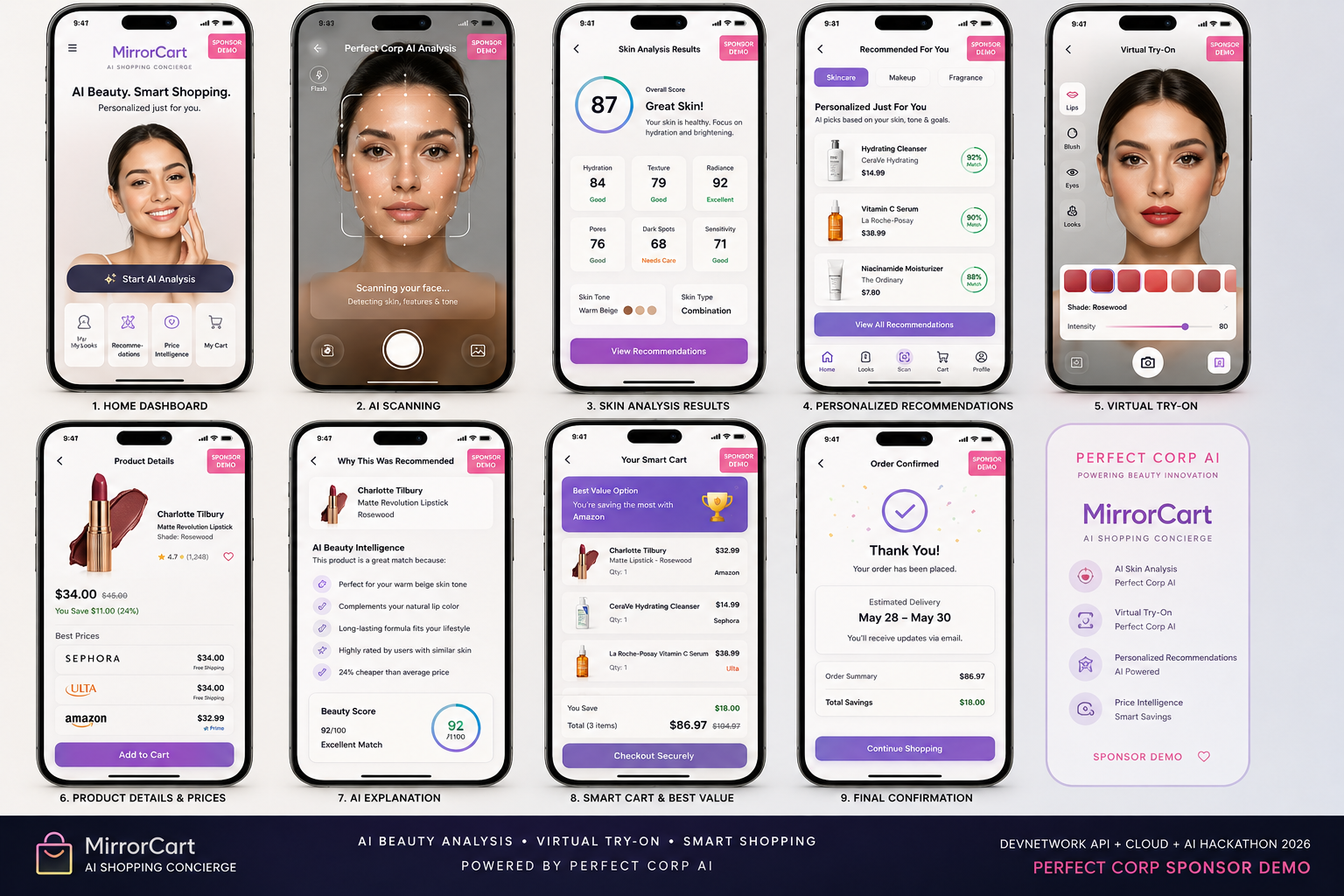
MirrorCart is a mobile AI stylist and shopping agent designed around three tightly connected capabilities: personalization, AR/virtual try-on, and agentic commerce.
1. AI understands the shopping mission
The user can describe an outfit request naturally instead of filling out a traditional ecommerce filter form.
Examples:
“Wedding guest look under $250.”
“Make me a casual weekend outfit using my white sneakers.”
“I want something minimal, black and cream, for a dinner date.”
The agent extracts the important constraints:
- occasion
- style
- budget
- colors
- categories
- preferences
- wardrobe constraints
- shopping intent
The system then uses those constraints as part of the recommendation and ranking process.
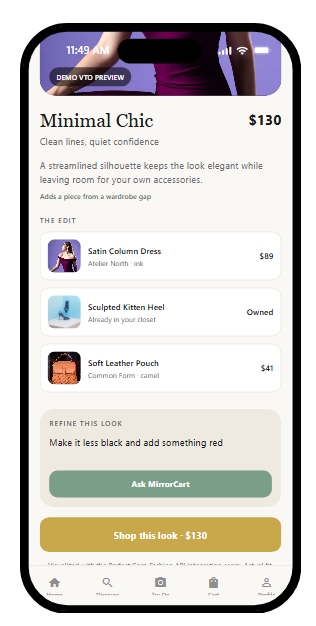
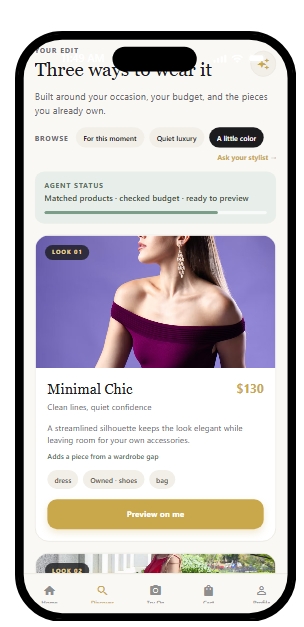
2. MirrorCart builds complete looks
Instead of returning a flat product list, MirrorCart composes outfits.
A look can include:
- top or dress
- bottoms
- shoes
- bag
- accessories
- outerwear
The agent evaluates the combination rather than treating each product independently.
For example:
Look A — Minimal Chic — $168
Look B — Modern Romantic — $187
Look C — Statement Evening — $194
The user can compare complete looks and understand the total cost.
3. AI-powered virtual try-on
The AR/visual experience is the centerpiece of MirrorCart.
The user can capture or upload a photo, then select a look to visualize.
MirrorCart uses Perfect Corp's AI fashion visualization / virtual try-on capabilities to generate a representation of the selected clothing on the user's image. Perfect's Fashion APIs support virtual try-on workflows across apparel and additional fashion categories such as footwear, bags, scarves, and hats.
The interface is designed around an immersive mobile camera experience, including:
- camera/photo capture
- framing guidance
- loading and processing states
- try-on results
- before/after comparison
- product switching
- outfit layering
- color alternatives
- save/share actions
- retry and error states
The goal is not simply to produce a cool image. The try-on result becomes part of the shopping decision process.
4. Conversational outfit refinement
The user can tell the agent what to change.
For example:
“Make it cheaper.”
“I don't like black.”
“Swap the heels for sneakers.”
“Add something red.”
“Keep the dress but change everything else.”
The agent then searches for replacements that maintain the original intent while respecting the new constraint.
This creates an iterative loop:
Generate → Visualize → React → Revise → Visualize again
5. Agentic shopping
MirrorCart is designed as a tool-using shopping agent rather than a chatbot that only generates text.
The agent can orchestrate functions such as:
- product search
- product retrieval
- product filtering
- product ranking
- look composition
- budget calculation
- virtual try-on generation
- item replacement
- look comparison
- wishlist actions
- cart creation
- retailer handoff
This means the AI can move from a vague user request toward a concrete shopping outcome.
6. Personalization
MirrorCart is designed to become more useful as it learns the user's preferences.
The personalization layer can incorporate signals such as:
- preferred colors
- favorite brands
- categories frequently viewed
- saved looks
- wardrobe items
- previous shopping missions
- budget behavior
- occasion preferences
- explicit likes/dislikes
- interactions with recommendations
- try-on feedback
The long-term vision is for MirrorCart to understand not just “what product is popular,” but what product is likely to be right for this particular person in this particular context.
7. Ecommerce and cart flow
After a look is finalized, MirrorCart transforms the recommendation into an actionable commerce experience.
The app can show:
- individual products
- prices
- variants
- total outfit cost
- alternatives
- retailer information
- availability data where available
- shopping links
- cart state
- final review
The user remains in control of the actual purchase decision.
The agent can prepare the shopping journey, but the human makes the final purchase approval.
How we built it
MirrorCart was designed as a mobile-first architecture using React Native so the core experience can be delivered consistently across iOS and Android.
The product architecture separates the user experience, AI orchestration, commerce logic, and visual AI services.
Mobile frontend
The React Native app handles the user-facing experience:
- onboarding
- style preferences
- home/dashboard
- AI stylist conversation
- camera/photo capture
- AR/try-on experience
- look comparison
- product detail
- wishlist
- cart
- checkout handoff
- profile and settings
We designed the UI around a premium fashion-editorial aesthetic with large imagery, clear hierarchy, minimal controls over the camera experience, and reusable mobile components.
AI agent layer
The agent layer converts natural-language requests into structured shopping tasks.
A typical flow looks like:
User Request
     ↓
Intent Extraction
     ↓
Constraint Construction
     ↓
Product Search
     ↓
Candidate Filtering
     ↓
Product Ranking
     ↓
Look Composition
     ↓
Virtual Try-On
     ↓
User Feedback
     ↓
Agent Revision
     ↓
Final Look
     ↓
Cart / Retailer Handoff
The important architectural decision was to give the agent tools rather than letting it generate everything as free-form text.
A simplified tool model looks like:
searchProducts()
getProductDetails()
buildLook()
calculateBudget()
tryOnLook()
replaceItem()
compareLooks()
createCart()
prepareCheckout()
This makes the agent more deterministic, testable, and extensible.
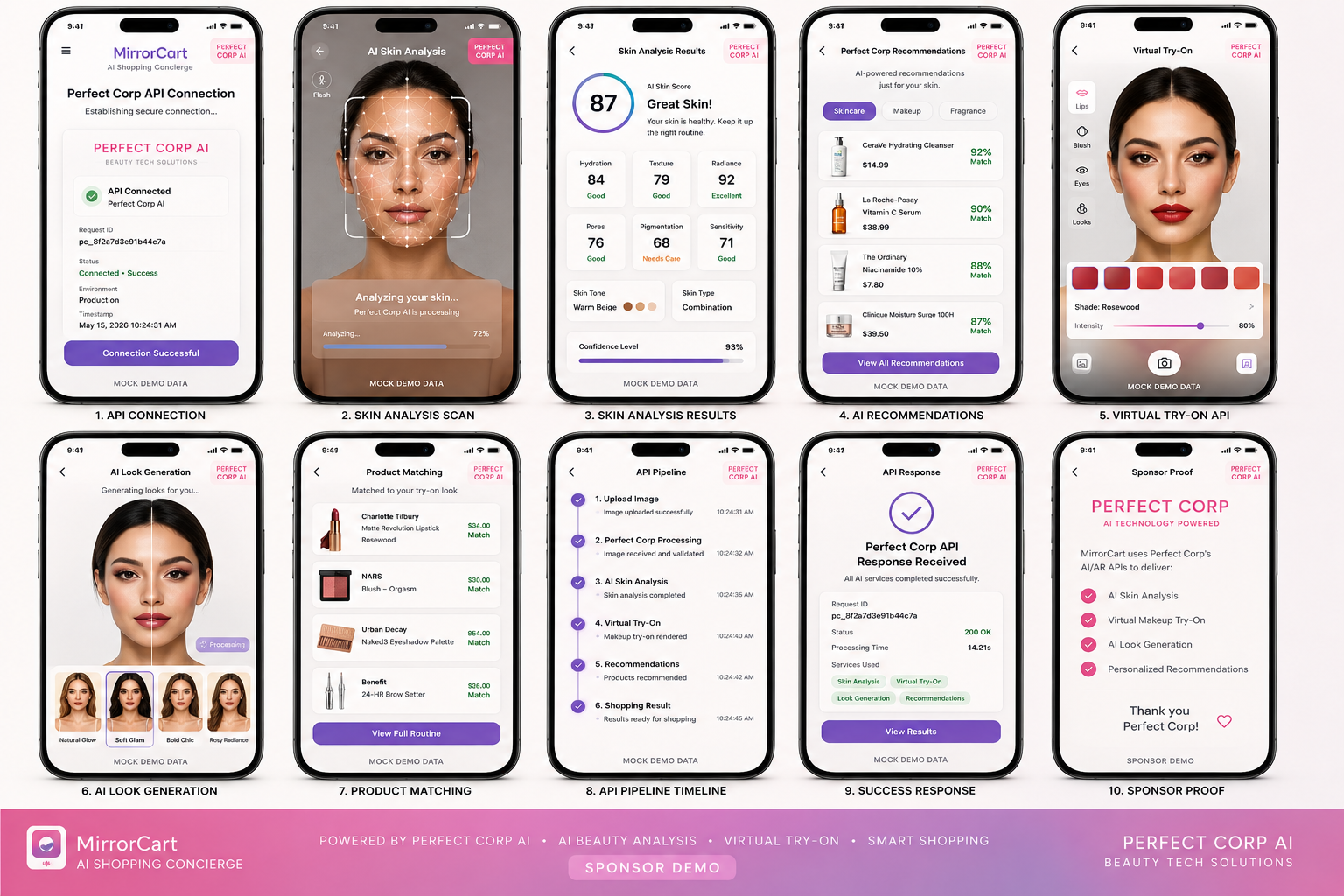
Perfect Corp integration
Perfect Corp provides the visual AI layer that makes MirrorCart's virtual try-on experience possible.
The mobile application does not directly expose provider credentials. Instead, provider-specific calls are handled through a server-side integration layer.
The general workflow is:
React Native App
      ↓
Upload / Prepare Image
      ↓
MirrorCart Backend
      ↓
Perfect Corp API
      ↓
Virtual Try-On Job
      ↓
Result Polling / Retrieval
      ↓
Normalized MirrorCart Result
      ↓
React Native AR Experience
This keeps provider credentials out of the mobile bundle and gives us a clean abstraction for handling:
- authentication
- uploads
- job creation
- asynchronous processing
- polling
- retries
- failures
- result URLs
- caching
- provider-specific response formats
It also gives MirrorCart the flexibility to evolve its visual AI layer without tightly coupling the React Native application to one raw API response format.
Backend and application services
We designed the backend around application-owned entities rather than mock-only frontend state.
Core concepts include:
User
Profile
StylePreference
WardrobeItem
Product
ProductVariant
Look
LookItem
TryOnJob
TryOnResult
ShoppingMission
AgentSession
Cart
CartItem
Wishlist
Recommendation
AnalyticsEvent
The backend becomes the source of truth for business state while the mobile app becomes the experience layer.
Personalization engine
The personalization architecture combines explicit and behavioral signals.
Explicit signals include:
- stated preferences
- favorite colors
- budget
- style categories
- occasion
Behavioral signals include:
- products viewed
- products saved
- looks accepted
- looks rejected
- item swaps
- try-on interactions
- shopping-session outcomes
This creates a feedback loop where the system can continuously improve relevance.
Reducing mock data
A major engineering goal was to move MirrorCart away from static demo data.
Instead of hard-coded product arrays scattered throughout the frontend, the architecture uses:
- API-driven product retrieval
- normalized response models
- caching
- loading states
- empty states
- retry states
- server-backed session state
- explicit demo fixtures only when required
This makes the prototype closer to a real product and significantly easier to extend after the hackathon.
Commerce architecture
The commerce layer was intentionally designed with human approval at the end.
The agent can:
- discover products
- compare products
- assemble a look
- revise the look
- calculate totals
- create a draft cart
- prepare the checkout handoff
The user then reviews and approves the final purchase.
This gives us the benefits of agentic shopping without hiding a financial action behind autonomous AI behavior.
Challenges we ran into
1. Making AR useful rather than decorative
The biggest challenge was avoiding the common virtual-try-on pattern where the AI image becomes a novelty feature.
We wanted the visual result to directly affect the shopping experience.
That meant connecting the try-on system to:
- product selection
- outfit composition
- conversational changes
- product replacement
- recommendation ranking
- final purchase intent
The AR experience had to answer a real question:
“Does this help me decide what to buy?”
2. Asynchronous AI workflows
Virtual try-on is not necessarily an instant synchronous API call.
The application therefore has to manage:
idle
→ preparing
→ uploading
→ queued
→ processing
→ completed
→ failed
→ retrying
Getting those states right on a mobile device is critical to making the experience feel reliable.
We had to think about retries, cancellation, stale jobs, duplicate requests, timeouts, loading states, and preserving the user's shopping session while the visual AI job was processing.
3. Balancing AI creativity with commerce constraints
Generative AI wants to be creative.
Ecommerce systems need to be accurate.
A recommendation can sound fantastic and still be unusable if:
- it exceeds the budget
- the item is unavailable
- the category does not match
- the product cannot be purchased
- the outfit does not include compatible pieces
- the agent invents product details
This pushed us toward a tool-grounded architecture where the AI reasons over structured product data rather than hallucinating an imaginary catalog.
4. Personalization without overcomplication
Personalization can quickly become a huge machine-learning project.
For the hackathon, we focused on building a strong foundation:
- explicit preferences
- behavioral events
- structured product attributes
- contextual ranking
- semantic retrieval
- wardrobe context
- session context
That creates a practical path toward more advanced recommendation models later.
5. Mobile performance
Images are expensive.
AR/try-on workflows can involve large photos and generated outputs, which creates challenges around:
- upload size
- image compression
- memory
- network conditions
- caching
- rendering
- device capability
- repeated generation requests
We therefore treated media handling as a first-class mobile engineering problem rather than an afterthought.
6. Designing an agent that remains predictable
A shopping agent needs freedom to make useful decisions, but it also needs boundaries.
We designed actions around explicit tools and state transitions so that sensitive operations can require confirmation.
For example:
Recommendation → automatic
Product swap → automatic
Try-on → automatic
Draft cart → automatic
Purchase → human approval
That distinction is important as agentic commerce becomes more powerful.
Accomplishments that we're proud of
We connected visual AI to an actual commerce workflow
Our biggest accomplishment is that the AR experience is not isolated.
The same system can move from:
shopping intent → product discovery → complete look → try-on → refinement → cart
That is the experience we believe makes MirrorCart meaningfully different from a standalone virtual fitting-room demo.
We designed the product around the complete outfit
Most shopping experiences optimize around individual products.
MirrorCart thinks in terms of looks.
The user does not necessarily want “a shirt.”
They want:
“What should I wear?”
That shift changes how recommendations, ranking, visualization, and commerce are designed.
We made conversational refinement part of shopping
One of the most exciting interactions is:
“Make it cheaper.”
followed by an actual revised look.
The AI is not simply producing another sentence. It is changing the underlying product set while trying to preserve the user's original intent.
We built for mobile from the beginning
The camera, AR visualization, gesture interactions, product browsing, and shopping workflow were designed around mobile rather than treating mobile as a later wrapper.
We designed a real path away from mock data
We deliberately moved the architecture toward live application services, normalized API models, persistent state, real image workflows, and explicit test fixtures rather than relying on static mock arrays throughout the UI.
We treated monetization as part of the product architecture
MirrorCart has room for multiple business models:
- premium AI styling
- virtual try-on credits
- subscription plans
- affiliate commissions
- retailer referral revenue
- premium personalization
- paid styling experiences
Importantly, these monetization concepts are tied to real product value rather than simply placing advertisements throughout the experience.
We designed for extensibility
The same architecture can support future capabilities such as:
- shoes
- handbags
- accessories
- cosmetics
- wardrobe planning
- travel packing
- event styling
- social outfit sharing
- personalized storefronts
The AR experience becomes a platform rather than a one-feature demo.
What we learned
The best AI experience is often an interaction loop
We learned that the strongest product idea was not:
“AI recommends fashion.”
It was:
“AI proposes something, lets me see it, listens to my reaction, and improves it.”
That loop is much closer to how a real human stylist works.
Visualization changes the meaning of recommendation
A recommendation is hypothetical.
A try-on result is concrete.
Once the shopper can see the outfit in context, the conversation becomes much more specific:
“I like the dress but not the shoes.”
“Make the outfit less formal.”
“Show me a cheaper bag.”
That makes visual AI an interface for better decision-making, not simply image generation.
Agentic systems need strong grounding
We learned that commerce agents should be grounded in structured data and explicit tools.
The AI can decide what to do, but application services should determine facts such as:
- price
- availability
- product identity
- cart contents
- API status
- entitlement
- transaction state
That separation makes the system more reliable.
AR introduces a completely different product-design problem
A normal mobile interface can place lots of information on the screen.
An AR camera cannot.
The user needs to see themselves.
That forced us to think much more carefully about:
- information density
- overlays
- touch targets
- loading behavior
- visual hierarchy
- motion
- capture controls
- error recovery
Personalization is more than recommendation history
The most useful personalization is contextual.
The same person might want completely different recommendations for:
- work
- vacation
- a wedding
- a date
- a weekend
- a limited budget
That means the future personalization model needs to understand the user's current mission, not only their historical preferences.
The human still matters
The strongest agentic-commerce experience is not necessarily one where the AI does everything autonomously.
It is one where the AI removes the tedious work while keeping the user in control of important decisions.
MirrorCart is designed around that principle.
What's next for MirrorCart
The next phase is to turn the prototype into a continuously learning shopping platform.
1. Real-time product ecosystem
We want to connect more live retailer and commerce sources so MirrorCart can operate on a broader and fresher product catalog.
The goal is to move from a curated prototype catalog toward:
“Show me what I can actually buy right now.”
2. More advanced AR
We want to push the visual experience further with:
- more complete outfit layering
- accessories
- footwear
- stronger depth and occlusion
- improved body/pose guidance
- lighting-aware visualization
- richer gesture interactions
- faster generation
- higher-quality visual output
The long-term experience should feel increasingly like a digital fitting room rather than a generated image screen.
3. Persistent wardrobe intelligence
Users should be able to build a digital closet by photographing their existing clothes.
MirrorCart could then reason over:
- what they already own
- what they actually wear
- gaps in their wardrobe
- duplicate purchases
- compatible new products
A future shopping request could become:
“Build me five work outfits using what I already own and tell me the three things I should buy to complete them.”
4. More intelligent agent memory
We want MirrorCart to remember useful preferences without making the experience feel repetitive.
For example:
“You usually prefer neutral colors, but last time you liked the red accessory. Want me to include a statement piece?”
That turns personalization into an evolving relationship.
5. Advanced recommendation intelligence
Future versions can incorporate stronger retrieval, embeddings, multimodal product understanding, contextual ranking, and continuous feedback models.
The goal is to optimize not only:
“What product is likely to be clicked?”
but:
“What complete look is most likely to make the shopper feel confident about their purchase?”
6. Agentic commerce beyond recommendations
Eventually, MirrorCart could handle much more of the shopping workflow:
- monitor wishlists
- track price drops
- identify better alternatives
- watch product availability
- rebuild an outfit when an item sells out
- optimize the cart against a budget
- prepare orders
- coordinate shopping for events or trips
The user could simply say:
“I need three outfits for my trip next month. Keep everything under $500 and use as much of my existing wardrobe as possible.”
MirrorCart's job would be to figure out the rest.
7. A larger business opportunity
The long-term vision is bigger than a virtual try-on app.
MirrorCart can become the AI interface between people and fashion commerce.
Instead of visiting dozens of storefronts and manually comparing products, the shopper interacts with an intelligent visual agent that understands:
who they are + what they need + what they own + what looks good on them + what they can afford + what they can actually buy.
That is the future we want to build with MirrorCart.
MirrorCart: See it. Style it. Shop it.
Built With
- youcam

Log in or sign up for Devpost to join the conversation.