Judge in 60 seconds
A shopper sees the shade, learns the technique on their own face, gets a misread caught, is graded with CIEDE2000 on a real attempt, and lands on the exact products; 14 YouCam units for a first lesson, 4 after. Try it at 0 units, no selfie: https://mirror-tutor.vercel.app/?lang=en (tap "Try with a sample model").
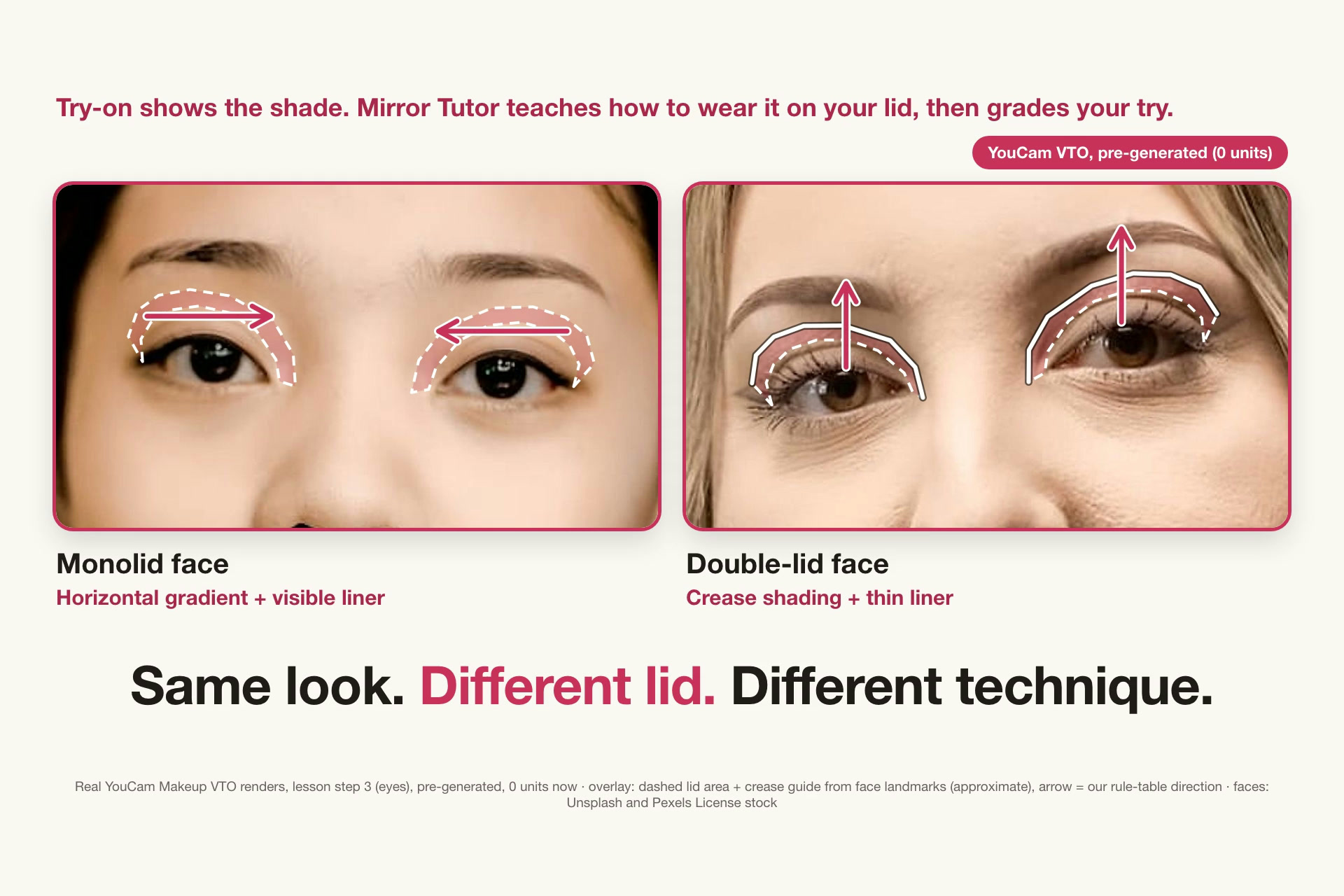
- Misread and fix: Face Analyzer read our monolid stock model as double-lid; one tap corrects it and the technique changes (/compare?lang=en shows both lessons side by side).
- Answer key and grading: Makeup VTO renders each step as the answer key; your real attempt is graded per region with CIEDE2000 (deterministic on the landmark path; the LLM only phrases the one-line correction).
- Three YouCam APIs: Face Analyzer, Makeup VTO and an opt-in Skin Analysis check (9 units) whose dark circles, redness, oiliness and pores are drawn as landmark zones on your photo (only the ones that fired, approximate) and change the Base step through a hand-written rule table.
- Impact, checkable: the market is beauty retailers and brands that already sell try-on on YouCam APIs, whose try-on answers "how does this shade look on me" but not "how do I wear it". /partner turns your own numbers into a break-even: 14 units for a first lesson and 4 after, so 2,000 first + 6,000 repeat lessons a month = 52,000 units and N = ceil(52,000 x unit price / margin per order) extra orders. The two-week 50/50 A/B (add-to-cart per product-page session) is judged against the 4.3% beauty-return baseline (PYMNTS, citing NRF: https://www.pymnts.com/news/ecommerce/2024/perfect-corp-ar-try-on-reduces-returns-for-ecommerce-beauty-brands/). No pilot exists and no retailer data: the counts are illustrative and the baseline is context, not our result.
- Retailer fit: one iframe widget; /partner?lang=en has the cost calculator and a two-week A/B test plan.
Pitch
- Problem: makeup tutorials are filmed on someone else's face, so a monolid and a double lid get the same advice, and a shopper who tries a shade still does not know how to wear it.
- YouCam features used (three APIs): Face Attribute & Ratio Analysis reads the eyelid, eye, lip, face and brow (a visible rule table turns that into the technique, and you can correct a misread), the opt-in Skin Analysis reads dark circles, redness, oiliness and pores (a second rule table changes the Base step), and Makeup VTO renders every lesson step on your own photo as the answer key your real attempt is graded against.
- Buyer metric: a retailer that sells try-on gets a drop-in widget that ends in the lesson's own products, so the number to watch is shop-the-step conversion and returns (beauty returns run 4.3%), at a known cost of 4 YouCam units per extra lesson.
Why a brand pays
Buyer: a beauty retailer or brand that sells try-on on its product pages. Try-on answers "how does this shade look on me", not "how do I wear it".
- One checkable number: a first lesson costs 14 YouCam units (10 analysis + 4 renders), every later lesson 4, session cap 24 (the opt-in skin check adds 9). The baseline it must beat is the 4.3% blended beauty-retail return rate (PYMNTS, 27 Feb 2024, citing National Retail Federation data: https://www.pymnts.com/news/ecommerce/2024/perfect-corp-ar-try-on-reduces-returns-for-ecommerce-beauty-brands/). That rate is demand context, not a result for our app.
- Drop-in today:
/embed/lesson?sku=...(or?hex=...&name=...for a shade outside our demo catalog), a chrome-less iframe: stepper, bare/finished slider, the shade matched to the lesson color with CIEDE2000, then the lesson's own products to the cart (the store handles checkout). - Worked example first: /partner opens with 2,000 first lessons x 14 + 6,000 repeat visits x 4 = 52,000 units a month, and break-even is N = ceil(52,000 x your unit price / margin per order) extra orders. The counts are illustrative and no unit price is assumed.
- Your own numbers: /partner turns your session counts, unit price and margin per order into the extra orders needed to break even (example inputs only). The KPI is shop-the-step conversion against a plain product page; we found no independent data on eyelid-specific tutorial demand and claim none.
- Two-week retailer test (a plan, not a result): 50/50 A/B on one lip SKU; primary metric add-to-cart per product-page session, secondary lesson completion to step 4 and shop-the-step clicks; n per arm = 16p(1-p)/d^2, about 6,144 sessions per arm at an illustrative 4% baseline and a 1 pt lift; success is a lift of 1 pt or more, otherwise stop; widget-arm cost is at most 86,016 units (14 per first lesson). The baseline is illustrative, not measured.
Try it (no selfie, 0 units)
- 30-second walk-through: https://mirror-tutor.vercel.app/?lang=en - pick Monolid (correct what the analyzer cannot see: Face Analyzer reads this face as Double-lid and you fix the eyelid) or Double-lid, tap the filled button "Try with a sample model · 0 units" (KO: "샘플 모델로 체험하기 · 0 유닛"), then walk analysis (with the pre-generated skin check card), a 4-step lesson (the Base step shows "Why this fits you" from the skin check), grading and shop the step. To use your own photo instead, tap "Use my own selfie" (asks for consent).
- Retailer view (live widget in a fictional store): https://mirror-tutor.vercel.app/partner?lang=en - the "In your store" strip, your own lip shade, the iframe snippet, a cost calculator and an illustrative break-even from your own inputs.
- Two faces side by side: https://mirror-tutor.vercel.app/compare?lang=en - opens on the eye step with a default-on "Show technique" toggle: lid area, crease guide and gradient direction drawn from face landmarks on both faces (the lid area and crease are landmark approximations, the direction is our rule table; the same overlay appears on lesson step 3).
- Interactive grader (0 units): https://mirror-tutor.vercel.app/grade?sample&lang=en - starts the sample trial by itself and lands on the grade. Under each region, "Try it: change the attempt color" offers shade chips; pick one and the CIEDE2000 difference, the region score and the total are recomputed in your browser with the same function the live grader uses. The attempt photo is a labelled simulation and stays unchanged; only the numbers are recomputed.
- Deep links (
/shop,/grade,/share) opened cold or reloaded offer the same one-tap sample trial, so no page is a dead end.
How we use YouCam
| YouCam API | What we do with it | Units |
|---|---|---|
| Face Attribute & Ratio Analysis | 5 features (eyelid, eye shape, lip, face, brow) drive a visible rule table, so a monolid and a double lid get different techniques. | 10, once |
| Skin Analysis (SD, 4 concerns) | Opt-in "Skin check": dark circles, redness, oiliness and pores (dark_circle_v2, redness, oiliness, pore, format: json). A hand-written rule table maps each concern that is not clear to one change in the Base step: dark circles -> peach corrector, redness -> green primer, oiliness -> mattifying primer plus a thinner foundation, pores -> blurring primer pressed in. Shown as a skin card on the analysis screen and a "Why this fits you" reason on the Base step. |
9, opt-in |
| Makeup VTO | Lesson step k renders effects 1..k cumulatively on one file_id: 8 effects, with the on-device foundation shade passed in. The output is the answer key we grade your attempt against. |
1 per step |
| Credit / feature-cost | Unit guard: reserve before a task, session and daily caps, demo mode when the balance is low. | 0 |
YouCam provides: face reading, skin reading and the makeup renders. Ours: the rule tables that pick the technique and the base prep (including our own 70/85 cut-offs on YouCam's 1-100 skin scores), the correction flow for analyzer misreads, per-region CIEDE2000 grading of a real attempt on landmark polygons, catalog matching, and the embeddable widget.
This is not a wrapper: the analyzer's and the skin check's output feed visible rule tables instead of being displayed, VTO output is the grading reference, and the foundation shade is measured on the device from your cheeks and passed into the VTO foundation effect.
Honest notes
- Analyzer misread, corrected by hand: Face Analyzer read our monolid stock model as double-lid. The Monolid sample shows that real, wrong reading, the fix is the visitor's tap ("Fix the eyelid", marked "Edited"; the lesson's eye step also nudges to fix it if skipped), and /compare shows both lessons.
- No pilot: no retailer, user test or measured lift exists; fewer returns after seeing the look in the exact shade is a hypothesis. The monolid horizontal-gradient rule is a rule of thumb from public tutorials, not a Perfect Corp result.
- Demo catalog: 18 fictional "MT Select" SKUs and a fictional store on /partner; the
/embed/lessonwidget itself is real. - Pre-generated sample vs live: the sample trial and /compare play back real YouCam calls captured live (14 units for the first lesson) at 0 units, and a banner says so on every screen. A selfie on the live site runs the live path.
- Skin check, what it is and is not: one live Skin Analysis call on each of the two sample faces (9 units each) was captured once and is replayed at 0 units, labelled "Pre-generated". Scores are YouCam's 1-100 (higher is clearer); the 70/85 cut-offs and the base tips are our own rules, and a photo-based estimate depends on the light. On both sample faces redness and oiliness read clear, so only the dark-circle and pore rules show there (all four rules are unit-tested). The Makeup VTO image only paints colour, so primer and corrector tips are text, not render. The skin check is in the app, not yet in the retailer widget.
- Simulated attempt: the sample grade scores a labelled, simulated attempt (the answer image with each region shifted off-shade). The CIEDE2000 differences are real (total 79 for both samples); grading your own selfie runs live on your device.
Inspiration
A gradient eyeshadow that works on a double eyelid can look muddy on a monolid, and a wrong eyelid reading from AI changes the technique the shopper is taught. We wanted a tutorial that starts from your face, lets you correct the reading in one tap, checks your result, and turns each step's color into the exact product to buy.
How it works
- Capture and analyze: a quality gate checks the photo before any unit is spent; Face Attribute & Ratio Analysis reads eyelid, eye, lip, face and brow shape, and you can correct any value. An optional skin check (Skin Analysis, 9 units) reads dark circles, redness, oiliness and pores.
- Technique: a visible rule table maps each feature to a technique and a plain reason. Monolid gets a horizontal gradient shadow plus a liner visible 1.5 mm, a double lid gets crease shading; a skin concern that is not clear adds one prep change to the Base step.
- Lesson: 3 lessons x 4 steps. A step k is Makeup VTO with effects 1..k rendered cumulatively on one uploaded
file_id, so each step is an answer image, with a before/after slider. - Grade and shop: your real attempt is compared with that VTO answer per region (eye line, eyelid, cheek, lip) with CIEDE2000, with a one-line correction, then step colors are matched to catalog products (<= 5) and a share card is drawn on the device.
Also: Korean and English UI, per-session and daily unit caps, a render cache, and a demo mode that serves pre-generated results when the API balance is low.
Accomplishments that we're proud of
- A misread caught and fixed in one tap, and the whole lesson changes; a real attempt graded per region with CIEDE2000 against the VTO answer; an embeddable widget at 0 units.
- 278 tests (33 files) run offline against recorded API bodies; typecheck and lint are clean.
How we built it
Pipeline (docs/pipeline.svg): Face Analyzer (10 units, once) -> rule table (0) -> optional Skin Analysis (9 units) -> base rule table (0) -> Makeup VTO effects 1..k cumulative (1 unit per step) -> CIEDE2000 grading on device (0) -> catalog match (0).
- Next.js 15 + TypeScript on Vercel. Images are processed in memory only; EXIF is stripped with
sharp. - Face Attribute & Ratio Analysis (
POST /s2s/v2.0/task/face-attr-analysis): five features, 10 units, withface_angle_strictness_level: flexible, because the defaulthighrejected both stock test photos. - Skin Analysis (
POST /s2s/v2.0/task/skin-analysis): SD actionsdark_circle_v2,redness,oiliness,porewithformat: json(1-4 concerns = 9 units); the body and response are indocs/api-notes.mdandfixtures/youcam/live/skin-analysis.*.json, and the normalizers are tested offline. - Makeup VTO (
POST /s2s/v2.0/task/makeup-vto):skin_smooth,foundation,eyebrows,eye_shadow,eye_liner,blush,contour,lip_color. Request builders are tested against recorded live bodies (docs/api-notes.md). - On-device measurement: the foundation shade is read from the cheeks in the browser, and MediaPipe Face Landmarker computes per-region CIELAB means (eyeliner, eyelid, cheeks, lips) on landmark polygons; the photo never leaves the device for this step. No outcome is claimed from it.
- Grading: those per-region CIELAB means feed the grader; the server computes CIEDE2000 and the scores, and Claude (claude-opus-5-5) writes only the one-line corrections from those numbers (text only). If MediaPipe cannot run, a fixed-box fallback grader is used and there Claude's vision scoring may set the region scores.
- Privacy: no image stored server-side, nothing logged, share card drawn on the device. A reload keeps a sample trial in the tab's sessionStorage (sample id and the 5 attributes only).
What's next
- Validate with monolid and hooded-lid users: does the per-region score rise across attempts?
- Replace the demo catalog with a partner product feed; let brands publish lessons as JSON.
Built with
Next.js, React, TypeScript, Tailwind CSS, YouCam API (Face Attribute & Ratio Analysis, Skin Analysis, Makeup VTO), Anthropic Claude API, MediaPipe Face Landmarker, sharp, zod, Vitest, Vercel
Try it out
- Live demo: https://mirror-tutor.vercel.app/?lang=en (if the YouCam balance is low it shows pre-generated sample models and says so)
- Retailer view: https://mirror-tutor.vercel.app/partner?lang=en ; widget: https://mirror-tutor.vercel.app/embed/lesson?sku=MT-VT-07&lang=en
- Source code: https://github.com/sh0sub/mirror-tutor (public, MIT)
- Video: https://youtu.be/Raj9P3LMVUA . About 2:48 (168.1 s), faceless (stock photos only). It opens with the monolid vs double-lid split, then the hook, a real tap on the sample trial, the analyzer misread and its one-tap fix, the lesson, a zoom on the horizontal vs vertical monolid renders, grading, shop and the retailer view; the analysis scene shows the skin check zones (dark circles, pores) drawn on the photo from landmarks, and the live Face Analyzer call (10 units, 883 -> 873) is shown on a stock monolid face. Every scene is labelled live or pre-generated (0 units).
- Test images:
public/demo/model-a,model-b(Pexels License),model-c(Unsplash License);model-a/sample-attempt.jpgis a simulated attempt derived from model-a's answer image
Built With
- claude
- mediapipe
- next.js
- react
- sharp
- tailwindcss
- typescript
- vercel
- vitest
- youcam-api
- zod
