Inspiration
As students, we often deal with stress, academic pressure, mood swings, and uncertainty. Most wellness apps are too complex or require sign-ups, which makes them difficult to use in stressful moments. I wanted to create something simple, fast, and lightweight — a tool that students can open instantly on their phone to calm down, reflect, and track their emotional wellbeing. This inspired me to build MiniMood, a minimal wellness and mood-tracking web app.
What it does
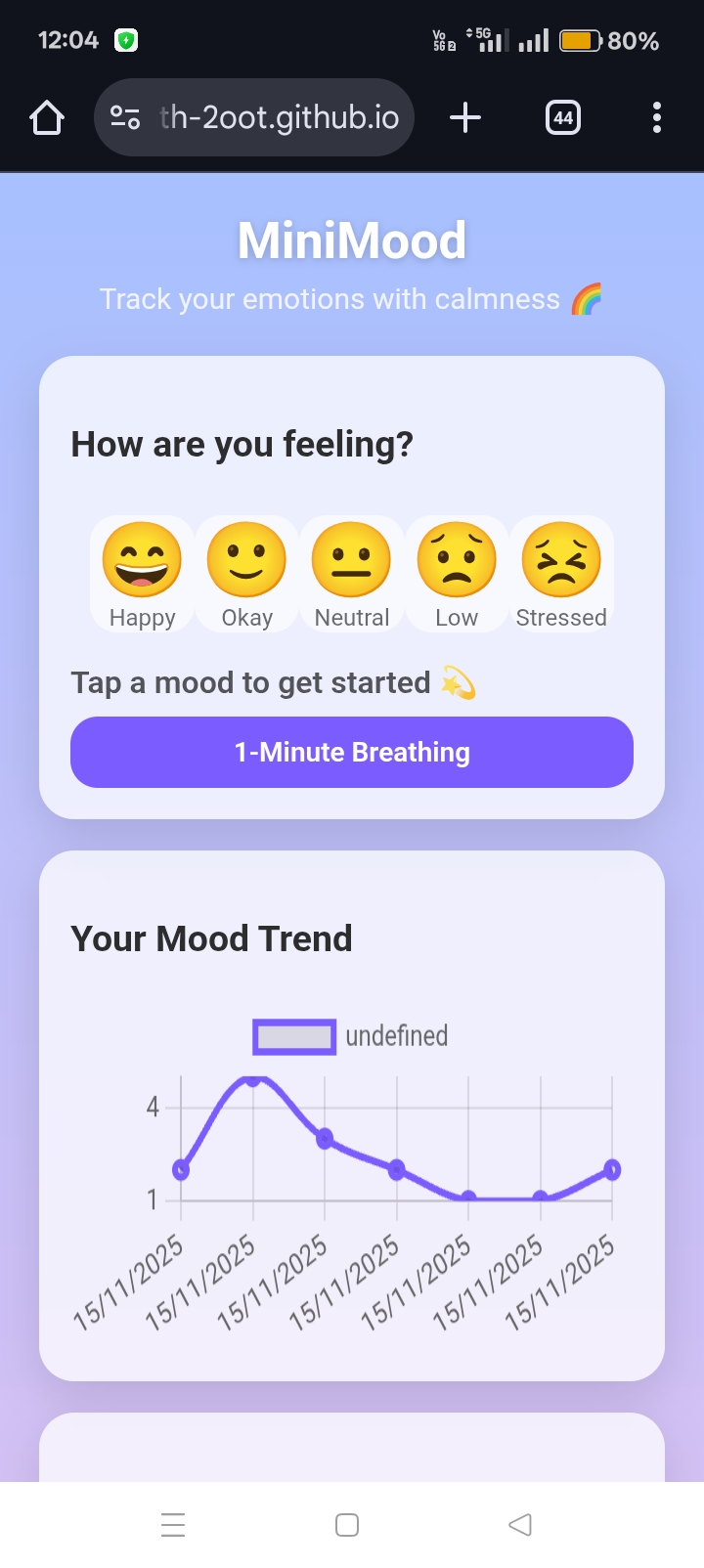
MiniMood helps students improve their emotional awareness through:
- A mood picker with five emotion levels
- Instant mood-based tips and affirmations
- Mood history saved locally
- A beautiful trend graph using Chart.js
- A 1-minute animated breathing exercise
- A simple journaling space to reflect on the day
- Optional calming background music
- A clean, glass-style UI that feels relaxing
The app works offline, loads instantly, and remembers your entries using LocalStorage.
How we built it
MiniMood was built entirely using:
- HTML for structure
- CSS (glassmorphism + gradient theme) for UI
- JavaScript for logic, animation, and saving user data
- LocalStorage for mood history and journal notes
- Chart.js for visualizing mood trends
- GitHub Pages for deployment
I built and edited the entire project on a mobile phone, using the SPCK code editor and GitHub’s mobile interface.
Challenges we ran into
- Developing and debugging everything from a mobile device
- Making the UI clean, readable, and calming across different screen sizes
- Getting Chart.js to update dynamically when the user logs a new mood
- Creating a smooth inhale/exhale breathing animation synced with a timer
- Fixing LocalStorage structure to save multiple mood entries
- Deploying to GitHub Pages from a mobile browser Each challenge taught me something valuable.
Accomplishments that we're proud of
- Built a fully working wellness app entirely on a phone
- Designed an aesthetic and calming UI suitable for student use
- Added multiple features: mood tracking, charts, journaling, breathing, and music
- Achieved smooth animations and responsive layout
- Successfully deployed to GitHub Pages
- Created a useful, student-friendly tool that actually helps reduce stress
What we learned
- How to design and build a mobile-first web application
- How to use LocalStorage to store structured data
- How to use Chart.js for real-time graph updates
- How to create animations using CSS + JavaScript
- How to structure and deploy a static site
- How to write clean documentation and present a project
- How to handle UI/UX decisions that improve mental-wellbeing tools
MiniMood taught me not just technical skills, but also how small design decisions can make an app feel more peaceful and supportive for students.
What's Next for ➡ MiniMood – Student Wellness Tracker
MiniMood is functional and helpful, but there are several exciting features planned for the future:
- Cloud Sync & Multi-Device Support – Save mood logs and journals online so users can access them from any device.
- Dark / Light Theme Toggle – Let users switch themes for better comfort and personalization.
- Reminders & Notifications – Gentle reminders to log moods, write journal entries, or practice breathing exercises.
- More Mood Levels & Custom Emojis – Allow users to add their own moods or select from more emotions.
- Export & Share Data – Option to download mood history or journal notes as a PDF or CSV.
- Progress Insights – Show weekly or monthly analytics, like average mood, most common emotion, and streaks.
- Mobile App / PWA – Make MiniMood installable on phones like a native app for offline-first experience.
- Relaxation Music Library – Add multiple calming tracks and playlists for better stress relief.
These updates will make MiniMood even more helpful, engaging, and student-friendly.
Built With
- chart.js
- css
- github
- html
- javascript
- localstorage
- spck-mobile-code-editor