-
-
MineralWatch Agent — AI Supply Chain Intelligence with Secure Third-Party Access
Inspiration
Critical minerals — lithium, nickel, cobalt, manganese — are the foundation of the global battery and EV supply chain. Prices swing violently on tariff announcements, export bans, and production disruptions. Regulatory deadlines like the FEOC Chinese battery procurement ban and IRA production credits are reshaping sourcing strategies worldwide.
The data to track all of this exists across scattered public APIs: FRED for macro indicators, Alpha Vantage for commodity prices, SEC EDGAR for company filings. But raw data isn't intelligence. Teams need processed, contextualized risk assessments — delivered where they already work, in formats they can act on.
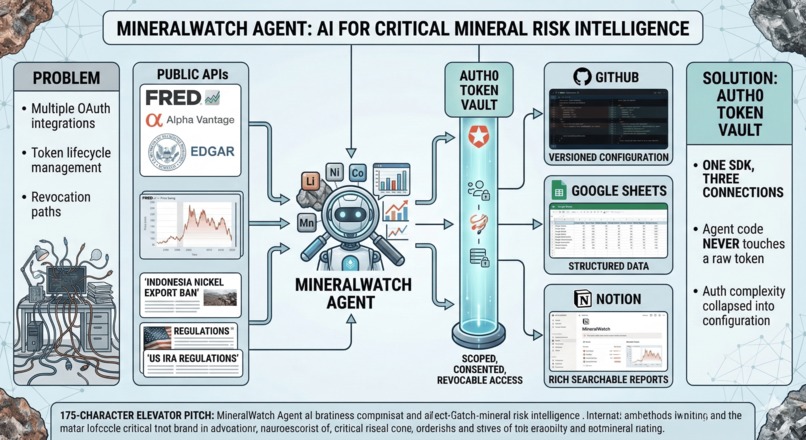
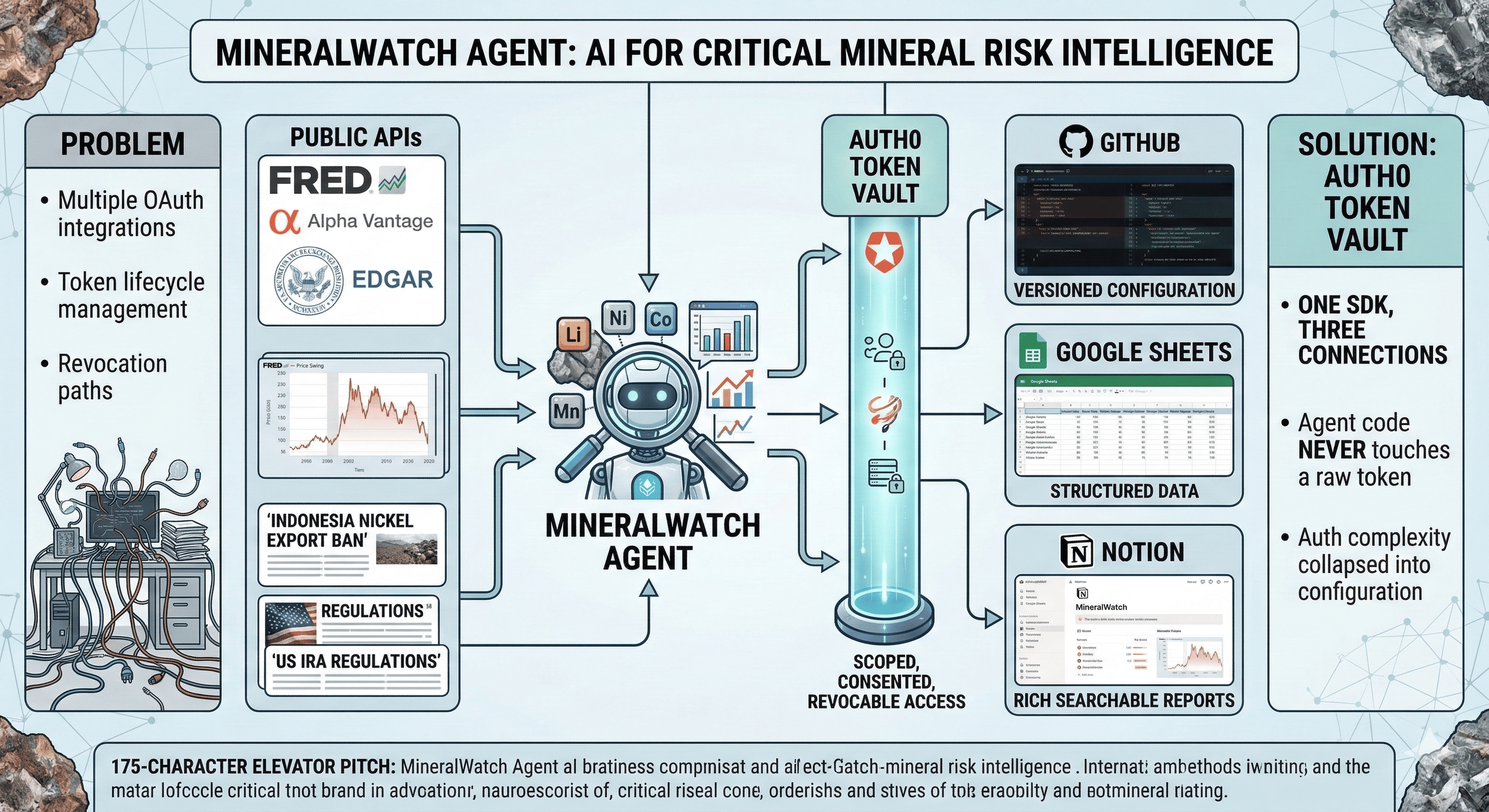
That means an AI agent that can securely connect to multiple third-party services on the user's behalf: GitHub to read versioned configuration, Google Sheets for structured data persistence, and Notion for rich alerts, risk reports, and searchable intelligence databases. Each of these is OAuth-protected. Each requires its own consent flow, token management, and scope enforcement.
Without Auth0 Token Vault, building this means managing three separate OAuth integrations, storing refresh tokens for three providers, and handling rotation and revocation independently for each. That's weeks of security plumbing that has nothing to do with the intelligence layer.
Token Vault collapses all of that into configuration. One SDK. Three connections. Scoped, consented, revocable access — and our agent code never touches a raw token.
I wanted to build a domain-specific agent that demonstrates Token Vault's multi-provider pattern on a real use case: one where AI pulls financial data, generates risk analysis, and then acts across the user's connected tools — all under secure, user-controlled authorization.
What it does
MineralWatch Agent is an AI-powered critical minerals supply chain monitor that combines public financial data with secure third-party integrations via Auth0 Token Vault.
Data ingestion (public APIs — API key auth):
- FRED API — macro indicators: PPI for metals, industrial production index, yield curve spread, PMI
- Alpha Vantage API — daily commodity prices: lithium carbonate, nickel sulfate, cobalt hydroxide
- SEC EDGAR API — 10-K/10-Q filings from battery and EV companies, parsed for regulatory exposure language
Secure third-party actions (Auth0 Token Vault — OAuth):
GitHub (Token Vault Connection #1) — reads agent configuration from a private repo: alert thresholds, monitored minerals, tracked companies, regulatory milestone dates, and scoring weights. Config is a YAML file — anyone on the team can update the agent's behavior by editing and committing, no redeployment required. Version history gives full auditability of every threshold change.
Google Sheets (Token Vault Connection #2) — writes structured data to a shared spreadsheet: daily commodity prices, rolling volatility, macro indicator snapshots, and composite risk scores. Each run appends a new row, building a persistent time series the team can chart, filter, and share — a lightweight data warehouse without infrastructure.
Notion (Token Vault Connection #3) — the agent's primary intelligence output layer:
- Risk Alert Database — when the agent detects a regime change, macro threshold breach, or material regulatory filing, it creates a new entry in a Notion database with severity, mineral, trigger description, and Gemini-generated context summary. Entries are filterable by mineral, date, and severity.
- Weekly Digest Pages — every week the agent generates a formatted Notion page with price trends, risk score movement, top regulatory developments, and a forward-looking outlook section. These pages live in a dedicated Notion workspace section and serve as a searchable intelligence archive.
- Regulatory Timeline — a Notion database tracking upcoming policy milestones (FEOC enforcement dates, IRA credit phase-downs, EU CRMA deadlines) with status, days until deadline, and estimated market impact.
AI analysis layer (Google Gemini 2.0 Flash):
- Classifies SEC filing paragraphs by regulatory relevance (FEOC, IRA Section 45X, EU CRMA) and sentiment
- Detects price regime transitions using Hidden Markov Model state changes (low-vol → trending → crisis)
- Generates natural-language alert summaries and weekly digest narratives — not data dumps, actionable context
- Synthesizes answers to user questions: "What's driving the lithium risk score this week?"
User flow:
1. User logs in via Auth0 Universal Login
2. Token Vault prompts consent for GitHub, Google Sheets, and Notion
3. Agent reads config YAML from GitHub repo (thresholds, watchlist, scoring weights)
4. Agent pulls FRED + Alpha Vantage + EDGAR data
5. Gemini analyzes: price regime, macro signals, regulatory NLP on filings
6. Daily → appends price + risk score row to Google Sheet
7. On alert trigger → creates entry in Notion Risk Alert Database
8. Weekly → generates formatted Notion digest page
9. User can chat: "Summarize cobalt risk drivers this month"
How we built it
Architecture:
[Auth0 Universal Login] → [Token Vault]
                               ↓
                    ┌──────────┼──────────┐
                    ↓          ↓          ↓
               [GitHub]   [Google     [Notion]
               (config)    Sheets]    (alerts +
                          (data)      reports)
                               ↑
              [Vercel AI SDK + Gemini Agent]
                               ↑
                    ┌──────────┼──────────┐
                    ↓          ↓          ↓
               [FRED]   [Alpha       [SEC
               (macro)   Vantage]    EDGAR]
                         (prices)   (filings)
Tech stack:
| Layer | Technology |
|---|---|
| Frontend | Next.js 14 (App Router) |
| Auth | Auth0 (@auth0/nextjs-auth0) |
| Token Management | Auth0 Token Vault (@auth0/ai-vercel) |
| AI Framework | Vercel AI SDK |
| LLM | Google Gemini 2.0 Flash |
| Token Vault Connections | GitHub, Google Sheets, Notion |
| Public Data APIs | FRED, Alpha Vantage, SEC EDGAR |
| Deployment | Vercel |
Token Vault integration — three connections:
const auth0AI = new Auth0AI();

// Connection 1: GitHub — read agent config from private repo
export const withGitHub = auth0AI.withTokenForConnection({
  connection: 'github',
  scopes: ['repo'],
  refreshToken: getRefreshToken,
});

// Connection 2: Google Sheets — write price data and risk scores
export const withGoogleSheets = auth0AI.withTokenForConnection({
  connection: 'google-oauth2',
  scopes: ['https://www.googleapis.com/auth/spreadsheets'],
  refreshToken: getRefreshToken,
});

// Connection 3: Notion — create alert entries and digest pages
export const withNotion = auth0AI.withTokenForConnection({
  connection: 'notion',
  scopes: [],  // Notion OAuth grants access to selected pages at consent
  refreshToken: getRefreshToken,
});
Each agent tool is wrapped with the corresponding withTokenForConnection helper. When the agent calls createNotionAlert, Token Vault exchanges the Auth0 refresh token for a fresh Notion access token. No manual token management anywhere in our code.
Agent tools (Vercel AI SDK):
| Tool | Auth Model | Purpose |
|---|---|---|
fetchFREDData |
API key | Pull macro indicators |
fetchCommodityPrices |
API key | Pull daily mineral prices |
fetchSECFilings |
API key | Pull 10-K filing text |
readGitHubConfig |
Token Vault (GitHub) | Read alert thresholds and watchlist |
appendToSheet |
Token Vault (Sheets) | Write daily price + risk score row |
createNotionAlert |
Token Vault (Notion) | Create risk alert database entry |
createNotionDigest |
Token Vault (Notion) | Generate weekly digest page |
updateRegulatoryTimeline |
Token Vault (Notion) | Update milestone database |
analyzeWithGemini |
API key | NLP classification + summarization |
Design principle: Public data flows through API keys. Private actions flow through Token Vault. This separation makes the security boundary explicit — you can audit exactly which tools require user consent.
Notion integration detail:
Notion's OAuth model grants access to specific pages and databases the user selects during the consent flow. This is ideal for our use case — the user points the agent at a specific workspace section, and the agent can only write there. We create three Notion databases on first run:
- Risk Alerts — columns: Date, Mineral, Severity (Critical/High/Medium/Low), Trigger Type, Summary, Risk Score
- Weekly Digests — columns: Week, Top Mover, Risk Direction, Key Regulatory Event, link to full page
- Regulatory Timeline — columns: Policy, Milestone, Date, Days Until, Estimated Impact, Status
Each alert or digest is a rich Notion page with formatted text, not a flat row — Gemini generates the content in Notion's block format for clean rendering.
Challenges we ran into
1. Three OAuth providers, three consent flows, one smooth UX. Each Token Vault connection requires its own authorization. Presenting three consent screens on first login is jarring. We implemented progressive connection: GitHub connects first (to load config and prove value immediately), then Sheets and Notion connect when the agent first needs to write. Each connection is triggered in context — the user understands exactly why access is needed at the moment it's requested. Auth0's async authorization flow makes this pattern clean.
2. Notion's page-level permission model. Unlike GitHub where you authorize broad repo access, Notion OAuth lets the user select which pages to share. This is great for security but means the agent can't create databases in arbitrary locations. We solved this by having the user share a single parent page during consent — the agent creates its three databases as children of that page on first run. Clean containment with minimal permission surface.
3. Combining API-key and OAuth-authenticated data in a single agent turn.
The agent fetches FRED data (API key), analyzes with Gemini (API key), then writes to Sheets and Notion (Token Vault OAuth). Mixing auth models in one tool chain required clean separation: data-fetching tools are plain functions, action tools are wrapped with withTokenForConnection. The Vercel AI SDK's tool composition handled this naturally.
4. Making Notion alerts high-signal, not noisy. Early versions created an alert for every minor price move. We implemented a regime-based trigger system: alerts fire only when the Hidden Markov Model detects a state transition (low-vol → crisis), when a macro indicator crosses a config-defined threshold, or when Gemini classifies a new SEC filing as containing material regulatory language. Each alert includes a Gemini-generated summary explaining why it triggered and what it means — not just raw price data. This cut alert volume by ~80% while making each alert worth reading.
5. Notion API rate limits on rich page creation. Generating a weekly digest page with multiple text blocks, embedded data, and formatted sections requires many Notion API calls. We hit rate limits during testing. The fix was to batch block creation into chunks of 100 (Notion's append limit) with retry logic, and to pre-compose the full page structure before making any API calls.
Accomplishments that we're proud of
Three Token Vault connections working in concert. GitHub for config, Sheets for structured data, Notion for rich intelligence output — each OAuth-protected, each independently revocable, each scoped to minimum necessary permissions. This demonstrates the multi-provider pattern Token Vault is designed for, on a real use case judges can immediately understand.
Zero stored credentials in our codebase. No GitHub personal access tokens. No Google service account keys. No Notion integration secrets. Every third-party interaction goes through Token Vault. The only secrets in our environment are Auth0 credentials and API keys for public data sources.
Config-as-code via GitHub connection. Using Token Vault's GitHub connection to read agent configuration from a private repo means thresholds, watchlists, and scoring weights are version-controlled, auditable, and editable by anyone on the team — without touching deployed code. Change a YAML value, commit, and the agent picks up the new behavior on next run.
Notion as an intelligence platform, not just a notification channel. Instead of flat text alerts, MineralWatch outputs rich, formatted, searchable intelligence in Notion: filterable databases, formatted digest pages, regulatory timelines. Judges can open the Notion workspace and explore the output — a far more compelling demo than a chat screenshot.
Domain-specific intelligence, not a generic chatbot. Every other submission will build "an AI assistant that connects to Notion." MineralWatch connects to Notion to deliver critical minerals supply chain risk intelligence powered by real-time macro and commodity data. The domain is the differentiator.
What we learned
Token Vault's multi-provider model is the right abstraction for production agents. Real AI agents don't connect to one service — they connect to many, each for a different purpose. Token Vault's one-connection-per-provider model with scoped access per tool is exactly how agent authorization should work. Building three OAuth integrations from scratch would have taken weeks; with Token Vault it took hours.
Separating data ingestion from authorized actions is a clean architecture. Public data (FRED, Alpha Vantage, EDGAR) flows through standard API keys — no OAuth needed. Private actions (GitHub reads, Sheet writes, Notion creates) flow through Token Vault. This makes the security model obvious and auditable.
Progressive connection > upfront consent. Asking for three OAuth authorizations before the user has seen any value kills conversion. Connecting services as needed — GitHub first (config), then Sheets and Notion when the agent first needs to write — respects the user's attention and builds trust incrementally.
Notion's permission model is underrated for agent output. The user chooses exactly which pages to share during consent. The agent can only write to those pages. This gives the user granular, visible control over where AI-generated content appears — a trust model other platforms don't offer at the same granularity.
The identity layer determines what agents can actually do in production. Gemini can generate brilliant analysis, but without secure access to the tools where teams work, that analysis dies in a chat window. Token Vault turns an analytical AI into an operational AI.
What's next for MineralWatch Agent
Scheduled runs via Vercel Cron — daily data pulls and weekly digest generation running automatically, with Notion alerts created as events occur
Expand Token Vault connections — add Jira or Linear to auto-create compliance tickets when regulatory filings flag risk; add Microsoft 365 for teams using Outlook/SharePoint
Write-back to GitHub — when the agent detects a new company or regulatory milestone, auto-create a PR to update the config YAML — full read-write loop through Token Vault
Fine-grained authorization with Auth0 FGA — role-based access so different team members see different Notion databases: analysts get the full alert feed, executives get the weekly digest only, compliance gets the regulatory timeline
Backtest mode — "Would this config have caught the 2022 lithium spike?" — replay historical data through the current ruleset, generating a simulated Notion timeline
Interactive Notion dashboard — embed Notion database views with rollup formulas, charting risk scores and trend direction directly in the workspace
Built With
Auth0, Token Vault, Next.js, Vercel AI SDK, Google Gemini API, Notion API, Google Sheets API, GitHub API, FRED API, Alpha Vantage API, SEC EDGAR API, TypeScript, Vercel, OAuth 2.0, RFC 8693 Token Exchange, Hidden Markov Models
Bonus Blog Post: Multi-Provider Token Vault for Domain-Specific AI Agents
Beyond the Generic Chatbot: Why Real Agents Need Multi-Provider Auth
Most AI agent demos connect to one service. The real world doesn't work that way.
A supply chain intelligence agent needs to read configuration from GitHub, write structured data to Google Sheets, and publish rich reports to Notion — three OAuth providers, three consent flows, three token lifecycles. Each with different scope models, different refresh cadences, and different revocation patterns.
Without Auth0 Token Vault, building this means managing three separate OAuth integrations, storing refresh tokens for three providers in your database — creating a high-value target for attackers. That's weeks of security-critical plumbing that has nothing to do with the intelligence layer you're actually trying to build.
Token Vault collapses all of that into SDK configuration. Our agent code calls withTokenForConnection, gets a fresh access token, and makes its API call. Auth0 handles storage, rotation, and revocation on the platform layer — where it belongs.
The Architecture: Public Data In, Authorized Actions Out
MineralWatch splits cleanly between two auth models:
API key layer — public financial data from FRED (macro indicators), Alpha Vantage (commodity prices), and SEC EDGAR (company filings). No OAuth needed. No user data involved.
Token Vault layer — every action that touches the user's environment goes through OAuth: reading their GitHub repo, writing to their spreadsheet, creating pages in their Notion workspace. Each connection is independently scoped, consented, and revocable.
This separation is a security architecture, not just clean code. The public data layer has zero blast radius if compromised. The private action layer is scoped, auditable, and under the user's control at all times.
Notion's Permission Model: Underrated for Agent Output
An unexpected learning: Notion's OAuth consent flow lets the user select which specific pages to share with the agent. This is more granular than most providers — GitHub grants repo-wide access, Google Sheets requires file-level sharing after the fact.
For an AI agent publishing intelligence, this is ideal. The user points the agent at a workspace section, and the agent can only write there. The containment is visible and user-controlled. Combined with Token Vault's revocation support, the user can cut off Notion access in one click without affecting GitHub or Sheets connections.
Progressive Connection: Earn Trust Before Asking for Access
Presenting three OAuth consent screens on first login is a conversion killer. Nobody wants to authorize GitHub, Google, and Notion before they've seen a single line of output.
We connect progressively: GitHub first (read config, prove value), then Sheets (when the first data row is ready), then Notion (when the first alert is ready to publish). Each connection is triggered in context — the user sees why access is needed at the exact moment it's requested.
Auth0's async authorization flow makes this natural. The agent detects a missing connection, pauses, prompts consent, and resumes once granted. No error states, no dead ends.
Why This Matters
The gap between demo agents and production agents is almost entirely about trust and authorization. Users will let an AI agent write to their Notion workspace only if they understand what access they've granted, can see what scopes are active, and can revoke at any time.
Token Vault provides this by design — across any number of providers, with minimal developer effort. For anyone building agents that act across multiple services on behalf of real users, this is the infrastructure layer to build on.
Built With
- alpha-vantage-api
- auth0
- bayesian
- fred-api
- github-api
- google-gemini-api
- google-sheets-api
- hidden-markov-models
- next.js
- notion-api
- oauth-2.0
- rfc-8693-token-exchange
- sec-edgar-api
- token-vault
- typescript
- vercel
- vercel-ai-sdk

Log in or sign up for Devpost to join the conversation.