-
-
boom
-
plant
-
architecture
TL;DR: Viewers secretly plant words from their phones, and the streamer never sees them. When the streamer says one live, speech recognition blows up the overlay, names who planted it and gives them a point. Built solo in four days with Codex.
The full live round is on Twitch: highlight.
What it does (Design)
Minefield is a Twitch game where viewers hide secret words and the streamer's own voice sets them off. The streamer never sees the words, so every boom is a surprise.
Easy to use, fun to watch. Viewers scan, tap a word and paste a code; the streamer presses one button. Every boom flashes, shakes, names a viewer and shows the sentence that gave the streamer away.
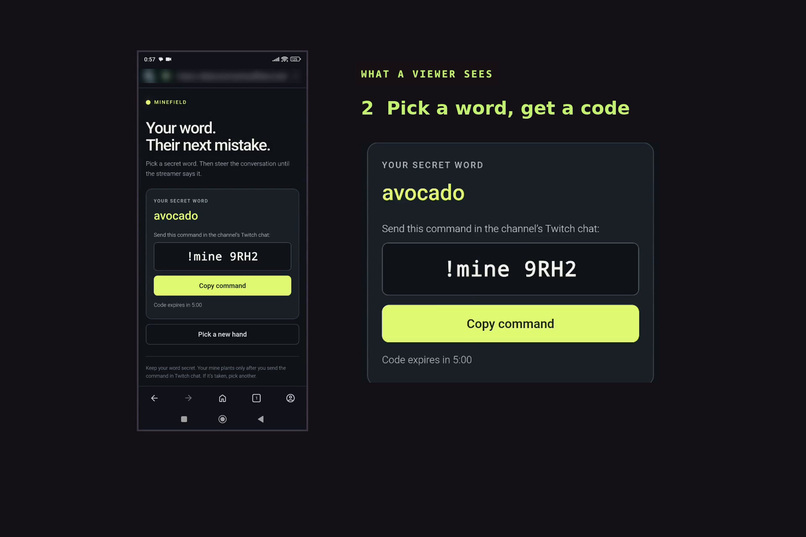
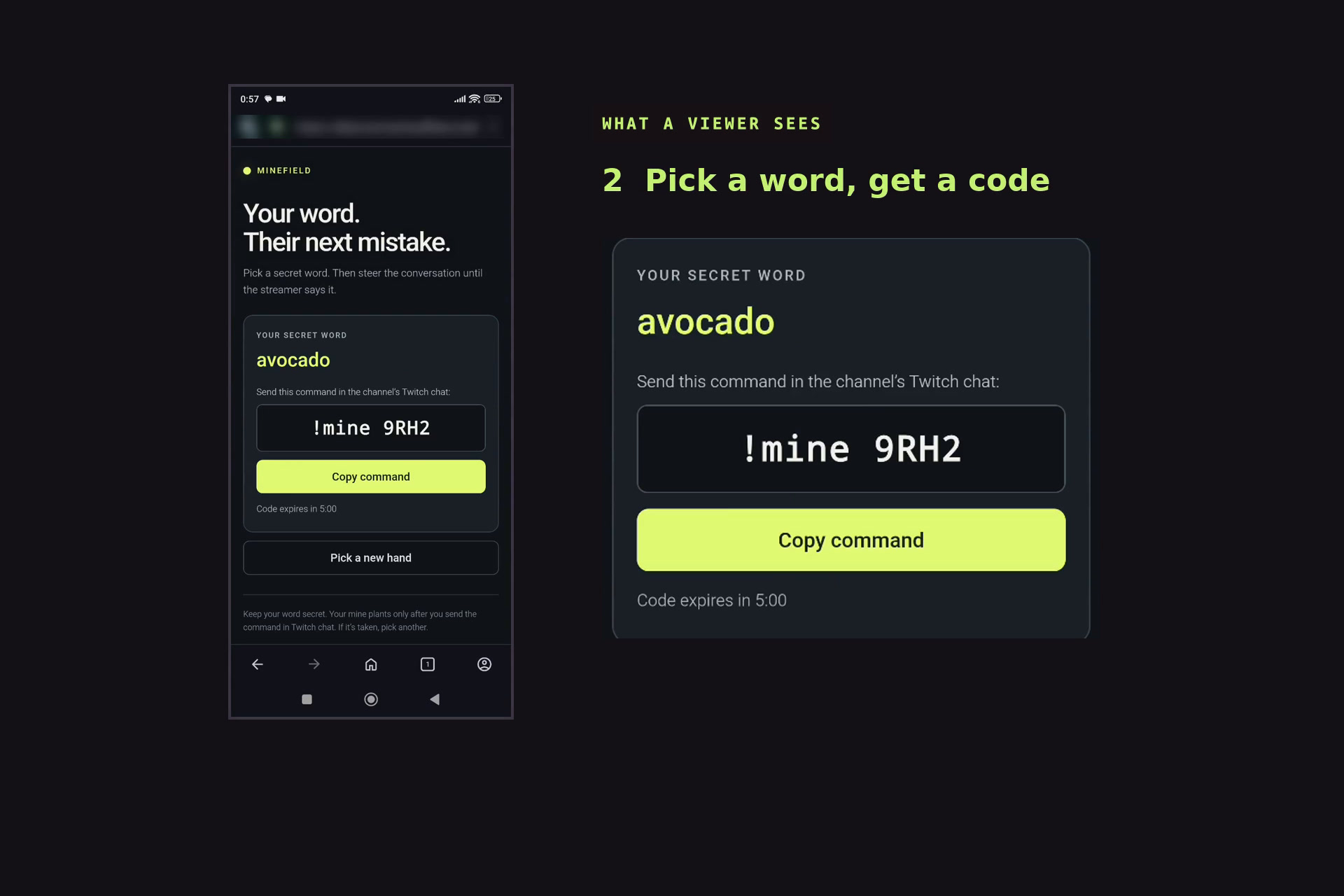
- Plant. A viewer scans the QR code on the overlay, picks one of six word cards on their phone, and types the one-time code in chat (
!mine AB12). Planting shows only a code in chat. - Steer. The mine arms after 30 seconds. Chat steers the conversation toward the words; the streamer talks around anything that sounds like a trap.
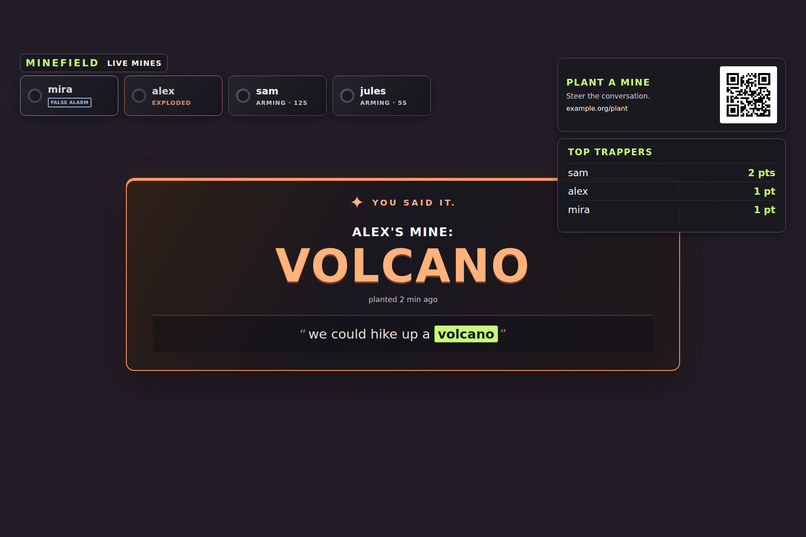
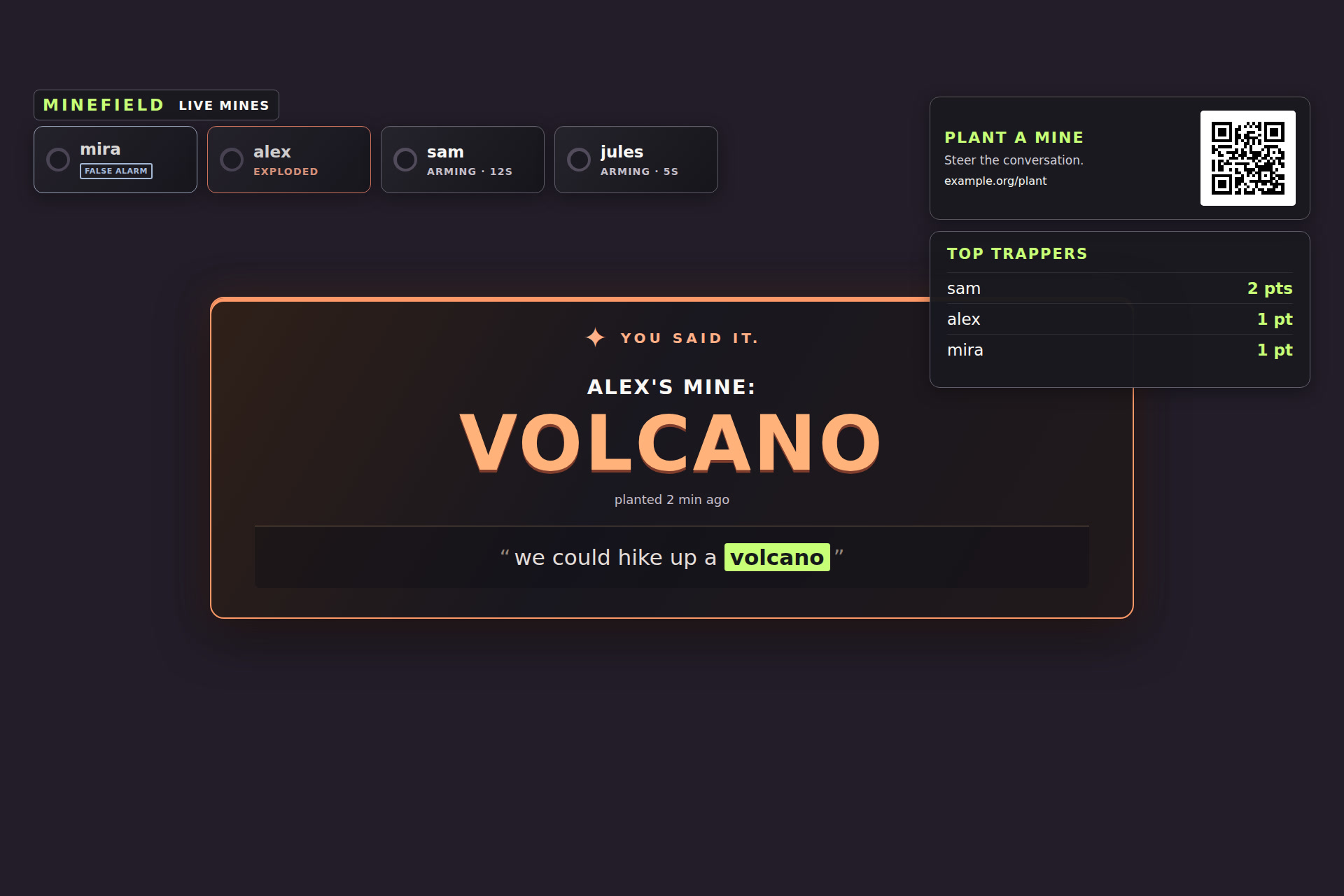
- Boom. When the streamer says a live word, the overlay flashes, shakes and plays a synthesized explosion. A banner names the viewer and shows the receipt: the sentence as the recognizer heard it, with the word highlighted. After three seconds it shrinks to a corner, so the streamer's face stays clear.
- Score. Each boom is a point for the viewer who planted it, and points last the whole stream. A TOP TRAPPERS panel ranks the viewers, and the bot posts the new total in chat. A viewer whose mine went off can plant again right away.
A mine first sparks when the recognizer hears its word, and explodes when a matching update confirms it a moment later; if the recognizer changes its mind, it fizzles. If a boom was misheard, the streamer presses False alarm within 10 seconds: the point is taken back and the viewer gets a free re-plant. At round end the overlay reveals every mine that survived and the round's top trapper, and the bot posts a recap in chat.
What's new (Innovation)
Most chat games ask viewers to type or vote, and stream word bingo is marked by hand. Minefield turns this around: the streamer's own voice is the controller, and chat sets the traps.
- Speech as the trigger. Live speech recognition is usually used for captions or voice commands. Here it is the game itself: the streamer just talks, and any sentence can set off a mine.
- Hidden information on both sides. The streamer sees who has a live mine but never the word. Each viewer knows only their own word. Every question in chat is both bait and a clue, and the streamer has to guess which topics to avoid.
- Every boom has an author and a receipt. The banner names the viewer who set the trap and shows the sentence the recognizer heard, so the moment is credited and easy to check.
- Nothing to install. No account linking, no Extension, no app: a phone and Twitch chat are enough, and it runs as an overlay on top of any stream.
Why streamers want it (Potential Impact)
Minefield is built for small streams. Even with three viewers, every plant puts a name on screen, and every viewer has a reason to keep listening and to steer the conversation.
- A race between viewers. Points last all stream and the panel re-sorts after every boom, so chat competes to trap the streamer first. The streamer doesn't score, so they never have a reason to stop talking.
- Little to add on stream. After a one-time setup, it is one OBS browser source for the overlay and one dock for the streamer. Press Start round and the QR code appears. Viewers need only a phone and Twitch chat.
- Any category. Just Chatting, gaming, cooking: it works wherever the streamer talks, and it listens only to the streamer's mic.
- Moments that travel. The boom banner names the viewer and shows the receipt, and the bot's messages and recap carry the round into chat.
- Fair to both sides. Viewers win when their word goes off. The streamer never sees the words, but can guess from chat's questions and talk around them. False alarm exists only for misrecognition.
How it works (Technological implementation)
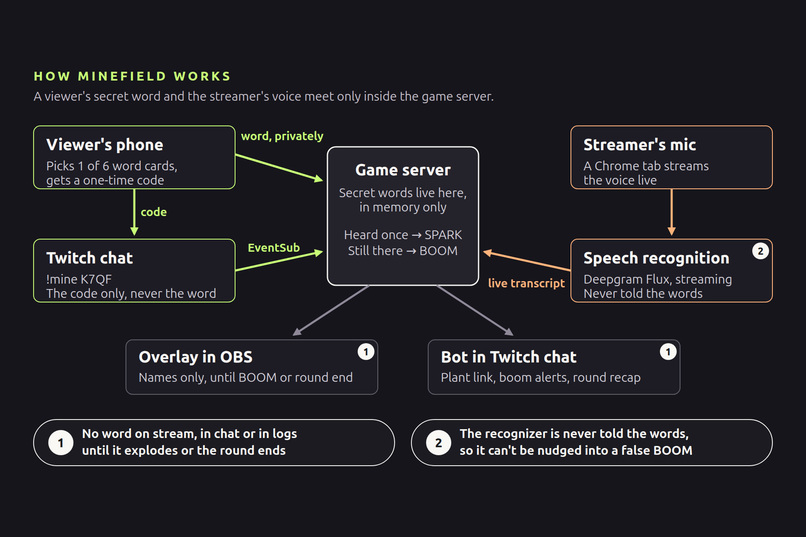
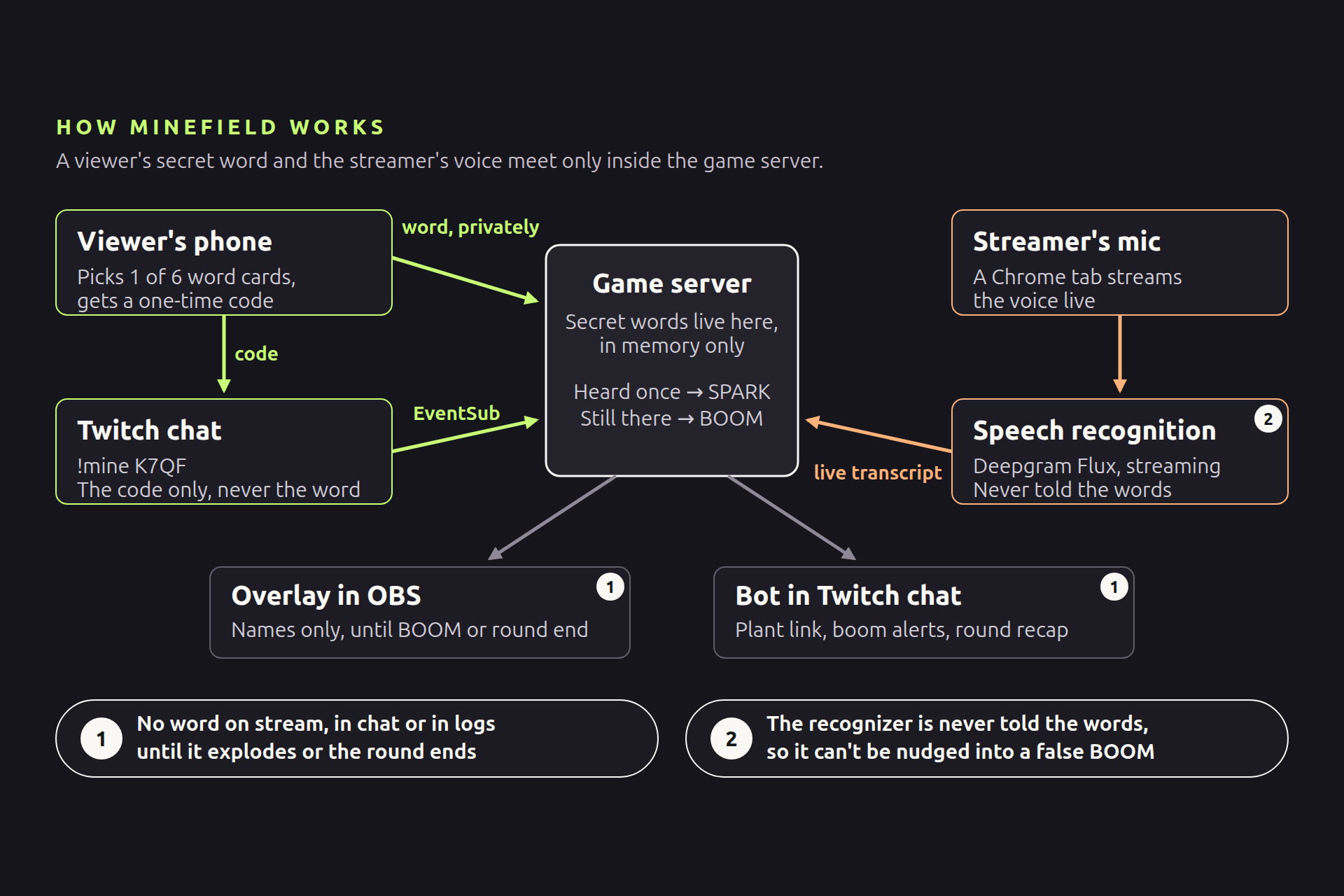
A Python game server (FastAPI) sits between two paths. The architecture diagram is in the gallery.
- Viewer path. The plant page reaches phones through a Cloudflare quick tunnel. The server deals each viewer six words and keeps the pick private; chat carries only a one-time code. The bot reads
!mine CODEthrough Twitch EventSub and answers through the Helix chat API. - Voice path. A Chrome tab streams the microphone as 16 kHz audio to a speech engine, which streams it to Deepgram Flux. Each partial transcript goes to a matcher in the game server, and events reach the overlay and dock over WebSockets.
Two rules keep it fair. No mine word reaches the overlay, chat, the game's INFO logs or any Twitch API call until it explodes or the round ends. And the recognizer is never told the words: no keyword boosting, so it can't be nudged toward a viewer's word.
Matching. A word counts only if spoken after it arms. The streamer speaks English with a Turkish accent. In the recorded round, Flux heard "a top", then "a turnout", then "a tarantula": the mine sparked on that guess and exploded 0.25 s later, when the next update agreed.
Built to survive a live show. Every connection reconnects on its own and resyncs from a snapshot; queues are bounded; a Twitch or Deepgram failure is logged and never blocks the game. The game rules, including scoring, are a pure, fully unit-tested core: 223 tests run by default, and 66 live Twitch, Deepgram and browser tests run separately.
How Codex built it (Technological implementation: Codex use)
Minefield was built solo in four days. Most of the work ran in one main Codex thread (session 01a188b5-edca-79f3-9ee7-1b1d7198d173), with side threads building the overlay and the phone planting page in parallel.
- The spec was the contract. SPEC.md split the game into 13 work packages with acceptance criteria; AGENTS.md held the rules (secrecy, no speech-recognition biasing, a pure core). For each package Codex wrote failing tests first, then the code.
- How Codex worked. Many work packages started in plan mode, so the steps were agreed before any code was written. Codex worked in the terminal (tests, the server, the speech engine, logs) and used the Codex app's built-in browser to open the overlay, dock and plant pages and to watch Twitch chat for the bot's replies. On bigger milestones it split work across parallel subagents in separate worktrees, and independent agents reviewed finished work.
- Codex checked its own work. It took headless screenshots of the overlay, saw that the LIVE MINES label disappeared on light backgrounds, and fixed the CSS. It verified Twitch and Deepgram endpoints against the official docs and cited them in the code (17 doc links). The Twitch milestone also went through a pull request reviewed with
@codex review. - The rehearsal-log loop. The engine saves every hypothesis it receives. After one rehearsal the log showed the transcript falling 50 seconds behind the mic within three minutes, and 2.5 minutes behind by the end: audio was being lost in short gaps that added up. Codex traced the cause and fixed it with a test (commit
99323e9). In the recording takes, the lag stayed under 0.4 s. - Codex ran the recording. It refreshed the test accounts' tokens, started the services, planted the final round's mines through real Twitch chat, sent the chat messages and checked the logs after each take.
Codex was the main builder; other coding agents helped now and then.
Demo transparency
- The three viewers are test accounts. In the main round, Codex sent their plants and chat messages through real Twitch chat.
- The phone clip comes from a separate round, planted from my own phone as minefield_test. No boom from that round is in the video.
- The streamer's voice in gameplay is real and live; the narration is text-to-speech.
- Added in editing: the chat questions shown over gameplay (they are in the Twitch chat replay), the subtitles, the labels pointing at parts of the overlay, and the under-the-hood diagram (its transcript lines come from the game's own logs).
- Hidden in editing: the quick-tunnel address on the overlay and on the phone, old chat history on the phone, and the dock's connection-status row in the OBS setup clip.
- The False alarm shots are from local demo mode.
- Typed fallback was not used in the gameplay footage.
- The full round is on Twitch: highlight.
Challenges and what we learned
- Audio that silently went missing. Without the saved hypotheses (the rehearsal-log loop above), the lost audio would have looked like a recognizer that simply missed words.
- Misrecognition without cheating. The easy fix would be to tell the recognizer the mine words, but then it hears them where nobody said them, and a false boom names a viewer. Instead, a mine sparks on the first guess and explodes only when the next update agrees, and False alarm covers the rest. With an accent, partial transcripts wander ("a top", "a turnout", "a tarantula") before they settle.
- Secrets in a game built to broadcast. Every word passes through the server, and the overlay, chat, logs and Twitch API calls all face the public. Keeping words out of every one of them until a boom or round end became a written rule for Codex and a set of tests, not something to remember.
What's next
- Automatic clips of every boom, posted to chat with the receipt.
- Themed decks (Halloween, food, a streamer's own game).
- More languages, once the recognizer supports them without biasing.
Limitations today: English only, and the quick tunnel's URL changes on every restart.
Try it
You can play a round without any API key. You need WSL or Linux with Bash 4.4+, Python 3.12 and uv.
- Start demo mode:
./scripts/run_all.sh --demo - Open the dock (
http://localhost:8100/dock) and the overlay (http://localhost:8100/overlay), and start a round. - Plant a word:
curl -fsS -X POST http://localhost:8100/dock/debug/plant -H 'Content-Type: application/json' -d '{"owner":"demo-viewer","word":"pineapple"}' - After 30 seconds, type
I could go for some pineapplein the dock's typed box. The overlay booms.
For a scripted visual preview, open http://localhost:8100/overlay?demo=1. Full play on Twitch needs a one-time setup: a Deepgram API key, a Twitch app, a bot account, cloudflared, and the mic page in Chrome on Windows. The README walks through it. Run the tests with uv run pytest.
Built With
- cloudflare
- codex
- css
- deepgram
- fastapi
- html
- httpx
- javascript
- obs
- playwright
- pytest
- python
- ruff
- twitch-eventsub
- twitch-helix-api
- uv
- uvicorn
- webaudio
- websockets

Log in or sign up for Devpost to join the conversation.