Inspiration
My wife and I have been traveling around Asia for 4 months now, and since we’re living on a fairly tight budget given that both of us don’t have stable jobs, we track all of our expenses. We’ve been using a good old Google Sheet, but when I found out that I could create a Coda Pack to help simplify this process, I jumped at the opportunity.
The most important thing about tracking expenses is to just remember to do it, and from my own personal experience I’ve found that the simpler it is to do, the more likely I am to continue doing it. That’s why I thought this Pack and this Doc could be helpful to people like us.
I know some people already use budgeting apps like Mint or business credit cards like Brex that do this for you, but those only really handle payments made by credit card. For other purchases made with cash, you have to go in and add the transaction yourself. Expensify does actually have this feature, but only offers 25 SmartScans per month.
So this is where Mindee comes in to the story. I used Mindee a bunch in my previous role as co-founder and Head of Ops at a startup. They have an awesome image recognition technology that can read things like passports, receipts, and invoices and extract data from them. I even trained custom models using their technology to read data from my custom document types! Pretty cool stuff.
I put 1 and 1 together, and realized that I could use Coda’s existing structure (which is already perfect for tracking expenses) with Mindee’s technology to extract info from receipts and throw it into a Coda Doc.
This Mindee for Coda Pack and this expense template document are the end result of that idea, and I hope they can help make tracking your expenses simpler, faster, and more automatic.
What it does
The Mindee Pack is fairly simple to explain because it only does one thing. It uses the Mindee API (which uses Mindee OCR technology) to extract a bunch of useful information from images.
In this case, I'm only using one of the public models Mindee uses: their "Expense Receipt" model. It takes as an input a receipt file, and it outputs a bunch of information that it extracts from that file:
At the moment, here’s the data that can be extracted from the Mindee Expense Receipts API:
- Total Amount: total purchase amount including taxes
- Taxes: information about taxes
- Amount: the tax amount
- Rate: tax rate in percentage
- Code: tax code if applicable (like VAT)
- Purchase Date: local date of purchase
- Purchase Time: local time of purchase
- Vendor: name of the business where the purchase was made
- Category: the category of the receipt. At the moment, only 7 predefined categories are supported:
- toll
- food
- parking
- transport
- accommodation
- gasoline
- miscellaneous
- Locale: information about where the purchase was made
- Language: ISO 639-1 code. Works best with:
- ca
- de
- en
- es
- fr
- it
- nl
- pt
- Country: ISO 3166-1 alpha-2 code. Works best with:
- CA
- CH
- DE
- ES
- FR
- GB
- IT
- NL
- PT
- US
- Currency: ISO 4217 code. At the moment, only 5 predefined currencies are supported:
- CAD
- CHF
- GBP
- EUR
- USD
- Language: ISO 639-1 code. Works best with:
More to come obviously (see section below regarding next steps), but I've proven here with this first use case that I can connect to Mindee and use their technology to do amazing things!
How we built it
I am not a developer by training (I'm a mechanical engineer), but I've picked up some skills in the past year and a half as I've dove deep into the no-code space and built projects that required a bit of coding knowledge (think Bubble, n8n workflows, Airtable automations).
I've also worked with a ton of APIs before (in the context of building n8n workflows), though, so no stranger to interfacing with APIs.
As I mentioned earlier, I've actually used the Mindee API for other purposes before. Not specifically the receipts one, so I had to familiarize myself a bit with their documentation, but it wasn't too difficult given I knew the basics of how it worked. I was building another Pack at the same time, so was learning lots of stuff as I went along.
I built fully in the Coda online code interface - not advanced or knowledgeable enough yet to do the whole CLI local machine thing.
Challenges we ran into
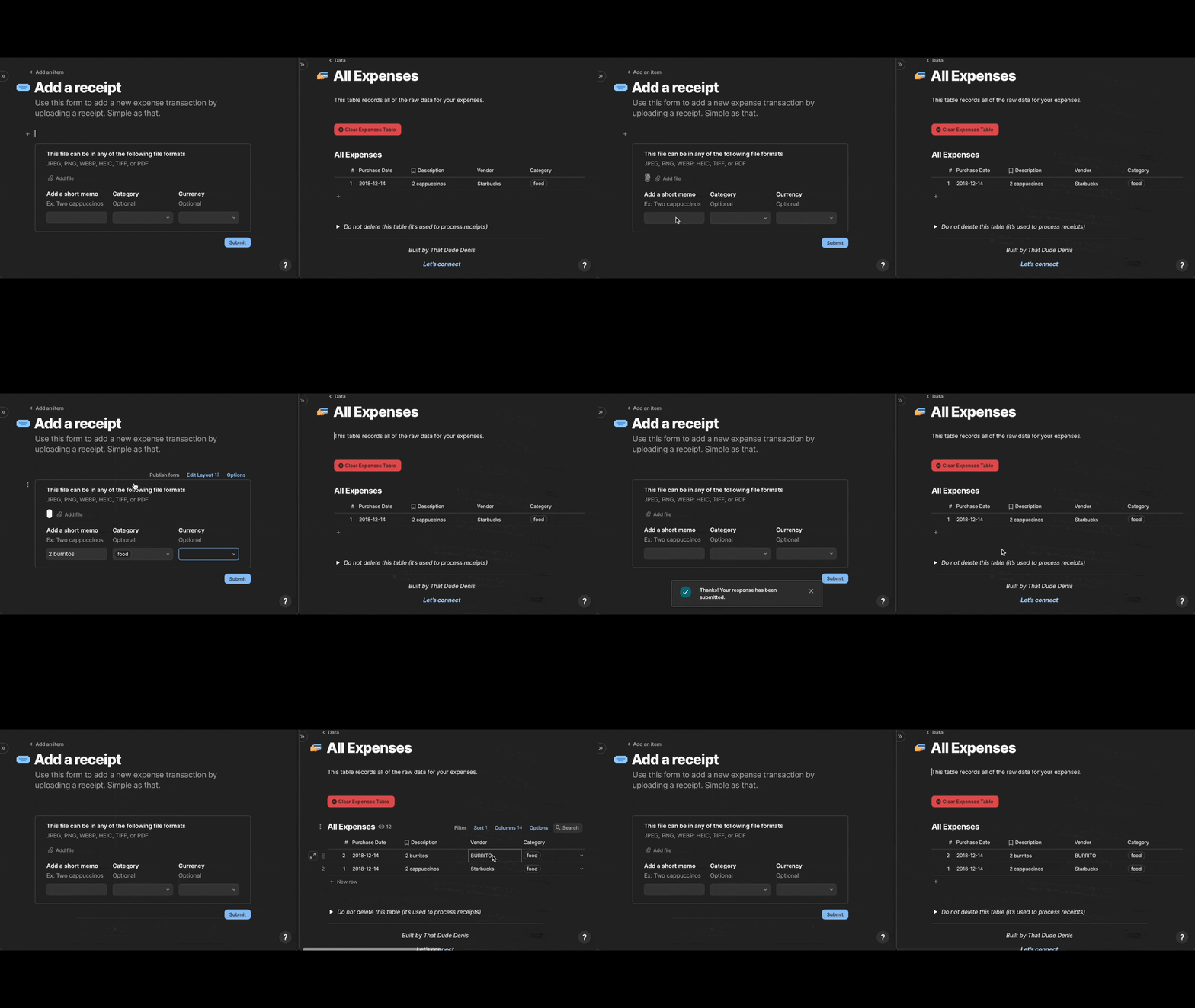
There was one major struggle I had -> the experience I wanted was: user uploads picture -> picture gets processed & data extracted -> fields get updated in table.
The issue is that when the row gets created and image first uploaded, I learned that the image actually gets uploaded in temporary file format, which isn't usable. So my formula would try to act directly on that temp file, and there was no way for me to tell it to wait a few seconds before trying to process the file.
Had to figure out a workaround - luckily I was able to get a bit of help from Eric! The workaround: instead of having it be a formula, have it be an action that can be run either through a button or an automation (I chose automation). This is the new process:
- Submit image file via form
- New row is created with image file
- Automation runs and extracts the data to a JSON
- JSON is parsed by a formula, and the result then has all the extracted fields accessible by other columns!
Accomplishments that we're proud of
It actually works! :) I think that's an accomplishment in and of itself, that I actually got this over the finish line and I'm happy with how it works.
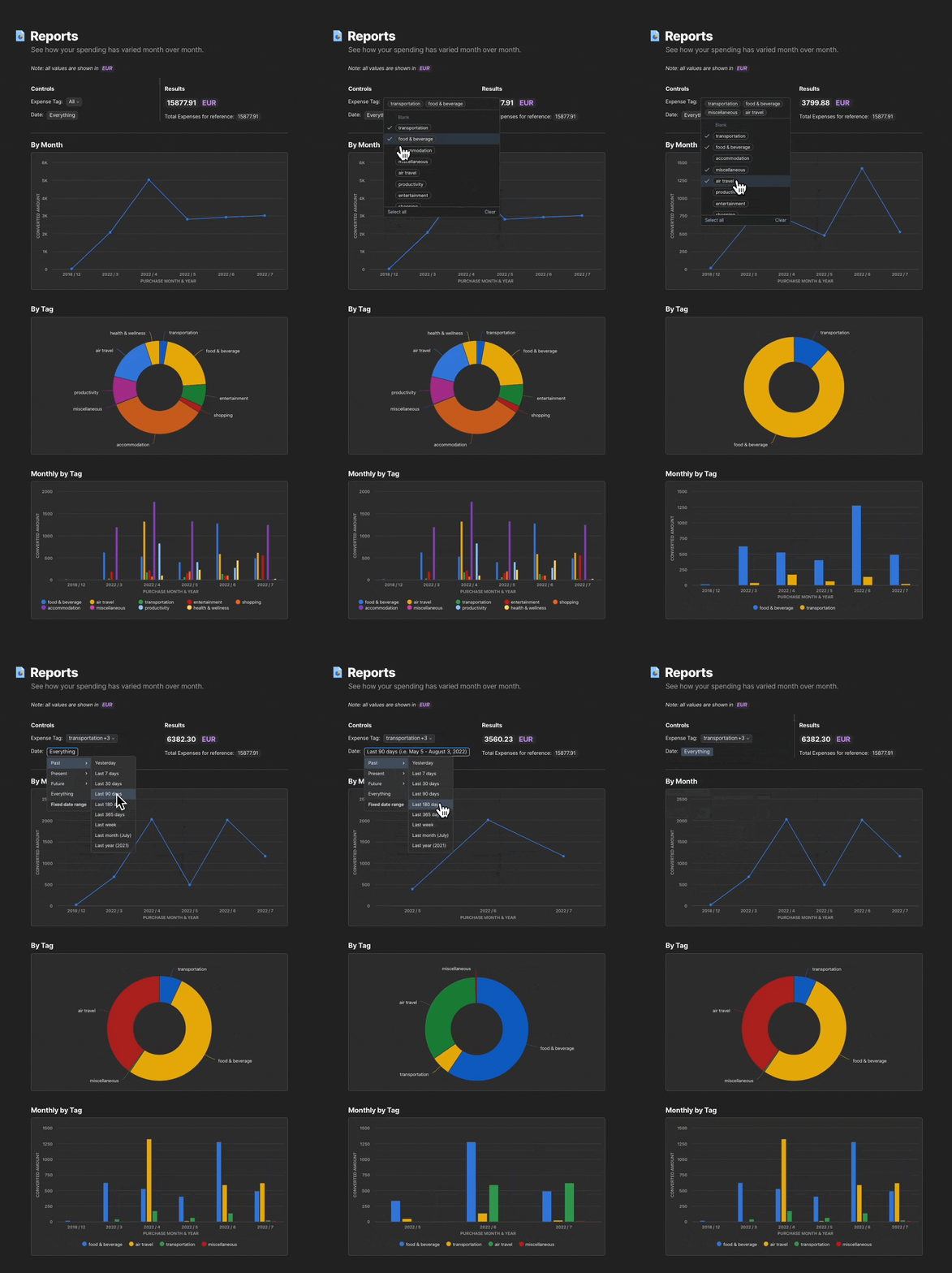
Pretty proud of the expense tracker Doc I put together too because it's a real use case that puts this powerful technology in the hands of normal people. Looking forward to seeing people use it :)
What we learned
Building the Doc takes so much time! The actual coding itself took some time, but creating the Doc and making sure it was comprehensive and clear for future users took a bunch of time.
But without the Doc to show people how the Pack can be used and what it can do, no one would really be able to find out about the Pack, so it's an essential part of the build process.
What's next for Mindee for Coda
On the product side, I have big plans. I know for sure I'll be adding support for the Invoice API, which can extract information from invoices. This will be great for small businesses or freelancers.
I might skip support for the Passport API, since that's a fairly niche set of businesses that would need that. However, I will be exploring opportunities for custom built APIs - I'll be looking to talk to freelancers and small business owners and figuring out if there's other templatized document types that they'd want this Pack to support. If so, I'll work with Mindee to build and train custom APIs that I can then integrate through this Pack to make accessible in Coda.
Also planning to monetize this and start marketing and spreading the word to get more people using it! My plan is to start with a free plan for the first month, then start charging a small fee. As I develop the other functionalities, I'll have to decide whether I want to offer them separately or keep them combined in the one Pack.
Built With
- javascript
- mindee-api


Log in or sign up for Devpost to join the conversation.