-
-
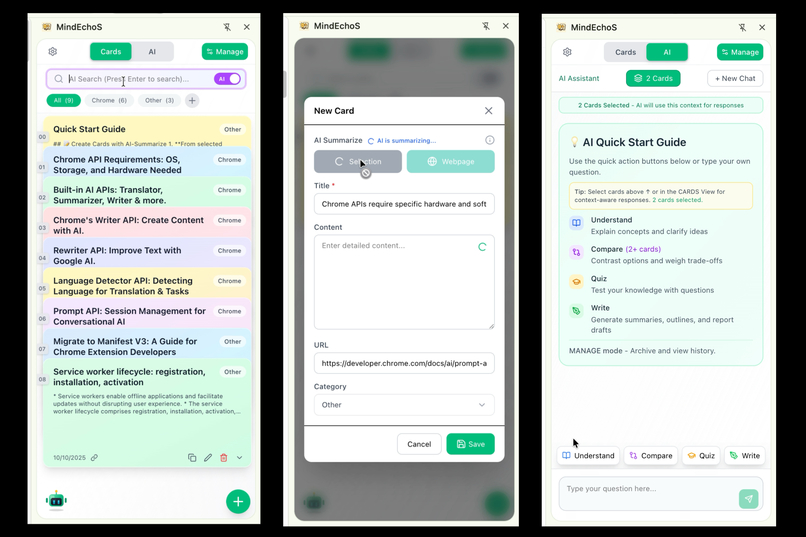
Extension Panel
-
Intro
Inspiration
Nowadays, we’re constantly surrounded by information — blogs, news portals, research reports, and more. As a student and developer, I often find myself jumping between tabs, note-taking apps, and other tools just to capture, save, and organize what I’ve learned. It’s fragmented, time-consuming, and ideas often get lost.
I needed a solution that:
- Captures knowledge instantly, without interrupting my workflow
- Helps me think with my saved content, rather than just storing it
That’s what inspired me to build MindEchoS — a Chrome extension designed to bridge this gap, turning scattered reading into an organized, connected knowledge workspace directly in the browser.
What it does
MindEchoS is a Chrome Extension designed to streamline your workflow — making knowledge capturing and thinking an effortless part of your browsing experience.
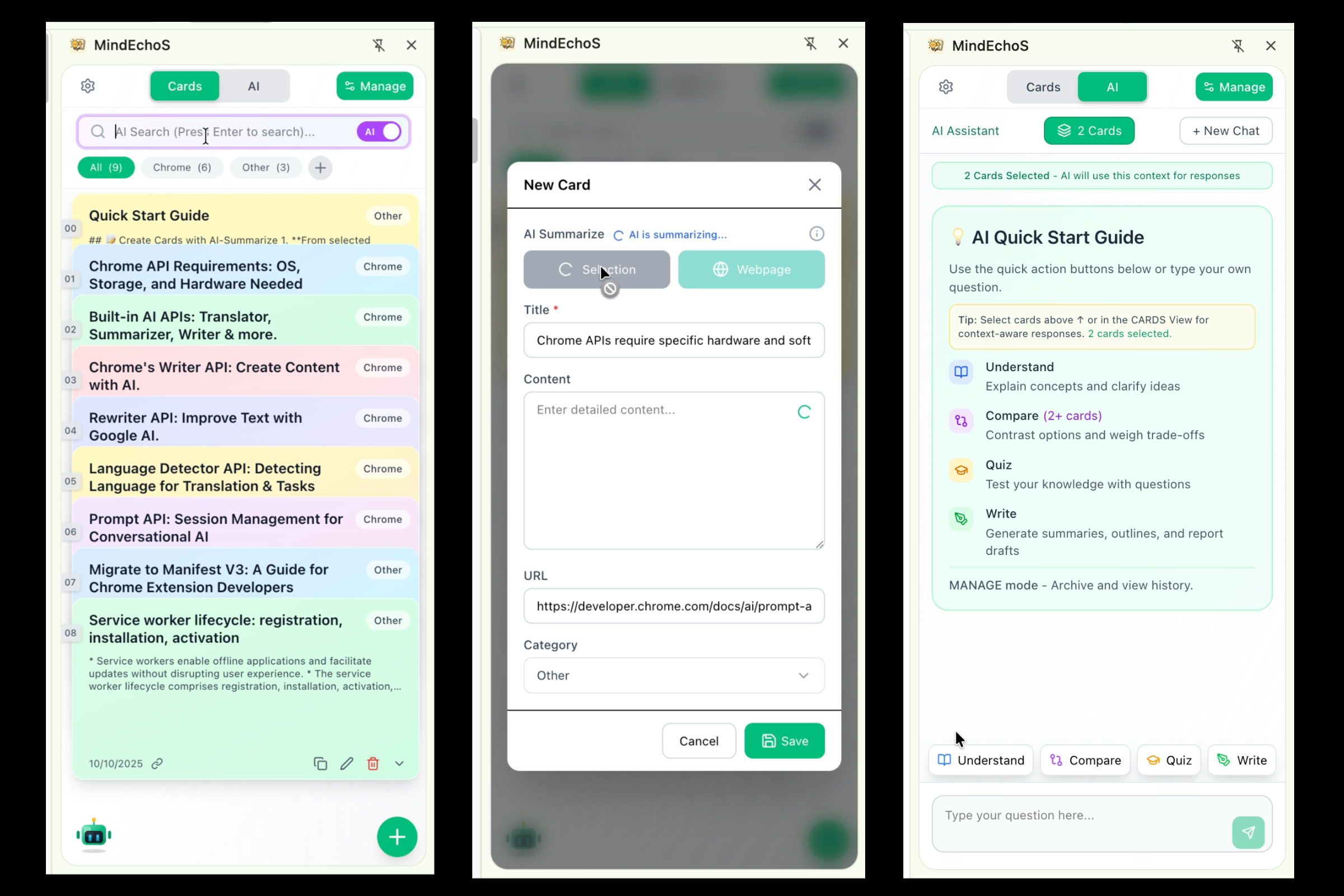
📝 Summarize what you read into Knowledge Cards
Whenever you come across something worth keeping, simply click SELECTION or WEBPAGE to summarize your highlighted text or the full article.
Even if the side panel is closed, you can still capture content seamlessly — just use a keyboard shortcut or the right-click menu to trigger the extension. MindEchoS will auto-summarize it into a Knowledge Card powered by built-in AI (Summarizer AI).
🤖 Weave knowledge with AI-powered thinking
When you want deeper insight or better understanding, select one or more cards as context and interact with the Gemini Nano. MindEchoS provides Quick Actions to help you think and learn efficiently:
- Understand: Get clear, easy-to-grasp explanations of concepts
- Compare: Discover relationships and differences between ideas
- Quiz: Generate several personalized questions to strengthen your memory
- Write: Create summaries, outlines, or report drafts based on your selected content
🗂️ Organize your Knowledge Cards with ease
- Categorize: Use tags to group cards by topic or theme
- Search: Quickly find cards by keyword, or toggle AI Search for finding related topics
- Batch actions: Select multiple cards to delete, export, or move across categories
How I built it
MindEchoS is built on selected stack technologies and Chrome APIs:
- Frontend: React + TypeScript + Tailwind CSS, component-based UI development
- AI Integration: Chrome's Summarizer API for content processing and Prompt API for interaction functionality and cards search.
- Storage: Used a dual-layer approach, chrome.storage.local for persistent data and chrome.storage.session as a bridge between background script and UI.
Challenges I ran into
UI/UX vs Functionality Trade-offs: Balancing multiple features while maintaining clarity required constant iteration. I had to make tough decisions about which features to prioritize and how to present them without overwhelming users.
AI Search Accuracy: To reduce processing time and stay within token limits, I couldn't send full card content as context. So, I experimented with prompts and tuning parameters to make the AI’s answers as accurate as possible.
AI Chat Design & Development: For each AI feature (Understand, Compare, Quiz, Write), I tested multiple prompt variations to achieve the desired output. As an extension limited by the narrow side-panel interface, I had to carefully craft instruction prompts and format prompts to ensure responses were clear, concise, and properly structured for the constrained space.
Platform Limitations: True cross-device functionality (especially on mobile) and language support remain challenges.
Accomplishments
- Built a production-ready knowledge management extension with seamless AI integration in short time
- Achieved true local privacy—all AI processing happens on-device
- Designed polished UX with smooth animations, intuitive workflows
- Found the right balance between powerful features and simple, uncluttered interface
What I learned
- Prompt engineering
- Chrome extension architecture
- AI session optimization
What's next for MindEchoS
- Cross-device sync support
- Hybrid AI approach combining local Gemini Nano with optional cloud models for advanced features
- Multi-language support for broader accessibility
Built With
- prompt
- react
- summarizer
- typescript


Log in or sign up for Devpost to join the conversation.